
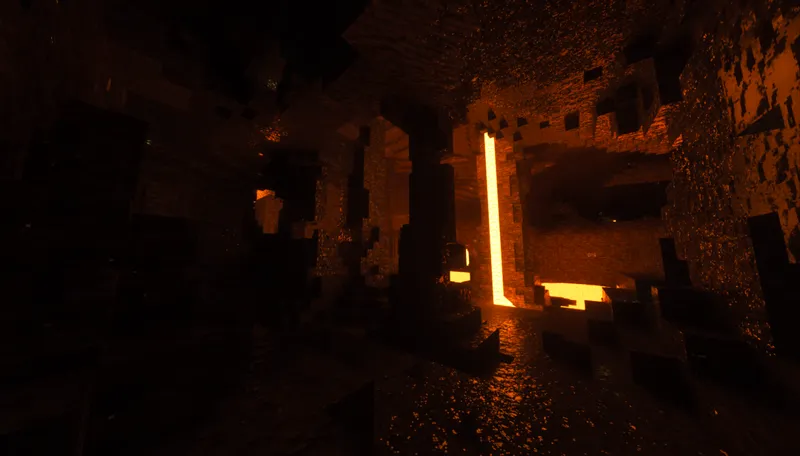
[Download] SEUS PTGI HRR 3
Resource pack by Patrix
Surprise, and Happy Holidays! Here's a present for you! I hope you all have been doing well and staying safe!
This one is all about Minecraft 1.18 compatibility. With the amazing new world generation, the short ray lengths and short ray tracing view distance that PTGI has gotten away with so far just won't cut it anymore! So, I've increased the area of the world around the player against which rays can be traced, as well as lengthened the default ray trace length settings. This has a significant performance impact in comparison to HRR 2.1, keep that in mind! If you have performance issues, experiment with the Reflection Trace Length and Diffuse GI Trace Length settings. SEUS PTGI really needs a redesign at this point to be improved much further, which I have put some work into, but I'm mainly waiting for things to be a little more clear as far as where shader modding in general is going for Minecraft.
As far as E13, its tech is super clunky and a better way of doing generalized ray tracing is likely to be possible fairly soon. I've got some new ideas in that area and am looking forward to where new shader modding possibilities can take them!
I hope you enjoy! Thank you so much for being so awesome!
Here's the changelog:
Atmosphere, cloud, and outdoor lighting improvements: white balance adjustment to make sky bluer and sunlight less dingy, decreased cloud coverage directly overhead and increased coverage in the distance near the horizon, balanced cloud and sky colors so that ambient shadows aren't pale and washed out anymore when Clouds in GI is enabled
All blocks in 1.18.1 function properly, including new light sources: candles, glow lichen, and glow berries
Candle lighting is based on the colors in the candle texture itself and how many candles are in a block
Sea pickles and end rods now emit light
GI denoising filter improvements
Reworked default tonemapping for an emphasis on a bright, vibrant look
Increased GI voxel data area size, allowing greater view distance for ray tracing effects
Increased default diffuse and reflection ray lengths to accommodate 1.18's larger caves and world structures
Improved "HRR" tech: fixed blurring when quickly moving the view, improved stability and responsiveness, improved "Filmic" pixel look setting
Entities now have proper motion vectors and don't look awful under motion and contribute properly to motion blur!
Default water fog density is now 0, avoiding glowing water issues. You can turn it back on if you miss it!
Smoother bloom
Fixed bug seen in the shading of blocks inside smooth reflections
General cleanup for shader options
Changed default torchlight color temperature
Added new option: Lighting > Candlelight Color Temp
Added new option: Lighting > Light Leak Fix. This replaces the old light leak fix options previously found in Raytracing settings. This has been reworked/improved to not be based on where the player is, so moving in and out of caves no longer awkwardly enables/disables light leaking.
Reworked Utility > Visualize Dangerous Light Level option. Considers that mobs now require light level 0 to spawn, and doesn't look blinding and horrible anymore
Added new option: Surface > Texture LOD Bias. Higher values increase detail in textures but can lead to instability, ghosting, and reduced performance. Lower values improve image stability and performance but can lead to lower resolution textures at distance and grazing angles
Added new option: Surface > Anisotropic LOD Bias. Enabled by default. When enabled, preserves details on surfaces at higher grazing angles. Similar tradoffs as Texture LOD Bias.
Added new option: Surface > Wet Caves Effect. Disabled by default. An experimental effect that attempts to make surfaces inside caves damp/wet.
Added Raytracing > GI Responsiveness option. High responsiveness allows lighting to respond to changes more rapidly but can cause instability and decreased detail. Low responsiveness allows more samples to accumulate over time and offers increased detail and stability but causes laggy lighting.
Fixed crazy bloom when in lava
Fixed caustics bugs
Added short raytraced contact shadows
Fixed certain flowing lava shapes not being voxelized or contributing to lighting
New physically-inspired low-light vision effect which now applies on top of the entire image instead of fakely on certain light types and improves the look of night scenes
Moonlight overhaul: the moon phase now properly affects night time lighting, being fairly bright during the full moon and very dark during new moon.
Moon and moonlight color tweak
Starlight contribution to GI at night, providing some visibility even when the sky is very dark at night when the moon is at its darkest phase
Increased max ray distance for Atmospheric Godrays
Improved energy conservation in reflection filter. Rougher surfaces now show more subtle reflections more visibly
PLEASE READ THE FOLLOWING REQUIREMENTS FOR USING THIS SHADER PACK!
Minecraft 1.18.1 (older version compatibility may be present but is not guaranteed)
OptiFine HD U H4 or newer
Options > Video Settings > Details > Trees: Fancy or Fast (Smart may break lighting)
Options > Video Settings > Quality > Natural Textures: OFF
Options > Video Settings > Shaders > Shadow Quality: 1x
Options > Video Settings > Shaders > Old Lighting : DEFAULT
Resource packs with custom block models will probably cause lighting glitches!!!!!!
Some of the currently known issues are as follows:
Particles aren't rendered properly yet
Block texture alpha is not considered in diffuse GI tracing, so doors and trapdoors don't let any light through their windows currently.
Being underwater in ravines/caves shows light leaking, and “glowing” water fog. This is unavoidable currently.
"Disco Floor" flickering artifact mostly seen in reflections (the new Secondary GI Samples option can help with this)
Secondary GI bounces (2nd bounce and onward) can take a while to adapt to lighting changes
Issues with the rendering of semi-transparent/translucent materials
Lighting breaks often when using resource packs with custom models, a solution is being investigated!
Comments (146)
dows this work with sodium and iris
the water looks bad
lö
on amd only it has the black screen
It is on developement so thats why i think so they will fix it
I'm requesting an improvement for my AMD graphics card; I want to use this shading with my 9070 XT card.
graciaassssss
It is for 1.20.1?
Solas is better
For me the windows is the water texture and if i place a window down my player model becomes the water texture.
the best version is hhr 2.1, more stable
why is my glass water?
THIS IS SO GOOD I LOVE IT WWW
Too real i can run this shader with NAPP textures with 40+ fps on my Nvidia RTX 4060 laptop its like real life bro! W shader
goon
How to fix invisible mobs and bad lighting from the torches and other blocks who can make light?
And how to fix water effect on glass and pictures?
im geting 7fps but my cpu is not high at all
torch light is abysmal everything else is class
SO REALISTIC WITH REALISTIC TEXTURES V109 1024X IN MY 5090!
lmao ur such a bad liar lmao minecraft doesnt use the gpu soo good try
I have a small problem I put the advisor settings but it gives me a black screen in the game I can't see the game do you have any idea? im on 1.12.2
i have the same issue, when i press f3 it doesnt see my rtx 5080
I cant get the torch lighting to work. I normally do Redstone industrial stuff and caving in survival and the torches don't light up the surrounding area. even the dynamic held light doesn't do much and the settings don't change anything lighting related for me and there are a lot of shadow and reflection bugs, other than that, the textures look good
I am on 1.20.1, and the screen is black. All the settings are on what the instructions asked. Any suggestions?
android lmao u dumb
so many bugs right now, also doesn't work with 1.20 :/
I am on 1.20 and it works just fine.
When I build super high in the sky, the bottoms of blocks are pitch black, and nothing I do can change it
Seems like the black screen is plaguing everyone
6800 RX black screen, older versions noisy reflextions. Any fix ?
The shader needs to be in version 1.18.1 to work
lantern not lit in neither verison
Why is it a black screen for me 2.1 works just fine for me?
Lantern lighting not working for me shows them as not lit
Black screen as well. I guess it's just dead for us :/
hi. love you work. question. after some time in the game i suddenly saw that the frog light no longer shine a light source after it is placed. light works when in hand, but not as lighting after block i put in place. have i messed up some settings? : Frank-Eddie. it used to work in the older shaders pack you made.
black screen
Try Using Fabric
you cant use shader pack in fabric, wdym?
Paintings don't render properly and have this soup-like effect while moving the camera, and it's only with these shaders on any texture pack including vanilla.. Is this a known issue, or is there a fix already? The only way they stop doing that is when I enable "skip all anti-aliasing", but that makes the game look all powder-y and awful.
same black screen for me
black screen
black screen (6900xt)
black screen im guessing same as me Christopher
Any texture packs that go well with this shader?
black screen for me aswell
Black Screen when trying to load or create a world
New to this whole thing, can i use this shader on 1.16.5?
Rain Particles not appearing for me either. :/
rain and snow particles not appearing with this shader even tho the weather is raining, how to make it looks visible ? any config to do that ?
my screen is just black when i load a world
i got a black screen when i try to join/create world/servers
I just get a black screen with a ton of errors saying "invalid program", any idea on how to fix?
its becuase you prob have a amd gpu, you have to have nvida
for some reason water is fully invisible and light is in striped lines everywhere
will this shader get updated?
seem like all versions of the shader pack are broken in 1.19. used to work in older version without a problem but now all the lighting is color is messed up alonf with rippling black lines across all blocks
just a black screen when i load it up using a rtx 3070
can i use this shaders for 1.18.2?
Will there be a 1.19 version because there are new light sources.
run this at a nice 60 fps
hoiw do you getb the 3d blocks ?
when i use this pack my screen goes black and i get like 200 errors. could someone help me or tell me how to fix it?
Make sure you have 1.18.2
can anyone recommend some updated texture packs for this??? (by updated i mean 1.19)
Cant seem to get mine to work right.
Nice
first time using. beacons lose color, mobs blurry i dont know how to fix
As far as I'm aware, HRR doesn't work for AMD GPU's for anyone that gets black screens
im getting the same problem
Hi! I have a few questions about HRR vs E12. Generally speaking I prefer E12 to HRR 2.1 and 3 for it's better clarity, but I've noticed that HRR ostensibly does a few things better. Firstly, the depth and quality of pbr texture packs seems better with hrr. And secondly, far away sand dunes always appear dark/shaded until i come within a certain range of them on E12 and HRR 2.1, but with HRR 3 sand dunes are a consistent color regardless of distance from the player. Is there a version of your non HRR shaders that has these same improvements?
HRR has actual parallax effects as opposed to normal maps in the older shader versions. It also has a parallax smoothing option that smooths out the texture depth making it look less pixelated. Plus, the upscaling sharpens the image slightly, so it accentuates the details. The issue with the sand dunes is most likely due to the Diffuse GI distance which is higher by default in HRR 3. If you want this in the older versions, go into the older versions and set the Diffuse GI Trace higher and higher until the problem goes away.
Sometimes I miss rain but I always come back to you for my shader needs. This makes my 2080 Super sweat a bit, but the results are truly awesome. Only bug I've noticed is occasionally I'll be branch mining and I get a light blue glow in a newly revealed block that fades to normal in about a second.
It says invalid comand and just shows UI when loaded
I lost like 60fps with the new version. It looks amazing tho! Would be nice on the next update focusing on the HRR to improve performance or somehow making a function to allow players with RTX cards to use those RT Cores
its this work for 1.18.2?
ya
Runs and looks beautiful on my R9 5700XT and Ryzen 3600. Only issue I have is a weird ghosting effect on paintings.
Getting 30 less fps than what I was getting with HRR 2.1
I love how when you go to the end its just a blue sky with an ender dragon. other than that it looks amazing.
what texture pack does the image use?
This requires an RTX card to run ray tracing.
It doesn't have to be mean you have run on an RTX card to run this shader you can use any GTX card but it has to be powerful like GTX 1080 ti it's still a beast today tittle
version 1.18.2??
So I have a black screen with this shaderpack with no other resourcepacks enabled, I have a Radeon rx 5500 xt with a ryzen 7 3700 8 core 16-threaded and 32 gb ram, idk if I did something wrong or its my computer
please no one click the link, this is a new and now common baiting tactic to steal your discord account and try to sell it back to you. IDK how to report, someone please report!
Sonic? I have a question. I was wondering if I could let non-patreons have access to your PTGI E7.1 Shaders?
Not working on rx 590
Not working
I am not sure if this is the shaders fault or the textures or my own settings but there are square buildups in each block trying to get a 3d effect and it doesn't work too well If you could offer me some help or advice it would be great
Wow this is so much better then Renewed on 1.18.1. I'm so glad I found it
It is all just black
I maybe be an idiot but I cannot get this to work at all.
you using optifine?
So about that Screen Space Shadow Shader I talked about (Reshade 5 is out and allows plugins that can make that possible now? Maybe even to the extent of a full on Fixed Direction Shadowmap Shader?)
End Rods and Sea Pickles are fixed! :D Beacons are still not working yet. I just added "beacon" to the "Block 50" line to fix mine and now it illuminates. Fantastic shader pack otherwise. HardTop's Vanilla PBR texture pack pairs beautifully with it.
I'm new to this patron, was just wondering how to fix the black screen I get in-game, i hear sounds but i cant see anything except my hot-bar and inventory.
Same here
Is it normal that The End is so black? If not, how do I fix it?
"white balance adjustment to make sky bluer and sunlight less dingy" However I feel a little overexposure during the day, sometimes I even cannot see the texture on some light-colored blocks like quartz or while wool. Meanwhile the sight underwater is a bit too blue, my eyes could feel pain in 10 minutes. I think the hue in PTGI E12 is the most and realistic and comfortable one. Expecting further adjustments or more custom options. Anyway my words are merely suggestions, PTGI is the best shaderspack I have ever used:)
Can't get more than a black screen either on any of the versions but betting its my stupid m1 mac
Its not yours, mine is black too
I cant figure out how to get this to work, it just goes black every time i launch a world.
Same
Very good shaders
how could I make this work on Mac?
depending on the mac i think you could break it from over heating
my fps drops massivly
anyway to fix?
Sonic? Is this compatible with modded light blocks? Like modded lamps, ceiling lights, etc.?
Everything is just black in 1.12.2, I know its not confirmed compatibility but nothing at all works.
Then obviously not compatible..
Where to find resource pack?
i ran into problem with this shader. i keep getting lag spikes every 5-10 seconds and i have no issue with other shaders.
any recommended settings if during night time its wayyyy to dark??
Finally, it came out
when i use this shader everything is black. what am i doing wrong?
i am trying to use patrix 1.18, with forge 1.18.1, and optifine 1.18.1
I wonder why the emissive textures dont work right. not even when held in your hand they don't glow at all.
Love this! Thank you for your work! One question though, is there any intention on adding amethyst clusters to the light sources? Can't wait to use some purple lighting! Cheers and happy New Year! 🎉
nice
I appreciate hard work on v3 but from many tests with custom resource packs on Optifine 1.18.1 U H4 my fps dropped up to 120% down :( From 40-50 fps to 14-20fps. Where I can get some help?
Wow. Looks like shit. :(
bruh you look like shit yet no one said anything. get lost
awsome shader! is there a way to run this with like vanilla pbr on sodium? i know there is no shader option but is it possible in any other way to make it work?
There's a shader mod for sodium called iris (although the current version doesn't support HRR 3 yet. 2.1 works fine).
Lovely upgrade from the last shaders! i only have a few issues with how some of the shadows and light sources flash and flicker when moving. Nothing extremely bad with the flickering though! Great shaders and love your work! keep it up!
OOP ACCTUALY JUST READ THE OPTIONS
hmm nothing changes when i apply this shader is it because im using sodium and not optifine?
That's exactly why.
thanks
This version has some oddities underground, it seems that random light sources are appearing through the ground, and some light seems to be coming from the sky even near the bottom of the world. https://imgur.com/a/2woMzNv
Merry Christmas! Thanks so much for your work <3
Thanks 👍
this looks amazing, thank you :D could you also add light source for glow item frames?
That looks amazing thank you :) .
Awesome update, but I got a small request for utility. With 1.18 mobs spawn at a light level of 0, can you please lower it from light level 7? Thanks bro!
Thanks for updating it to the latest. So happy to see this!
yooooo, this is a welcome surprise, this is awesome man, great job :D
Is there support for the end yet? Also does it work with the Iris mod?
Awesome!
oshit it's that boi
thank you!!!
Anything on the particles on water for 6000 series GPUs?
Thank you so much! Have a happy holidays!