




SEUS PTGI E11 Dev News
Hello again! Here's what's going on with the development of SEUS PTGI E11!
A lot of research has gone into this update, and there are still some things being worked out that will hopefully arrive in E12. The adaptive temporal GI filter (for instant lighting changes) is still being worked on, for example, and won't make it into E11.
I've put a lot of time into working on optimization. Most ideas don't work out, but some do. I've managed to optimize the GI filter a bit without redesigning it, so it should mostly look the same. The reflection filter has a new optimization feature that basically tries to skip doing denoising if reflections aren't very visible in a region of pixels. It works fairly well, and it does cause additional noise in areas where reflections are subtle/not very bright, but I'll include an option to disable this optimization.
The worst performance situations occur when using high resolution resource packs with normal and specular maps and Full Raytrace Reflections is On. I've tried to save some frames in this situation by simplifying the shading of blocks that rays hit. This makes almost no difference visually in most cases, but gives a bit performance boost. The only problem left with it is that this simplification is really noticeable with reflected blocks that are close to the reflective surface. I need to add logic to fix this to be able to say just how much performance improvement there will be, but things are looking good!
Quite a bit of research has gone into improving mod support in the future as well. I'll probably be putting together a tool that will help users setup SEUS PTGI to be compatible with the mods they've got installed. This will require a rework of SEUS PTGI's block ID handling and voxelization to make sure things don't break too much with unexpected block shapes. Know that this is something I'll be working on, even if I don't mention it in the next dev news post.
Lastly, I've put a lot of work into one of the visually weakest areas of PTGI, the sky and clouds. The sky is a really simple (and really fake) model I put together to be as lightweight as possible. But recently, I've found a new approach that relies more heavily on the math (so a lot of work goes into creating the right formulas), but after the math is worked out, the shader code is as simple as evaluating the final formula, without any iteration loops. The result is a hopefully more realistic sky overall, but it still needs a little bit of work. Expect somewhat abrupt dawn/dusk transitions while that is being worked out.
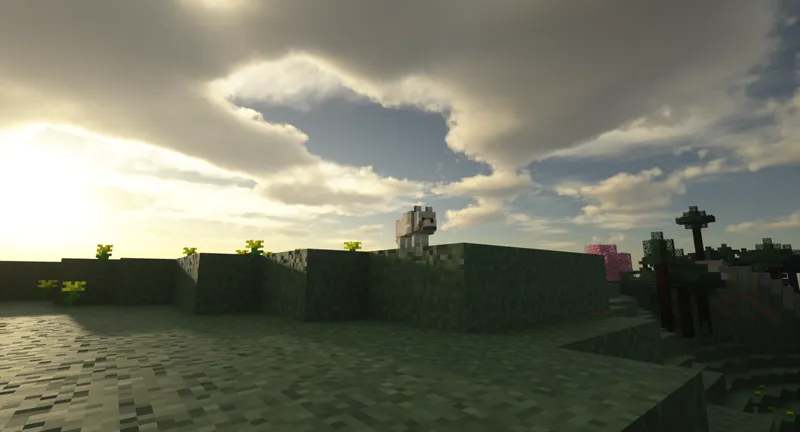
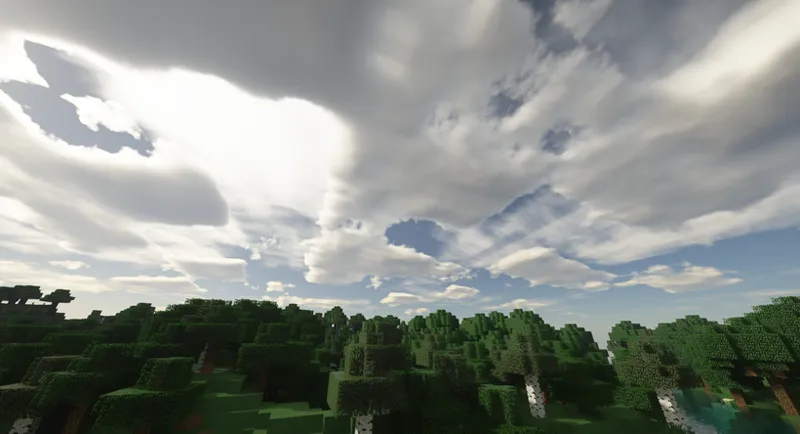
And well, the clouds in SEUS PTGI are ancient and bad. When approaching writing the new clouds, I knew that I wanted them to be cheap enough to have them render in raytraced reflections and GI. So, volumetric clouds were out of the question. I decided to see how far I could push a 2D clouds system to look 3D.
Also, I experimented with making the structure of the clouds more blocky, to bring some Minecraft essence to them.
Which look do you prefer? I'll have an option for both, but I've always enjoyed the juxtaposition of a blocky world rendered in a realistic manner, and the blocky clouds give that sort of vibe.
Once again, I'll provide an option to disable them altogether if you'd rather save the frames, but the performance impact is looking pretty low so far, since they're just 2D clouds (no raymarching).
Looking forward to hearing your thoughts!
Comments (68)
yea
Some Graphics are have glitches
PTGI pe when
PE Shaders will never exist, sorry kid.
HOW TO WITHDRAW FROM SUPPORTING LESS TO PAY EVERY MONTH 1usd
VAFFANCULO
ti ho dato 1€ e tu NON MI DAI LA SHADER
YES!!! PTGI fonctionne avec les CG AMD ( j'ai une rx 580oc) je fait du 15-30fps avec le jeux quasi au max
Follow me to check some of my pictures
amazing job
it keeps saying ive supported 10$ yet i dont have access to anything
It’s been a blast I’m as soon as I was done I wanted to build another one haha but thanks for the advice!!
I’ve been using it since last night and I don’t want to play Minecraft any other way lol. I was tweaking with a lot of the setting and I’ve been able to get good settings with steady 55-60 FPS
This is my first pc build, and just wanted to know will I be ok running these shaders with a 2080, a 3800x, and 32gb of ram?
Yep, you'll be A-okay. Im running an RTX2070 super, an old Intel i7-6700k and 64gb of ram. The hardware you mentioned will be plenty fast to run this, just keep in mind that the shader is still in development so you might need to play with settings a bit to get a stable frame rate that your happy with. but from the devlogs Sonic said he is trying to work on optimization so I would expect frame rates to get a little better in the future. Good luck with your first build! its super exciting the first time you get a new system to post!
i just wasted 10 euros for thisi cant run this with gtx 1060 3gb and inter i5-8400 does anyone have any advice how i can make it run other than i already tried lower resolution but it had no signicant performance difference PLEASE HELP.
How do I make it not so blurry under water
What version of Minecraft do I need to run for pgti e11 to work? And what version of optifine
When can we expect fog to be implemented? I really like the looks of this pack, but can't justify the price, because the edges where rendering stops are just plain ugly to me. Also, everything just looks so much better with quality fog!
can we get an option for og clouds/sky? I think i'd be cool to have raytraced cloud shadows with the original sky/clouds
Oh, also, can we expect to ever be able to see the playermodel in reflections? (ok just one more: what about fully reflective iron blocks? like mirrors)
What about the snow . .
3D clouds are way better
I like where they look more natural
what is the minimal configuration of SEUS PTGI E11? ANd the recommended configuration? The configuration GTX 1650, 16 Go of RAM, Core I5 9300H is enough?
I get about 50-60fps with a Vega 56, and the Vega 56 is about 50% faster than a 1650, so you might see yourself in the 30-40 fps range. Cutting down render distance is one of the best ways to improve performance. I play at 16 chunks.
Bonjour, quelle abonnement faut prendre pour avoir accès au discord et au shader seus ptgi ?
le gold, et le téléchargement des shaders se trouve en bas des posts
Can anyone help me Have a Nvidia gtx 1070, but I have extreme lags with the shader although I've seen test where people have significantly more FPS.
I have an RTX 2060 SUPER and can only run it at 100-120 so lag is a given unless you have a pretty beefy computer
For clouds you could add a setting where we could change how the clouds look, the thickness to them, how blocky they look, maybe color
Amazing clouds!
So I paid 1$ for nothing? great bro....
That's why you read what you're getting before buying something online, you have nobody to blame but yourself. It clearly says that only the $10/mo tier gets you access to experimental shaders
为什么没有别的支付方式
Da ge .. xie yingwen ba.
hey i have a question about this new update and v10 do the iron blocks still do the reflections like mirrors or is that a removed feature? if you can respond that'll be great.
This is dependent on your resource pack.
Okay I am LOVING the Minecrafty blocky clouds SO MUCH, I literally blurted out "awwww YEAH" at work XD thank goodness I'm alone overnight! Could there be some kind of hybrid mode where the clouds ARE occupying 3d space that you can fly through but their REFLECTIONS are 2d...? Or would that just be crazy trouble?
I have an AMD processor; I guess even this shader keeps the incompatibility. So I'll have to find another shader... 😐
Incompatibility? I run with a 2700X and it looks and runs fine...
I was wondering about the sky already (I've only been testing the pack for a few weeks now) and the new clouds are crazy, I really like them.
Both clouds look awesome but more importantly are end rods getting fixed? They don't illuminate up close.
Beautiful Clouds! Great Job!!
block clouds are better but it's better also to make it an option
New clouds look too angular and too many clouds float in the sky. and I think seus ptgi needs more farther shader distance. I was disappointed with this dev news. But I believe it will show you better results as you have done so far.
Has light source on end rod fixed yet?
I like the block clouds
Hi Cody, i like more the blocky clouds
Dude, theres another problem with the doors that their shade is just a single line instead of the entire tile entity
I find the Boxy clouds amazingly humourous. It works perfectly for how minecraft works out. If its not too much having the choice available for people to choose might be a good idea.. but i worry that means maintaining more things. That could be a problem. I vote for blocky clouds. Also that tool being worked on to help bring modded Block ID's in is gonna be a life saver. I have already delved into the block id file a couple times to get modded torches working right. It would definitely make life easier for those unaware of how to do it. and don't want to risk breaking the shaders multiple times as they try to get light to emit from something.
But the clouds would have shadows? I would make it much more realistic, I also still think that a depth of field effect is absolutely necessary to appreciate landscapes, or constructions with texture pcks, will it be added in the future? only if possible of course
i think seus shaders doesn't have DOF...
Those blocky clouds are sick. Besides, if the world/terrain is made to be blocky, what's the harm in a blocky sky? Also, if it means better performance, then definitely put these awesome clouds in.
Looking forward to it. That's the major thing that's been missing from my experience. Although I really miss the clouds that block the ground when you get high enough. It made my map with airships really believable
This is very interesting and beautiful results and also loving that you are working on high resolution resource packs performance since I'm working on one and I would love if it can get a little more fps, amazing job!
Your cloud-ideas are really interesting. Looking forward to it Cody! Thanks for your work so far!
+1 for boxy clouds! they fit really well with this juxtaposition of realism and the reminder that you are, in fact, in minecraft
I really love the boxy clouds!
I think the boxier cloud option would work best because it better befits the Minecraft aesthetic while maintaining the desired juxtaposition.
Great work once again Cody, any chance to have both cloud options in shader settings? Natural and “lore-friendly”?
Definitely!
I definitely think the blocky clouds really fit in better and look fantastic - great work!
Any updates about how the shaders run on your Radeon 580 or a newer generation 5700?
Loving the blocky clouds! Keep up the good work.
I assume the 2D clouds are like MC's 2D Cloud Option? At least at the code level? Also, they do kinda looks like clouds to me, although I do think the connections could be a bit less blocky, the 2nd to the last image is a major showcase of that. As for other topics, will E11 have some implementation of Mod-support based on the previous question you asked?
The blocky clouds look sick!!!
Agreed, I love how they stay in theme with minecraft but are very subtle. Definitely go with that :D