
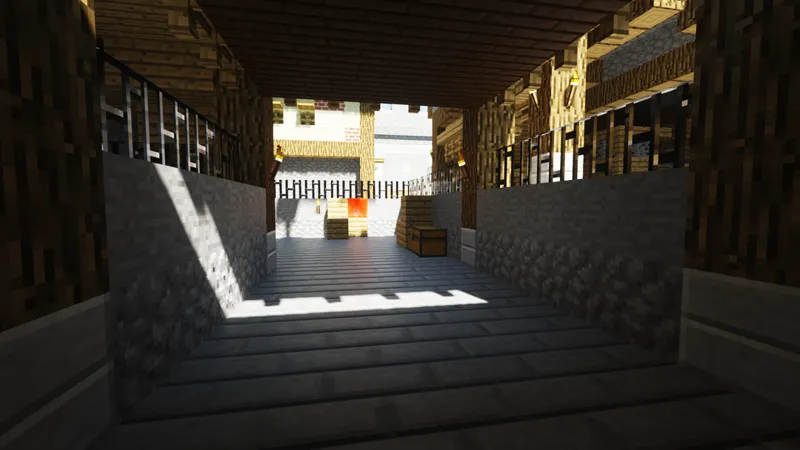
SEUS PTGI E6 Release!
HOTFIX 1 (April 7): Fixed a compile error with one of the shader options. Re-download it and it should work now!
HOTFIX 2 (April 13): A fix for graphical glitches on RTX cards has been found and implemented! I've updated the attachment, just re-download it. Huge thanks to Tre on the Discord server who found this fix!
Phew, it's finally here! I'm sorry it's taken so long! This update is pretty big, with a lot of fixes and totally redesigned GI and reflection noise filters!
The biggest improvements are with the GI and reflection noise filters, allowing for a more dynamic range of light intensities (thanks to the new GI filter), and in most situations, almost noiseless reflections on semi-rough surfaces!
However, the new GI and reflection filters are still young and will continue to improve. In particular, the reflection filter can cause some flickering. I'm eager to get feedback on these and am open to constructive criticism!
Also, you'll see a nice performance boost when Full Raytrace Reflections is OFF!
Another thing I wanted to improve on was the general appearance when playing at lower resolutions, since running the game at a lower resolution is a great way to get better performance. I hope you can better enjoy playing the game at a lower resolution to get better frame rate with this update!
Other than that, check out this beefy changelog!
Redesigned GI noise filter which can now handle a wide range of light source intensity
Redesigned reflection noise filter with much more noise-killing power!
Ray traced reflections now look much more consistent and similar to sunlight specular highlights (should make texture artists' lives much easier!)
(Subjectively) better overall appearance when running the game at lower resolutions
Fixed rendering of stained glass in hand
Added support for 1k and 2k resolution resource packs
Jack o' lanterns, sea lanterns, fire, and redstone torches now contribute to GI lighting
Added Raytracing Options > Simpler GI Sky Model option
Added Raytracing Options > Secondary GI Samples option
Removed GI Responsiveness and GI Filter Quality options, they aren't integrated into the new GI filter yet. New default "responsiveness" similar to GI Responsiveness 2
Screen-space reflection and GI tracing are OFF by default
Full Raytrace Reflections is OFF by default
Fixed Sunlight Leak Fix not removing reflection leaks
Added Lighting & Shadows Options > Block Light Intensity option
Added Lighting & Shadows Options > Torch Light Intensity option
Removed shader options that didn't do anything
Added Texture Resolution option to the main page of the shader options (since it's important to set it!)
Surfaces with normal maps can no longer have impossible angles to them (surface pointing away from observer), helps a lot with reflections
Improved GI stability on surfaces seen at a grazing angle
Smooth auto-exposure (finally)! Fixes flickering when swinging tool/weapon and other brightness stability problems
Night lighting adjustments
Night time "blue filter", simulates how the human eye sees low intensity light
Fixes for TAA artifacts on hand
Improved frame rate when Raytracing Options > Full Raytrace Reflections is OFF (frame rate is about the same when it's ON and you're using a resource pack with specular maps)
Fixed flickering artifacts that were caused by Screen-Space Reflection Tracing at grazing angles
Normal maps ("bump mapping") much more visible in path traced GI
Much more stable path traced GI on surfaces with normal maps
Fail-safe code added to voxelization stage that ensures improperly voxelized blocks don't write garbage everywhere and ruin lighting
No more noise seen on reflected blocks ambent lighting
Fixed reflections bug that caused some pixels to shoot a ray in a totally wrong direction
Fixed secondary bounce GI light leaking in enclosed spaces
Fixed streaking artifacts caused by TAA when moving the view quickly
Fixed "dusty" looking sky colors
Added Post-Processing Settings > Black Depth option
Other minor fixes
No 1.13 support yet, I'm sorry! I've been so focused on the huge task of rewriting the GI and reflections noise filter, as well as all of the other improvements you see above.
PLEASE READ THE FOLLWING REQUIREMENTS FOR USING THIS SHADER PACK!
Minecraft 1.12.2 (no 1.13 support yet)
OptiFine 1.12.2 HD U E2 or newer
Options > Video Settings > Details > Alternate Blocks: OFF
Options > Video Settings > Details > Trees: Fancy or Fast (Smart may break lighting)
Options > Video Settings > Quality > Natural Textures: OFF
Options > Video Settings > Shaders > Shadow Quality: 1x
Options > Video Settings > Shaders > Old Lighting : DEFAULT
Resource packs with custom block models may cause issues
Some of the currently known issues are as follows:
Color precision issues in GI and reflections in darker areas (causing banding and strange colors). A fix for this will come in E7
"Disco Floor" flickering artifact mostly seen in reflections (the new Secondary GI Samples option can help with this)
Blocks which are not a full-sized cube in the world aren't considered properly in lighting and reflections (causes artifacts with half slabs, stairs, and the like)
Some flickering sometimes seen in rough reflections
Issues with the rendering of semi-transparent/translucent materials
AN IMPORTANT NOTE ON GRAPHICS DRIVER ISSUES AND GPU COMPATIBILITY:
Since I only have a GTX 1080 to do development with, and different GPUs can compile shaders differently than others, you may experience compile errors (causes "[Shaders] Error: Invalid program..." messages to appear in the in-game chat).
If you experience compile errors, you can help me fix them by following the steps on this page, in the "How to Report a Compile Error" drop-down section and sending me the log!
Furthermore, NVIDIA drivers have caused visual artifacts lately, particularly with RTX 20xx GPUs. Driver issues are to blame if you experience extremely bizarre behavior (green lighting, "dancing" world, crazy flickering, and other strange visual bugs).
If you are using an NVIDIA RTX GPU, unfortunately no drivers have yet come out which eliminate all of these, to my knowledge. RTX card owners, please keep me updated!
If you are on a different GPU and experience driver issues, you can try installing an older graphics driver, or, sometimes pressing "F3 + R" (to recompile shaders) can fix these driver-related issues. Do this first if you experience strange visual bugs!
Lastly, I have been absolutely overwhelmed with the amount of support (in many ways) you all have given me lately, I really cannot thank you enough! I hope you enjoy this update! As always, I'm eager to hear your feedback (and see pretty screenshots) in the Discord server! See you there!
Comments (151)
which ressourcepack should i use for this shader?can someone link me?
my game crashes as soon as I try to use this. I don't think there is anything wrong with my forge or optifine because the game runs fine until I try to add this shader pack. I am fairly new to all this though so its probably something im doing wrong. any tips? Edit: does this not work with AMD graphics cards?
Don't know if this is where i should say this but just got the PTGI Shader and am using a 2080 rtx card and have noticed that while playing on survival mode, not creative, that there is a block loading issue. When breaking blocks, whether it is grass or wood, there is either a lag or it will just not break the block at all. Hope that helps since i heard you dont have many people using rtx cards.
Have this same issue, even in E7.1 Edit: Also have 2080ti
I know how hard it must be for you to make tweaks and updates but I really hope you're working on a 1.13.2 update for the shaderpack. I absolutely love your work!
hey please make reflections for items being held by player thanks.
Wow my lab now has no more glowstone. LAPIS ROCKS!
my in game light doesn't work anymore, like my torches and glowstones no longer emit any light
also my water is invisible, like waaay too clear
Changing connected textures while in game will crash it so don't do it lol
I tried using vanilla normals renewed and everything broke.
I've used OptiFine_1.12.2 E2 to E6, Minecraft version 1.12.2, and I've had ram set anywhere between 10 and 20. My Shader and graphic settings are set to your recommendations, but the cloud blocks are jet black, and my high rex resource packs like UMSOEA wont load in... What am I doing wrong?
So I'm still seeing the same problem as before, where the GI seems to be washing out caves and indoor areas with ridiculous levels of ambient lighting. What's more, torches don't emit any light. Did you completely nix shadowmaps and lightmaps in favor of the GI, or something? I can only guess at the cause, but it destroys a lot of the atmosphere. EDIT: For the record, I've tested it on both a laptop with a GTX 980M, and a PC with a 1080 Ti, both with the same results.
I'm having the same problem. Torches don't work at all.
Hey, I get black clouds, any ideas?
When do you think amd cards will be supported?
amd cards not supported
when i turn on rtx shader,i have black clouds,very brightness colours,problems with shadows and bag with reflections. who can help with this error?
Everytime i turn this shader on my game crash. I use Optifine 1.12.2 HD U E2 and i have a Ryzen 5 1600 and a AMD RX 580 and 8GB Ram. I dont use any Resource Packs and I have everything set as in the description.
I am getting massive memory leaks with this enabled. On Ryzen 5 2600x, GTX 1080 and 16 GB RAM. Running 1.12.2. Any ideas?
then go to settings-->video-->shaders and select it
You need optifine installed, then just put the zip in the "shaders" folder
do i just download it or do i put it in a specific minecraft folder?
Is this known problem the problem that I have that everything is green by the light reflecting from the grass and trees? http://prntscr.com/nn70xm http://prntscr.com/nn716s "Color precision issues in GI and reflections in darker areas (causing banding and strange colors). A fix for this will come in E7"
Try recompiling the shader, F3 + R. Worked for me.
is compatible with minecraft windows 10 edition?
No only java edition because you can't download optifine for the windows 10 edition. You may already own the java version because I think if you purchase the windows ten you automatically get the java, check the mojang website. (Java is better anyway)
When is the update?
Hi, I've been using the SEUS PTGI E6 shaders for a couple of days now and is working pretty well. However, I've seen a resource pack that lets blocks reflect stuff off of them like vanilla normals renewed. I can not get vanilla normals renewed to actually get the effects shown in videos, and don't really know what I am doing wrong. I have all of the shader options to the correct settings, unless I am missing something. Any idea on how to fix my problem?
I have the same problem
Which version of OptiFine should I use with SEUS PTGI E6? Thank you.
I personally use the latest for 1.12.2 with no side-effects.
Hey, just downloaded this and work perfectly, only thing it's my fps, I got around 45-60 fps with a I5 4690k stock and a 980Ti with 16gb of ram, is that normal tho?
Sounds about right to me.
Just downloaded and the game looks like this <a href="https://i.imgur.com/C9OsWtY.jpg" rel="nofollow noopener" target="_blank">https://i.imgur.com/C9OsWtY.jpg</a> . Anyone else had this problem and knows how to fix? Thanks.
Hi! I just got a New computer running a Geforce RTX 2070 with an Intel i7 Core Processor with 16GB of RAM. I was wondering why everytime I click on the shaders pack it freezes my game. I did everything correctly. Ive got the correct version of Minecraft and Optifine but this issue still persists. What is going on?
Applying shaders takes some time, and the game does act frozen even on fast hardware for a number of seconds. Wait up to a minute before attempting to reboot the game. Also try other free shader packs from other moders to try to isolate the issue.
Hi, can you please tell me there will be support for AMD cards ?, if so, when?
I have a 2700x With 2080ti combo rocking 32 gigs ill do a few tests for you and try and find some issues but im real excited to see whats to come with this. Also what Vs of Optifine do you need I am assuming 1.12.2
You'll need 1.12.2 to see full results but I've seen it run with bad artifacting and other issues on newer versions.
What version of Minecraft does this work on?
Extream stutters even tho I have a 1080ti and i7770, and no texture/resource packs 1.12.2
i found it does use normal maps but the issue is when you mix a couple resource packs each at either 128 or 256 resolution the preformance can be unpredictable would make for a good excuse to buy a 2080ti
Hello, just wondering if the textures for reflective blocks i see are part of the pack or i have to get a separate resource pack for them? i see them in various videos covering the ray tracing shader and was hoping if anyone could answer this for me, thx in advance
<a href="https://github.com/Poudingue/Vanilla-Normals-Renewed-1.12" rel="nofollow noopener" target="_blank">https://github.com/Poudingue/Vanilla-Normals-Renewed-1.12</a>
Hello! Please, improve working with resourcepacks - at this moment SEUS PTGI supports ONLY specular (aka PBR) maps (w/o normal maps aka POM) and this PBR must use old standart, so SEUS PTGI can't correctly run Stratum resorcepack
Can anyone tell me what the texture package used for the demo video is?Please :D
Default Improved 1.12 I think
Does anyone know why Minecraft wont save the files for 1.12.2 I have to keep downloading and Optifine will not install.
This is not a widespread issue. Can you try reinstalling optifine/ downloading a different version? It works perfectly for me.
DOES NOT WORK!!!!!! I bought the "gold pass", and downloaded the SEUS PTGI E6 version, for optifine the 1.12.2hd u e3 and for minecraft the version 1.12.2. - I installed on my pc: (video card) amd radeon rx 480 8gb ddr5 / (cpu) intelcore i5-6500k 3.20ghz / 16gb ram ddr4 / a 64 bit operating system problem: just enter a "world" yes to a crash or you see almost completely all black except the skybox and something is written in chat (crash immediately, and no time to read)
On the overview it says this, "SEUS PTGI will not currently run on AMD graphics cards. I am currently researching how to get it running on AMD cards. I will update this section as progress is made towards this."
Why the shadow of the whole world is green ?
f3+r should reload it. Good luck!
I'm also experiencing the no light issues. Torch, glowstone, nothing emits light at night until its further out than fifty blocks. GPU is a GTX 1070 and CPU is a Ryzen 7. GPU reports 3% usage while the shader is on.
Are you making sure that Minecraft is set to default to your dedicated graphics card in the NVIDIA Control Panel? Your GPU usage should be very high.
Looks really good, the only issue found is distant land shadows on water are a bit off. <a href="https://i.imgur.com/nOy5383.png" rel="nofollow noopener" target="_blank">https://i.imgur.com/nOy5383.png</a>
I have that issue too. Also you seems to have the greenish color issue, to fix it try to hold R and press F3 but that will only fix colors not the distant reflection.
Loving the new shader - Quality work. One thing I've noticed though is that held torches don't emit any light. Obviously this is due to the complexity of having the light move, but it's one thing I do miss. Someone has already mentioned having the same issue so I'm just reiterating in the hope a fix is possible. Is there an 'official' way to raise bugs? No idea what a compile error is so I wasn't sure if I was meant to follow that report process. Thanks!
New user, just subscribed. Running Minecraft with nothing other than forge, optifine, a texture pack, and this. Not that this doesn't look cool, but what the hell is going on <a href="https://imgur.com/a/TduAxKo" rel="nofollow noopener" target="_blank">here</a>?????? I've tried adjusting settings but nothing I do gets rid of it. Reminds me of playing Terraria on trippy lighting xD
F3 + R
Love your work, can get pretty much stable 1080p/60fps on my 1080Ti but without latest version/Realms support it's not much more than a curiosity at this point, which is a real shame because I would absolutely love to play on my Realm with this :(
hey how did you manage to get above 30
Hi... This is awesome work. GI is working for me, but I'm not getting any reflections. Is there a recommended Resource Pack I should use?
Wait for SEUS that support RT Cores and CUDA The RTX 2080 will handle lot
i have a 1080ti and i only get about 15fps fullscreen (1440p) is this normal?
i have a 2070 (slightly less performance than a 1080ti) and get about 35fps at 1440p fullscreen. I am also running realistico lite for a resource pack. So no thats not normal? unless the shader works better on the turing architechture and actually takes advantage of RT cores
With 1.14 being released next week, what is your update schedule? Do you think when 1.13 is done for SEUS you will be able to make a fast port to 1.14?
Couldn't find anything available to non-patrons that explained whether or not this would work with Windows 10 Ed. so I subscribed only to discover it doesn't? Don't you think you could make this something that is easy to see so those of us who don't know don't have to spend the money to find out?? XD
This Patreon is set up so that you won't be charged until the next round of funding, that being the 1st of the next month, or May 1st. Most software Patreons are set up this way for people to test and verify that the software works for them before they are charged. Now you can cancel and not worry about being charged.
Seems to crash instantly. shows building terrain and then crashes.
Can someone explain why my fps caps at 28? I'm running optifine 1.12.2 on a GTX 1080TI with a 9700k. I've dedicated 8gb of RAM to Minecraft so no shortage there but I can't seem to get higher than 28 also I've turned the launcher settings to 1080p instead of 4k. I have the correct settings in order to run the shaders but I also updated my driver last night so maybe that's why.
Update: tried it on my 1080p monitor and I have a boosted 30 fps xD
or do i merge that with the current sonic ether shader
what version of minecraft is this made for?
"Minecraft 1.12.2 (no 1.13 support yet)"
Is there a way to extend how far the torches, lava, etc illuminate? The glow extends maybe a block for me...
For me Everything is light source :/ I can't have dark room
My bad i was on 1.10.2 xD
From initial inspection... Awesome! You are doing a great job. I however don't know what all is on your to-do list. One problem that I have found is that the torch fire texture only works below the skybox. <a href="https://imgur.com/A7FpiI9" rel="nofollow noopener" target="_blank">https://imgur.com/A7FpiI9</a> below, <a href="https://imgur.com/SuOrdtt" rel="nofollow noopener" target="_blank">https://imgur.com/SuOrdtt</a> above. Was that intentional? Also will end portals get a purple texture like the redstone and lapis? I am very excited for the future of this project
What the... reflection Why is this? <a href="https://www.img.in.th/image/DcGKlY" rel="nofollow noopener" target="_blank">https://www.img.in.th/image/DcGKlY</a>
Hi Cody. i love your shaders. I'm running an rtx 2060 and an Ryzen 2700x and still getting the green lighting issue but otherwise love your current work.
I have been trying to use this new shader for the last few days and I'm getting the green light/tint issue too. Have you found out what is causing this?
Please add POM and the effect that makes grass and trees sway in the wind.
He's mainly working on the 'path tracing' aspect first, don't expect this any time soon, just use his other shaders right now. (That effect is meh anyways for leaves.)
à quand le support 1.13.2 ?
Any word on when the Ray Tracing Cores on RTX 20XX Cards will be compatible and properly integrated by this Mod?
I am getting an issue where things like torches, glowstone and fire don't emit any actual light.
I'm getting the same issue with no light
You are running these on 1.12.2 right?
All of these releases keep disabling light from torches and all environmental shading, so caves and forests all have the exact same light level. Am I the only one this is happening to?
These shaders require 1.12.2, newer versions won't have light, so downgrade if you haven't already.
I'm experiencing compile errors. <a href="https://pastebin.com/Ah7mXcye" rel="nofollow noopener" target="_blank">https://pastebin.com/Ah7mXcye</a>
i have a issue that i dont get any shadows.. i have all the right settings
What Version of Optifine and Minecraft are you running?
Would love to have the map for testing.
Is there any way we can make our own tone mapping curves/tone maps?
This is awesome!
can anyone kindly tell me what's the texture pack he's using in the first picture?
someone help me <a href="https://puu.sh/De6RU/329dd4c44e.png" rel="nofollow noopener" target="_blank">https://puu.sh/De6RU/329dd4c44e.png</a>
What version of Optifine are you running?
My screen is black . _.
Damn, no AMD cards. :(
Small bug report: After a while, the screen seems to dim and I get borders of non-shadedness when I look around/move, I'll update with a picture if it happens again.
Update: Here's a pic. <a href="https://i.imgur.com/yZmpo8W.jpg" rel="nofollow noopener" target="_blank">https://i.imgur.com/yZmpo8W.jpg</a>
Is it just me or does lighting from torches/glowstone/redstone lamps etc. not work at all? Is there something I am missing in the options?
I just realized I was using 1.13 Optifine and was in that game version, I will try it again in 1.12.2
It would appear I'm getting the "Green lighting" on a GTX 1070.
Change shaders to 'off' or '(internal)' then back, change to/from full-screen mode as I've heard some others say on here.
There is also a problem with exposure when viewing outside from indoors, in that it is WAYYYY too bright. Is there an option to fix this? <a href="https://prnt.sc/nabbjv" rel="nofollow noopener" target="_blank">https://prnt.sc/nabbjv</a>
Whenever I try to recompile the shaders, I have to close fullscreen then go fullscreen again to get rid of this really annoying green tint to everything. Here's the pre-fullscreen change: <a href="https://prnt.sc/nab9os" rel="nofollow noopener" target="_blank">https://prnt.sc/nab9os</a> And here's after I close then reopen fullscreen: <a href="https://prnt.sc/nab9iy" rel="nofollow noopener" target="_blank">https://prnt.sc/nab9iy</a>
how to recompile it i have green shading issue everywhere and i have 11fps because i have shit gpu lol its a 960
All of the textures do not work. Here's the script from one of my worlds today: <a href="https://pastebin.com/ic7iS3Lc" rel="nofollow noopener" target="_blank">https://pastebin.com/ic7iS3Lc</a>
Also none of the plants are waving in the wind for me
It's likely not implemented yet, this is a beta after all.
I am unable to get torches to illuminate the area when I hold them in my hand with this shaderpack. What do I do to fix this?
Torches illuminating the area is likely not implemented, plus it would be fairly smeary with the lighting as it calculates the rays over many frames.
Forge 1.12 crashes with OptiFine installed, damn I really wanted to use your sound mod with this
Really do wish it worked on AMD...
Levers, Tripwire Hooks and buttons don't give of shadows when it's a torch or a placed light that is producing. And the light adapts slowly to changes i make, for example placing glowstone and destroying it. What am i doing wrong? even dubblechecked the options for it to be correct.
The slow adaptation is to make it easy on the eyes, I believe. And to reduce artifacts from pop-in. But the reason fences, levers, tripwire hooks, etc don't case shadows is the GI only works for full, solid blocks right now. It is / would be very complicated to calculate for non-cubes, and also for any sort of object that's dynamic (a lever that flips, for example). In video games, light is usually baked into the scene (permanently applied to the scene), but in the case of a voxel world like this, I imagine the GI gets an update call every time the chunk's mesh changes (a block is added or removed). This is very accomplishable, but only because the world is made up of cubes. Were it a non-cube voxel world, it might be more difficult in this same engine.
Sadly still doesnt work on my Vega 64. What is the newest SEUS version that works on AMD gpus?
I can't get any of the PTGI versions to work with AMD driver (crash in atio6xx.dll). SEUS-Renewed-1.0.0 works, however. Since I work at AMD (writing non-OpenGL graphics drivers) I will poke around a bit and see if there's a workaround or older driver version that works.
Added support for 1k and 2k resolution resource packs --sounds interesting, what are some good resource packs at that resolution?
I'm a big fan of laacis2.
I was wondering the need for two 20xx's was for. CAD is a son of a gun on systems. I tried what you suggested...slight progress after I changed the JVM. not a totally black screen. <a href="https://imgur.com/jxdgf0Y" rel="nofollow noopener" target="_blank">https://imgur.com/jxdgf0Y</a> . All of the other shaders work perfectly. Just the PTGI in 1.12.2. Thanks for the help. **The screenshot was before I cleared and reinstalled drivers. Screen still hasnt changed after all updates and installs.
I'm an idiot, It was the version of optifine I was using. It is working now and looking sexy. Thanks for the help and apologies missing that. Trying to work and figure it out at the same time.
I am still getting the issue where 1.12.2 just have a black screen. I can see the gui, but nothing from the environment. When I run it in 1.13, i can see everything fine, except the lighting at night. My card is a GTX 1060, 16gb ddr4 and an I-5 8400. I dont expect high fps, but I still should be able to see more than a black screen. Can anyone advise? Love the work going into this, would like to see on my rig.
Are you using Optifine 1.12.2 E2? And what operating system do you have? Windows 10? Myself I'm using Optifine 1.12.2 E2, Windows 10, Geforce 2070RTX and it's working perfectly. Not sure if it's your GPU that is causing that, but that probably is the issue. Try getting a sexy RTX card, it's worth every penny :D
what texture packs should I use
Realistico 8.0 Full version. Its amazing! It costs 3 euro to download but you can find it for free on reddit, somebody uploaded it :P Here it is: <a href="https://www.file-upload.net/download-13459542/realistico-08-full.zip.html" rel="nofollow noopener" target="_blank">https://www.file-upload.net/download-13459542/realistico-08-full.zip.html</a>
Great work! Good job! Well done! 😍
Very good visual and performance improvement for this patch, the noise reduction is very significant, and the light exposure is much better. But it seems like the RTX cards still suffered from the artifacts. I'm using a 2070, instead of having "dancing" shades and reflection in E5, I got subtle flickering pixels on reflective surfaces in E6 (flicker at a fixed speed). If I continue play after this effect occurred, I would get a more annoying effect in about 20 minutes, all the reflective surfaces would flicker crazily whenever i move my camera.
May the rays keep tracing / are infinite and don't have any timeout or falloff (not sure of the correct term). I don't know anything about shader coding, but I know a bit about ray tracing and a lot about programming, and that's what it sounds like to me. Same phenomenon with acoustical waves in certain-shaped rooms. Called 'standing waves'.
Looks like a pretty substantial FPS gain from this version. 50-60 fps 1440p (2080TI), from 30-40 using E5. Nice work!
1070 and I went from 35 ish to 45. It's good code!
my take on this light bug and how going from bright to dark<a href="https://youtu.be/YrlJ6cSx6ok" rel="nofollow noopener" target="_blank">https://youtu.be/YrlJ6cSx6ok</a>
Why don't torches work anymore?
update captured some vid <a href="https://youtu.be/SByMefjGKdM" rel="nofollow noopener" target="_blank">https://youtu.be/SByMefjGKdM</a>
I'm using an RTX 2080, I'm noticing a few issues. When I do a fresh start, the screen always has a green tint; This can be corrected by going into and then exiting out of full-screen mode. When I'm in a dark area and I break a block, the surrounding area of the block I broke has a light blue tint which makes it easy to see while in the dark; This normalizes about 0.1 - 5 seconds after the block was broken. After about 30 minutes of playing, new blocks that come into your pov take about 0.2 seconds to normalize from a light tint, and all light sources have less of an effect; This can only be fixed by restarting the game. I would be happy to provide more information!
The green tint can be easily solved by pressing 'F3+R', at least it worked for me.
Yo, uh, the link to join the Discord server when you pledge is broken, so, nobody new can join the server. You sure you didn't accidentally give Patreon a temporary/expiring invite link?
Most people are able to join just fine (plenty of new people are joining), could it be a problem with an ad/script blocker extension? Have you tried with a different browser?
Awesome! RTX2800 User here, getting 80% load on GPU at Full HD, 60FPS (capped at 60), FXAAx2 etc ...though I'm testing it on 1.13.2 (with the ususal incompabilities). Really hope for 1.13.2 soon! Keep up the good work mate!
Instructions say no higher than 1920x1080 -- give that a shot.
setting up now will update. System is a beast 9900k and dual RTX 2080 TI's water cooled I'm more then willing to help with debugging if you like I have a spare system(8700k 32GB ram) I can toss GPU's in and setup for remote dev work if you want something to test on also have other GPU's floating around you can test with (GTX1060 6G, GTX 1080 ti, GTX 1660, RX580, RTX 2070, RTX Titan, Titan V's)
I am coming!
Very nice! My FPS doubled with this version. Still no light from end rods up close and shadows don't line up with the base of large structures if you get a hundred or so blocks away. But still great work! I'm loving the way underwater looks.
The work you are doing is incredible.
I run this shader nice and smooth on my GTX1080 Rig. but on my new Radeon VII rig it just crash when loading the shader.
AMD really bad in minecraft. When I own 1060 and RX 480, 1060 was really faster up to 250%. Also only GTX 10xx, 16xx and RTX 20xx can run 1K and 2K resourcepacks