





Garry's Head Cam V1.01 release
V1.01 Update
I've updated this post with the new version instead of making a new one, so the link in the App Hub's marketplace stays the same and everything for the Head Cam stays in one place. The download at the bottom of this post is now V1.01.
V1.01 is mainly so the Head Cam works with the new V0.12 NeckFx App. All of the settings are now in CM's script settings, so they show up in the NeckFx App's Scripts tab and in CM, and any presets you saved before still work.
Along with that, car tracking can now look through a gap in traffic when there's room for your car, instead of only looking at the nearest car, and there's a new low FPS stabiliser which fades out the shake your frame rate can't show properly below 50 FPS, so it doesn't turn into a slow judder.
V1.0 Release Post
Garry's Head Cam is my own take on a cockpit camera, and with it i wanted to add some features that no one else has really done before that i find useful, like automatic tuning of the camera per car, the ability to automatically look at other cars you choose in your sessions when they come into view, the choice of what mirror to look in when reversing and a few more.
Controls
Auto by Car Category
You don't have to create new NeckFx presets yourself for every car anymore. The script reads the car's tags, class and year, works out whether it's Open-wheel, GT and Prototype, Touring, Rally or a road car, and sets the neck stiffness and HANS to suit.
Head physics
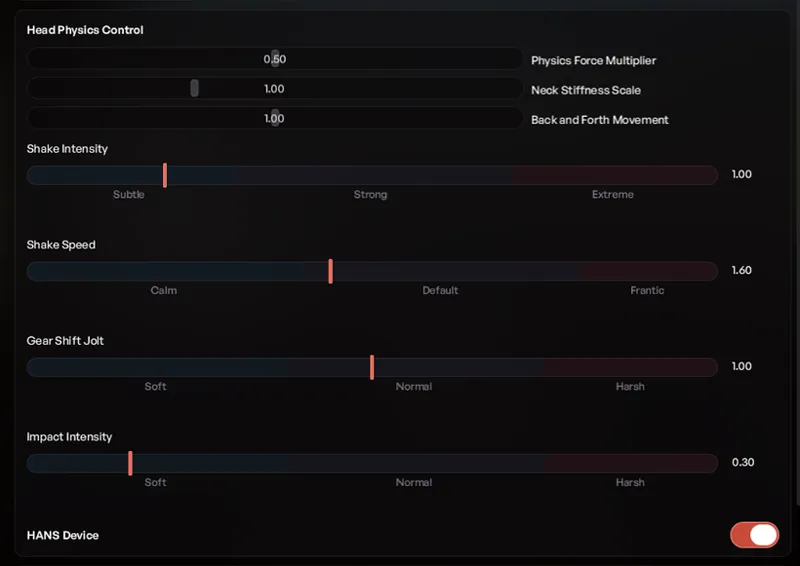
Physics Force Multiplier is the main control for your head physics. It sets how much weight your head carries as the car throws you about. You can get two completely different cameras out of either end of it so it's worth a play around with before you touch anything else.
Neck Stiffness Scale controls how far your neck can move in each direction.
Back and Forth Movement is how far your head rocks forwards and back as you brake and get on the power. If that's the bit that bothers you, turn it down on its own and leave the rest of the physics where it is, 0 stops it completely.
Then there's Shake Intensity and Shake Speed controls if you want a greater sense of speed. The shake is gone at a standstill and eases off past 200mph so it never gets silly,
Gear Shift Jolt gives the camera a jolt when you change gears.
Impact Intensity controls how violent landings, kerb strikes and other impacts are.
HANS Device does one specific thing, it stiffens the forwards and backwards movement so heavy braking stops throwing your head forward, which is exactly what a HANS device does. It leaves everything else alone.
Head Gaze
Corner Gaze glances your head towards the apex before you turn in, taken from the track ahead of you blended with your actual steering input.
You have 3 settings to control the corner gaze, those being:
Glance Strength which is the strength of the glance.
Gaze Lookahead which is how far up the road your eyes reach in seconds.
Inside Lean which leans your head a little into the corner so you get a look past the pillar rather than into it.
Slide Gaze takes over when the back steps out and keeps your eyes looking down the road through a drift rather than looking wherever the nose happens to be pointing.
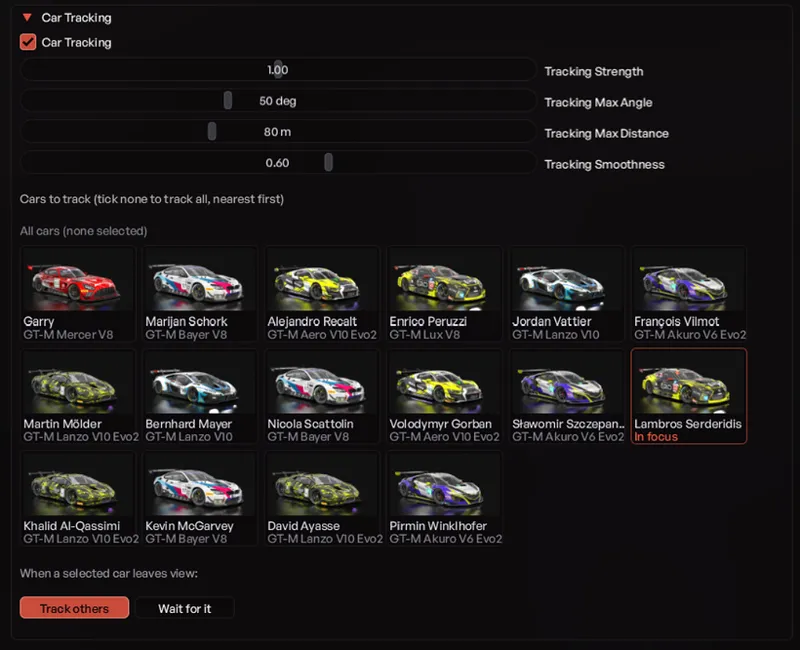
Under Advanced there's Car Tracking, which turns your head to watch cars near you when they come into view.
Tracking Strength, Max Angle and Max distance sets how big a glance you give them, how far round and how far away it bothers with, and you can tick specific cars from a grid of the field if you only want to watch certain people. A slide always takes priority over it.
Tracking Smoothness sets how lazily your head moves as it picks a car up or swaps between them.
Hovering a card in that grid outlines the real car in-game so you can see who you're actually choosing to track when there's a pack of similar cars around you.
There's also a choice for what happens when a car you've ticked leaves your view, either it moves on to whoever else is around, or it waits for that one to come back.
Reverse Look turns your head the moment you select reverse, to the rear-view mirror or either wing mirror, whichever you pick. If your car has real mirrors the camera finds it and aims at where it actually is on that car rather than at a fixed angle.
There's also Disable in VR which is on by default.