
font overrides tutorial
One of the few tutorials I've written on tumblr copied here for archival sake :-)
tools used: JPEXS Compiler and Sims 4 Studio
You can find all of my released font overrides from the link below
First, make sure you have your chosen font downloaded as TrueType Font (TTF), possibly in different static font weights or styles if you'd like to add variations to your override. Google Fonts is a nice place to browse from as it offers a complete range of glyphs, available with the SIL Open License.
// setting up package file
Create a new empty package
Open Game File Cruiser, then search for gfxfontlib
Add gfxfontlib to current package, then export it as a GFX file
Save package to be used for importing later
or- download the zip to get all the files already set up
// overriding fonts
Download JPEXS Compiler and open gfxfontlib with it
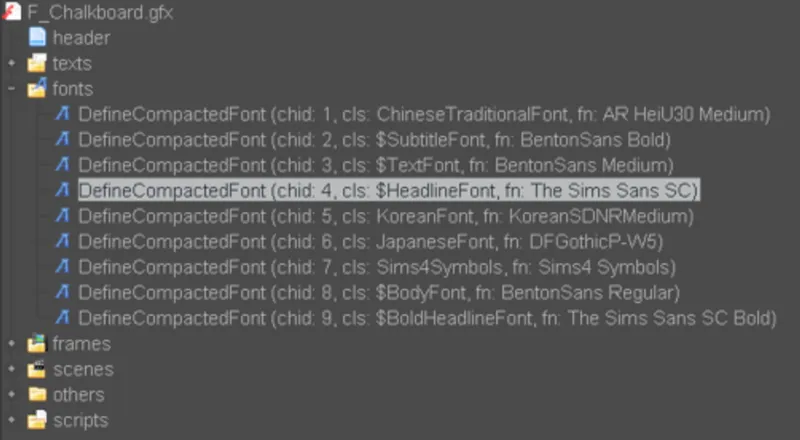
Go to the navigation tree on the left, then expand the Fonts tab. You'll see several font options that you can replace.
The Sims Sans SC Bold // title font, found only in main menu
The Sims Sans SC // headline text ; found in loading screen, menu title and header, paused indicator, sim emotion text, dropdown boxes
BentonSans Bold - Medium - Regular // regular texts
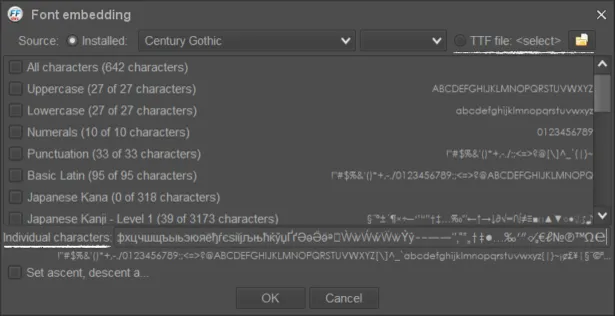
Select BentonSans Regular to start with, then click Embed found in the Parameters tab
On the opened window, select TTF file and locate your font to override with.
I recommend searching for your font in explorer/finder first, copy its path, then paste it onto the file name box.
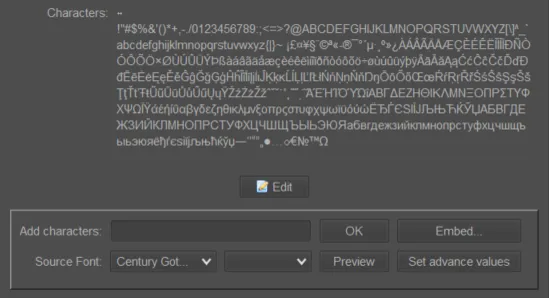
Once the font is selected, input these into the Individual Characters box. If you do so by selecting character types (uppercase, lowercase, etc.), it can cause issues with the text.
BentonSans Bold/Medium/Regular
!"#$%&'()*+,-./0123456789:;<=>?@ABCDEFGHIJKLMNOPQRSTUVWXYZ[\]^_`abcdefghijklmnopqrstuvwxyz{|}~¡¢£¥¦§¨©ª«¬®¯°±²³´µ¶·¸¹º»¼½¾¿ÀÁÂÃÄÅÆÇÈÉÊËÌÍÎÏÐÑÒÓÔÕÖ×ØÙÚÛÜÝÞßàáâãäåæçèéêëìíîïðñòóôõö÷øùúûüýþÿĀāĂ㥹ĆćĈĉĊċČčĎďĐđĒēĔĕĖėĘęĚěĜĝĞğĠġĢģĤĥĦħĨĩĪīĬĭĮįİıIJijĴĵĶķĸĹĺĻļĽľĿŀŁłŃńŅņŇňʼnŊŋŌōŎŏŐőŒœŔŕŖŗŘřŚśŜŝŞşŠšŢţŤťŦŧŨũŪūŬŭŮůŰűŲųŴŵŶŷŸŹźŻżŽžſƏƒǺǻǼǽǾǿȘșȚțəɚˆ˜΄΅ΆΈΉΊΌΎΏΐΑΒΓΔΕΖΗΘΙΚΛΜΝΞΟΠΡΣΤΥΦΧΨΩΪΫάέήίΰαβγδεζηθικλμνξοπρςστυφχψωϊϋόύώЁЂЃЄЅІЇЈЉЊЋЌЎЏАБВГДЕЖЗИЙКЛМНОПРСТУФХЦЧШЩЪЫЬЭЮЯабвгдежзийклмнопрстуфхцчшщъыьэюяёђѓєѕіїјљњћќўџҐґӘәӚӛᵊᶕẀẁẂẃẄẅỲỳ‒–—―‘’‚“”„†‡•…‰′″‹›⁄ₔ€ℓ№℗™Ω℮
Sims Sans SC + SC Bold
!"#$%&'()*+,-./0123456789:;<=>?@ABCDEFGHIJKLMNOPQRSTUVWXYZ[\]^_`abcdefghijklmnopqrstuvwxyz{|}~¡£¤¥§¨©ª«®¯°´µ·¸º»¿ÀÁÂÃÄÅÆÇÈÉÊËÌÍÎÏÐÑÒÓÔÕÖ×ØÙÚÛÜÝÞßàáâãäåæçèéêëìíîïðñòóôõö÷øùúûüýþÿĀāĂ㥹ĆćĈĉĊċČčĎďĐđĒēĖėĘęĚěĜĝĞğĠġĢģĤĥĨĩĪīĮįİıĴĵĶķĸĹĺĻļĽľŁłŃńŅņŇňŊŋŌōŐőŔŕŖŗŘřŚśŜŝŞşŠšŢţŤťŦŧŨũŪūŬŭŮůŰűŲųŸŹźŻżŽžˆ˜΄΅ΆΈΉΊΌΎΏΐΑΒΓΔΕΖΗΘΙΚΛΜΝΞΟΠΡΣΤΥΦΧΨΩΪΫάέήίΰαβγδεζηθικλμνξοπρςστυφχψωϊϋόύώЁЂЃЄЅІЇЈЉЊЋЌЎЏАБВГДЕЖЗИЙКЛМНОПРСТУФХЦЧШЩЪЫЬЭЮЯабвгдежзийклмнопрстуфхцчшщъыьэюяёђѓєѕіїјљњћќўџ―‘’“”„•…‹›⁄€№™Ω
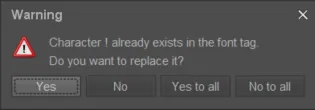
When you've clicked OK, it will ask you if you'd like to replace a character that already exists in the font tag. Select Yes to all. It will then replace all the characters and JPEXS will do its thing in the background.
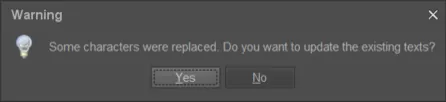
Once it's replaced everything, it will ask you if you'd like to update the existing texts. Select Yes. To know if the characters have been replaced, see if there's any changes to the SWF preview tab.
Repeat for the other fonts.
Aand that should be it :-) test in-game to see how it looks to make sure it's not too small or unreadable or have any visual issues. You can switch the font weights around if the regular font is too thin or thick.
Comments (1)
thank you again for this ! 🤍 doing gods work