

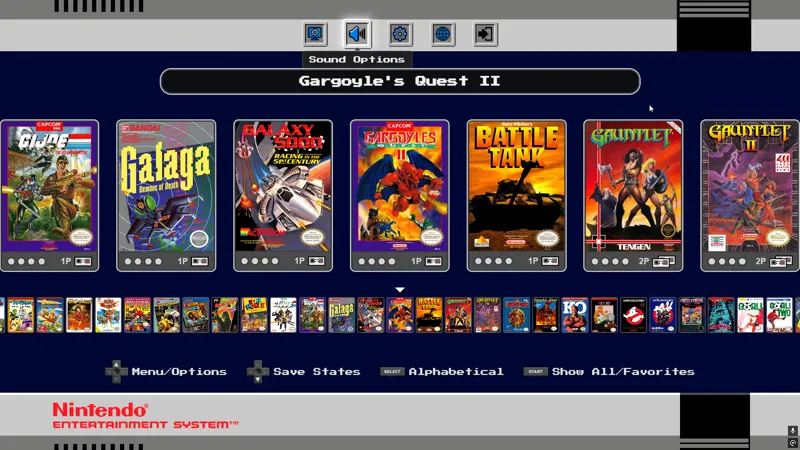
PC Classic Mini: NES Edition! [Update!🔥]
If you haven't yet, please consider buying me a coffee here ☕ 🤗 Your support allows me to dedicate more time to this work ❤
🔰What's New
Removed the Myrient requirement/integration and all heavy backend.
Auto detection of games, simply put your games files and Covers in the correct folders (this works for regular games, hacks, translations and homebrew).
Cleaned code and better folder structure.
Music widget during Attract mode (to customize BGM, go to "resources\sounds\bgm").
Option to change the core, modify "coreFilename" in settings.json (for advanced users).
For old users, quick update tutorial here 😎.
🔰Frontend Features
Classic NES Mini Style: A clean UI designed for the "Mini" console feel.
Retroachievements: Support with an Auto Login system to track your progress.
Quick Navigation: Use the alphabetical menu/shoulder buttons to quick browse games.
Video Options: Choose different aspect ratios/add or remove scanlines.
Pre-configured Retroarch for the best balance of speed and accuracy.
Customizable BGM: Set background music and adjust volume levels within the menu.
Save States Manager: Dedicated save state system featuring screenshots date and time.
Rewind and FFW option available.
Multi-language: Support for several languages.
Screensaver Mode: Dims the screen and plays some classic NES themes automatically.
🔰Quick Setup - get it working in no time!
Add ROMs: Put your games into "resources\games", try to use .zip format.
Add Covers: Put your covers into "resources\covers", try to use png or jpg.
Cover names must match the roms'*.If you have the old version with the downloaded romset, go here for instructions 👀🚀
🔰General Use Tips
Saving: In-game, press L3 + BACK/Select to save. The "4 slots" system can auto-increment, allowing you to pick your state directly from the frontend later.
If enabled, you can rewind and FFW using the combo L3 + LT / RT
Press shoulder buttons LB/RB to jump to letter.
If you're using 1440p or something different than 1080p/2160p you should disable scanlines in the menu and/or use Retroarch's shaders directly.
Controllers: This works best with Xinput gamepads (Xbox, 8bitDo, etc.).
If using PS4/PS5 Gamepads you should be using DS4Windows or something similar.
If you like this project, please consider supporting me ☕ with a coffee or a video review so I can keep improving this and other apps!
This is only a frontend it DOES NOT include any rom files.
Comments (8)
hi m8 i cant seem to get cover arts to work i download the rooms and all work fine
Hey, remember that your covers must have the exact same name of the ROMS, I created a tool to make this process easier: https://www.patreon.com/posts/155889403?collection=2117449 You can also use other renamer apps, but this is created with roms+covers in mind.
What happened to the online integration with other player lobbies?
I got rid of it because: 1.- It made sense before, when everyone was using the exact same romset (with myrient). 2.- Almost no one used it. 3.- It makes it easier for me to maintain.
excelente ya esta la actualizacion de nes, una pregunta hay manera de integrar el driver especifico de un control o remapear de alguna forma el game mode del frontend con un control generico basado en rasperry pi pico, por que en retroarch si funciona perfecto, pero en la navegacion del frontend estan sin orden los botones y algunos no estan
Dependiendo qué estés usando en la pico, por ejemplo GP2040 CE, deberías usar el modo XBOX / Xinput con eso te asegurarás que funcione en TODOS los juegos y emuladores como corresponde, recuerda que al usar una pico puedes mapear cualquier botón de cualquier manera (incluso configurar inputs como teclas de teclado), además puedes tener un botón que controle perfiles o modos (en caso que uses uno específico para otra cosa), todo depende del código/firmware que uses para el microcontrolador (espero estés usando GP2040), me comentas!
Another solid update! Is there any way to sort newly added games alphabetically? For example, I had to add Kung Fu, which was missing from the Myrient auto download before the update. It now appears at the end of the list.
Hey! by default the list is ordered alphabetically, check if the rom name has any weird character at the start, also make sure to update correctly, only move your games, covers and saves into the new version, let me know!