


Diaz Household from LIS 2 🐺
Life is Strange 2 is my favorite game in the franchise, so I decided to recreate the Diaz family home. I literally paid attention to every single detail to make it as close as possible to the original house in the game, and I think I did a good job with it.
The file size is 1.11 GB. If you have problems with this house, please note that my game is still running in DX9, and if your game is running in DX11, this build will probably not be compatible. You can easily batch fix the custom content of this build in Sims 4 Studio; there are many tutorials on YouTube for this, and I also have to mention that Sims enter the house through the laundry room next to the workshop, since the main entrance was impossible for me to make functional. I tried many ways but nothing worked. The patio and the rest of the house are fully functional.
⚠️BEFORE YOU PLACE THE BUILD DONT FORGET TO ACTIVATE THE CHEAT BB.MOVEOBJECTS ON⚠️
✨Residential
✨40x30
✨3 beds 2 Bath
✨Tray files and Custom Content included in the download file below
✨Gallery ID Michy0113
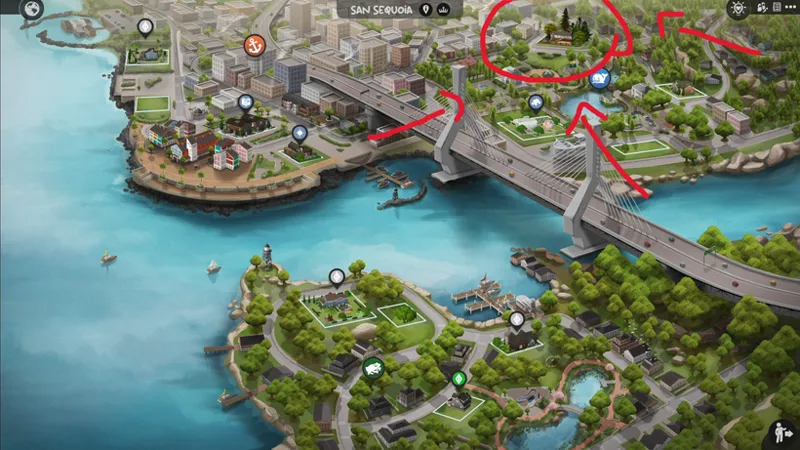
✨Located in San Sequoia
Packs used⬇️⬇️
LOCATED HERE
✨FAQ✨
Gshade preset Pluto by Ceru
Cc finds on my Pinterest account (Michysims)
Gallery ID Michy0113
Thank u to all the cc creators
T.O.U Don't claim as your own and do not re upload.
Michysims💖
How to Add Custom Builds to Your Sims 4 Game
1. Select the house or build you want and download the file.
2. Move the Tray files into your Tray Folder (located at: Documents > Electronic Arts > Sims 4 > Tray).
• These files won’t have the .package extension; instead, they’ll end in .bpi, .blueprint, or .trayfile.
3. If the build includes custom content (CC), place the .package files into your Mods Folder (Documents > Electronic Arts > Sims 4 > Mods).
• These files will be labeled as CC/Mods when you extract the download.
4. Open The Sims 4, then go to your Library (found in the top-right corner, represented by a lightbulb icon).
5. On the left side of the Library screen, check the box that says “Include Custom Content” in the settings.
6. Your downloaded house/build should now be visible and ready to use!
🩷🩷Thank you to all the cc creators 🩷🩷
FIND ME ON MY OTHER SOCIALS MEDIA AS MICHYSIMS
Diaz Household From LIS 2🐺|| Sims 4 CC Speed Build (YouTube)
Comments (7)
MY FAV LIS STORY!!!! ugh this is amazing please never stop<3
YOU ARE AMAZING!!!!
Thank you 😊
I'm making my first forever save and I'll definitely download your builds for my gameplay, I absolutely love how good you are at this!
GORGEOUS. LOVE IT!
you kill it every time !!! literally have all your builds in my game
I'm glad you like my builds 🥰