
How to Load Your Saved File from Chapter 1 to Chapter 2 (MAC)
Hey! So you’re stuck because your save file won’t load? No worries — just follow this step-by-step and you’ll be fine.
✅ Step 1: Did You Use Your Own Save File?
First, make sure you actually used your own save file from Chapter 1 — not an old version or a random one.
Make sure your Chapter 1 is UPDATED:
Check this out: Independent Horizons CHAPTER 1 - Completed
✅ Step 2: Find Your Save File from the Chapter 1
Now you need to find that save file on your Mac.
📂 It should be here:
/Users/YOUR-USERNAME/Library/RenPy/IndependentHorizons/
Note: The Library folder might hidden!
To make it appear:
Open Finder → Go to your Home folder (Shift + Command + H)
Where:
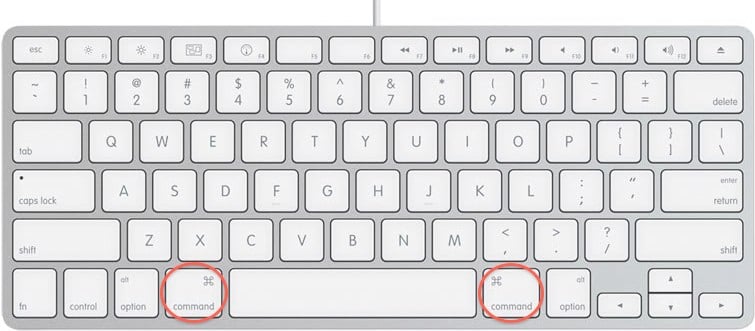
Command” = the ⌘ key — it’s the key on your Mac keyboard with the little cloverleaf or looped square symbol: ⌘
Press Command + Shift + . (period)
✨ Boom — hidden stuff appears!Or you can watch this to find the LIBRARY - https://www.youtube.com/watch?v=sd7yTwysITc
Then go to renpy/IndependentHorizons and then find your saved file.
Now you have to copy that Saved File!
✅ Step 3: Bring It to Chapter 2
You have two ways to get your save to work in Chapter 2:
The process is the same thing as Step 4 but now you are looking in the /Users/YOUR-USERNAME/Library/RenPy/IndependentHorizonsChapter2part1 - something like this
But if you still can’t find a saves folder, try opening Chapter 2 and Start the game. That should automatically generate the folder. Then go back to:
/Users/YOUR-USERNAME/Library/RenPy/IndependentHorizonsChapter2Part-1
and check if the saves folder has been created.
✔️ Option A — Rename it as chapter-1-LT1.save
Same thing: put it in the saves folder.
Open Chapter 2 → Start the game → LOAD your OWN Saved File
✔️ Option B — Rename it like 2-1-LT1.save (As long as you know what page and what block it is)
Same thing: put it in the saves folder.
Open Chapter 2 → Click LOAD → Find it manually (Page 2, Block 1 in your Load screen).
And that’s it!
If you follow these steps, your save should load perfectly.
Still stuck? Email me your saved file and let’s fix it - swampystudio@protonmail.com
