
Announcement : Upcoming & Future Patches/Game Updates
As you guys know, there's a patch tomorrow!
If you're new here (on my patreon) I rarely make posts for each patch or any mod update in general unless it's really necessary. Instead I update my pinned post and that's where you need to go check for any updates. It's pinned on my profile so it's hard to miss lol. You'll see "Resources & Mods Status" and it will include a list of my mods showing when each one was updated. My mod posts also include "Last Updated : __".
If you ever receive a notification and it says "Resources & Mods Status" please check it out because it means one of my mods got updated.
From now on, whenever there's a patch, I will be turning off my comments until I've had a chance to update my game and test my mods. Please just wait for me to update my pinned post before trying to reach out to me on any social media, thank you!
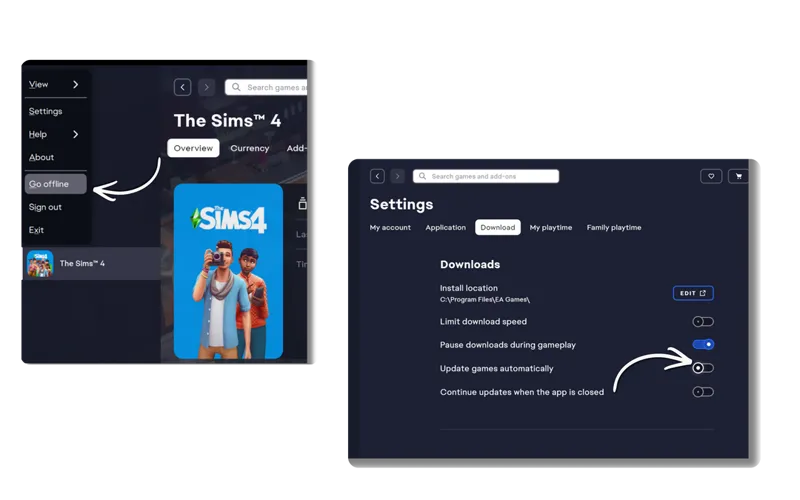
If you don't wish to update right away, make sure to turn off auto updates and play offline. Patiently wait for creators to update their mods or confirm that everything is good! If you're new to mods click here .
AFTER I confirmed my mods to be compatible or updated some of them (whatever the case may be), if you have any issues click here.
Here's how I prepare to update my game :
I wait for creators to update their mods or at least a confirmation that their mods are compatible for the patch.
I personally update my game whenever all the main mods I use are updated. How do you check if a mod got updated? There's a different ways to go about this, you can see mod updates of some creators on Deader Pool Discord Server or Scarlet Mod List. You can also check the creator patreon to check if they recently updated any of their mods or confirmation. The best way to confirm if a mod got updated is checking on the creators PAGE. In my case as i mentioned, you will find any details about it on my pinned post or the mod post itself.
I make a backup of my save and tray files before updating. I also remove my mods folder before updating as well. I NEVER press update and leave my mods and save file folders inside.
Delete localthumbcache! ALWAYS