





ChromatiX Enhanced V0.8
Download ChromatiX Enhanced V0.8
chromatixmods.com/exclusive-downloads
Installation Guides
GTA 5 Legacy – Singleplayer
https://youtu.be/fOIK8XDQXsk
GTA 5 Legacy – FiveM
https://youtu.be/66PKqRvLU7Q
GTA 5 Enhanced – Singleplayer
https://youtu.be/SKt08Hu2WB8
⚠️ Install V0.8 on a fresh copy of GTA 5 Enhanced, and avoid installing it over V0.7
(Simply delete the existing mods folder from GTA 5 Enhanced game directory)
Change Logs: chromatixmods.com/change-logs
ChromatiX Website: https://chromatixmods.com/
ChromatiX YouTube: https://youtu.be/g7H0GppkF6c
Change Logs:
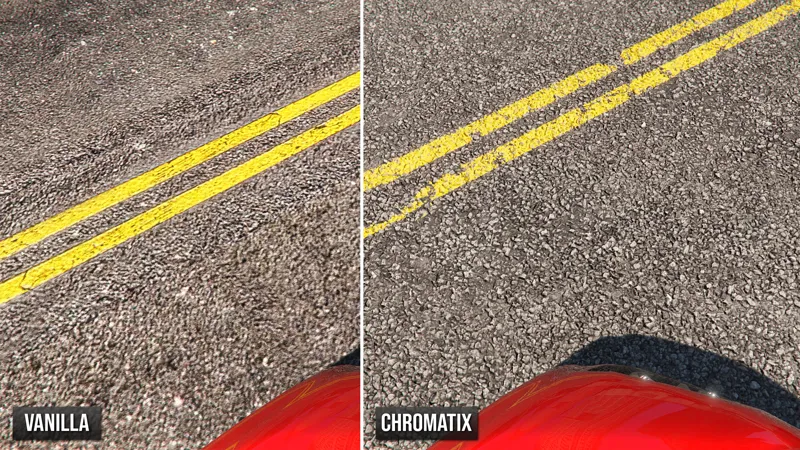
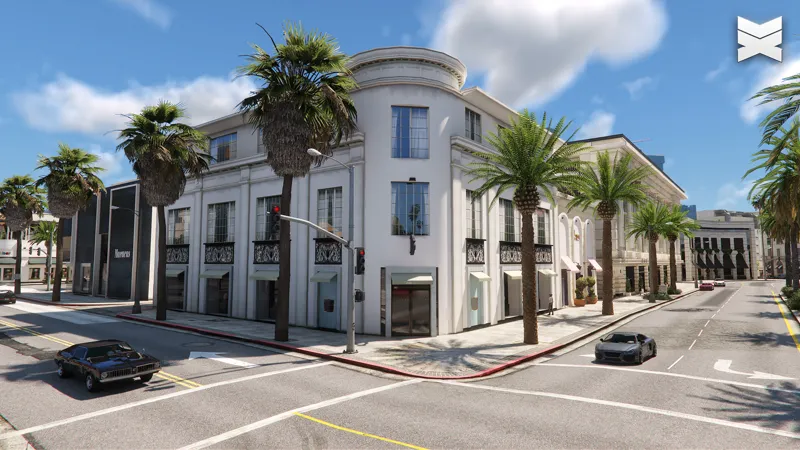
Added 3D parallax roads across Vinewood, Downtown, and South Central in GTA 5 Enhanced
Improved cloud density, quality, and blending across all weather conditions in GTA 5 Enhanced
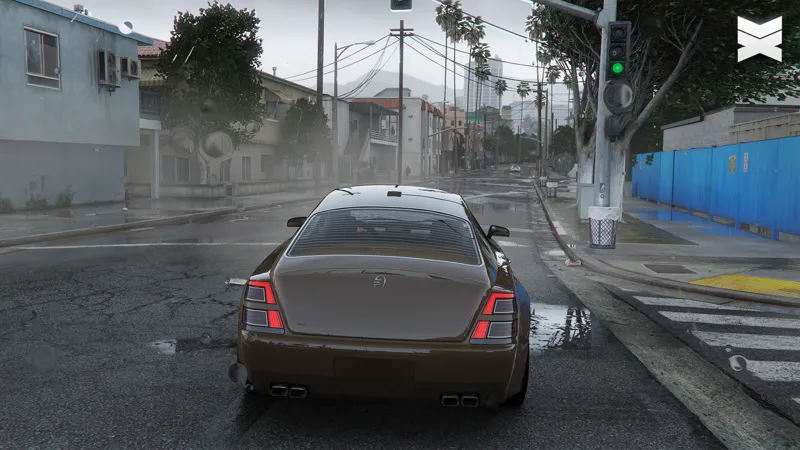
Introduced major lighting enhancements for all weathers in GTA 5 Enhanced
Optimized and improved various textures to improve overall visuals and performance in GTA 5 Enhanced
Added a new optional ReShade preset for GTA 5 Enhanced
Comments (54)
how can I get access to 0.7 version?
How can i play this with Dlss 5 because always when i wanna start it crashes after the intro
I just subscribed to this mod, but after installing everything, I'm getting a lot of flickering or shaky shadow reflections. I have an RTX 4050; I hope you can help me.
the method doesnt work at alll
fyi with the latest update of GTA enhanced I am getting wild magenta artifacts with a formerly working perfect chromatix v0.8 install and the add-ons.. my workaround is to disable ray reflections and global illumination in the RAY TRACING section of settings.. I tried reinstalling all mods, no dice, same stuff.. so keeping those settings off for now.. just FYI
Complete bullshit mod it seems. tried everything but I get black characters unlimitled black rectangles on rtx 5080. i think creator is scammer cuz he cant fix theses problems he knows that but still sells it.
I got the same issue recently.. I tried a lot but in the end this is my workaround: disable two RAY TRACING configs in settings, 1) ray reflections and 2) ray global illumination to OFF and that fixed it for me. GL
I have tried so many times to install this and it DOES NOT WORK! GTA V Enhanced. V0.8 .OIV files wont install, Game crashes... NOTHING about this seems to work.
I don’t know what’s up I was able to run this graphics mod (the enhanced version) perfectly fine about a month ago but now anytime I go near the city the game instantly crashes, insanely annoying considering I spent 10 bucks on a graphics mod I can’t use because it never gets updated or fixed. The last post about the Enhanced version was put out in early APRIL, It’s almost September. We’re closing in on nearly half a year without one fix or update. It’s a joke. This guy’s ripping people off.
Deleted my previous comment. Your most modern video explains everything nicely except there's an issue. The most modern version of the Enhanced Mod ONLY has ONE file in it and it is an OIV file. I'm getting REshade add on errors and NO F7 working at all. If this is supposed to be a drag n drop file it ain't happening with an OIV file. Reshade is also 6.8 now and your video shows REshade 6.6 being used. Might wanna update your video. Also, I don't mind donating to hard working modders but when your videos are out of date and your files don't match then there's an issue.
looks like when you click in the enhanced version of this it downloads legacy...
gives me OIV files
Volumetric clouds and the F7 menu don't work. Just says toggle post fx to Ultra or very high which it is. I reinstalled this twice already and followed all instructions. Pretty disappointing after spending $10 on this
same bro ive than everything what added instructions inside main package folder and still f7 toggle no working ive set everything to ultra and still no menu
Despite following the installation instructions, I still see no volumetric clouds at all. F7 just tells me to switch Post-FX to Ultra or Very High which it already is. I'm on enhanced.
Same here
I thought it was free
I am having really wierd visual glitches especially at indoors how can I send you image so you’ll know what’s happening?
2nd time reaching out chromatiX. In the newest update just released for august 2026, have you fixed the enhanced version to actually have ray tracing turned on without black pixelation or complete freeze of this visual upgrade? I have to turn ray tracing all the way off and I'm running a rtx 5080 with a ryzen 7 98003d?! This doesn't make any sense to me ?
got the same issue recently.. I tried a lot but in the end this is my workaround: disable two RAY TRACING configs in settings, 1) ray reflections and 2) ray global illumination to OFF and that fixed it for me. I turned all RT off at first but found I could enable all but those two and things were ok.
i! Is CRX Roads already compatible with GTA V Enhanced 1.0.1158.13? After updating to 1.0.1158.13 I'm consistently getting ERR_GFX_STATE crashes while driving at high speed. I've tested my setup extensively (NVE, ScriptHook, gameconfig, heap, packfile, vehicles, etc.), and the issue only appears when CRX Roads is installed. Just wondering if an update or hotfix is planned. Thanks! ANY UPDATE?????
I thought this was "The best free resource mod for enhanced"?
I'm experiencing an issue with the mod when I enable TAA. The graphics become unstable, and the shadows move randomly from left to right. I'm not sure whether the problem is related to the textures or the shaders. When I switch to FXAA or AMD FSR 3, the issue disappears. However, I want to use TAA because it provides much better anti-aliasing. Could you please let me know if there is a solution? If this is a known issue, please consider releasing an update to fix it.
I'm also sure this issue did not exist in **Chromatix V0.4_SP BETA**. I used that version with TAA enabled, and everything worked correctly without the shadow flickering or the unstable graphics I'm experiencing now. The problem only started after updating to the newer version, so it seems that something changed between **V0.4_SP BETA** and the current release. I hope you can compare the two versions and identify what caused this issue.
Hi! Is CRX Roads already compatible with GTA V Enhanced 1.0.1158.13? After updating to 1.0.1158.13 I'm consistently getting ERR_GFX_STATE crashes while driving at high speed. I've tested my setup extensively (NVE, ScriptHook, gameconfig, heap, packfile, vehicles, etc.), and the issue only appears when CRX Roads is installed. Just wondering if an update or hotfix is planned. Thanks!
Hi.. I need you help. How can I remove the bloom and car coronas? Ive already tried replacing thr corona and distant_light dds but there's still corona.. can you please enlighten me where can i disable all corona and bloom effect??
After installing according to the guide, the following message appears after launching the game: unable to save configuration and or current preset,make sure files permissions are set up to allow writing to these paths and their parent directories C:\Program Files (x86)\Steam\steamapps\common\Grand Theft Auto V Enhanced\ReShade.ini C:\Program Files (x86)\Steam\steamapps\common\Grand Theft Auto V Enhanced\ChromatiX.ini
i have a bug were when i enable ray tracing my game breaks, black cubes everywhere fully black characters etc, how can i fix this?
good luck I've sent in that report to no avail about a month ago....Ashame bc I really want to like this mod!@
Tried to install this over NVE (Enhanced), I cannot get GTA to load. It thinks for a minute and then says quitting. I also had to remove the dxgi.dll file - help please
why does my shadow flicker
waste of money, horrible shadow flickering, random bloom flickering for no reason, white lines around all vegitation, don't waste your money.
Do you know why I am getting white lines around trees in certain weathers (rainy cloudy ect)
i can't get mod to work keep getting rehade.ini error and another .ini can't write, please help i'm new to modding
dlclist.xml is wrong. it reads: ` dlcpacks:/crxlights/ dlcpacks:/crxvegetation/ dlcpacks:/crxreflections/ dlcpacks:/lwecityhigh/ dlcpacks:/lwedeserthigh/ dlcpacks:/lweforesthigh/ dlcpacks:/lwemountainshigh/ dlcpacks:/lwecitymedium/ dlcpacks:/lwedesertmedium/ dlcpacks:/lweforestmedium/ dlcpacks:/lwemountainsmedium/ dlcpacks:/lwecityhigh/ dlcpacks:/lwedeserthigh/ dlcpacks:/lweforesthigh/ dlcpacks:/lwemountainshigh/ dlcpacks:/real_traffic_1/ dlcpacks:/acentral/ dlcpacks:/crxroads/ ` Should read: ` dlcpacks:/crxlights/ dlcpacks:/crxvegetation/ dlcpacks:/crxreflections/ dlcpacks:/lwecitylow/ dlcpacks:/lwedesertlow/ dlcpacks:/lweforestlow/ dlcpacks:/lwemountainslow/ dlcpacks:/lwecitymedium/ dlcpacks:/lwedesertmedium/ dlcpacks:/lweforestmedium/ dlcpacks:/lwemountainsmedium/ dlcpacks:/lwecityhigh/ dlcpacks:/lwedeserthigh/ dlcpacks:/lweforesthigh/ dlcpacks:/lwemountainshigh/ dlcpacks:/real_traffic_1/ dlcpacks:/acentral/ dlcpacks:/crxroads/ `
Wait so is there a way to fix this or is it a problem that needs an update?
Why can't my GPU reach full load? It's only working at 70%.
I bought mod ..how i can remove bloom from game? Because só much bloom on light in Cars dont see speedometer.. maybe is options white streelights?
Im broke, cant buy membership, is there a free version?
i followed your guide to a T but i dont see a difference, no volumetric clouds and the f7 menu doesnt work.
How to Fix the Blinking ?
Can i get this for free? Please!!
Hi, I’ve been following your work and your latest GTA 5 Enhanced mod looks amazing. I create gaming content on YouTube, and I’d love to feature your mod in several videos (installation guide, performance tests, and gameplay showcase). This could help bring more visibility to your mod. Would you be willing to provide me with a free copy for this purpose? I’d of course credit you and link your work in every video. Thanks in advance!
I can't get rid of this error message: "unable to save configuration and or current preset make sure file permissions" I've tried everything
Same issue
Aurora Lights for GTA 5 Enhanced - ChromatiX Enhanced V0.6 BETA i want dowanload that but i cant why
That was from an older version of ChromatiX. The latest version does not include aurora lights in Enhanced, as we’re currently working on adding new ones.
bro i dont like mist on screen its not good. can u tell me how to remove that mist on screen
You can use the F7 menu to disable volumetric dust.
for some reason, I have no clouds and F7 doesnt pull up the menu. Any idea why?
Please follow the installation guide appropriate for your game version: FiveM, Enhanced, or Legacy. 📘 Installation Guides GTA 5 Legacy https://youtu.be/fOIK8XDQXsk GTA 5 FiveM https://youtu.be/66PKqRvLU7Q GTA 5 Enhanced https://youtu.be/SKt08Hu2WB8
Hey bro, is there any way to restore the original cloud? I like your cloud, but when I turn it on, it causes image errors.
Simply delete the “Chromatix_Settings” file from your game directory.
love the graphics and here I am as a member you made me do it Great work btw love you