


ChromatiX V2.9 [Legacy/FiveM]
Download ChromatiX V2.9
chromatixmods.com/exclusive-downloads
Updated Change Logs: chromatixmods.com/change-logs
ChromatiX Website: https://chromatixmods.com/
ChromatiX YouTube: https://youtu.be/g7H0GppkF6c
Change Logs (Singleplayer & FiveM)
Added new ray-traced screen space reflection shaders that now reflect cars, buildings, props, clouds, and more
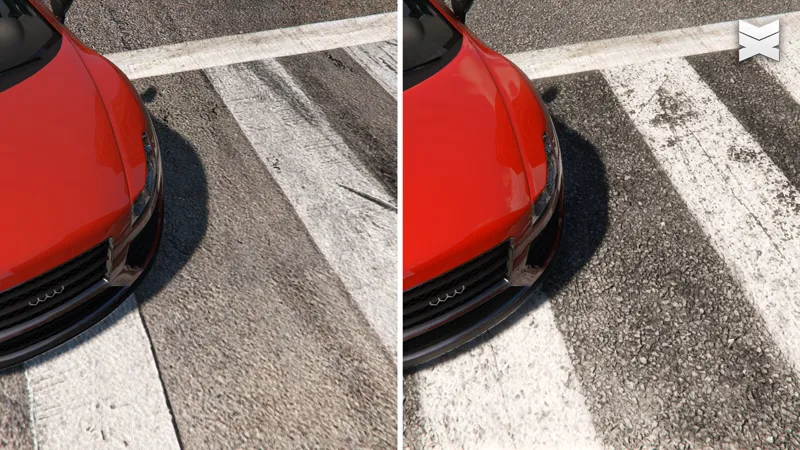
Added new 8K parallax road textures for the Downtown, Hollywood, and South Side regions
Implemented major lighting improvements across all weather conditions
Improved cloud density, quality, and blending for all weather types
Optimized textures to improve overall performance
Added an optional new ReShade preset
Adjusted the volumetric mist color for cloudy weather to better match the lighting
Fixed an issue where animated raindrops were missing from vehicles
Reduced volumetric dust density by default
Comments (16)
Hello , i had followed your YouTube video tutorial after that also facing same issues on F7 key , please fix the issue as soon as possible
Please follow the installation guide appropriate for your game version: FiveM, Enhanced, or Legacy. 📘 Installation Guides GTA 5 Legacy https://youtu.be/fOIK8XDQXsk GTA 5 FiveM https://youtu.be/66PKqRvLU7Q GTA 5 Enhanced https://youtu.be/SKt08Hu2WB8
F7 not working unless I use QuantV with it which breaks the reflections...
Please do not install on an already modded game. Install Chromatix on a fresh copy of GTA 5 to avoid bugs. 📘 Installation Guides GTA 5 Legacy https://youtu.be/fOIK8XDQXsk GTA 5 FiveM https://youtu.be/66PKqRvLU7Q GTA 5 Enhanced https://youtu.be/SKt08Hu2WB8
F7 not working for me
We’ve run multiple tests, and the F7 menu is working correctly in all cases. The only reason it wouldn’t work is if ReShade is not functioning properly. Please install Chromatix on a fresh copy of GTA 5 to avoid issues. 📘 Installation Guides GTA 5 Legacy https://youtu.be/fOIK8XDQXsk GTA 5 FiveM https://youtu.be/66PKqRvLU7Q GTA 5 Enhanced https://youtu.be/SKt08Hu2WB8
im having no issues with the cloud menu, clouds r just not appearing for me lol
Please install Chromatix on a fresh copy of GTA 5 to avoid issues.
ya F7 key don't work
We’ve run multiple tests, and the F7 menu is working correctly in all cases. The only reason it wouldn’t work is if ReShade is not functioning properly. Please install Chromatix on a fresh copy of GTA 5 to avoid issues. 📘 Installation Guides GTA 5 Legacy https://youtu.be/fOIK8XDQXsk GTA 5 FiveM https://youtu.be/66PKqRvLU7Q GTA 5 Enhanced https://youtu.be/SKt08Hu2WB8
f7 here too
We’ve run multiple tests, and the F7 menu is working correctly in all cases. The only reason it wouldn’t work is if ReShade is not functioning properly. Please install Chromatix on a fresh copy of GTA 5 to avoid issues. 📘 Installation Guides GTA 5 Legacy https://youtu.be/fOIK8XDQXsk GTA 5 FiveM https://youtu.be/66PKqRvLU7Q GTA 5 Enhanced https://youtu.be/SKt08Hu2WB8
seems a lot of people have some trouble with the F7 menu, i'm one of them tho... please can we have a fix thanks
We’ve run multiple tests, and the F7 menu is working correctly in all cases. The only reason it wouldn’t work is if ReShade is not functioning properly. Please install Chromatix on a fresh copy of GTA 5 to avoid issues. 📘 Installation Guides GTA 5 Legacy https://youtu.be/fOIK8XDQXsk GTA 5 FiveM https://youtu.be/66PKqRvLU7Q GTA 5 Enhanced https://youtu.be/SKt08Hu2WB8
can any one help me i am pressing F7 but the cloud menu is not opening at all i installed heap adjuster , packfile limit adjuster , scripthookv , scriphook v .net nightly , gameconfig . still the cloud menu is not opening
We’ve run multiple tests, and the F7 menu is working correctly in all cases. The only reason it wouldn’t work is if ReShade is not functioning properly. Please install Chromatix on a fresh copy of GTA 5 to avoid issues. 📘 Installation Guides GTA 5 Legacy https://youtu.be/fOIK8XDQXsk GTA 5 FiveM https://youtu.be/66PKqRvLU7Q GTA 5 Enhanced https://youtu.be/SKt08Hu2WB8