





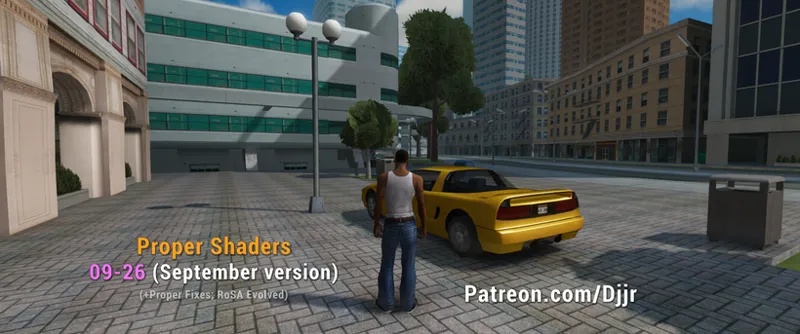


Proper Shaders 09-26 (public access)
If you don't know what Proper Shaders is, check other posts or official MixMods post: https://www.mixmods.com.br/2026/05/sa-proper-shaders/
(other updates/hotfixes for this month are logged on comments, updated on this same post)
I highly recommend to use with newer Proper Fixes version, that improved mesh normals for better lighting: https://www.mixmods.com.br/2026/06/sa-proper-fixes/
Update:
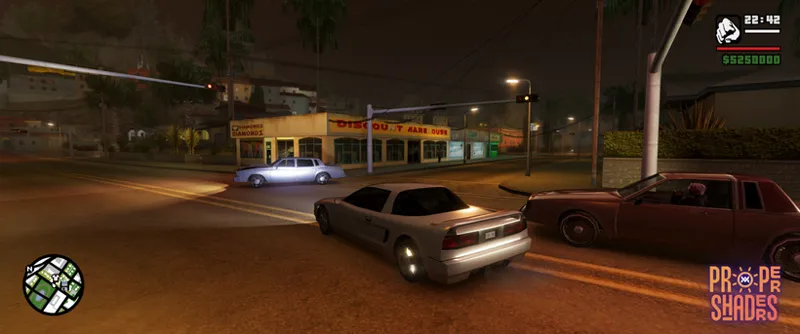
The game's ambient color is now a gradient similar to those found in modern engines, and a "Skylight" (sky occlusion) feature has been implemented; this creates world-space ambient occlusion across the entire scene based on sky visibility—acting like a secondary shadow that modulates the sky color within the environment. It is a proprietary solution so advanced that it even recalculates lighting direction globally (e.g., the side of the car and CJ will receive light from the sky from open sky direction, regardless of the Sun's position). Consequently, the mod now features real-time global illumination; areas under bridges or enclosed by buildings and trees will appear darker.
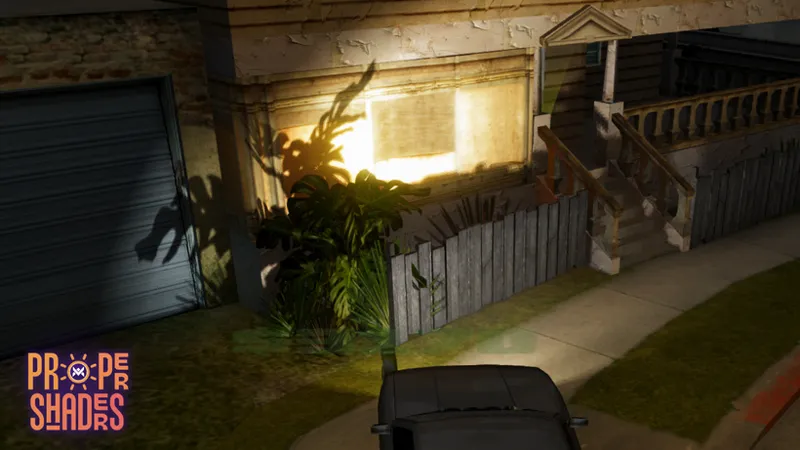
Furthermore, the entire lighting system has been overhauled to reduce issues with lights easily blowing out brightness. Crucially, the deferred lighting calculation now employs high-fidelity techniques akin to modern games, utilizing an emission buffer captured from prelight data (making game nights look genuinely illuminated, as if real light sources existed throughout the world). This buffer is also leveraged by other features, such as SSGI, to further enhance the accuracy of indirect lighting calculations.
There's more: deferred composition using HDR for high color precision has been implemented (this is handled within the engine itself, so no HDR monitor is required). This prevents color banding (where gradients appear as distinct layers, often visible on dark surfaces) and includes options to incorporate HDR into post-processing effects.
And finally: the mod has undergone a comprehensive stability review, fixing various visual bugs and refining the overall look (including improvements to lighting and water). An extremely robust API has also been added to facilitate compatibility and expansion for other mods (allowing them to create lights based on this mod's system, for instance). Oh, and did I mention that the player's car headlights now cast shadows?
Even if you are not a supporter, you can check the public devlog on MixMods' server, "Proper Shaders" topic on Mod Showroom.
Jéssica Natália also helped a lot with this update, and she released Proper Shaders port for GTA Vice City and GTA III too, check it out!
Presets comparison running on RTX 3060 native 3440x1440 (UHD ultra-wide):
Current progress
Full deferred rendering technique (like modern games)
Per-pixel lighting (hundreds of optimized dynamic lights)
Volumetric lights beams
Dynamic 4 cascaded per-pixel shadows (NVIDIA's PCSS)
Soft shadow mask technique with gaussian blur
Screen space global illumination with AO.
Skylight (sky occlusion for additional big ambient occlusion areas, occluding sky light ambient color).
Tricolored ambient lighting like modern engines.
Volumetric clouds
Volumetric height fog with godrays
Water surface
Water caustics
Underwater
Ambient occlusion (SSAO, HBAO, proprietary SSGI)
HDR simulation with tonemapping (ACES or Timoty)
HDR composition and postfx (fixes color banding, specially on dark)
LUT
Auto exposure
Bloom
Sun rays
SMAA with temporal
AMD Contrast Adaptive Sharpening
Adaptive Depth Of Field
Simple dithered sky shader
PBR sky shader with sky blend
New horizon fog
Improved z-fighting
Soft particles
Player mipmapping (automatic)
Shaders lit by directional light
Stochastic procedural texturing
Realtime global reflections
World rain surface
Vehicle shader (PBR, fresnel, rain surface)
Animated wind shader
Animated pickup shine
First person anti-clipping
Optional artistics (VHS, GTA:CW outlines, Aurora borealis)
Support for unlimited TXDPs (TXD parents) files in .ide files, which helps this (shadermaps) and other texture mods (disabled for now).
All 11+ thousand game textures are already configured with proper values for roughness, stochastic and shadows casting.
In progress
Shadermaps (normal map, roughness map etc).
Cel/anime shading.
GPU instancing grass system.
Decals projector (replacing the vanilla decals system, from CPU to GPU)
Screen space reflections
Planned
Lens flare
Parallax occlusion mapping
Specular anisotropic hair
Subsurface scattering
Improve wind/vegetation shader
Terrain splat maps shader
Download version 09-26. For beta supporters on 01.10.26 (DD.MM.YY) and 01.11.26 for the public. Possible bug fixes will be updated in the same post (check comments and Discord).
Sharing is prohibited until specific dates.
Comments (55)
I’d like to point out that in the latest public versions of Proper Shaders, some added NPCs have begun to appear with darkened textures—much like what occurred during the early development of the PedFuncs mod (which I previously reported on MixMods). Is it currently possible to fix this via the Proper Shaders .ini settings or by any other means? If not, I would like to request that this be addressed in future versions. https://imageupload.app/i/55328f8471227f48d502
Im playing with an i5 12400f and 6700xt but my fps is less than 60 even with the low preset
Don't look normal, how it is without the mod? PC like that would run the game, without this mod, in like 200, 300 FPS, and maybe about 80 with the mod. You can use something like MSI Afterburner to check if GPU is 100% or not (if not, is limited by CPU).
Tem que melhorar ele pro Samp Junior
can anyone help ? i dont know what im doing ive kept up to date, with alpha and its clearly marked as fixed but anything white glows like hell,it almost hurts my eyes during night time scenarios i dont have timecyc modded so its defintately something ive got wrong any thoughts ?
Hey Junior. Love your work. Keep doing you!
Junior is it possible to get this to work with the bulletholes mod?
also i found this mod for anyone having timecyc issues should try this https://libertycity.net/files/gta-san-andreas/238840-improved-timecycle-for-proper-shaders.html
On Proper Shaders 09-26, distant hills are heavily obscured even in Extra Sunny LA. Disabling [VolumetricFog] made little visible difference to the rooftop haze. Is there a setting to reduce distance/horizon fog strength while preserving PBRSky and clouds? I can provide comparison screenshots and my configs.
The horizon fog opacity is from game's timecyc.
Hi everyone! Could you help me solve a problem or identify the mod that might be causing a conflict? At night, the grass—as well as objects like weapons and items such as money, barrels,,gas cylinder—appear overly bright, as if they aren't affected by the lighting. I’m also experiencing an issue where certain objects, like forest cabins, look extremely dark compared to the surrounding environment. I don't have a screenshot right now since I'm away from my setup. Thanks!
Check if is caused by a timecycle mod and tell here.
Is it okay if I have 29-60 fps (4070ti, ryzen 5 7600x3d, 2k Resolution) on Very High preset here and with Soundize, Urbanize mods + real trafic mod? On your screenshot you have much more fps on higher res.
Soundize, Urbanize and Real Traffic are not GPU mods, they are CPU mods. And no, check this page and presets folder, on RTX 3060 it runs very high preset in 70 FPS day and 76 night. Must be CPU weight, not GPU.
https://imageupload.app/i/e7d8d31a9451f239dc25 i removed the 24hr timecyc messed with the lighting settings but between here and the long strip leading to the beach the lights get over saturated is there no other suggestion as to how to fix this?
I already replied on your other comment: Find which mod is causing that and tell here.
this area of lights are really bright https://imageupload.app/i/d096f9b046788cf5d8fc
All fine here. https://imgur.com/a/s6Ry0vO#cfd6udZ Find which mod is causing that and tell here. Some timecycle mod?
Updated: Fixed shadows not working with ID limits enabled in the fastman92 limit adjuster; added anisotropic filtering (sharper distant and angled textures) to Base.ini; added a few more shadow optimization settings.
Junior, please fix the issue. There is the following model display issue for SA:MP TextDraws: https://imageupload.app/en/i/f93b09af1471e43899db
Updated: Vehicle headlight shadows now include the last vehicle you were using (previously, they only worked with the vehicle currently in use). Some minor preset adjustments were made, and an error check for volumetric fog was removed, allowing it to run regardless of the error (I’m not sure if this causes any issues).
Honestly, the September build of the shaders was disappointing. The shadows have clearly gotten worse — they look much more washed out. Shadows from buildings and objects are barely visible in places, or missing entirely. I'd put it this way: it feels like there are practically no shadows at all, and this is on the "Very High" preset. At startup with the Very High preset (09-26 build), I consistently see Failed to read 'settings/ProperShaders - Rendering.ini' and ...Decals.ini. These files aren't present in any of the folders in the official preset archive (most likely they're referenced in the code but the functionality isn't implemented yet — not a complaint, just noting it). I also see Failed Feature: VolumetricFog error 3, which doesn't occur in the August build. I dug a bit deeper comparing the logs from both versions: 1. SSGI is being calculated at a different trace resolution: - August: [SSGI] Enabled (quality=2, trace divisor=2) → resolution 1280x540 - September: [SSGI] Enabled (quality=2, trace divisor=4) → resolution 640x270 Note that quality=2 is the same in both, but the actual trace resolution in September is 4x lower by area (divisor 2→4). That directly affects AO/contact shadow detail at what's nominally the same quality level. 2. VolumetricFog: worked in August, broken in September: - August: Volumetric Fog enabled — clean, no errors. - September: Failed Feature: VolumetricFog error 3 — the feature fails to initialize. I really like what this author is doing. I'm not an expert, so I may be misunderstanding something. But the September version feels like it was cut down somehow, or perhaps something was accidentally left out. For reference, here are two screenshots taken at nearly the exact same in-game time (06:41 vs 06:40), from the same spot, both on the Very High preset: - 0826: https://imgur.com/a/mngQPbr - 0926: https://imgur.com/a/pAFDurn You can clearly see: in the August version, there's a visible elongated shadow from the character on the pavement, the tree canopy casts a distinct light/shadow pattern on the blue wall, and the poles/wires cast diagonal shadow lines across the road. In the September version, the character's shadow is almost gone, the foliage pattern on the wall is barely readable, and the pole/wire shadows have either disappeared or become so faint they blend into the asphalt. The scene and time of day are identical — the difference isn't in the scene's lighting, it's in how shadows/AO are being calculated. Small addition: I re-downloaded the mod on September 8th via the current link — the issue is still there.
Sadly, I have to partly agree with this. I am having the same feeling that something has been cut down (or we're not understanding this correctly?) in regard to shadows. I did deep troubleshooting by removing pretty much all other mods, and it does not seem like a compatibility issue. Shadows are mostly invisible in the September version and totally fine in the August build. Running out of ideas on what to test, since Junior showed that shadows look fine for him in the September version. Very weird. My Proper Fixes gta3.img is packed with modded .txd/.dff assets (to improve streaming memory allocation) - but that can't be possibly related, can it?
To remove excessive shine, how is it done? It's quite annoying that some structures shine too much with HDR
You mean night light or sunlight? You mean sunlight too strong or the whole map lighting too strong? You mean the whole screen too bright? They are different things, and depends on SkyGfx, Timecycle mod etc, and in general is explained on readme.
I have 3060 too, but using high settings with ROSA, max i get it 36 fps... any idea?!
I have RTX 3060 and like showed on presets image, it holds 80 FPS on high. You are limited by CPU resources not GPU then. On High preset what increases CPU is Cascade shadows and Skylight mainly. Check your mods that consumes CPU.
Updated: Added several additional ambient color and Sun settings (Lighting.ini). Colors have been slightly adjusted (the Sun will now appear slightly yellow during the day, and shadows will be slightly stronger)
is it just me or does september build look worse graphics wise here is august 2026 build pic https://imageupload.app/i/017d35d1ab06b8044569
and here is september build version pic https://imageupload.app/i/ab20992c036d50fce15d
there doeseem to be an immense glow eminating from lot of objects i'm sure this will be fixed in time though
last update: https://ibb.co/Y4fKM5yc this update: https://ibb.co/36z8vS1
alpha acess bro, what u want ? so wait
Junior the goat.
nvm i was able to fix it by changing preset to Ultra in the SMAA section in PostFX ini just incase anyone else experiences the same
Nice! thanks for fixing the glowing emissions, but now i dont know if anyone else is experiencing this but i have weird glitches with steering animation with the hands, if i remove this version and put the old version it doesnt happen, is it conflicting with the drive mod or animation fix now? or is it something else
configure it to samp
I'm not sure why, but this update improved performance on Linux Proton by a lot. There's also no more issues with order of effects / shaders on screen, everything works as it should.
i wish i could say the same. On my steam deck I was getting like 20 fps consistent, now it's even laggier. Also clouds still show through the wall when leaving an interior
SA:MP detects a warning at the following offset - 1001b429. I figured it out and realized that this offset is from your plugin. Please take a look and see what’s going on there.
is anyone getting like a low qulity / raindow effect ? im pretty sure it wasnt there then bam there it was
Updated: Fixed lights showing through walls in CJ's house and other transparent faces, fixed ImVehFt materials not working, further optimized Skylight.
Look! Adapted) https://imgur.com/a/hUfE5v8
this , this right here, lost for words. just one little, nag from mewhich is probably too earlt but yell looksvery white and in some settings like cjs house its just emitting a bright white light also artefacts from cj'sbedroom can be seen through the ceiling but otherwise this is yet another materpiece. **Worth noting it's only really noticable during the night/lowlight hours**
Yeah this is the only thing that I noticed that’s a bit off, otherwise it’s awesome I hope that can be fixed In the settings somehow
is this still compatible with skygfx?
sim, testei e joguei por mais ou menos 1 hora com os dois ativos, até então nenhum bug de iluminação
In SA:MP when vehicle render - crash. --------------------------- fastman92 limit adjuster 6.0, compilation time: Mar 26 2021 04:55:38 (UTC) --------------------------- Game has crashed, here's a crash log: Current process ID: 22104 Current thread ID: 17048 Last file to be loaded: D:\GTA\audio/sfx/genrl Last library loaded: ws2_32 Exception address: 0xE8E1CCF0 (module not found) Exception code: 0xC0000005 (EXCEPTION_ACCESS_VIOLATION) Inaccessible memory address: 0xE8E1CCF0 General registers: EAX: 0x00000000 (0) EBX: 0x3B35AA14 (993372692) ECX: 0x216E69F0 (560884208) EDX: 0x80022003 (-2147344381) ESI: 0x22C36020 (583229472) EDI: 0x00000000 (0) EBP: 0x00000000 (0) ESP: 0x0177F434 (24638516) EIP: 0xE8E1CCF0 (-387855120) [module not found] EFL: 0x00010246 (66118) Please do not take a screenshot, but send a full log file to others! --------------------------- ОК ---------------------------
There might be a conflict in one of my plugins, because everything was fine with the previous version in August. What changed with transport? Where should I look to fix the crash? It just won't even send me anywhere, and I don't even know what to check.
Some objects get too bright like in cj's bedroom and the pool table balls are bright white
Same for me. I cant find the parameter on Lights.ini and Lighting.ini
This update sounds bonkers. Can't wait to try it out
That’s wonderful 🔥
Amazing
The 🐐