


Proper Shaders 05-26 (public access)
(old version from May, much has been improved since then)
I highly recommend to use with newer Proper Fixes version, that improved mesh normals for better lighting: https://www.mixmods.com.br/2026/06/sa-proper-fixes/
Note: due to license, Cloudworks (from June version) is already added to this update too!
If you don't know what Proper Shaders is, check the previous post, where I explain it with more details: https://www.patreon.com/posts/154497598/
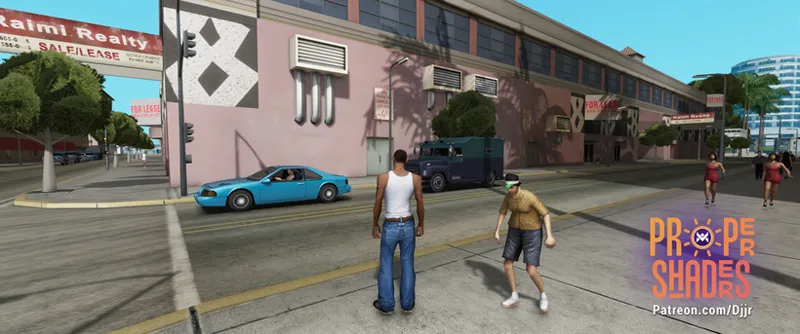
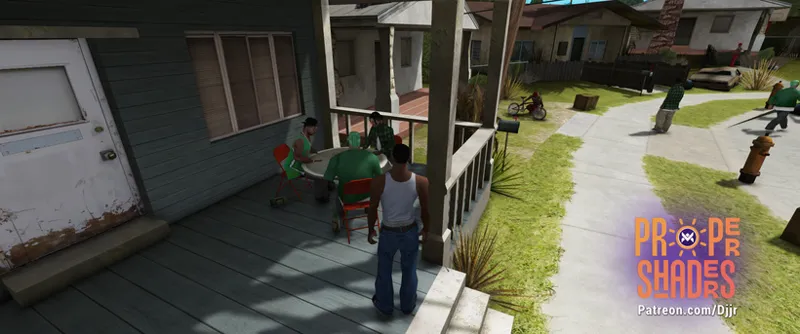
Update: May version, with all fixes, visual and stability improvements I did for the whole month, and, mainly, deferred rendering with per-pixel lighting and improved shadows (now less buggy). Keep following comments and Discord for more updates for next days.
I'll record a video only for next version (including clouds and water).
This is the first time in the world that anyone has fully implemented deferred rendering in GTA San Andreas, in a complete way. You might think the game's nights are now laggy with all these dynamic lights... You'd be completely wrong.
You'll notice a significant improvement not only in lights, but also in how shadows, ambient color, and sunlight interact with the world, including the use of reflections on all surfaces (basics of PBR), controlled by roughness PBR value (you'll notice some reflections on certain metallic surfaces and windows).
Current progress
Full deferred rendering technique (like modern games)
Per-pixel lighting (hundreds of optimized dynamic lights)
Volumetric lights beams
Dynamic 4 cascaded per-pixel shadows (NVIDIA's PCSS)
Soft shadow mask technique with gaussian blur
Ambient occlusion (SSAO, HBAO)
HDR simulation with tonemapping (ACES or Timoty)
Auto exposure
Bloom
Sun rays
SMAA
Simple dithered sky shader
New horizon fog
Improved z-fighting
Soft particles
Player mipmapping (automatic)
Shaders lit by directional light
Stochastic procedural texturing
Animated wind shader
Support for unlimited TXDPs (TXD parents) files in .ide files, which helps this (shadermaps) and other texture mods (disabled for now).
All 11+ thousand game textures are already configured with proper values for roughness, stochastic and shadows casting.
In progress
Volumetric clouds
PBR sky shader with sky blend
Roughness mapping
Ambient occlusion mapping
Normal mapping
Metallic mapping
Water surface
Underwater
Decals projector (replacing the vanilla decals system, from CPU to GPU)
Screen space reflections
World rain surface
Planned
Lens flare
Volumetric height fog
Screen space global illumination
Vehicle rain surface
Parallax occlusion mapping
Specular anisotropic hair
Subsurface scattering
Advanced car paint and dirt
Temporal anti-aliasing
Improve wind/vegetation shader
Terrain splat maps shader
Download version 05-26. For beta supporters on 01.06.26 (DD.MM.YY) and 01.07.26 for the public. Possible bug fixes will be updated in the same post (check comments and Discord).
Sharing is prohibited until specific dates.

Comments (59)
are the shooting stars in the game disabled now?
I don't think so.
Black screen during the loading screen with the 05-26 version (04-26 Works). I don't use SkyGfx, and I've already tried disabling deferred rendering in the config, but the issue persists. I even tested it on a minimal setup using only Essentials, RoSA, Proper Fixes for RoSA, and Proper Shaders, but still get the same black screen. Any advice on how to fix this?
You have something else, this mod is always created using Essentials Pack and Proper Fixes. Find which is causing this and tell here.
SAMP users MUST use xSAA mod by Dante to bring compatibility with Proper Fixes and RoSa... This information should be on MixMods website.
Do you know why my game is so dark? https://ibb.co/W4Nx3gVy
Maybe is because you are not using Windowed Mode mod and caused this bug, but I think I know how to fix it.
Good day brother. Do you recommend using proper shaders alone? I have mods, like RoSA, Project Props, SkyGfx, SkyGrad. are they all compatible with this mod? I faced an issue with CJ being in the light, he GLOWS so much that i can't see. I deleted Project2DFX and reLIT - San Andreas, it becomes better. but still, artificial lights are high glow in my game.
Read the readme, and light intensity is also tweakeable inside the mod .ini. But SkyGrad obviously isn't necessary anymore, our sky shader don't have this issue.
Will dynamic shadows from lamp posts be possible with this rendering engine?
Yes, it's just resource-intensive (even in modern engines) and not a crucial factor at the moment.
My game looks like this as soon as i put "Proper Shaders 05-26 (alpha access)" Game screenshot (CJ in the alley, beginning of the game): https://ibb.co/JwGFM9jh Mods i am using (screenshot 1) - modloader folder: https://ibb.co/qLDYrRYk Mods i am using (screenshot 2) - cleo folder: https://ibb.co/67W9bjJx Mods i am using (screenshot 3) - game directory: https://ibb.co/C5yjtWgb I followed your instructions in "Readme" file: "SkyGfx: Disable (; at the beginning of the line) "vehiclePipe" and "buildingPipe" in skygfx1.ini (and others), as this mod replaces them on ProperShaders.ini. Remember that this mod replaces SkyGfx, so it only makes sense to use it if you want the PS2 colors. Brightness: If the game is too bright or too dark, configure "DayLightingMult" and/or "Exposure_Day" in ProperShaders.ini. If your goal is to have faithful PS2 graphics with SkyGfx, disable SimulateHDR in this .ini file. Remember that the "brightness" in the game menu is simply a control for the ambient color and shading of the map (prelight). It is recommended to use this mod with the brightness in the menu set to half. It's good to remember that the game's "brightness" is actually just a prelight adjustment (map shading), so you can tweak the game's graphics with that in mind, while the screen brightness is tweaked on the "exposure" in .ini file. The GraphicsTweaker mod is still welcome (but in the future, it will be fully implemented into this one)." Can you tell me what is causing this extremely black lighting, because as soon as i remove "Proper Shaders 05-26 (alpha access)" the game works just normally, the colors and lighting are fine and normal. Btw i have 0 crashes or errors and using "Steam" version of the game. I also downgraded to v1.0, don't worry i know the process. I tried with SkyGFX Extended and without, but nothing changes. If you would be so kind to tell me which mod is conflicting with "Proper Shaders 05-26 (alpha access)" or what line can i change in "ProperShaders.ini" file, that would be very much appreciated. Thank you! Btw keep working on this mod, it looks amazing, i became a member as soon as i saw you are trying to fix z-fighting in the game. You rock my man. Keep it up. P.S. - I should also mention i used your "ProperFixes.asi" in "(extras)" folder and it didn't help, i used default medium preset and very high, no difference. I have very powerful PC and i can handle very high without issues. I also use paid mods of RoSA - May 2026 version alongside with Proper Player Retex aswell. Proper Fixes i downloaded is for RoSA version, so all those file are installed correctly. If that helps. I read your "Readme" file very carefully and i don't usually have problems when modding GTA San Andreas, but this really bugs me.
If you actually followed the instructions in the readme, simply find out which mod is causing the conflict and tell here. Today with modloader and improved fastloader you can move the folders and test 50 mods in like 2 minutes to find which mod is causing it (half-by-half, 50, 25, 12, 6, 3, done).
I sadly faced a critical error. When i enter the trans fender garage in LS, the wheel arch garage or any house interior, then my game freezes. It doesnt freeze fully tho. I can still see my character breathe and the fps counter also doesnt stop. But to close the game I still have to terminate the game via the task manager. This also happens with every preset you provided. Here you can see how it freezes: https://www.youtube.com/watch?v=KBHgtKxce5I I've installed only the essentials pack, proper shaders and SAMP 0.3.7 R5-2
Looks fine on singleplayer, so maybe something server added, idk.
Hi, there's a problem with SkyGFX. The game keeps crashing, and when I remove SkyGFX, everything looks blurry and yellowish. I'd like to keep both mods, but I need an answer on how to fix this. Please.
If I'm not wrong, proper shaders doesn't work with SkyGFX. I'm pretty sure that's written down in the readme, so I'll suggest you check that again
https://www.directupload.eu/file/d/9285/2vttpr89_png.htm https://www.directupload.eu/file/d/9285/c8rytg8v_png.htm not sure if they are regular gtasa props but neon lights are way too bright. what settings do i need to adjust to make them not so extremely bright?
https://www.directupload.eu/file/d/9286/ur9ft59t_png.htm Intensity = 0.3 ; Lights intensity multiplier. RadiusMult = 0.3 ; Lights radius multiplier. ok found the values myself. but I think it's not intended to lower them that much. because now the headlights of a car arent as bright as before
Hi huge fan of your work. Keep up the good work. A question i installed proper shaders with rosa project evolved and proper fixes. I am seeing 2 shadows on the screen. One is perfect on the ground buy the other one is on cj back. Any solution s and one more thing if not a bother, Junior_Djjr could you share your gta sa build, cause my gta sa looks nothing like yours and thanks again
Have you instealled "Proper fixes for rosa evolved"? If you have visual issues then I'll recommend adding a link to a screenshot. That makes it much easier to debug issues
So I got it to work properly in SAMP. Seems like "Proper fixes" isn't compatible with SAMP 0.3.7 R5-2. Yes I also used the .bat patch thing. As soon as I actually spawn in, the game starts to freeze. Without proper fixes it works fine, but I still found an issue. I would assume your shaders are "hardcoded", based on the gta map. Because on the SAMP server I play, some buildings have been removed. If you drive into those buildings, you notice that the cars are getting super dark. Also you notice that the car is not gradually getting darker, you have fixed levels. Maybe this can be improved. Here's a video: https://youtu.be/UFMpEUwDY3o
Hi. The mod is amazing. I'm here to report two bugs I've noticed so far. 1) Some modded weapons look transparent. https://streamable.com/utihtc Here are some I've tested: - The default ones look fine - The ones included in RoSa (February) look transparent - The neXtGen remastered ones look transparent - The INSANITY weapons look fine. 2) When Shadows Cascaded is set to 1 or higher, a strange shadow appears on CJ’s back when he runs (I think it’s coming from his arms, but the shadow is exaggerated). This doesn’t happen with Shadows Cascaded = 0. Note: This is most noticeable at 12:00 PM. https://streamable.com/gm3h9b That’s it for now. Thanks for developing the mod.
I too have noticed this
Updated: Fixed object rendering issues in SAMP; Theoretically fixed other incompatibilities from mods related to game rendering (SilentPatch, for example, was doing something and the mod was overriding it, now it no longer overrides it); Fixed graffiti tags rendering as if they were always painted.
After the latest update, the first-person vehicle transparency issue still seems to be present.
Hey, I really want to try this out, but I'm afraid that "Proper fixes" wont work for the latest SAMP version. I have a clean SAMP 0.3.7 R5-2 game, CLEO and modloader is installed. Placed proper fixes, SkyGfx and Open Limit Adjuster in the modloader folder. SkyGfx already had buildingPipe=PS2 as default for GTASA I adjusted MemoryAvailable = 1024 manually in Open Limit Adjuster Aditionally I also ran the .bat file from Proper fixes in the root directory of my SAMP folder, but the game still crashes on startup. The loading bar from SAMP is at 50% when the game crashes: SA-MP 0.3.7-R5 Exception At Address: 0x004C666A Base: 0x03E00000 Registers: EAX: 0x00000000 EBX: 0x008E2C64 ECX: 0x00B1C934 EDX: 0x00000000 ESI: 0x00B1C934 EDI: 0x00000001 EBP: 0xFFFFFFFF ESP: 0x0177EEF8 EFLAGS: 0x00210206 Stack: +0000: 0x00B71848 0x005B3D93 0x000004A3 0x01AA0000 +0010: 0x000004A3 0x42C80000 0x00001000 0x00000000 +0020: 0x0177F094 0x00825EA4 0x706D6272 0x5F726C5F +0030: 0x00317673 0x005389C4 0x00B71848 0x000001D9 +0040: 0x61766173 0x00616E6E 0x008E2C90 0x00B71848 +0050: 0x00000200 0x01AA0000 0x005B85E2 0x00B71848 +0060: 0x0177F0A8 0x0177F120 0x0177F080 0xFFFFFFFF +0070: 0x008E2C90 0x000004A2 0x01AA0000 0x000003E8 +0080: 0x61746164 0x70616D5C 0x65765C73 0x6F6D5F68 +0090: 0x765C7364 0x6D5F6865 0x2E73646F 0x00656469 +00A0: 0x0177EFCC 0x7710F949 0x00000000 0xD71F8E50 +00B0: 0x0000001F 0x00000020 0x0000000F 0x0177EFA4 +00C0: 0x00000028 0x0177F020 0x77151BB0 0xA176BD54 +00D0: 0xFFFFFFFE 0x0177EFE4 0x709F6EDF 0x01AA0000 +00E0: 0x00000000 0x00000020 0x19321FE0 0x0177EFF0 +00F0: 0x709E342B 0x00000020 0x0177EFFC 0x709D8E13 +0100: 0x00000020 0x0177F02C 0x707D5FF0 0x00000020 +0110: 0x0000001F 0x19325A50 0x0177F028 0x708905EB +0120: 0x19325A50 0x19321FE0 0x19325B70 0x70AFED20 +0130: 0x0177F074 0x708908DB 0x0177F080 0x0177F000 +0140: 0x19325B70 0x19321FE0 0x19321FD0 0x0177F0A8 +0150: 0x0177F120 0xFFFFFFFF 0x04CDD3A8 0x70AFED20 +0160: 0x0177F000 0x19325B70 0x0000001F 0x0177F044 +0170: 0x0177F094 0x70A0FC00 0x00000000 0x0177F0A0 +0180: 0x709CBEC0 0x1939D60C 0x0177F0A0 0x708C46A0 +0190: 0x0177F0D0 0x19321FD0 0x00000201 0x0177F0DC +01A0: 0x70A19168 0x00000000 0x0177F0E8 0x7088E030 +01B0: 0x70A29220 0x04CDD408 0x00000000 0x0177F0EC +01C0: 0x6FC10277 0x00000000 0x00000002 0x6FC10281 +01D0: 0x00000000 0x0177F0A8 0x1939D60C 0x04CDD408 +01E0: 0x04CDC258 0x0177F10C 0x70A1AF68 0xFFFFFFFF +01F0: 0x0177F0FC 0x708C8522 0x04CDC26C 0x0177F120 +0200: 0x0177F0A8 0x0177F118 0x708C50D7 0x0177F120 +0210: 0x0177F2A0 0x0177F280 0x70A19168 0x00000000 +0220: 0x0177F28C 0x708D0E76 0x70A28A3C 0x04CDD408 +0230: 0x00000CD0 0x00000001 0x00000000 0x0177F280 +0240: 0x70A127E5 0xFFFFFFFF 0x0177F28C 0x00000000 +0250: 0x0177F2A0 0x00000000 0x1939D60C 0xFFFFFF00 +0260: 0x00000006 0x00000018 0x00000002 0x05C790FA +0270: 0x00000000 0x0D9D8048 0x0000003E 0x0D9D8048 SCM Op: 0x0, lDbg: 0 LastRendObj: 0 Game Version: US 1.0
Lots of people uses for SAMP, but I don't know exactly which version and so, but generally, it works, with a few issues that I still want to keep fixing later, just focusing more on the mod features before. Like issues with interior with mirrors (can force disable mirrors with mixsets). "SkyGfx already had buildingPipe=PS2 as default for GTASA" But is said on readme that you must not use any pipe on SkyGfx, isn't compatible.
no shadows
So try to find the problem with your game, settings etc.
Junior I am facing a bug with shadow acne on peds, the shadow is casting upon their own selves. Do you know if this is a config issue or a bug? This only happens when moving away from the light source, if the ped is static or moving towards the light source it doesn't happen. Also, it only happens on peds, not cars or other objects.
I think I know, but still not found how to fix, I'll try fixing later.
Could GraphicsTweaker, Improved 2DFX, or ECG Enhanced cause lighting issues with Proper Shaders, such as areas becoming extremely bright at night where multiple lights overlap?
ECG Improved 2DFX multiplies the lights range from the lampposts, is a better idea to not install anymore because it is already included on ProperShaders.ini. The others have nothing to do with lighting from the lights.
Hello Junior ! Thanks a lot for that piece of art. Maybe you already know, but some objects appear pitch black. For instance Artem's pigeons and the added Urbanize objects located in the cleo folder.
I'll check it later. Only for this 05-26 version right? The deferred renderer option I think? Not on previous version?
Hey Junior I see that you fixed the bug where the lights were lighting up the wrong side of peds, however now there is a bug where the shadows are being casted on the body of the peds that are casting the shadow, like self shadowing if you will. So something like this: https://streamable.com/sf1r0o
Hi! I’m not sure what I’m doing wrong. The April alpha version works flawlessly, but the May version is crashing my game. It does't even start @Never mind, I’ve found a solution. The problem was the wrong CLEO version—I had 5.4.0, but it should be the one from Essentials Pack. "Version Build: May 03 2026 16:47:54 2026-05-04 17:57:05 f0 | ==== Proper Shaders by MixMods.com.br ==== 2026-05-04 17:57:05 f0 | Proper Shaders mod enabled 2026-05-04 17:57:05 f0 | Logging Enabled Level 3: Errors, warnings and other non important infos will be logged. Prefer using this just for debugging. 2026-05-04 17:57:05 f0 | Using D3D9 Proxy, required for lots of features. Disable it in ProperShaders.ini if conflicts with other mod. 2026-05-04 17:57:05 f0 | Using Z/depth buffer. Better shader compatibility, but no MSAA support (use SMAA antialiasing instead). 2026-05-04 17:57:05 f0 | Using reversed Z/depth buffer. Requires proxy. This improves z-fighting a lot (very close faces flicking), but other graphic mods like ReShade must toggle reversed zbuffer to be compatible, otherwise you will see some rendering order issues. 2026-05-04 17:57:05 f0 | Using lit map pipeline. 2026-05-04 17:57:05 f0 | Using lit vehicle pipeline. 2026-05-04 17:57:05 f0 | Using lit skin pipeline. 2026-05-04 17:57:05 f0 I| Intercepted: D3D9System _rwD3D9VertexBufferManagerOpen 2026-05-04 17:57:07 f0 W| Patched_AfterD3D9DeviceInit called. 2026-05-04 17:57:07 f0 W| Sucessfully installed D3D9 Proxy. 2026-05-04 17:57:07 f0 W| SkyGfx is installed. 2026-05-04 17:57:07 f0 W| SilentPatch is installed. 2026-05-04 17:57:07 f0 W| Open Limit Adjuster is installed. 2026-05-04 17:57:07 f0 I| Intercepted: CGame::InitialiseRenderWare createRandomRaster 2026-05-04 17:57:07 f0 I| Data successfully loaded from MaterialsData.json 2026-05-04 17:57:07 f0 I| Map tweaks data successfully loaded from MapTweaks.json 2026-05-04 17:57:07 f0 W| Init called. 2026-05-04 17:57:07 f0 I| Intercepted: Idle RenderScene 2026-05-04 17:57:07 f0 I| Intercepted: RenderScene CPlantMgr::Render as after rendering transparent effects 2026-05-04 17:57:07 f0 I| Intercepted: RenderEffects CPostEffects::Render as after rendering 2026-05-04 17:57:07 f0 I| Intercepted: CPostEffects::Render GtaColorCorrection as final screen rendering 2026-05-04 17:57:07 f0 I| Intercepted: RenderFadingEntities 2026-05-04 17:57:25 f0 I| PatchedRenderScene called. 2026-05-04 17:57:25 f0 W| Start Reading Features... 2026-05-04 17:57:25 f0 E!| Unknown error creating effect from binary: 'resources/shaders/DepthPass.cso' 2026-05-04 17:57:31 f0 W| Failed to initialize Depth Pre Pass. 2026-05-04 17:57:31 f0 I| SMAA: Loaded texture from resources/textures/CarReflectionMask.dds 2026-05-04 17:57:31 f0 W| Global Reflections initialized. 2026-05-04 17:57:31 f0 I| Using Global Reflections. 2026-05-04 17:57:31 f0 W| Deferred Lights enabled. 2026-05-04 17:57:31 f0 I| Using Deferred Renderer 2026-05-04 17:57:31 f0 W| Shadows enabled. 2026-05-04 17:57:31 f0 W| SunRays enabled. 2026-05-04 17:57:31 f0 E!| Unknown error creating effect from binary: 'resources/shaders/SoftParticles.cso' 2026-05-04 17:57:32 f0 E!| Unknown error creating effect from binary: 'resources/shaders/HBAO.cso' 2026-05-04 17:57:39 f0 I| SMAA: Applied preset 2 (threshold=0.10, steps=16, diag=8, corner=25) 2026-05-04 17:57:39 f0 E!| Unknown error creating effect from binary: 'resources/shaders/SMAA.cso' 2026-05-04 17:57:39 f0 E!| Unknown error creating effect from binary: 'resources/shaders/SimulateHDR.cso' 2026-05-04 17:57:39 f0 E!| Unknown error creating effect from binary: 'resources/shaders/SimpleSky.cso' 2026-05-04 17:57:39 f0 E!| Failed to load SimpleSky shader. 2026-05-04 17:57:39 f0 W| Finish Reading Features. 2026-05-04 17:57:39 f0 I| Creating resources for Direct3D Device: 101cc3b0 2026-05-04 17:57:39 f0 W| Resources created successfully. "
Hey, do you know how I can fix these cuts in the roads? It only happens when I use the mod with Proper Fixes. https://ibb.co/hxJMsYPN
It is explained on the readme that we are creating a too to fix this. Isn't only with Proper Fixes, the vanilla game has too, is just different places etc. The game isn't meant to use "mesh normals" originally.
Hi Junior, with may version, if I enable the Deferred Rendering, shadows don't render, the world is just without any shadow. I'm using the default preset (without HDR). This is my Proper Shaders Log Version Build: May 03 2026 16:47:54 2026-05-04 12:39:33 f0 | ==== Proper Shaders by MixMods.com.br ==== 2026-05-04 12:39:33 f0 | Proper Shaders mod enabled 2026-05-04 12:39:33 f0 | Logging Enabled Level 3: Errors, warnings and other non important infos will be logged. Prefer using this just for debugging. 2026-05-04 12:39:33 f0 | Using D3D9 Proxy, required for lots of features. Disable it in ProperShaders.ini if conflicts with other mod. 2026-05-04 12:39:33 f0 | Using Z/depth buffer. Better shader compatibility, but no MSAA support (use SMAA antialiasing instead). 2026-05-04 12:39:33 f0 | Using reversed Z/depth buffer. Requires proxy. This improves z-fighting a lot (very close faces flicking), but other graphic mods like ReShade must toggle reversed zbuffer to be compatible, otherwise you will see some rendering order issues. 2026-05-04 12:39:33 f0 | Using lit map pipeline. 2026-05-04 12:39:33 f0 | Using lit vehicle pipeline. 2026-05-04 12:39:33 f0 | Using lit skin pipeline. 2026-05-04 12:39:33 f0 I| Intercepted: D3D9System _rwD3D9VertexBufferManagerOpen 2026-05-04 12:39:33 f0 W| Patched_AfterD3D9DeviceInit called. 2026-05-04 12:39:33 f0 W| Sucessfully installed D3D9 Proxy. 2026-05-04 12:39:33 f0 W| SkyGfx is installed. 2026-05-04 12:39:33 f0 W| SilentPatch is installed. 2026-05-04 12:39:33 f0 W| Open Limit Adjuster is installed. 2026-05-04 12:39:33 f0 I| Intercepted: CGame::InitialiseRenderWare createRandomRaster 2026-05-04 12:39:33 f0 I| Data successfully loaded from MaterialsData.json 2026-05-04 12:39:33 f0 I| Map tweaks data successfully loaded from MapTweaks.json 2026-05-04 12:39:33 f0 W| Init called. 2026-05-04 12:39:33 f0 I| Intercepted: Idle RenderScene 2026-05-04 12:39:33 f0 I| Intercepted: RenderScene CPlantMgr::Render as after rendering transparent effects 2026-05-04 12:39:33 f0 I| Intercepted: RenderEffects CPostEffects::Render as after rendering 2026-05-04 12:39:33 f0 I| Intercepted: CPostEffects::Render GtaColorCorrection as final screen rendering 2026-05-04 12:39:33 f0 I| Intercepted: RenderFadingEntities 2026-05-04 12:39:55 f0 I| PatchedRenderScene called. 2026-05-04 12:39:55 f0 W| Start Reading Features... 2026-05-04 12:39:55 f0 I| SMAA: Loaded texture from resources/textures/CarReflectionMask.dds 2026-05-04 12:39:55 f0 W| Global Reflections initialized. 2026-05-04 12:39:55 f0 I| Using Global Reflections. 2026-05-04 12:39:55 f0 W| Deferred Lights enabled. 2026-05-04 12:39:55 f0 I| Using Deferred Renderer 2026-05-04 12:39:55 f0 W| Shadows enabled. 2026-05-04 12:39:56 f0 W| SunRays enabled. 2026-05-04 12:39:56 f0 W| SoftParticles enabled. 2026-05-04 12:39:56 f0 W| HBAO enabled. 2026-05-04 12:39:56 f0 I| SMAA: Applied preset 2 (threshold=0.10, steps=16, diag=8, corner=25) 2026-05-04 12:39:56 f0 W| SMAA enabled (Preset: 2). 2026-05-04 12:39:56 f0 I| SimpleSky: Created dome with 561 vertices, 3072 indices 2026-05-04 12:39:56 f0 I| SimpleSky shader initialized successfully. 2026-05-04 12:39:56 f0 W| SimpleSky enabled. 2026-05-04 12:39:56 f0 I| Attempting to install SkyHooks... 2026-05-04 12:39:56 f0 I| SkyHooks installed: 0x53D81C -> RenderAtmosphericSky (Clear Black), Clouds NOP'd. 2026-05-04 12:39:56 f0 W| Finish Reading Features. 2026-05-04 12:39:56 f0 I| Creating resources for Direct3D Device: ae378e0 2026-05-04 12:39:56 f0 W| Resources created successfully. 2026-05-04 12:39:56 f0 I| PatchedRenderFadingEntities called. 2026-05-04 12:39:56 f0 I| PatchedPostEffectsFirst called. 2026-05-04 12:39:56 f0 I| PostEffectsFirst called. 2026-05-04 12:39:56 f0 I| ProcessPostFxFeatures_PostEffectsFirst called 2026-05-04 12:39:56 f0 I| PatchedPostEffectsLast called. 2026-05-04 12:39:56 f0 I| ColorFilterProcessing called. 2026-05-04 12:39:56 f0 I| ProcessPostFxFeatures_AfterRendering called 2026-05-04 12:39:56 f0 I| SMAA: Loaded texture from resources/textures/AreaTexDX9.dds 2026-05-04 12:39:56 f0 I| SMAA: Loaded texture from resources/textures/SearchTex.dds 2026-05-04 12:39:56 f0 I| SMAA: Resources created for 2160x1440 2026-05-04 12:39:56 f1 E!| Unknown error creating effect from binary: 'resources/shaders/ShadowMask.cso' 2026-05-04 12:39:57 f1 I| InitShadowsFeature 0 2026-05-04 12:39:57 f1 E!| Failed to initialize shadow effect.
Ok, by studying the situation I found out that if the game is full of heavy mods, the game won't be able to load shadows ONLY when deferred rendering is activated. That means, if I remove like ten "light" mods or one "heavy" mod, the shadows are loaded correctly; if I put back those mods, the game can't load shadows anymore. My impression is that when you hit some certain limit, the game can't manage to load shadows - and as I said before, this only happens when deferred rendering is activated. Even if I disable the shadows from proper fixes, the game can't even load its stock shadows. I hope it's clear, English is not my native language so I try my best to be as clear as possible.
Updated: Fixed mirror bugs; improved the intensity of different map lights; volumetric lights are now stronger in foggy weather; fixed light reflections in the rain.
The volumetric lighting looks great, fantastic work. However, I can't see the shadows at night; they're disabled. Why is that? Do I have a bad setting? I'm confused.
Yes, on ini, on night shadow distance. It is enabled on high settings.
Updated: Fixed vehicles with excessively dark windows (they were rendering twice); Fixed missing alpha in textures marked as DXT1 with 1-bit alpha; Fixed the per-pixel light of the fire appearing under the ground and in a greenish color; Fixed the lack of fog on the particles (now Ezekiel's Traffic LOD looks good)
Always.
se bugea en SAMP, al tener usuarios por detras, aparecen sus nombres enfrente cuando giramos la camara, sera que haya alguna solución para eso? alguna confi que permita usarlo en SA-MP? muchas gracias.(Posdata: ESTOY TRADUCIENDO DESDE GOOGLE desde el español)
Solução está avisada no arquivo Leiame.
Previously, I reported an issue with transparency on peds that was fixed, thank you! I’m now reporting that when changing a player’s skin to a new character (not from the game, but one downloaded), the player remains in the T-pose with the new skin (this didn’t happen in the earlier versions of Proper Shaders). The issue only occurs with "some skins". This is probably the worst way to report a bug, but that’s how it is. I’ve tried skins from different authors, with different heights, proportions, etc., and the T-pose issue happens almost all the time. Even with some skins I’ve created myself, only a few work properly. Could this be related to bones or materials? I hope you can take a look at it, thanks!
Which "earlier versions"? And which skin for example?
Updated: Fixed some transparent vehicle textures not rendering; fixed pixelated reflections and incorrect angles on the sides of cars; attempted to fix the chat disappearing with mirrors in SAMP.
When driving in first-person camera, the vehicle becomes transparent. It seems related to the Modern vehicle pipeline or Global Reflections, because disabling vehicle reflections appears to be the safest workaround. Changing the vehicle pipeline from Vehicles = 2 to Vehicles = 1 does not seem to improve the problem. Vehicles = 0 causes a crash in my setup, so I cannot use it as a fallback. The issue seems more related to first-person camera rendering with the depth/deferred/reflection pipeline, rather than only the Modern vehicle pipeline. I really like the mod and just wanted to report this in case it helps. Hope you can fix it in the next version. :)
it seems that vehicle reflections look pixelated with enabled deferred rendering
A nova versão está ótima! Não sei se já foi respondido, mas pretende o suporte para o III e o VC?
Sim, a Jéssica já começou um pro GTA Vice City, em breve.
Damn good work man this is sick
I hope you fix this in SAMP in the next version, I♥u Junior, This is the best mod ever created♥
This what?