


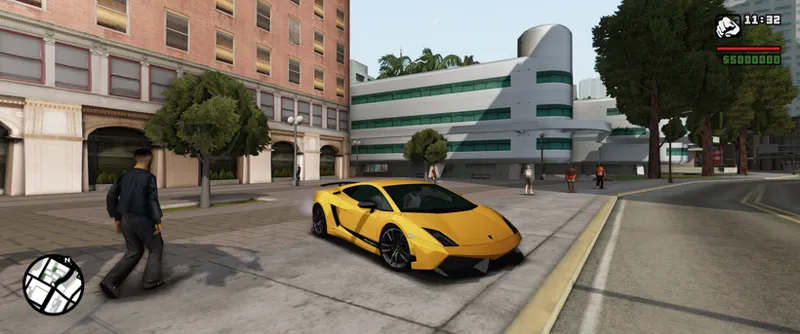


Proper Shaders 03-26 (public access)
(old version from March, much has been improved since then)
The first version of a mod that revolutionizes the graphics of GTA San Andreas.
New short video: https://youtu.be/ywMmVQ7pgTk
Video from last month (the shadows have been improved drastically):
https://www.youtube.com/watch?v=7uCiIDZdUNE
With the goal of stability, compatibility, and optimization, this is a graphics mod that's actually playable, for gameplay, not just for taking screenshots.
Well integrated into the game (e.g., separate values for day and night), non-intrusive and highly customizable, similar to my MixSets mod: if you don't enable anything in the .ini file, this mod will do practically nothing to your game. There are no minimum requirements; if you want, you can use it only for soft particles and fix z-fighting - you have total control.
This is a proprietary mod; not a preset or modpack!
You're not on a Patreon page from those people that just edit .ini files from a mod (like ENB, ReShade, RenderHook etc) and share them to make money off of it for years, even without updates. This mod is being created by me - If you're stumbled upon this and you don't know me, I'm the owner of MixMods, the largest GTA website in Latin America; I've been creating mods for GTA San Andreas for 15 years (any game mod for 22 years), and I'm the modder who has created the most technical GTA mods in the world.
Why this is big?
Until yesterday, the only person in the world who had created something like this for GTA San Andreas was petrgeorgievsky (not counting the MTA:SA shader framework), but both SA::Render and RenderHook never became complete and stable because, in my view, the project was worked on from top to bottom (recreating parts of the game's rendering, and the rest of the work was limited to fixing bugs), instead of bottom to top (taking the original, functional game rendering and only enhancing it, without reinventing the wheel). Furthermore, this mod uses some patches (like PS2 pipeline) and best practices from SkyGfx, and is even partially compatible with it.
What can you expect from this version?
Even though the goal is stability, compatibility, optimization etc, we're still talking about the first alpha test version, so expect something not totally functional yet, as there's still a lot of work to be done (I worked on it for only 3 weeks yet! With some helps from Jéssica Natália). Read the Readme file in the download, as it contains all the warnings about potential problems. I still have to work every day on my GTA-like game "IMPUNES", I'm very busy, so I can only work on Patreon for a little over a week a month (usually the last week), but I still intend to fix critical bugs at any time, and I always reply on supporters' Discord server and Patreon helping people.
Current progress
Dynamic 4 cascaded per-pixel shadows (NVIDIA's PCSS)
Ambient oclusion (SSAO)
HDR simulation with tonemapping (ACES or Timoty)
Auto exposure
Bloom
Sun rays
SMAA
Simple dithered sky shader
New horizon fog
Improved z-fighting
Soft particles
Player mipmapping (automatic)
Shaders lit by directional light
Stochastic procedural texturing
Animated wind shader
Support for unlimited TXDPs (TXD parents) files in .ide files, which helps this and other texture mods.
All 11+ thousand game textures are already configured with proper values for roughness, stochastic and shadows casting.
In progress
Volumetric clouds
PBR sky shader with sky blend
Per-pixel lighting
Roughness mapping
Ambient occlusion mapping
Normal mapping
Metallic mapping
Water surface
Underwater
Decals projector
Planned
Lens flare
Volumetric fog
Volumetric lighting
Screen space reflections
Screen space global illumination
World rain surface
Vehicle rain surface
Parallax occlusion mapping
Specular anisotropic hair
Subsurface scattering
Advanced car paint and dirt
More AO options
Temporal anti-aliasing
Improve wind/vegetation shader
Terrain splat maps shader
Download version 03-26. For beta supporters on 01.04.26 (DD.MM.YY) and 01.05.26 for the public. Possible bug fixes will be updated in the same download link.
Sharing is prohibited until specific dates.
Comments (131)
where can i download?
This is the old version, go do Patreon page for latest version.
How to fix incompatibility with Ultimate First Person? https://imgur.com/a/sNXoFsU https://libertycity.net/files/gta-san-andreas/239321-ultimate-first-person-beta.html
Check with the mod author.
Hello, Junior, I installed that mod, but everytime when I run GTA SA, it shows "Proper fixes requires "Proper Shaders" mod", basically the mod doesnt run, even tho it causes no crash in my GTA SA. My PC is currently running in 16GB, RTX 4050, and AMD Ryzen 7 7735HS CPU. Usin v1.0 US hoodlum with silentpatch, 2DFX, and sometimes SkyGFX
Are you sure Proper Shaders is working?
Es compatible con samp?
Sim, não totalmente.
My game is crashing, and I can't post the error log here. Do you have a Discord
This is old version, use newer version and follow readme file.
Hey i'm trying to use the mod with skygfx and isn't working, it splash a screen telling an error with proper shaders.asi
Did you followed the mod readme?
Amazing work! Love the non-intrusiveness compared to other graphics mods. I did get an error message though during a mission. Not sure if it's due to that but I figured this mod does not intrude on the script? The error referred to Proper Shaders in it's summary explanation. This is the Error log: GTA SA 1.0.0.0 US Unhandled exception at 0x00755031 in gta-sa.exe (+0x355031): 0xC0000005: Access violation reading location 0x7E7D3760. Register dump: EAX: 0x00000000 EBX: 0x7E713778 ECX: 0x9F90022C EDX: 0x000BFFE8 EDI: 0x00000000 ESI: 0x00000001 EBP: 0x0000000C EIP: 0x00755031 ESP: 0x0177F418 EFL: 0x00210246 CS: 0x00000023 SS: 0x0000002B GS: 0x0000002B FS: 0x00000053 ES: 0x0000002B DS: 0x0000002B Stack dump: 0x0177F418: 14C90CD8 9F8C0048 0177F494 03A22040 00000009 2A11F8B6 0x0177F430: 14C90D18 2A11F8B4 2A11F8A0 7E713778 0000BB92 00000001 0x0177F448: 2A11F8A0 9F9400B8 000041A2 37CE3D48 3F5C973E 00000000 0x0177F460: BF525202 00000000 3FCDC52C BE9EC5DE 00000000 3FD3EB66 0x0177F478: 5DF23E5F 00000002 03A22060 9F90022C 9F8C00C4 14C90CD8 0x0177F490: 0000002C 0177F59C 5DF23E76 9F8C0048 00000002 03A22060 0x0177F4A8: 9F90022C 9F8C00C4 14C90CD8 0000002C 14C90CD8 9D8E1074 0x0177F4C0: 14C90D3C 00000001 9F8C0080 9F8C0048 00000001 00000FFF 0x0177F4D8: 00010000 00000077 03A22040 00000000 00000000 00000001 0x0177F4F0: 6D514470 00000000 00000000 00000002 000C0000 00030002 base: 0x01580000 top: 0x0177F418 bottom: 0x01780000 Backtrace (may be wrong): =>0x00755031 __rpD3D9VertexDeclarationInstTangent+0x211 in gta-sa.exe (+0x355031) (0x0177F474) 0x5DF23E5F in propershaders.asi (+0x13e5f) (0x0177F494) 0x5DF23E76 in propershaders.asi (+0x13e76) (0x0177F59C) 0x00756D25 __rxD3D9Instance+0x3c5 in gta-sa.exe (+0x356d25) (0x0177F5D8) 0x0075773B _D3D9AtomicAllInOneNode+0x14b in gta-sa.exe (+0x35773b) (0x0177F60C) 0x007F1910 _RwMatrixMultiply+0x60 in gta-sa.exe (+0x3f1910)
Which mission? Isn't because you are using PedSpec? Explained on readme.
downloading! thx !
Can we get this type of mods for android version san andreas. I'm really bored to see all of this same type of mods on youtube. I've highly recommend you bro bring new mods for android as well
I don't make mods for Android and I don't intend to; the GTA SA community for Android is extremely toxic, steals my mods and so, they're even attacking Proper Shaders already making fun of it saying it is ugly, incomplete etc.
Hi! I've encountered a consistent crash when using this mod alongside 90s AVP Reborn 3. GTA SA 1.0.0.0 US Unhandled exception at 0x00755031 in gta_sa.exe (+0x355031): 0xC0000005: Access violation reading location 0xB52E652C. Register dump: EAX: 0x00000000 EBX: 0xB5226550 ECX: 0xB500553C EDX: 0x000BFFDC EDI: 0x00000000 ESI: 0x0000FFFF EBP: 0x000BFFF4 EIP: 0x00755031 ESP: 0x0177E808 EFL: 0x00210246 CS: 0x00000023 SS: 0x0000002B GS: 0x0000002B FS: 0x00000053 ES: 0x0000002B DS: 0x0000002B Stack dump: 0x0177E808: 124387B8 B4FC5C70 0177E884 BA489040 00000003 B9CD8E6E 0x0177E820: 124388D0 B9CD8E6C B9CD8E64 B5226550 000003BA 00000012 0x0177E838: B9CD5420 B5045CD8 00002CD9 00000000 BF9D73F2 00000000 0x0177E850: 3F9D73F2 00000000 4030B1A0 00000004 00000000 3F800000 0x0177E868: 6D203E5F 00000002 BA489068 B500553C B4FC5CEC 124387B8 0x0177E880: 00000034 0177E988 6D203E76 B4FC5C70 00000002 BA489068 0x0177E898: B500553C B4FDC3B4 124387B8 00000034 124387B8 B5048AD0 0x0177E8B0: 12438B58 00000001 B4FC5CAC B4FC5C70 00000001 00000FFF 0x0177E8C8: 00010000 000000F3 BA489040 00000000 00000000 00000002 0x0177E8E0: 00000000 00000000 00000000 00000002 000C0000 00030002 base: 0x01580000 top: 0x0177E808 bottom: 0x01780000 Backtrace (may be wrong): =>0x00755031 __rpD3D9VertexDeclarationInstTangent+0x211 in gta_sa.exe (+0x355031) (0x0177E864) 0x6D203E5F in propershaders.asi (+0x13e5f) (0x0177E884) 0x6D203E76 in propershaders.asi (+0x13e76) (0x0177E988) 0x00756D25 __rxD3D9Instance+0x3c5 in gta_sa.exe (+0x356d25) (0x0177E9C4) 0x0075773B _D3D9AtomicAllInOneNode+0x14b in gta_sa.exe (+0x35773b) (0x0177E9FC) 0x00809897 _FrameSyncHierarchyLTMRecurse+0x47 in gta_sa.exe (+0x409897) (0x0177EA00) 0x00805769 _RxPipelineExecute+0x59 in gta_sa.exe (+0x405769) (0x0177EA14) 0x6E728451 in skygfx.asi (+0x8451) (0x0177EA40) 0x0073321C _ZN18CVisibilityPlugins30RenderVehicleReallyLowDetailCBEP8RpAtomic+0x3c in gta_sa.exe (+0x33321c) (0x0177EA4C) 0x00749B4B _Z13RpClumpRenderP7RpClump+0x2b in gta_sa.exe (+0x349b4b) (0x0177EA68) 0x005343A1 _ZN7CEntity6RenderEv+0x91 in gta_sa.exe (+0x1343a1) (0x019CC74C) 0x0047004E sub_470040+0xe in gta_sa.exe (+0x7004e) (0x019CC750) 0x00520050 nullsub_85+0x7c in gta_sa.exe (+0x120050) (0x019CC754) 0x0046004F unknown_libname_3+0xcdf in gta_sa.exe (+0x6004f) (0x019CC758) 0x004C0049 _ZN13CEventHandler34ComputePersonalityResponseToDamageEP12CEventDamageP7CEntity+0x699 in gta_sa.exe (+0xc0049) (0x019CC75C) 0x003D0045 in unknown (+0x3d0045) (0x019CC760) 0x0041004C sub_410040+0xc in gta_sa.exe (+0x1004c) (0x019CC764) 0x0041004D sub_410040+0xd in gta_sa.exe (+0x1004d) (0x019CC768) 0x019CC748 in unknown (+0x19cc748) (0x019CC76C) I tried setting the vehicle pipeline, CastVehicles, CastVehiclesLOD to 0 but it didn't work EDIT 2: Setting dualPassVehicl in skygfx and CastVehiclesLOD in proper shaders to 0 fixed it EDIT 3: Nah it happend again
alternatives for real skybox?
This mod will include its own implementation of something like real skybox.
Very cool mod but please 🙏 can you made an android version?
I don't make mods for Android and I don't intend to; the GTA SA community for Android is extremely toxic, steals my mods and so, they're even attacking Proper Shaders already making fun of it saying it is ugly, incomplete etc.
Cool mod . It's work but please 🙏 man made an android version
I don't make mods for Android and I don't intend to; the GTA SA community for Android is extremely toxic, steals my mods and so, they're even attacking Proper Shaders already making fun of it saying it is ugly, incomplete etc.
I don't know who will answer me or if anyone will answer me or if Junior_Djjr himself will answer me but if possible someone Can recommend me a mod if there is a Proper alternative to the PedSpec.asi but that is compatible with Junior_Djjr's ProperShaders and that fixes Texture Ripple Problems on specific skins without using a Vertex that weighs up to 4 times nor that uses old techniques nor that uses Specularity etc but only that fixes the Texture Ripple problem and that's it and as Junior_Djjr says this thing that PedSpec.asi does that fixes the skins unintentionally in that specific way using a vertex in the Rigging that weighs up to four times and that uses specularity is not supported by the game and much less accepted in modernity and modern games what PedSpec.asi does ok in case I'm waiting for a fix to be added for this specific thing on one of the Future Update of the Proper Shaders itself from Junior_Djjr
Hi, there's a problem with SkyGFX. The game keeps crashing, and when I remove SkyGFX, everything looks blurry and yellowish. I'd like to keep both mods, but I need an answer on how to fix this. Please.
Followed the readme?
A question for the author: this shader is truly magnificent and a very complex, technically feasible project, but the description doesn't make it clear whether it will support a normal map for the surrounding world? It seems to me that this takes classic GTA SA Age 3D mods to a new level.
It will, the normal map is listed on the roadmap in this post, it's in progress. Btw, the updated roadmap: https://www.mixmods.com.br/2026/05/sa-proper-shaders/
mr i dont think this works with mods like vehfuncs and imvehfit can you fix?
It works.
cool but just too dark for me even tho i turned up game and even my monitors brightness. i didnt get even close to what the pictures showed i dont know if i need other mods to get better results since i only had modloader and cleo might give it another try after couple of updates
To tweak the brightness is explained on the readme.
Hi! How to fix "unknown error creating effect from binary"?
I see people fixing installing that link on readme, and also caused by badly configured Improved Streaming making the game uses too much RAM so there is no more free RAM to load the shaders. Check your RAM usage.
For Junior_Djjr ok I thought about it and I saw the readme in fact it is all written as you say and it is true but unfortunately PedSpec.asi and ProperShaders cannot be together and I understand But I also know that PedSpec.asi unintentionally adjusts models with vertex weights up to Four Times and this is not supported by the game nor accepted by modern games today. But I also know that Proper Shaders does the same thing only it doesn't work on the skins I have So what I'm asking is I'm not interested in the Graphics Part of PedSpec.asi nor am I interested in the rest but I'm only interested in the part of the mod that Fixes the models But without Specularity and without That same technique used by Ezekiel As I said before I would like to try Proper Shaders but at the same time With my skins and I can't because of PedSpec.asi Ok, you can also invent your own version that only does the fix but with modern techniques and I'm not in a hurry, I can also wait until the May version of Proper Shaders become public. Ok And I don't want to create any disturbance or annoy anyone. And Not Even Create Problems for You
OK, I'm not trying to be annoying or create problems, but technically there's already a fix ? created by Ezekiel that doesn't require using a vertex that weighs 4 times, which weighs down the game and isn't supported by the game, nor do modern games accept it. So, OK, I understand this and the specific part of the Readme that says PedSpec: Not compatible, but technically this mod does the same thing (and will have a shadermap to selectively add the highlights). If any mod you downloaded needs that mod, ask the author to fix their mod (because PedSpec "unintentionally" fixes skin models using more than 4 weights on the vertices, which isn't supported by the game, and modern games usually don't accept this either). Okay, then thanks for everything and sorry if I caused any inconvenience.
yes but the problem is caused specifically by the Nvidia GeForce RTX-4060 Laptop Mobile GPU 8 GB VRAM and it also happens in GTA SA Vanilla without any specific Mod but with Essentials Pack only installed and the problem is only related to certain Skin Add-ons in HD it doesn't matter if it's Skin Selector or other Skin loaders but I don't know why certain skins have that Bug that I fix with PedSpec.asi but fortunately it doesn't happen to the pedestrians in the game but I used PedSpec.asi to fix the texture ripple Bug but I set everything to Zero in the .ini file because I was only interested in the Fix and not the Graphics Part but unfortunately PedSpec is incompatible with Proper Shaders but I could ask the author of PedSpec.asi in case anyway ProperShaders is not the cause nor Essentials Pack but one thing is for sure ProperShaders is Monstrous and I don't know what it could become once it reaches the final stage and it's an Incredible Mod
No isn't caused by GPU, I know exactly what the cause is, so much so that I've already simulated the exact same problem to test it and understand the problem. I explained the cause and solution in the Readme, and I even told Ezekiel about it, which led to him fixing it in his skins.
For Junior _Djjr Please Can You Make a Script That Make The PedSpec.asi Compatible With Proper Shaders. Because i Need It For Correction of Specific Skin Ondulation Bug. Caused Naturally by The Nvidia GeForce RTX-4060 Laptop GPU 8 GB Vram Bug That i Have Personally and Not Caused by The Proper Shaders Mod. But The Proper Shaders I Have Tested is the March Version. and This Mod Is Amazing WOW i Can't Belive The Beautiful of This Mod Approved. Who knows what this mod will be like after the final release. PS i Need an Adaptation For PedSpec.asi only For Specific Type of Skin That Have an Ondulation Texture Bug. On RTX 4060 That's all'
It is explained on readme, you need to contact the author or, if the author isn't active on modding anymore, someone to fix it, at least.
Hi Junior, if I had bewteen 25-30 fps in the previous versions, would I have similar fps or less fps with the may version?
Yes, or higher. This actually depends on the settings and whether your game is CPU or GPU bound, because besides the shadows (which do significantly increase the CPU load), the rest of this mod is basically only GPU-intensive, and the game uses very little GPU, so increasing GPU usage usually doesn't reduce FPS until you reach your GPU's limit, which I don't know if you've reached... In any case, all settings are optional. For example, deferred rendering is great and optimizes part of the game's rendering, but it increases GPU usage; if it causes lag for you, disable it (but you won't have those beautiful night lights, and shadows will keep pixelated like the 03-26 version).
When i install this mod, its really dark when i load in. (Yes i've read the readme, and changed the exposure_day value to atleast 5.0 and its still quite dark, especially at night. With the exposuredark being set to 1.0, is there any other value or thing i am missing? i am on an AMD graphics card if that is of any significance.. I have no other graphic changing mod installed other than Properfixes, ROSA, installed.)
Snowly, Patreon deleted your comment but I saw it, I think you need to install https://github.com/BloopSmasher/All-in-One-Runtime-Installer/releases/latest
i installed it and still same issue :(
i installed the free mod but the mod isn't doing anything at all (i followed the readme and did everything correctly) here's modloader logs ========================== Mod Loader 0.3.7 ========================== Game version: GTA SA 1.0 US Loading basic config file modloader/.data/config.ini Parsing command line Loaded menu fxt for locale 1033 Looking for plugins... Reading plugins.ini Loading plugin module "gta3\std.asi.dll" Plugin module "gta3\std.asi.dll" loaded as gta3.std.asi Jan 16 2018 17:44:17 by LINK/2012 Starting up plugin "gta3.std.asi" CLEO library version 4040400 found at "CLEO.asi" Loading plugin module "gta3\std.bank.dll" Plugin module "gta3\std.bank.dll" loaded as gta3.std.bank Nov 12 2016 18:52:34 by LINK/2012 Starting up plugin "gta3.std.bank" Loading plugin module "gta3\std.data.dll" Plugin module "gta3\std.data.dll" loaded as gta3.std.data Nov 12 2016 18:52:35 by LINK/2012 Starting up plugin "gta3.std.data" Loading plugin module "gta3\std.fx.dll" Plugin module "gta3\std.fx.dll" loaded as gta3.std.fx Nov 12 2016 18:52:38 by LINK/2012 Starting up plugin "gta3.std.fx" Loading plugin module "gta3\std.movies.dll" Plugin module "gta3\std.movies.dll" loaded as gta3.std.movies Nov 12 2016 18:52:50 by LINK/2012 Starting up plugin "gta3.std.movies" Loading plugin module "gta3\std.scm.dll" Plugin module "gta3\std.scm.dll" loaded as gta3.std.scm Nov 12 2016 18:53:09 by LINK/2012 Starting up plugin "gta3.std.scm" Loading plugin module "gta3\std.sprites.dll" Plugin module "gta3\std.sprites.dll" loaded as gta3.std.sprites Nov 12 2016 18:53:10 by LINK/2012 Starting up plugin "gta3.std.sprites" Loading plugin module "gta3\std.stream.dll" Plugin module "gta3\std.stream.dll" loaded as gta3.std.stream Jan 16 2018 17:44:17 by LINK/2012 Starting up plugin "gta3.std.stream" Loading plugin module "gta3\std.text.dll" Plugin module "gta3\std.text.dll" loaded as gta3.std.text Nov 12 2016 18:52:34 by LINK/2012 Starting up plugin "gta3.std.text" Loading plugin module "gta3\std.tracks.dll" Plugin module "gta3\std.tracks.dll" loaded as gta3.std.tracks Nov 12 2016 18:52:33 by LINK/2012 Starting up plugin "gta3.std.tracks" Reading profile named "Default" at "modloader.ini". Using profile named "Default". Using profile named "Default" Scanning mods at "modloader\"... Scanning files at "modloader\proper shaders\"... No handler or callme for file "MaterialsData.json" Found file [0x000000011379BF0C] "ProperShaders.asi" with handler "gta3.std.asi" No handler or callme for file "ProperShaders.ini" Found file [0x00000002E81DBFA1] "resources\shaders\Debug.cso" with handler "gta3.std.asi" Found file [0x000000020101AA84] "resources\shaders\DebugBuffers.cso" with handler "gta3.std.asi" Found file [0x000000023DF13E29] "resources\shaders\DebugTextures.cso" with handler "gta3.std.asi" Found file [0x0000000251604CFC] "resources\shaders\HBAO.cso" with handler "gta3.std.asi" Found file [0x00000002829E80B6] "resources\shaders\LitPrelight.cso" with handler "gta3.std.asi" Found file [0x0000000272531868] "resources\shaders\LitSkin.cso" with handler "gta3.std.asi" Found file [0x0000000290AA3118] "resources\shaders\LitVehiclePS2.cso" with handler "gta3.std.asi" Found file [0x00000002D2CD33F7] "resources\shaders\PS2Building.cso" with handler "gta3.std.asi" Found file [0x000000028BF61047] "resources\shaders\ShadowDepth.cso" with handler "gta3.std.asi" Found file [0x00000002792FDD7B] "resources\shaders\SimpleBloom.cso" with handler "gta3.std.asi" Found file [0x000000023B34D3A9] "resources\shaders\SimpleSky.cso" with handler "gta3.std.asi" Found file [0x00000002252E17A4] "resources\shaders\SimulateHDR.cso" with handler "gta3.std.asi" Found file [0x00000002EDBB9890] "resources\shaders\skygfx\envCarPS.cso" with handler "gta3.std.asi" Found file [0x00000002E14D38FE] "resources\shaders\skygfx\envCarVS.cso" with handler "gta3.std.asi" Found file [0x000000022FE35644] "resources\shaders\skygfx\ps2BuildingFxVS.cso" with handler "gta3.std.asi" Found file [0x00000002A30699CA] "resources\shaders\skygfx\ps2CarFxVS.cso" with handler "gta3.std.asi" Found file [0x00000002500205DA] "resources\shaders\skygfx\ps2EnvSpecFxPS.cso" with handler "gta3.std.asi" Found file [0x0000000274F7A531] "resources\shaders\skygfx\vehicleVS.cso" with handler "gta3.std.asi" Found file [0x000000026EE78CC8] "resources\shaders\SMAA.cso" with handler "gta3.std.asi" Found file [0x000000027F0E7035] "resources\shaders\SoftParticles.cso" with handler "gta3.std.asi" Found file [0x0000000215E155BC] "resources\shaders\SSAO.cso" with handler "gta3.std.asi" Found file [0x000000023AD680E1] "resources\shaders\SunRays.cso" with handler "gta3.std.asi" No handler or callme for file "resources\textures\AreaTexDX9.dds" No handler or callme for file "resources\textures\SearchTex.dds" Scanning files at "modloader\_essentials\"... No handler or callme for file "FramerateVigilante\Framerate Vigilante.url" No handler or callme for file "FramerateVigilante\FramerateVigilante.ini" Found file [0x00000001E36DEFA8] "FramerateVigilante\FramerateVigilante.SA.asi" with handler "gta3.std.asi" No handler or callme for file "RepairGTA\RepairGTA.log" Found file [0x00000001266C5E35] "RepairGTA\RepairGTA.SA.asi" with handler "gta3.std.asi" No handler or callme for file "RepairGTA\RepairGTA.url" No handler or callme for file "RunDLL32 Fix\RunDLL32 Fix.url" Found file [0x00000001058FE465] "RunDLL32 Fix\rundll32exefix.asi" with handler "gta3.std.asi" No handler or callme for file "SilentPatch\SilentPatch.url" Found file [0x000000013DC7E7D3] "SilentPatch\SilentPatchSA.asi" with handler "gta3.std.asi" No handler or callme for file "SilentPatch\SilentPatchSA.ini" Found file [0x000000014321C33A] "Widescreen Fix by ThirteenAG\GTASA.WidescreenFix.asi" with handler "gta3.std.asi" No handler or callme for file "Widescreen Fix by ThirteenAG\GTASA.WidescreenFix.ini" No handler or callme for file "Widescreen Fix by ThirteenAG\Widescreen Fix.url" Found file [0x000000010EA6D88A] "Windowed Mode\III.VC.SA.WindowedMode.asi" with handler "gta3.std.asi" No handler or callme for file "Windowed Mode\III.VC.SA.WindowedMode.ini" Updating mods for "modloader\"... Updating state for "modloader\_essentials\"... Installing file "modloader\_essentials\frameratevigilante\frameratevigilante.sa.asi" Installing file "modloader\_essentials\repairgta\repairgta.sa.asi" Installing file "modloader\_essentials\rundll32 fix\rundll32exefix.asi" Installing file "modloader\_essentials\silentpatch\silentpatchsa.asi" Installing file "modloader\_essentials\widescreen fix by thirteenag\gtasa.widescreenfix.asi" Installing file "modloader\_essentials\windowed mode\iii.vc.sa.windowedmode.asi" Updating state for "modloader\proper shaders\"... Installing file "modloader\proper shaders\propershaders.asi" [ASI] Failed to load module "propershaders.asi"; errcode: 0xC1 Failed to Install file "modloader\proper shaders\propershaders.asi" Installing file "modloader\proper shaders\resources\shaders\debug.cso" Installing file "modloader\proper shaders\resources\shaders\debugbuffers.cso" Installing file "modloader\proper shaders\resources\shaders\debugtextures.cso" Installing file "modloader\proper shaders\resources\shaders\hbao.cso" Installing file "modloader\proper shaders\resources\shaders\litprelight.cso" Installing file "modloader\proper shaders\resources\shaders\litskin.cso" Installing file "modloader\proper shaders\resources\shaders\litvehicleps2.cso" Installing file "modloader\proper shaders\resources\shaders\ps2building.cso" Installing file "modloader\proper shaders\resources\shaders\shadowdepth.cso" Installing file "modloader\proper shaders\resources\shaders\simplebloom.cso" Installing file "modloader\proper shaders\resources\shaders\simplesky.cso" Installing file "modloader\proper shaders\resources\shaders\simulatehdr.cso" Installing file "modloader\proper shaders\resources\shaders\skygfx\envcarps.cso" Installing file "modloader\proper shaders\resources\shaders\skygfx\envcarvs.cso" Installing file "modloader\proper shaders\resources\shaders\skygfx\ps2buildingfxvs.cso" Installing file "modloader\proper shaders\resources\shaders\skygfx\ps2carfxvs.cso" Installing file "modloader\proper shaders\resources\shaders\skygfx\ps2envspecfxps.cso" Installing file "modloader\proper shaders\resources\shaders\skygfx\vehiclevs.cso" Installing file "modloader\proper shaders\resources\shaders\smaa.cso" Installing file "modloader\proper shaders\resources\shaders\softparticles.cso" Installing file "modloader\proper shaders\resources\shaders\ssao.cso" Installing file "modloader\proper shaders\resources\shaders\sunrays.cso" Updating gta3.std.data state... Done updating gta3.std.data state. Starting up filesystem watcher... Mod Loader has started up! Opening file for streaming "MODELS\GTA3.IMG" Loading default font values "DATA\FONTS.DAT" Loading default vehicles handling "HANDLING.CFG" Loading default surface adhesion limits "data\surface.dat" Loading default surface infos "data\surfinfo.dat" Loading default surface audio infos "data\surfaud.dat" Loading default ped stats "DATA\PEDSTATS.DAT" Loading default decision maker "RANDOM.ped" Loading default decision maker "m_norm.ped" Loading default decision maker "m_plyr.ped" Loading default decision maker "RANDOM.grp" Loading default decision maker "MISSION.grp" Loading default decision maker "GangMbr.ped" Loading default decision maker "Cop.ped" Loading default decision maker "R_Norm.ped" Loading default decision maker "R_Tough.ped" Loading default decision maker "R_Weak.ped" Loading default decision maker "Fireman.ped" Loading default decision maker "m_empty.ped" Loading default decision maker "Indoors.ped" Loading default decision maker "RANDOM.grp" Loading default decision maker "RANDOM2.grp" Loading default time cycle properties "TIMECYC.DAT" Loading default population cycle properties "POPCYCLE.DAT" Loading default plants surface properties "PLANTS.DAT" Loading default anim association "DATA\ANIMGRP.DAT" Opening file for streaming "MODELS\GTA3.IMG" Opening file for streaming "MODELS\GTA_INT.IMG" Loading default stream config "stream.ini" Loading default fighting data "DATA\melee.dat" Preloading level file "DATA\DEFAULT.DAT" Loading default level file "DATA\DEFAULT.DAT" Preloading level file "DATA\GTA.DAT" Loading default level file "DATA\GTA.DAT" Loading preloaded level entries... Opening file for streaming "data\paths\carrec.img" Opening file for streaming "data\script\script.img" Opening file for streaming "models\cutscene.img" Loading default object types "data\default.ide" Loading default object types "data\vehicles.ide" Loading default object types "data\peds.ide" Loading default object types "data\maps\generic\vegepart.ide" Loading default object types "data\maps\generic\barriers.ide" Loading default object types "data\maps\generic\dynamic.ide" Loading default object types "data\maps\generic\dynamic2.ide" Loading default object types "data\maps\generic\multiobj.ide" Loading default object types "data\maps\generic\procobj.ide" Loading default object types "data\maps\la\lan.ide" Loading default object types "data\maps\la\lan2.ide" Loading default object types "data\maps\la\las.ide" Loading default object types "data\maps\la\las2.ide" Loading default object types "data\maps\la\lae.ide" Loading default object types "data\maps\la\lae2.ide" Loading default object types "data\maps\la\law2.ide" Loading default object types "data\maps\la\law.ide" Loading default object types "data\maps\la\lawn.ide" Loading default object types "data\maps\la\lahills.ide" Loading default object types "data\maps\la\laxref.ide" Loading default object types "data\maps\sf\sfn.ide" Loading default object types "data\maps\sf\sfs.ide" Loading default object types "data\maps\sf\sfse.ide" Loading default object types "data\maps\sf\sfe.ide" Loading default object types "data\maps\sf\sfw.ide" Loading default object types "data\maps\sf\sfxref.ide" Loading default object types "data\maps\vegas\vegasn.ide" Loading default object types "data\maps\vegas\vegass.ide" Loading default object types "data\maps\vegas\vegase.ide" Loading default object types "data\maps\vegas\vegasw.ide" Loading default object types "data\maps\vegas\vegaxref.ide" Loading default object types "data\maps\country\countryn.ide" Loading default object types "data\maps\country\countn2.ide" Loading default object types "data\maps\country\countrys.ide" Loading default object types "data\maps\country\countrye.ide" Loading default object types "data\maps\country\countryw.ide" Loading default object types "data\maps\country\counxref.ide" Loading default object types "data\maps\interior\int_la.ide" Loading default object types "data\maps\interior\int_sf.ide" Loading default object types "data\maps\interior\int_veg.ide" Loading default object types "data\maps\interior\int_cont.ide" Loading default object types "data\maps\leveldes\levelmap.ide" Loading default object types "data\maps\leveldes\levelxre.ide" Loading default object types "data\maps\interior\gen_int1.ide" Loading default object types "data\maps\interior\gen_int2.ide" Loading default object types "data\maps\interior\gen_intb.ide" Loading default object types "data\maps\interior\gen_int3.ide" Loading default object types "data\maps\interior\gen_int4.ide" Loading default object types "data\maps\interior\gen_int5.ide" Loading default object types "data\maps\interior\savehous.ide" Loading default object types "data\maps\interior\stadint.ide" Loading default object types "data\maps\leveldes\seabed.ide" Loading default object types "data\maps\interior\props.ide" Loading default object types "data\maps\interior\props2.ide" Loading default object types "data\maps\interior\propext.ide" Loading default object types "data\maps\veh_mods\veh_mods.ide" Loading default object types "data\txdcut.ide" Loading default object data "DATA\OBJECT.DAT" Loading default vehicle colours "DATA\CARCOLS.DAT" Loading default vehicle upgrades "DATA\CARMODS.DAT" Initializing the streaming... Loading abstract cd directory... Abstract cd directory has been loaded. Loading default scene "data\map.zon" Loading default scene "data\info.zon" Loading default scene "data\maps\la\lan.ipl" Loading default scene "data\maps\la\lan2.ipl" Loading default scene "data\maps\la\las.ipl" Loading default scene "data\maps\la\las2.ipl" Loading default scene "data\maps\la\lae.ipl" Loading default scene "data\maps\la\lae2.ipl" Loading default scene "data\maps\la\law.ipl" Loading default scene "data\maps\la\lawn.ipl" Loading default scene "data\maps\la\law2.ipl" Loading default scene "data\maps\la\lahills.ipl" Loading default scene "data\maps\sf\sfn.ipl" Loading default scene "data\maps\sf\sfs.ipl" Loading default scene "data\maps\sf\sfse.ipl" Loading default scene "data\maps\sf\sfe.ipl" Loading default scene "data\maps\sf\sfw.ipl" Loading default scene "data\maps\vegas\vegasn.ipl" Loading default scene "data\maps\vegas\vegass.ipl" Loading default scene "data\maps\vegas\vegase.ipl" Loading default scene "data\maps\vegas\vegasw.ipl" Loading default scene "data\maps\country\countryn.ipl" Loading default scene "data\maps\country\countn2.ipl" Loading default scene "data\maps\country\countrys.ipl" Loading default scene "data\maps\country\countrye.ipl" Loading default scene "data\maps\country\countryw.ipl" Loading default scene "data\maps\interior\int_la.ipl" Loading default scene "data\maps\interior\int_sf.ipl" Loading default scene "data\maps\interior\int_veg.ipl" Loading default scene "data\maps\interior\int_cont.ipl" Loading default scene "data\maps\interior\gen_int1.ipl" Loading default scene "data\maps\interior\gen_int2.ipl" Loading default scene "data\maps\interior\gen_intb.ipl" Loading default scene "data\maps\interior\gen_int3.ipl" Loading default scene "data\maps\interior\gen_int4.ipl" Loading default scene "data\maps\interior\gen_int5.ipl" Loading default scene "data\maps\interior\stadint.ipl" Loading default scene "data\maps\interior\savehous.ipl" Loading default scene "data\maps\leveldes\levelmap.ipl" Loading default scene "data\maps\leveldes\seabed.ipl" Loading default scene "data\maps\paths.ipl" Loading default scene "data\maps\paths2.ipl" Loading default scene "data\maps\paths3.ipl" Loading default scene "data\maps\paths4.ipl" Loading default scene "data\maps\paths5.ipl" Loading default scene "data\maps\cull.ipl" Loading default scene "data\maps\tunnels.ipl" Loading default scene "data\maps\occlusf.ipl" Loading default scene "data\maps\occluveg.ipl" Loading default scene "data\maps\occlula.ipl" Loading default scene "data\maps\occluint.ipl" Loading default scene "data\maps\audiozon.ipl" Loading default train track "data\paths\tracks.dat" Loading default train track "data\paths\tracks3.dat" Loading default train track "data\paths\tracks2.dat" Loading default train track "data\paths\tracks4.dat" Opening file for streaming "MODELS\PLAYER.IMG" Loading default clothes rules "DATA\CLOTHES.DAT" Loading default water level "DATA\water.dat" Loading default ped relationship data "DATA\PED.DAT" Loading default weapon data "DATA\WEAPON.DAT" Loading default ped groups "PEDGRP.DAT" Loading default car groups "CARGRP.DAT" Starting injected cleo script search 133FEFA0 for version '0'... Finishing injected cleo script search 133FEFA0... Starting injected cleo script search 133FEFA0 for version '4'... Finishing injected cleo script search 133FEFA0... Starting injected cleo script search 133FEDA0 for version '3'... Finishing injected cleo script search 133FEDA0... Loading default action reaction stats "DATA\AR_STATS.DAT" Loading default stat update conditions "DATA\STATDISP.DAT" Loading default shopping data "data\shopping.dat" Removing imported model file at index 0 Loading default furniture data "data\furnitur.dat" Loading default procedural objects "data\procobj.dat" Removing imported model file at index 20000 Removing imported model file at index 20001 Removing imported model file at index 20002 Removing imported model file at index 20003 Removing imported model file at index 20000 Removing imported model file at index 20001 Removing imported model file at index 384 Removing imported model file at index 385 Removing imported model file at index 385 Removing imported model file at index 386 Removing imported model file at index 386 Removing imported model file at index 387 Removing imported model file at index 387 Removing imported model file at index 388 Removing imported model file at index 388 Removing imported model file at index 384 Removing imported model file at index 385 Removing imported model file at index 385 Removing imported model file at index 386 Removing imported model file at index 386 Removing imported model file at index 387 Removing imported model file at index 387 Removing imported model file at index 388 Removing imported model file at index 388 Removing imported model file at index 300 Removing imported model file at index 301 Removing imported model file at index 302 Removing imported model file at index 303 Shutting down filesystem watcher... Ignoring mod at "modloader\proper shaders\" Updating mods for "modloader\"... Extinguishing some files from "modloader\proper shaders\"... Extinguishing file "modloader\proper shaders\propershaders.asi" Extinguishing file "modloader\proper shaders\resources\shaders\debug.cso" Uninstalling file "modloader\proper shaders\resources\shaders\debug.cso" Extinguishing file "modloader\proper shaders\resources\shaders\debugbuffers.cso" Uninstalling file "modloader\proper shaders\resources\shaders\debugbuffers.cso" Extinguishing file "modloader\proper shaders\resources\shaders\debugtextures.cso" Uninstalling file "modloader\proper shaders\resources\shaders\debugtextures.cso" Extinguishing file "modloader\proper shaders\resources\shaders\hbao.cso" Uninstalling file "modloader\proper shaders\resources\shaders\hbao.cso" Extinguishing file "modloader\proper shaders\resources\shaders\litprelight.cso" Uninstalling file "modloader\proper shaders\resources\shaders\litprelight.cso" Extinguishing file "modloader\proper shaders\resources\shaders\litskin.cso" Uninstalling file "modloader\proper shaders\resources\shaders\litskin.cso" Extinguishing file "modloader\proper shaders\resources\shaders\litvehicleps2.cso" Uninstalling file "modloader\proper shaders\resources\shaders\litvehicleps2.cso" Extinguishing file "modloader\proper shaders\resources\shaders\ps2building.cso" Uninstalling file "modloader\proper shaders\resources\shaders\ps2building.cso" Extinguishing file "modloader\proper shaders\resources\shaders\shadowdepth.cso" Uninstalling file "modloader\proper shaders\resources\shaders\shadowdepth.cso" Extinguishing file "modloader\proper shaders\resources\shaders\simplebloom.cso" Uninstalling file "modloader\proper shaders\resources\shaders\simplebloom.cso" Extinguishing file "modloader\proper shaders\resources\shaders\simplesky.cso" Uninstalling file "modloader\proper shaders\resources\shaders\simplesky.cso" Extinguishing file "modloader\proper shaders\resources\shaders\simulatehdr.cso" Uninstalling file "modloader\proper shaders\resources\shaders\simulatehdr.cso" Extinguishing file "modloader\proper shaders\resources\shaders\skygfx\envcarps.cso" Uninstalling file "modloader\proper shaders\resources\shaders\skygfx\envcarps.cso" Extinguishing file "modloader\proper shaders\resources\shaders\skygfx\envcarvs.cso" Uninstalling file "modloader\proper shaders\resources\shaders\skygfx\envcarvs.cso" Extinguishing file "modloader\proper shaders\resources\shaders\skygfx\ps2buildingfxvs.cso" Uninstalling file "modloader\proper shaders\resources\shaders\skygfx\ps2buildingfxvs.cso" Extinguishing file "modloader\proper shaders\resources\shaders\skygfx\ps2carfxvs.cso" Uninstalling file "modloader\proper shaders\resources\shaders\skygfx\ps2carfxvs.cso" Extinguishing file "modloader\proper shaders\resources\shaders\skygfx\ps2envspecfxps.cso" Uninstalling file "modloader\proper shaders\resources\shaders\skygfx\ps2envspecfxps.cso" Extinguishing file "modloader\proper shaders\resources\shaders\skygfx\vehiclevs.cso" Uninstalling file "modloader\proper shaders\resources\shaders\skygfx\vehiclevs.cso" Extinguishing file "modloader\proper shaders\resources\shaders\smaa.cso" Uninstalling file "modloader\proper shaders\resources\shaders\smaa.cso" Extinguishing file "modloader\proper shaders\resources\shaders\softparticles.cso" Uninstalling file "modloader\proper shaders\resources\shaders\softparticles.cso" Extinguishing file "modloader\proper shaders\resources\shaders\ssao.cso" Uninstalling file "modloader\proper shaders\resources\shaders\ssao.cso" Extinguishing file "modloader\proper shaders\resources\shaders\sunrays.cso" Uninstalling file "modloader\proper shaders\resources\shaders\sunrays.cso" Updating state for "modloader\_essentials\"... Updating gta3.std.data state... Done updating gta3.std.data state. Starting up filesystem watcher... Shutting down Mod Loader... Shutting down filesystem watcher... Shutting down menu... Unloading plugin "gta3.std.fx" Unloading plugin "gta3.std.asi" Unloading plugin "gta3.std.bank" Unloading plugin "gta3.std.data" Unloading plugin "gta3.std.movies" Unloading plugin "gta3.std.scm" Unloading plugin "gta3.std.text" Unloading plugin "gta3.std.tracks" Unloading plugin "gta3.std.sprites" Unloading plugin "gta3.std.stream" Mod Loader has been shutdown.
Does it works with AMD graphic cards?
Yes, this mod isn't intrusive, still runs on original RenderWare 3.6 and DirectX 9 from the game.
My game is fully black when i start the game, i can only see the hud.
And the game is running? With sounds and so? Maybe some graphic mod incompatibility, try to find and tell here. Also check ProperShaders.log for some error message.
cual son los requisitos del mod ?
Estão no arquivo Leiame/Readme.
hi porque el juego no me abre si tengo todo lo necesario para que abra ?
Error: ntdll.dll Problem: Difficult to know the exact reason as it is a very common Windows .dll. But it's more likely something to do with uploading files. First of all, if the crash occurred when opening the game, simply try to open it one or two more times that should work. It's weird and I still don't know why yet. But this same error can be caused by other things: Solution 1: At the end of "modloader.log", in the top line of the crash address, you will have the last file read, for example: "Loading default object types "data\maps\veh_mods\veh_mods.ide"", in this example , possibly crashed when trying to read the veh_mods.ide file, check it. If the last file was a .txd, it was quite possibly not a problem with it. Also often it can't have anything to do, as for example, if you enter a store it will appear that "shopping.dat" was loaded last, but that doesn't mean that the crash was in this file too, so be wary not sure, but still try to check them, especially if the crash was when trying to open the game. Solution 2: Check Windows permissions and file reads, it can be any file, whether from the data folder or from some mod. I always recommend using GTA in Documents and not Program Files, fix this and other problems. Solution 3: If it crashed when selecting the radio "User Tracks", update your CLEO version, this bug was already fixed, or delete the file "sa-utrax.dat" from the folder "Documents/GTA San Andreas User Files". It is also possible that some .mp3 there is with the wrong encoding, GTA SA only accepts the MP3 LAME format. Solution 4: If SAMP crashed, check if "SAMP Fix" is marked in the ImVehFt .ini. Or if any files needed for SAMP to work are missing (in this case reinstalling SAMP will help) Solution 5: If you see followed by an error window "std.asi: translator.SteupASI failed to identify caller ASI", it is because it was incompatibility of one .asi with another, mods .asi that modify the same thing as the other. I believe this was once due to vehlightsfix.asi along with silentpatch.asi, as they both fix some of the same things, but that was just a guess and also just an example. Problem 6: Action_x86.dll incompatible with ntdll.dll. Solution 6: Switch to 32-bit color resolution. Problem 7: When entering an interior? According to Luiz Felipe, possibly you use the mod HiDefCam.asi, took a photo with the streaming memory (stream memory) at the limit and then entered an interior where it caused the crash. Solution 7: Uninstall HiDefCam.asi. Problem 8: After minimizing the game? Solution 8: Pause the game before minimizing, or if you have already paused it, it could be the mod SAGrading (colorcycle). Solution 9: Try installing Improved Fastloader. Solution 10: The stream.ini file is missing from the game folder. Solution 11: Don't use special characters (no punctuation etc) in the game folder name or somewhere along the path. Also don't go too long. Has already been fixed after removing characters [ and . of the game folder name, but it is not exactly known if this was the problem, or if the path was too long, or if it was some Windows bug etc. Solution 12: If it was during user tracks: Go to "Documents\GTA San Andreas User Files\User Tracks" and check for corrupted music files or any other file other than mp3 format. Also try installing the newest Windows Media Player from "Add or Remove Features" or Microsoft's website. Solution 13: Skin Selector may randomly cause an error reading the .img file when opening the game, just open it again and it will not cause the problem, it is not yet known exactly what causes this. Solution 14: You have any of the following files in ModLoader that do not follow the address as it is in the original folder (original ModLoader problem?): data/gridref.dat; data/Decision/PedEvent.txt; data/Paths/ROADBLOX.DAT; models/coll/peds.col GTA SA 1.0.0.0 US Unhandled exception at 0x7795A546 in ntdll.dll (+0x6a546): 0xC0000022: NO_DESCRIPTION. Register dump: EAX: 0xC0000022 EBX: 0x0574DC7A ECX: 0x778E1F83 EDX: 0x00000000 EDI: 0x0636B7FC ESI: 0x0636B808 EBP: 0x0177F758 EIP: 0x7795A546 ESP: 0x0177F6D0 EFL: 0x00200286 CS: 0x00610023 SS: 0x0000002B GS: 0x0063002B FS: 0x00730053 ES: 0x0072002B DS: 0x0044002B Stack dump: 0x0177F6D0: 0636B7FC 00000438 00000001 008E2458 0636B808 0574DC7A 0x0177F6E8: 00000000 00000000 72661D4B 00000000 00000003 008E2458 0x0177F700: 38986A6B 03DAA250 00000003 03DAE5EC 00000780 00000000 0x0177F718: 0636B7FC 0038B000 0177F7A4 0177F760 72662ABF 0177F73C 0x0177F730: 72662A90 0636B7FC 00000438 00000000 20F8BDEE 00016D67 0x0177F748: 20F895D3 00000001 00016D67 53DA053C 0177F788 7797F41C 0x0177F760: 0038B000 0636B7FC 00000000 0574DC80 00000438 00000000 0x0177F778: 0636B7FC 0574DC7A 00000001 00000000 0177F79C 77944263 0x0177F790: 0177F7CC 0177F86C 0177F7CC 0177F7AC 726489DC 0636B7FC 0x0177F7A8: 0636B7F8 0177F7E8 72648846 0636B7FC 00000000 38986AB7 base: 0x01580000 top: 0x0177F6D0 bottom: 0x01780000 Backtrace (may be wrong): =>0x7795A546 RtlQueryPerformanceFrequency+0x4a6 in ntdll.dll (+0x6a546) (0x0177F758) 0x7797F41C RtlMapGenericMask+0x11dc in ntdll.dll (+0x8f41c) (0x0177F788) 0x77944263 RtlEnterCriticalSection+0x63 in ntdll.dll (+0x54263) (0x0177F79C) 0x726489DC in d3d9.dll (+0x489dc) (0x0177F7AC) 0x72648846 in d3d9.dll (+0x48846) (0x0177F7E8) 0x6AEC7E83 in iii.vc.sa.windowedmode.asi (+0x7e83) (0x0177F814) 0x007F96ED __rwD3D9CameraBeginUpdate+0x7cd in gta_sa.exe (+0x3f96ed) (0x0177F84C) 0x77933ACF RtlReleaseSRWLockExclusive+0x5f in ntdll.dll (+0x43acf) (0x0177F860) 0x76BB7C7B timeEndPeriod+0xeb in KERNEL32.DLL (+0x67c7b) (0x0177F880) 0x007EF391 _CameraBeginUpdate+0x21 in gta_sa.exe (+0x3ef391) (0x0177F894) 0x005908AD _ZN14CLoadingScreen16DoPCTitleFadeOutEv+0x4d in gta_sa.exe (+0x1908ad) // I have a couple mods installed so i will probably go one by one to find out which one is causing the crash, anyway god job man. ( and yes i do have essentials) !!! Translation may be wrong !!!
Followed the Readme?
Hi sir @Junior_Djjr, How can I fix too bright buildings?
Tweaking the brightness, is explained on Readme file.
The game keeps crashing, I don't know what to do :(
You need to send the crash log etc, you need to provide information.
i am not sure if the mod has loaded, my log says everything fine but i dont't see any ambient occlusion and shadows also seem very vanilla, what type of game version do i need? i run SA 1.0 US Edit: i think its installed correctly but the shadows still seem not like in the video
Show the ProperShaders.log
Hey junior, I found a bug where light sources light up the opposite side of custom skins. This doesn't happen with the original game skins (such as CJ or the other peds) but it does happen with every single modded skin I tried. I posted this video to show you what I mean. https://vimeo.com/1182121956?share=copy IDK if this is fixable by your mod or this is just the way custom skins interact with light sources.
Today I think I discovered the cause of this: if you remove the rigging, some skins are rotated differently by default in the dff model, and the lighting is based on this default rotation. I don't know how to fix it yet, but I don't think it will be too difficult.
is the in game graphics setting supposed to be set to "Low"? Im seeing double shadows and everything if i have it set any higher. thanks for your work on this great mod by the way it is so cool
So you are using other mod that forced the high shadows (the stencil shadows), because Proper Shaders already disables them when you enable the mod shadows.
still not working idk why ( i installed the essentials pack and OLA with some mixmod's mods like original radio extended.improved streaming.original HQ palms.proper fixes 2.0 and skygfx extended) and btw there is no crashes just the game acts normally but without the proper shaders mod
If there is error when on modloader.log loading the .asi file, is fixed by installing: https://github.com/BloopSmasher/All-in-One-Runtime-Installer
the mod isnt working at all for some reason
Check readme, if crash send the crash log... And you are commenting on old version of the mod, download the new version.
1. Enabling Shadows (any resolution) crashes the game with an access violation in propershaders.asi at offset +0x78430. 2. Enabling SMAA causes the screen to go completely black except for the HUD.
Send the crash log, make sure is latest version, and also find which mod is causing this and tell here so I can fix it.
**Updated:** Free FPS: I fixed a major optimization issue and several other minor ones; the FPS should increase considerably. Since some of the changes are intrusive, I'm not sure if this will cause new bugs.
tem alguma forma de eu fazer o jogo utilizar 4gb de ram? Já tentei de tudo e eu configurei no mixsets e OLA e ainda limita em 2048 e fica travando demais o jogo após um tempo aberto. O problema é 100% de certeza falta de memória, estou usando ROSA e proper fixes.
É só baixar o novo Improved Streaming postado recentemente. Mas o jogo nunca vai conseguir usar 4 GB, perto do 3,5 GB já é o limite de 32 bits, então na prática mesmo, vai usar 3 GB de RAM. Mas se é falta de memória, por que você está tentando configurar pra usar mais memória? É literalmente só abaixar o uso de memória, use uns 1500 em vez de 2048, assim o jogo nunca vai passar dos 3 GB de uso e não dar problema.
Updated: Added a much better new ambient occlusion: HBAO, which comes standard in almost all presets (except very low); SSAO has also been improved because postfx now uses a geometry-based normal buffer instead of depth approximation, plus a layer ID capture to filter different types of screen elements (that is, the mod implementation is now more advanced and correct, and is the first step towards implementing deferred rendering in the future, among other advanced effects); fixed sunrays appearing incorrectly in some cases; fixed the mod not working without Windowed Mode.
Bom dia, o meu caso eu instalei o Proper Fix com o Skygfx, deu problema e segundo o crash info, foi relacionado ao Skygfx, já que é o mod que usei pra fazer o proper rodar. blz instalei o proper shaders e tirei o Skygfx. agora meu jogo não ta widescreen, e nem mesmo abre, depois da imagem da rockstar simplesmente fica tudo preto.
Esses mods não têm nenhuma relação com widescreen e tal, você está com outro problema no seu jogo, identifique o que está causando isso.
Updated: A general overhaul of the mod's render states to avoid bugs related to game rendering breakage; you can now disable "Simple Sky" without causing bugs (but honestly, there's not much reason to do so); fixed stars rendering in front of buildings etc.
Good afternoon, Junior. This new update has the heat effect enabled constantly even inside house and at night. I have the "No More Haze" mod installed in my CLEO folder, but the heat waves are still visible even with the mod active. They remain visible even after I remove the mod from CLEO.
Hello Junior. First of all I want to hank you for your hard work as this mod looks extremely promising. I've tried a lot of enb's and other types of mods that change the look of the game and this is the only one that I really think respects the original feel of the game. I installed the mod WITH skygfx, of course putting the ";" in front of the ;buildingPipe=PS2 and ;vehiclePipe=LCS . However I've been running into an issue where the sky of the game takes on strange colours when moving the camera around. I'll link a video here: https://vimeo.com/1175229939?share=copy&fl=sv&fe=ci I want to know if this is an installation issue on my end or a bug.
That is my exact issue as well. I just spent 30-40 minutes troubleshooting compatibility with other mods, and have yet to find a mod that impacts this. Restoring ProperShaders.asi to an earlier version resolves it for me. Also tried with Vulkan and without it. Same result
tenho uma duvida sobre o Proper Shader a questa do d3d9.dll seria aquela q transforma em vulkan ?
Se quiser usar Vulkan, dizem que funciona.
Updated: More optimizations for cascade shadows (including more options in the .ini file to further optimize or adjust so objects don't disappear); addedDebugTextures to the ini file to visualize the shadows capture image on screen to help configure them; the .ini file can now be reloaded by typing "PSRLD" as a cheat (not fully supported); important optimizations for soft particles; other code cleanups related to postfx (this may fix bugs... or cause more, only luck will tell).
Hey Junior, this new updates has some visual bug with "Damage Screen Bloods" mod where the screen is covered by red effect fully
Hi, mode work with vulkan api?
Theoretically yes.
Updated: Fixed a bug on bloom HDR postfx causing issues on the screen. Also fixed the cascade shadows problem, which had a shadow disappearing and popping issue in the latest versions.
Updated: Fixed (completely? really?) a bug that caused textures to flicker without proper transparency, often including the camera flickering with blown-out colors; fixed the map disappearing when entering and exiting a door; improved skin lighting (adjusted interiors, cutscenes, and moonlight).
Hi Junior, I have a question. I just installed the "Proper Shaders" mod, but the game keeps crashing. I have the "Essentials Pack" and "Windowed Mode" installed, so I have no idea what could be wrong. The "CrashList" indicates that the error may be due to a problem related to the models, such as "NormalMap", but I already have it installed, so I'm not sure. Do you have any suggestions?.
""Essentials Pack" and "Windowed Mode"" Windowed Mode is already included on Essentials Pack, so you duplicated it. If that's not it, you have to find the cause and say here, you say you're only using the Essentials Pack and it still doesn't work, that's impossible, you have something else different in your game that's causing it not to work.
Updated: Fixed (completely?) a bug that caused textures to flicker without correct transparency; now the distance fog follows the draw distance and its final cut is nicer; vehicles and peds now receive the fog color; peds now receive additional lights from streetlights etc; peds no longer have sun light if they are in the shadow; added shadow distance multiplier for night (optimization).
GTA SA 1.0 instalação limpa com apenas os mods Essentials Pack, o jogo inicia, abre a intro da rockstar fica uma tela preta e vai pro modo janela (não tenho o mod Windowed Mode, sim é bizarro.) eae crasha. :/
Mas tá escrito no Leiame que precisa, não tire ele, você precisa de todo o Essentials Pack.
Found incompability with "Ped Specs Illumination v1.4 By Cohex". Not really important mod, however its required for Cleoude's cutscene fixes
He exported the models wrongly. This is caused when the skins uses more than 4 weights on rigging, originally the game limit is 4 weights; this also impacts the FPS. Ped Specs "unintentionally" fixes it. You need to ask him to fix his mod. Proper Shaders also changes the ped shaders (it also adds specular, and very soon there will be even a way to mask so there is no specular on the hair and fabric etc), you can't have two mods doing the same thing.
I am getting a crash momments after i load into the game its GTA SA 1.0.0.0 US Unhandled exception at 0x5192EA44 in propershaders.asi (+0x2ea44): 0xC0000005: Access violation reading location 0x4426DDFE. Register dump: EAX: 0x00B75898 EBX: 0x00734530 ECX: 0x9807E25C EDX: 0x00000000 EDI: 0x000003EC ESI: 0x4426DDE2 EBP: 0x0177F5E8 EIP: 0x5192EA44 ESP: 0x0177F5D8 EFL: 0x00210206 CS: 0x00000023 SS: 0x0000002B GS: 0x0000002B FS: 0x00000053 ES: 0x0000002B DS: 0x0000002B Stack dump: 0x0177F5D8: 069CD2A0 00000003 FFFFFFFF 00000001 0177F600 5192EF2C 0x0177F5F0: 761D0760 007FAD30 3E494579 3EC9457B 0177F64C 519302B2 0x0177F608: 01979DF8 0177F704 3F800000 007FAD30 3FE66666 007FAD30 0x0177F620: 00000001 00000040 16A9C701 00000040 00000000 00000000 0x0177F638: 00002000 00002000 00000000 3F800000 99701410 0177F66C 0x0177F650: 519164BE 0177F6C0 51C2907A FFFFFFFF 0177F684 0053E99C 0x0177F668: FFFFFFFF 0177F684 0053E9FE 44A00000 44340000 5266FC50 0x0177F680: 00000001 0177F6CC 5266B8E9 0177F6D8 018A3B28 526C8A9C 0x0177F698: 01979DF8 00070020 0F969EF8 0F96A388 0C00060A 01870000 0x0177F6B0: 00000000 0177F6D4 0177F694 0177F694 0177F6F0 526C3B40 base: 0x01580000 top: 0x0177F5D8 bottom: 0x01780000 Backtrace (may be wrong): =>0x5192EA44 in propershaders.asi (+0x2ea44) (0x0177F5E8) 0x5192EF2C in propershaders.asi (+0x2ef2c) (0x0177F600) 0x519302B2 in propershaders.asi (+0x302b2) (0x0177F64C) 0x519164BE in propershaders.asi (+0x164be) (0x0177F66C) 0x0053E9FE _Z4IdlePv+0xde in gta_sa.exe (+0x13e9fe) (0x0177F684) 0x5266B8E9 in modloader.asi (+0x1b8e9) (0x0177F6CC) 0x5266FC02 in modloader.asi (+0x1fc02) (0x0177F6E0) 0x5266E267 in modloader.asi (+0x1e267) (0x0177F6FC) 0x52670246 in modloader.asi (+0x20246) (0x0177F870) 0x5267013C in modloader.asi (+0x2013c) (0x0177F87C) 0x0053ECC2 AppEventHandler+0xb2 in gta_sa.exe (+0x13ecc2) (0x0177F884) 0x00619B71 _RsEventHandler+0x11 in gta_sa.exe (+0x219b71) (0x0177F898) 0x00748DA0 _WinMain+0x690 in gta_sa.exe (+0x348da0) (0x0177F938) 0x5266FB94 in modloader.asi (+0x1fb94) (0x0177F958) 0x5266DE46 in modloader.asi (+0x1de46) (0x0177F988) 0x5266B83B in modloader.asi (+0x1b83b) (0x0177F9DC) 0x5266FBBB in modloader.asi (+0x1fbbb) (0x0177F9FC) 0x5266E202 in modloader.asi (+0x1e202) (0x0177FA2C) 0x526707BB in modloader.asi (+0x207bb) (0x01
Try to find which mod is causing the conflict and tell here.
Updated: Fixed "ghost" images appearing on the screen, improved and optimized SSAO, fixed a crash caused by problematic mod models.
Thank you for your work! I'm using your mod with the very high preset and SSAO disabled. When it's raining I get a strange screen effect that gets stuck like an overlay. When I move under a canopy where the rain disappears, this effect also disappears. I'm using other mods (Essentials, SkyGfx with "vehiclePipe" and "buildingPipe" disabled, RoSA, other Proper mods from mixmods.com.br, etc.). Here's a video I made using nVidia's instant replay function: https://youtu.be/O9nIdgI8sp8
Fixed.
Updated: Finally fixed the 2 distorted peds. Theoretically, any other bugs related to "skinned" models, such as cutscenes, have also been fixed. A crash in the Cesar Vialpando mission cutscene has also been fixed (the crash could probably also happen in other cutscenes and missions, since the mod hasn't been extensively tested in missions and cutscenes yet)
I found it interesting that it's not compatible with the opcodes SET_CHAR_MODEL_ALPHA and SET_OBJECT_MODEL_ALPHA, but SET_CAR_MODEL_ALPHA works flawlessly. Aside from that, and ignoring the minor issues of it being an alpha version, it's a beautiful mod! I've always wished for a mod that was compatible with CLEO+ and ambitious mods like the Grinch's cheat menu! I really appreciate the effort!
Maybe is easy fix. There is any mod that uses those? (I think CLEO+ uses for fading peds, I don't remember)
Never was a fan of shaders but this is breathtaking for me when paired with skygfx ps2 graphics, tweaking like the readme suggests. Currently stable with all of my mod choices. Never been more happy with my personal copy of GTASA since enjoying mods for it since 2005! This is a must have and genuinely feels like Rockstar quality.
Amazing mod, bro. The best graphics mod I've ever seen. Is there any way to use it without the Window Mode mod? I've always had FPS drops with that mod, and the game crashes without it. Thanks.
I still need to check this, is related to how the game initiates the DirectX, but keep on mind that this mod makes the game run connected to the desktop, so forcing v-sync and same hz as desktop (generally 60 hz). Isn't exactly a "FPS drop", but vsync, besides forcing the screen hz can be slow on lowend GPUs.
Updated: Fixed a memory leak that occurred during the rendering of each vehicle; now the dual pass (transparency fix) will always be applied correctly to textures with alpha channel.
Updated: Fully compatible with fastman92 limit adjuster, theoretically even large mods that change the map size will now work. Also fixed the SkyGfx "vehiclePipe" causing crash (but I still recommend simply disabling it, although not crashing its useful for those who don't read the Readme), and I've added a "ProperFixes.asi" file without the warning asking for SkyGfx. Theoretically, some transparency bugs have been fixed. Make sure to always use the latest version, since lots of fixes has been made.
Hi my friend, I appreciate that you share your ideas with the community. I also have an issue with this mod. Every time I open the game and get through the rockstar cutscenes and the intro, the game switches to windowed mode and freezes. Basically the game opens but I can't even get to the main menu, I don't get any crash error, I'm not using windowed mode. Any ideas how can I fix this?
I have the 1.0.0.0 GTA SA version
PS: I Can Speak either English or Portuguese, its however you prefer x) Having problems aswell, looks like SkyGfx does not like Proper Shader. But without SkyGfx i cant use Proper Fixes ._. Log Number 1: GTA SA 1.0.0.0 US Unhandled exception at 0x007F0995 in gta_sa.exe (+0x3f0995): 0xC0000005: Access violation reading location 0x000000A0. Register dump: EAX: 0x007F0990 EBX: 0xFFFFFF00 ECX: 0x56D504D8 EDX: 0x20000000 EDI: 0x007F0990 ESI: 0x00000000 EBP: 0x0177F638 EIP: 0x007F0995 ESP: 0x0177F5FC EFL: 0x00210212 CS: 0x00000023 SS: 0x0000002B GS: 0x0000002B FS: 0x00000053 ES: 0x0000002B DS: 0x0000002B Stack dump: 0x0177F5FC: 007F2070 56CCAEC5 00000000 56D504D8 3F800000 56D504D8 0x0177F614: 0177F628 56D50418 56D50418 0399BC00 0399BBB0 3F000000 0x0177F62C: 3F000000 BF3504F3 A94A16DD 0177F658 567DE569 01927C18 0x0177F644: 0177F704 3F000000 3F000000 BF3504F3 DB9EC9CC 0177F684 0x0177F65C: 0053DFD3 FFFFFFFF 3F800000 00000000 56CB6B52 0053EAC4 0x0177F674: 44700000 44070000 5756FC50 00000001 0177F6CC 5756B8E9 0x0177F68C: 0177F6D8 01929DD0 575C8A9C 01927C18 00747EB0 00000000 0x0177F6A4: 0177F6BC 77964C9B 00000200 00000000 01EA038E 0177F694 0x0177F6BC: 0177F694 0177F6F0 575C3B40 00000001 0177F6E0 5756FC02 0x0177F6D4: 01929DE4 00000001 0177F884 0177F6FC 5756E267 0177F704 base: 0x01580000 top: 0x0177F5FC bottom: 0x01780000 Backtrace (may be wrong): =>0x007F0995 _RwFrameGetLTM+0x5 in gta_sa.exe (+0x3f0995) (0x0177F638) 0x567DE569 in propershaders.asi (+0x3e569) (0x0177F658) 0x0053DFD3 _Z11RenderScenev+0x93 in gta_sa.exe (+0x13dfd3) (0x0177F684) 0x5756B8E9 in modloader.asi (+0x1b8e9) (0x0177F6CC) 0x5756FC02 in modloader.asi (+0x1fc02) (0x0177F6E0) 0x5756E267 in modloader.asi (+0x1e267) (0x0177F6FC) 0x57570246 in modloader.asi (+0x20246) (0x0177F870) 0x5757013C in modloader.asi (+0x2013c) (0x0177F87C) 0x0053ECC2 AppEventHandler+0xb2 in gta_sa.exe (+0x13ecc2) (0x0177F884) 0x00619B71 _RsEventHandler+0x11 in gta_sa.exe (+0x219b71) (0x0177F898) 0x00748DA0 _WinMain+0x690 in gta_sa.exe (+0x348da0) (0x0177F938) 0x5756FB94 in modloader.asi (+0x1fb94) (0x0177F958) 0x5756DE46 in modloader.asi (+0x1de46) (0x0177F988) 0x5756B83B in modloader.asi (+0x1b83b) (0x0177F9DC) 0x5756FBBB in modloader.asi (+0x1fbbb) (0x0177F9FC) 0x5756E202 in modloader.asi (+0x1e202) (0x0177FA2C) 0x575707BB in modloader.asi (+0x207bb) (0x0177FBB8) 0x57570188 in modloader.asi (+0x20188) (0x0177FBD0) 0x5756DF18 in modloader.asi (+0x1df18) (0x0177FC00) Log Number 2: GTA SA 1.0.0.0 US Unhandled exception at 0x56CB311A in skygfx.asi (+0x311a): 0xC0000005: Access violation writing location 0x00000060. Register dump: EAX: 0x2026AB28 EBX: 0xFFFFFFFF ECX: 0x00000000 EDX: 0x2026AB80 EDI: 0x018E7C48 ESI: 0x0177F704 EBP: 0x0177F64C EIP: 0x56CB311A ESP: 0x0177F608 EFL: 0x00210216 CS: 0x00000023 SS: 0x0000002B GS: 0x0000002B FS: 0x00000053 ES: 0x0000002B DS: 0x0000002B Stack dump: 0x0177F608: 00000100 00000100 00000000 00000001 00000100 00000100 0x0177F620: 00000000 00000005 56CB3461 018E7C48 0177F704 FFFFFFFF 0x0177F638: 3951B717 56A7BFBF 04C86260 7DE04B3C 00000000 0177F66C 0x0177F650: 567B6027 0177F6C0 56AB907A FFFFFFFF 0177F684 0053E99C 0x0177F668: FFFFFFFF 0177F684 0053E9FE 44700000 44070000 5756FC50 0x0177F680: 00000001 0177F6CC 5756B8E9 0177F6D8 018E9150 575C8A9C 0x0177F698: 018E7C48 00747EB0 00000000 0177F6BC 77964C9B 00000200 0x0177F6B0: 00000000 021C03C0 0177F694 0177F694 0177F6F0 575C3B40 0x0177F6C8: 00000001 0177F6E0 5756FC02 018E9164 00000001 0177F884 0x0177F6E0: 0177F6FC 5756E267 0177F704 0177F884 0177F864 575C3B58 base: 0x01580000 top: 0x0177F608 bottom: 0x01780000 Backtrace (may be wrong): =>0x56CB311A in skygfx.asi (+0x311a) (0x0177F64C) 0x567B6027 in propershaders.asi (+0x16027) (0x0177F66C) 0x0053E9FE _Z4IdlePv+0xde in gta_sa.exe (+0x13e9fe) (0x0177F684) 0x5756B8E9 in modloader.asi (+0x1b8e9) (0x0177F6CC) 0x5756FC02 in modloader.asi (+0x1fc02) (0x0177F6E0) 0x5756E267 in modloader.asi (+0x1e267) (0x0177F6FC) 0x57570246 in modloader.asi (+0x20246) (0x0177F870) 0x5757013C in modloader.asi (+0x2013c) (0x0177F87C) 0x0053ECC2 AppEventHandler+0xb2 in gta_sa.exe (+0x13ecc2) (0x0177F884) 0x00619B71 _RsEventHandler+0x11 in gta_sa.exe (+0x219b71) (0x0177F898) 0x00748DA0 _WinMain+0x690 in gta_sa.exe (+0x348da0) (0x0177F938) 0x5756FB94 in modloader.asi (+0x1fb94) (0x0177F958) 0x5756DE46 in modloader.asi (+0x1de46) (0x0177F988) 0x5756B83B in modloader.asi (+0x1b83b) (0x0177F9DC) 0x5756FBBB in modloader.asi (+0x1fbbb) (0x0177F9FC) 0x5756E202 in modloader.asi (+0x1e202) (0x0177FA2C) 0x575707BB in modloader.asi (+0x207bb) (0x0177FBB8) 0x57570188 in modloader.asi (+0x20188) (0x0177FBD0) 0x5756DF18 in modloader.asi (+0x1df18) (0x0177FC00)
Just read the readme file.
No matter what it doesn't work it keeps crashing even with a vanilla game.
Share the crash log.
"failed find fx compiled file"
Exactly as it says, the file was not found, the installation is missing files.
I see you fixed the reversed sun lighting on cj skin,but the bug still present on npc's ,and the mod crash when i used with fastman limit adjuster,maybe a specific setting,can i send here the log?
Yes, right now. But not sure about FLA, someone said that the FILE_TYPE_DFF is crashing.
The object from far distance looks bright with white color, do you know why?
Isn't it simply because you have the brightness too high? For example, with the SkyGfx color filter, the game becomes super bright (as warned in the mod's Readme).
For some reason, this mod doesn't work. I've tried different versions of GTA SA, but the game still crashes or loads as it without this mod (standart graphics). And also i have a problem in my gta sa version with skygfx, game not loading with error Couldn't find Tex Dictionary inside 'neo\neo.txd'
All mods are created for 1.0 US version only. You need to send the crash log, and try to find which mod is conflicting, then tell here.
More important fixes are made, make sure to update it.
Works on samp?
Yes.
Hi, I think your mod is great, but the rendering gets worse and the graphics become pixelated. Can you tell me why that is? Thanks!
You need to explain what that means in more detail.
Apparently the shaders are incompatible with Project 2DFX. Is there any suggestion as to what the problem might be?
It works with it, what you mean by incompatible?