
Horizon Life Menu HUD Apps│v0.2
🆕│New Features
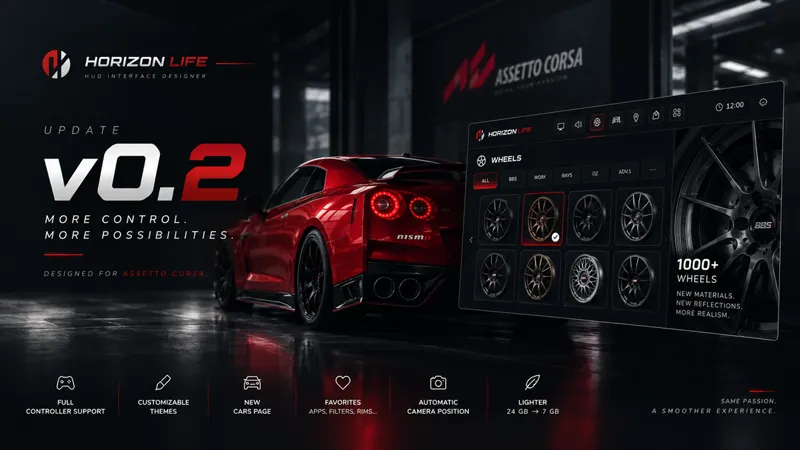
▸ Full controller support
Control the app entirely via gamepad—no mouse needed.
▸ Choose your theme
Customize the interface color to match your style.
▸ New "Cars" page
All your car settings in one place,
with clearer navigation between pages.
▸ Pin the app
Lock the window exactly where you want it.
It stays put.
▸ Favorite what you use
Your favorite apps, PP filters, rims, and spoilers
move to the top of the list.
➕│More Content
▸ Over 1,000 unique rims
All reworked: materials and reflections completely overhauled.
▸ Sorted by brand
Find the rim you're looking for without scrolling through the whole list.
▸ Automatic camera positioning
Select a rim or spoiler, and the view snaps right to it.
Use arrow keys or the right stick to orbit; use the scroll wheel to zoom.
📍│Better Experience
▸ Redesigned: main menu, rims, apps, and filters.
▸ Significantly improved 3D car rendering, with
perfectly smooth rotation.
▸ Smooth closing: the app collapses into the bar with an
animation instead of vanishing instantly.
▸ Collapsed app = no interference. Click and move your other
apps normally, as if Horizon Life HUD wasn't there.
🤖│Much Lighter
▸ 24 GB ➜ 7 GB
Same content, same visual quality. One-third the download size.
▸ Automatic memory management
When collapsed or while driving, the app releases
unused memory. It snaps back instantly as soon as you open it.
⬇️│Installation
Drop and drag the file into Content Manager.
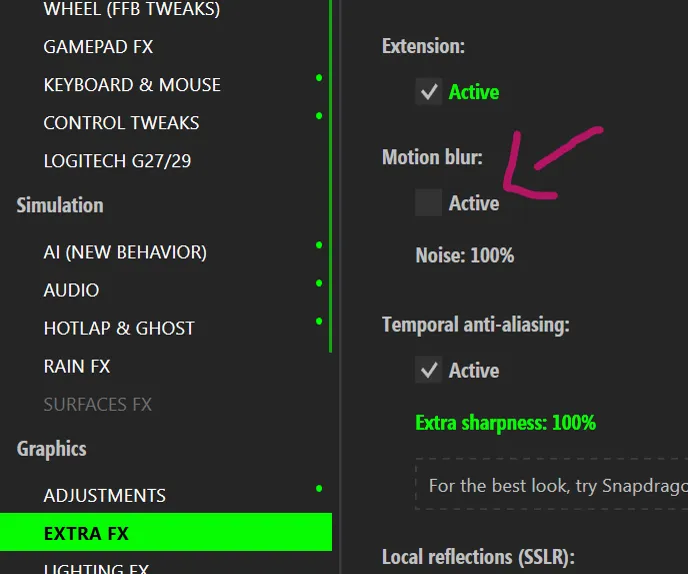
Regarding the wheel swap: if you notice a poorly rendered blur effect, that is normal for now. To counteract this effect, remove the "Motion Blur" setting within "Extra FX" will solve the issue.
🖥️│Link
Apps link : DRIVE
Horizon Life community : DISCORD
Trailer made by : AFSTUDIO