
Update Day Help
If You're always confused on update day here are some resources and tips.
1) Backup your cc, mods, and tray files to a flash drive or a hard drive
2) Use Scarletsrealm for mod updates. Also just go back to the creators patreon most of the time they've made a post telling you what's broken and if its updated or not.
3) Make a sims twitter. IDC just do it you don't have to post anything, just use it to keep up with the creators for important mod updates.
4) Never message and harass the modders! (plz get a life if you do that)
5) You don't have to update immediately you can play offline for a few days especially if you know you can't play without mods.
6) Get in sim discords (they keep you up to date with mods updates) I recommend Twisted Mexi & Deaderpool.
7) READ, READ, AND READ, AND KEEP ON READING!!! If you don't like reading you shouldn't even have mods. It's required so you don't keep asking the same things when most of the time the creator already explained whatever it is in the post.
I don't mind helping but I've been playing sims 4 for 7 years so I've learned a lot on maintaining this game it's a lot of unpaid work! You have to learn to do it yourself or go in those discords above so that the staff can help. (read those rules!) But it's always worth taking extra steps so you don't have to start over.
I personally back up my saves and trayfiles every week sometimes multiple times a week. Just incase a save file corrupts. I backup my cc folder once a week, or if I download a bunch of new cc then I'll do it again after everything is tested.
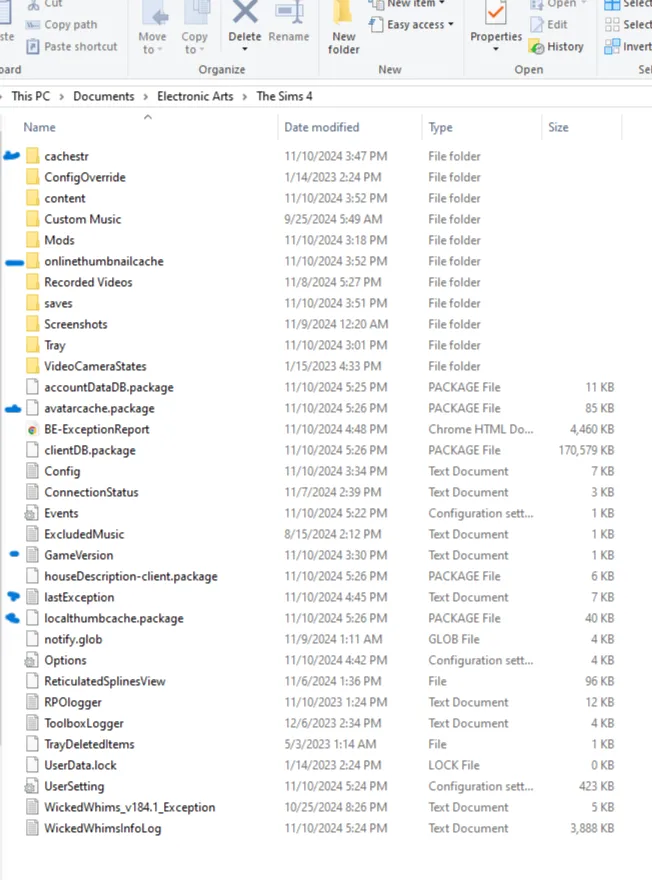
8) Look at the photo above. I've read under certain mod posts to delete those folder & files. So now I delete every last one of those every time before I load up my game (blue dots). If my Cache folder is there I delete everything inside as well before loading the game. But do this step at your own risk. I've been doing it for a year and nothing has ever happened.
Now I'm done I hope all of the tips help you and you learn how to fix your game now. I'll never delete those posts so you can always come back to it :)