
Importer tutorial
OnlyHaven needs your session key in order to access posts from the creators you are subscribed to. This guide explains how to find it.
OnlyFans
The OnlyFans import form asks for four values. After signing in at onlyfans.com, open your browser's developer tools (see Finding your cookies below):
- Session Key: under Cookies, the
sesscookie. - User ID: under Cookies, the
auth_idcookie. - BC Token: under local storage,
bcTokenSha. PastelocalStorage.bcTokenShainto the Console tab for easy access. - User-Agent: this needs to be the User-Agent of the last device that logged into your OnlyFans account. Leave it as the default value if you are on that device right now.
Patreon, Fanbox, SubscribeStar, Gumroad, DLsite, Fantia, Boosty, Afdian
Below are the respective cookies for the supported paysites.
-
For Patreon, your session
key is under
session_id. -
For Fanbox, your session
key is under
FANBOXSESSID. -
For Gumroad, your session
key is under
_gumroad_app_session. -
For SubscribeStar, your session
key is under
_personalization_id. -
For DLsite, your session
key is under
__DLsite_SID. -
For Fantia, your session
key is under
_session_id. -
For Boosty, your session
key is under
auth. -
For Afdian, your session
key is under
auth_token.
After going to the paysite you want to import and signing in ( Patreon / Fanbox / Gumroad / SubscribeStar / DLsite English / DLsite Japan / Fantia / Boosty / Afdian ) you need to find where cookies are located in your browser.
Finding your cookies
Chrome
- Press F12 to open Developer tools. If it didn't work for you try Ctrl+Shift+I or right click inspect element.
-
In the menu at the top, navigate to the "Application" tab. If this isn't visible at
first glance, simply press
>>for more tabs.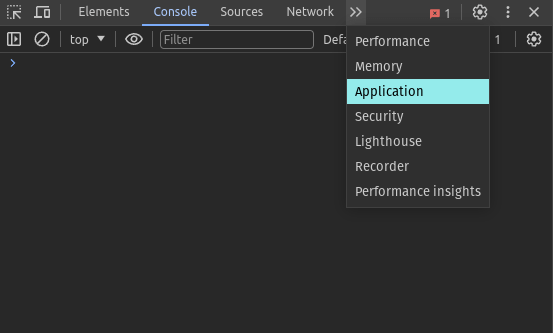
- In the "Application" tab, go to "Cookies".
- Within the "Cookies" dropdown, select the paysite's domain, e.g. "patreon.com".
-
Now in the list of cookies find the session cookie (e.g.
session_id) and select it; copy the contents and that will be the value you will use.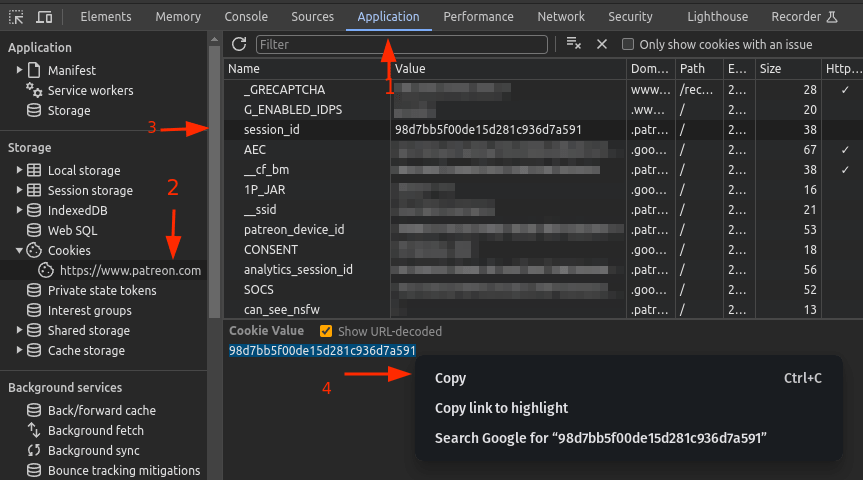
- Paste the content of the cookie you copied and submit it in the OnlyHaven import page.
Safari
- Ensure "Show Develop Menu" is enabled in Preferences (⌘,).
- Open Web Inspector (⌘⌥I).
- Go to Storage > Cookies.
- Right-click the cookie for your service and click "Copy".
Firefox
- Open DevTools by pressing F12 and open the Storage tab.
- Go to Cookies > [site].
- Right-click the cookie for your service and click "Copy".
For other browsers, please consult the browser documentation on how to access stored cookies.
Discord
Getting your token
- Open Discord in the browser of your choice.
- Open DevTools (F12, Safari see above).
- Go to the Console tab.
-
Paste and execute the following snippet:
webpackChunkdiscord_app.push([[Math.random()],{},e=>{for(let t of Object.values(e.c))try{let o=t?.exports?.default?.getToken;if("function"==typeof o&&"getToken"===o.name){let f=o();console.log(f)}}catch{}}]) -
A "slightly.long.string" will be returned at the bottom of the console. Copy the contents
between
"". This is your self token.
The above should work with most browsers and the official Discord app, although you open the DevTools via the following combination in the app: Ctrl+Shift+I.
Instructions on how to get the channel IDs can be found here.