




Update 0.7.12 RC Release
The update contains adjustments, optimization tools, and is generally aimed at improving performance, as well as containing minor edits and bug fixes from the previous update.
Sorry, UE is driving me nuts. I've been trying to build the project for about two days now and haven't had time to fix the latest engine update issues. That's why the update is marked "RC (Release Candidate)." There will likely be another update to 0.7 in a few days.
Graphics :
Fixed dithering of static shadows (large volume shadows could be of low quality and also contain artifacts in the form of noise).
Engine :
Nanites are disabled.
Scene :
A "ServerTravel" layer has been added between map loadings. Level preparation now occurs on an empty stage, preventing video memory overflows (on weaker devices with 7GB of memory or less, as well as on some portable devices, there was a tendency for video memory to overflow when loading a level, causing the game to freeze during the level preparation phase).
Wild Forest :
Gravitational anomaly zones (levitating rocks) now use timelines for physical displacements (a more performance-optimized option).
Some light sources have been optimized.
Resource-intensive Nanite assets have been temporarily removed from the map. Since nanite is no longer used in the game, these assets will be replaced in the future.
Some logic has been added to the post-process actor responsible for rendering the raindrop effect on the camera lens. The actor now periodically checks whether there is a ceiling beneath the player, and if so, the effect's intensity will be reduced. The same logic applies in reverse.
Blacksmith Village :
Optimized the draw distance of small props and interiors.
Optimized the visibility distance for some static light sources.
Reduced the number of draw calls (merging identical geometry).
Slaver Camp :
Landscape mesh rendering costs have been reduced.
Decal draw distance has been adjusted.
Fade Distance has been added for static light sources.
The draw distance of static light sources in dungeons has been adjusted.
The draw distance of static meshes in the service tunnel is now limited to the tunnel itself.
The draw distance for most small and large props has been updated.
Cull Distance Volumes have been added for enclosed spaces and confined areas.
The number of draw calls has been reduced (merging identical geometry).
Spy Hideout :
Reduced draw distance for decals.
Reduced memory allocation cost for texture streaming.
Added LOD groups for the "Display Sample" mannequins.
Some static meshes have been reduced (mesh level of detail reduction).
Reduced the draw distance of some static skeletal meshes.
Reduced the draw distance of some static meshes.
Reduced the number of draw calls (merging identical geometry).
Added fade distance for static light sources.
Added maximum draw distance for static light sources.
Added Cull Distance Volimes (geometry exclusion).
Classes :
The Stuffed Gag component no longer uses X-Ray highlighting due to a material limitation (there's no way to determine depth to render only the portion of the gag in the mouth).
Plug X-Ray now uses a translucent material without depth checking instead of a post-processing material.
References to X-Ray material settings for the Dildo Gag are now enabled only for the player character (disabling unnecessary activity).
Optimized Scene Component responsible for positioning the stamina widget (stamina for running) in space (Event tick events have been converted to Time events and are disabled when the widget itself is not active).
Tick events of the "Spring Component" component have been converted to Time events and are disabled when not in use.
The stamina component for sprinting is disabled for NPCs because they don't use sprinting (reducing CPU costs).
The "Struggle Stamina" and "Struggle Overdrive Stamina" components are disabled for NPCs because, while they use the same functions as the player character, they don't adjust or access stamina during struggle (reducing CPU costs).
Changes in the parent component "Progress Component" responsible for all widgets of the variable scale (stamina for running, stamina for fighting, stamina overload for fighting, holding your breath when shooting):
All value change events have been moved to Timer events, which are disabled as needed (CPU Reduction).
Events have been added that disable resource-intensive processes in child components (CPU Reduction).
The Sprint Widget Component has been optimized:
The material (radial circle) is now updated only when the stamina value has changed (previously, it was triggered by Event Tick).
The widget's visibility has been tied to Sprint component events (animations are only triggered when stamina is consumed or filled, previously by Event Tick).
The widget component no longer directly accesses dependent components (reducing memory costs).
The Sprint Component has been removed from the Character parent class because NPCs don't use it and it essentially just clutters the event tick.
A memory leak related to the creation of the Blindfold System component (blindfold effect) has been fixed.
The component simulating the blindfold effect is now created only for the player character (previously, the effect could take up unnecessary memory if assigned to an NPC even though it was in a disabled state).
Reduced overall memory consumption for the CoreCharacter class (2.9 Gib > 819.1 Mib).
Fixed a memory leak related to accessing deprecated CaptivePlaceData components, which are no longer used by the game.
Fixed a memory leak related to accessing the "Restraint Anim Layer Manager" component, which is no longer used (it was previously used to apply animations to bound hands in a specific style).
Fixed a memory leak related to accessing the "Team Member" system libraries, which is no longer used (the one where you could recruit multiple newbies and switch between them).
Reduced the memory consumption of the Ability Manager component (816 Mib > 16.9 Mib).
Fixed memory leaks in the Chrysalis and Arachnids ability components.
Reduced memory consumption for Captive Place Actor requests via interfaces (6.4 Gb > 16 Mb).
Some unified component classes used by the Race Manager component have been converted to safe classes (reducing memory consumption).
Reduced memory consumption for character configurations assigned to the Race Manager component (650 Mb > 1.4 Mb).
Reduced memory consumption for the Race Manager component (850 Mb > 2.1 Mb).
Fixed a memory leak related to accessing obsolete Behavior Trees that are no longer used in the game.
Fixed memory leaks related to accessing obsolete assets that are no longer used in the game.
Bondage Item library references now work with soft references (reducing the memory cost of their associated components and actors).
Craft Item library references now work with soft references (reducing the memory cost of their associated components and actors).
Scene Storage Item library references now work with soft references (reducing the memory cost of their associated components and actors).
Unique Item library references now work with soft references (reducing the memory cost of their associated components and actors).
Scene Storage Cloth library references now work with soft references (reducing the memory cost of their associated components and actors).
Fixed a memory leak related to GameInstance's access to outdated and inefficient libraries that are no longer used (1.7Gib > 2.1Mib).
Bondage item catalog data assets are loaded asynchronously on demand, instead of loading once at scene start.
Memory consumption when accessing the bondage item catalog data asset has been reduced (6.4 Gb > 2.3 Gb).
Reduced memory consumption when accessing libraries and assets associated with RaceAssets and RaceManager.
System :
Sight tracking component transformations are disabled if the system is disabled or if characters using the system are using LOD 3 or higher (reducing CPU usage).
Game settings delegate subscriptions now reference secure links, reducing overall memory consumption to 2.5Mb instead of 84Mb wherever they are used (which is ubiquitous and extremely common, given the extensive customization available in the game).
Getter functions now reference secure links when accessing in-game settings, and all attached actors and their components no longer need to load the entire game settings system into memory to obtain Bool, Int, Float, and other properties (reducing memory usage and speeding up the process of retrieving data from game settings).
A memory leak related to macros responsible for the noises emitted by girls has been fixed.
Memory consumption when accessing the settings menu has been reduced (280Mb > 84Mb).
Fixed a memory leak in the "Partner Intelligence" personal quest (the quest iterated through the enemy list by accessing character classes using hard references to classes).
Fixed a memory leak related to widgets not being unloaded from memory after closing the Workbench panel.
Reduced memory usage when accessing item disassembly instructions (1.4Gb > 180Kib).
Reduced memory usage when accessing item assembly instructions (1.4Gb > 180Kib).
Fixed a memory leak when assembling the "Apply Bound Item With Preferences" quest.
Reduced memory consumption when accessing "Change Cloth" tasks (818Mib > 213Mib).
Reduced memory consumption when accessing "Apply Bound Item" tasks (817Mib > 18.6Mib).
Reduced memory costs when executing level build pipeline scripts (1.7Gb > 127.5 Mib).
Reduced memory costs when accessing SceneDataCollector - saving a sandbox session (1.7Gb > 58.9Mib).
Reduced memory costs when accessing SceneDataExtractor - loading a sandbox session (1.7Gb > 58.9Mib).
Bondage items in scene storage are now populated from the full list of game items, not just a few.
Widgets :
Fixed a memory leak in the reconnaissance widgets (characters on the scene, their classes, quantity, and state) related to accessing root classes using hard class references.
Simplified functions for iterating through the list of nearby enemies.
Fixed a memory leak related to direct access to root character classes.
Speed up access to dependent components.
Speed up access to some player character components in the "CaptiveHUD" widget.
Fixed a memory leak related to the "CaptiveHUD" widget accessing deprecated libraries no longer used in the game.
Fixed a memory leak in the "PlayerHUD" widget related to accessing root character classes.
Disabled interpolation in the navigation bar on the Player HUD widget.
Behavior Tree :
Reduced memory usage when executing the "Spies Behavior" behavior tree (800Mib > 26.6Mib).
Fixed a memory leak related to direct access to delegates of the CoreCharacter parent class from the "Scarlet Countess" character class.
Reduced memory usage for executing the "Scarlet Countess" behavior (800Mib > 84.6Mib).
Reduced the overall memory usage for "Bondage With Preferences" tasks (to an average of 29Mib).
Fixed a memory leak related to an item not being unloaded from memory after being removed from an NPC's hands.
Fixed a memory leak in the "Inception Item" quest related to direct access to root character classes.
Reduced memory usage for executing the "Slave Traider" task tree (1.2Gib > 300Mib).
The memory cost of executing the "Slave" behavior tree has been reduced (1.5Gb > 186Mb).
The memory cost of accessing Volume components that define low-light zones has been reduced.
A memory leak related to accessing root CoreCharacter classes from the component responsible for low-light zones has been fixed.
Materials :
The material used by characters at LOD 3 and below has been rebuilt:
Scattering textures have been disabled, as subsurface scattering is not used.
Normal Map textures have been disabled.
Diffuse Color textures use a lower resolution by default (2048 > 1024).
Some interpolators and color space blenders have been disabled.
The high-quality shader has been rebuilt to a less demanding version:
Some resource-intensive vertex map blending nodes have been disabled.
Color space blending nodes not used by the game have been disabled.
SSS (Scattering) textures no longer use some types of color space blending.
Interpolators and color space blending solvers not directly used by the engine have been disabled.
Animation :
Changes have been made to the animation blueprint post-process responsible for correcting character eye expressions.
Additional morphs have been added to adjust the upper and lower eyelids for eye rotation.
Optimized morph key overrides.
Fixed eyebrow issues (in some angles, the character's eyebrows could twitch significantly due to interpolation errors).
Added facial animation morphs for the Struggle animations of hostages placed in captive devices.
Added facial animation morphs for the Wait animations of hostages placed in captive devices.
Added facial animation morphs when performing the "Call For Help" action without a gag.
Configs :
Changed config parameter Texture Quality:
Low - Streaming.MipBias= 2 | Streaming.PoolSize= 100 | VT.MaxAnisotropy= 1
Medium - Streaming.MipBias= 1 | Streaming.PoolSize= 200 | VT.MaxAnisotropy= 2
High - Streaming.MipBias= 0 | Streaming.PoolSize= 300 | VT.MaxAnisotropy= 4
Epic - Streaming.MipBias= 0 | Streaming.PoolSize= 400 | VT.MaxAnisotropy= 8
Cinematic - Streaming.MipBias= 0 | Streaming.PoolSize= 500 | VT.MaxAnisotropy= 8
Changed config parameter Folliage Quality:
Low - Density = 0 | LOD Distance Scale = 0
Medium-Density = 0.25 | LOD Distance Scale = 0.25
High-Density = 0.5 | LOD Distance Scale = 0.5
Epic - Density = 0.8 | LOD Distance Scale = 0.8
Cinematic - Density = 1 | LOD Distance Scale = 1
GUI :
An FPS counter has been added. You can enable it in the game settings (Settings > GUI > Show FPS). The counter has two modes:
Actual - the value is updated literally every frame.
Predicted - a delayed counter update with an average value.
Settings Dashboard :
A raindrop effect toggle has been added to the camera lens: Settings > Rendering > Enable Screen Rain Effect.
Highlighting of interactive objects no longer uses post-processing materials and only affects interactive objects.
The "Plug X-Ray" option no longer works in tandem with the "Enable Highlight Interactive Object" option (meaning it can be enabled/disabled independently of other settings).
Photomode v3 :
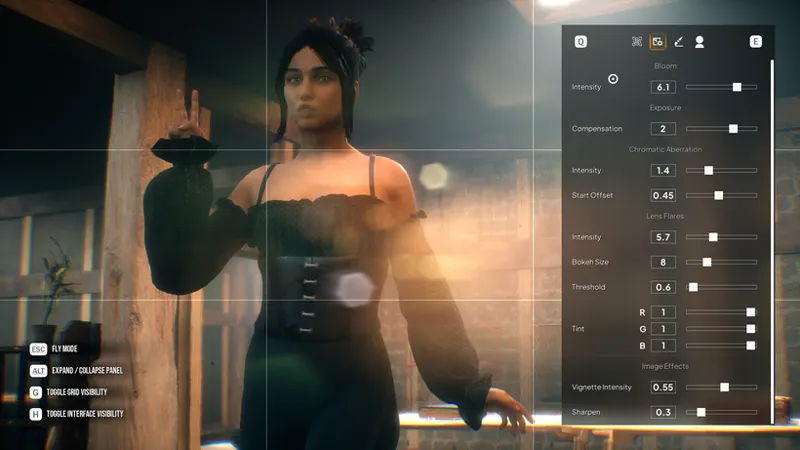
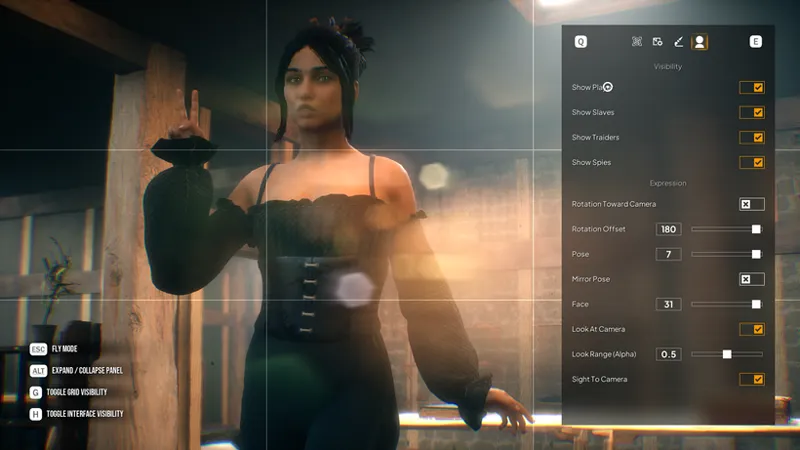
Photo mode has been moved to the GUI Maker design tool (which powers in-game settings), making it easier to add new parameters and features. Photo mode is currently in beta testing, as it contains some features that haven't been tested and clearly need to be limited in certain situations.
What's new:
An optional full-screen expansion of the settings panel is now available.
Grid display has been added.
Individual control over the panel and grid visibility has been added.
Most converters have been organized into common tabs to reduce the number of tabs.
Tab ( composition ) :
Added lens distortion emulation.
Added camera rotation.
Added image reflection.
Added additional Petzval Bokeh converters.
Added Ratio Scalar converter.
Tab ( Scene Light ) :
A bloom intensity slider has been added.
An exposure compensation slider has been added.
The Chromatic Aberration slider has been updated with an additional offset start property.
Lens Flares sliders have been added.
A Sharpen slider has been added.
Tab ( Color Grading ) :
The new tab contains almost all the post-processing parameters available in UE5 by default. These include:
Brightness adjustment (multiply by white).
Power adjustment.
Color saturation adjustment.
Screen - multiplies a pixel by itself, which slightly increases brightness.
Temperature balance settings for light in the scene.
General luminance grading settings in the scene, with four sliders for different blending types.
Shadow color grading settings in the scene, with four sliders for different blending types.
Midtone color grading settings in the scene, with four sliders for different blending types.
Highlight color grading settings in the scene, with four sliders for different blending types.
Additional blue and overall tone correction sliders.
Tab ( Scene ) :
Mixed Scene Settings Tab:
Added automatic rotation of the player character toward the camera.
Added offset of the character's rotation axis relative to the original axis. This parameter also works in tandem with automatic rotation, if you want the character to face the camera, but at a specific angle.
Added a pose slider. There are currently 8 of them.
Added a pose reflection toggle.
Added a facial expression slider. There are currently 32 options.
Added a Look At Camera toggle. This essentially rotates part of the torso and head toward the camera relative to the curve settings built into the animation.
Added a Look At Camera intensity slider. Useful if you want the character to have a slight offset toward the original pose or to look at the camera at a relative angle.
Added a Sight To Camera toggle - this literally means the character will make eye contact with the camera without the rest of the body interacting.
Attentions :
Since some character materials have been replaced, if you experience issues with your character missing geometry after removing clothing, delete the file at this location:
C:\Users\UserName\AppData\Local\MyPrettyToy\Saved\SaveGamesPlayerRaceNewFrontier.sav
Bug Fix :
Fixed an issue with a flickering white screen on some relatively low-end devices.
Stepping into a rope trap while sprinting permanently disables sprinting.
The player could become suspended in midair if fast-traveling while in Crouch.
Fixed an issue with NPC leash usage (NPCs could lead the player on a leash while in any other pose unsuitable for movement).
You could slide (move) while using the horn to trigger the alarm.
Fixed an issue with the Sight Tracking system when using the horn to trigger the alarm (the body and head could turn independently of the animation).
When NPCs used Alert, the player could be temporarily blocked by an animation montage because they were still a legitimate target for the NPC.
NPCs did not use the appropriate pose check to lead the player to the captivity device.
Fixed. NPCs could endlessly try to replace your cloth gag under your hood while you were calling for help - fixed.
When loading a save with an NPC as a passenger, restraints do not "disappear."
On-screen widgets did not disappear after executing the "Await You Fate" command - fixed.
You could trigger the "Await You Fate" action while being freed by a friendly NPC - fixed.
You could trigger the "Await You Fate" action while your gag was being changed - fixed.
The player could repeatedly trigger the "Await You Fate" action, which could lead to some script errors - fixed.
The "Await You Fate" action can be interrupted by triggering another action - fixed.
The player remained in the "Struggle" animation while calling for help while tied to furniture - fixed.
The Struggle action did not interrupt after removing the gag in Captive Place Mode.
The Mittens removal animation has been fixed if the character is tied with the Ball Tie technique and in the "Sit" pose.
The player character could still use the "Struggle Torso" command with the violin - this has been fixed.
Nav mesh modifiers have been placed beneath the level surface in the Blacksmith Village map (someone managed to fall through using the "I'm Stuck" utility).
When using the "Put In Hand" context action on a weapon located in the scene, it would simply be added to the inventory without executing the "Put In Hand" command - this has been fixed.
Crossbows lying around the level were missing LOD levels and visibility limitations - this has been fixed.
On the Slaver Camp map, the post-process scene coloring effect had a higher priority relative to its depth than the blindfold effect, causing the player to see the outlines of distant objects. This has been fixed.
Some component and data validation issues have been fixed.
Validation issues with systems loaded at level start have been fixed.
If the player is playing as a demonid and bound to furniture, activated abilities could remove all items from the body when attempting to free themselves from the gag. This has been fixed. (If the player is restrained by a device, the activation check for this ability will be ignored.)
Fixed the ability to stand up after freeing the arms if the character was bound with the "Ball Tie" technique.
Removing "Frogtie" from NPCs can now be removed using the "Legs" assignment.
Fixed missing on-screen prompts for switching assignments when using a web.
When using the "Unbound" action with the "Legs" target, the "Frogtie" knot is removed first, followed by the "Thigts" knot (previously, you could remove an NPC's ropes above the knee, but the knot on the neck would remain). This also applies to the "Thigts" target.
Fixed the ability to put ropes on legs after using the "FrogTie" technique.
Fixed the ability to put other items (shackles/cuffs) on legs after using the "FrogTie" technique.
The Muzzle Gag Advanced was marked as "Simple," causing NPCs to replace it with a more "complex" one when calling for help - fixed.
The Stuffed Gag can be worn over any OTM or OTN gags - fixed.
NPCs equipped with the Fiddle can now lie down on the floor - fixed. When NPCs are kneeling or sitting on violins, the struggle animation when putting on and taking off the leash sometimes results in a T-pose, and always when releasing the leash. They return to a kneeling position shortly afterward - fixed.
Fixed the ability to remove items from the torso while the Fiddle is equipped.
If only the legs are bound and the hanress is equipped, or if the character is kneeling, this results in an incorrect animation if the character attempts to remove an item from the torso. This has been fixed.
If only the legs and torso are bound, or if the character is kneeling, this results in an incorrect animation if the character attempts to remove an item from the torso. This has been fixed.
NPC skin appears very shiny at the level of detail (LOD) - fixed.
SSS scattering texture responsible for subsurface scattering boundaries has been fixed.
The mask responsible for skin pore scaling has been fixed (previously, pore scale on some areas of the body could be larger than necessary, which looked odd).
When the "Cloth Wraps (Hands)" clothing item is equipped and the player's or NPC's wrists are bound with rope, the rope visually flickers and turns on/off as the character moves. This has been fixed.
The sound accompaniment for entering prison does not respond to volume sliders.
The sound accompaniment for opening the Wild Forest map does not respond to volume sliders.
Spelling errors in Classified maps in the map selection menu have been fixed.
A spelling error in the Blacksmith Village map name has been fixed.
System errors with sound objects like "Cave Rats" have been fixed.
The camera FOV when switching to photo mode was different from the player's current camera FOV. This has been fixed.
Pop-up widgets for interactive objects have been fixed (previously, there could be issues with an interactive object continuing to display a pop-up widget even if the camera left its intersection volume).
Pop-up widgets for items or objects could remain visible after the player character was linked and the camera was pointed at the object or object - fixed.
An issue with the Scene Widget when using Photo Mode has been fixed (now, when entering Photo Mode, all scene widgets not related to it are automatically hidden).
Download Links :
Google Drive - https://drive.google.com/file/d/1LTUDU6qAa8U0lG4aIu7aF26EeqKQr0oU/view?usp=sharing
Mediafire - https://www.mediafire.com/file/16tnsrfnaxwb5k4/MPT_Build_0.7.12_RC.rar/file
Archive Password - JomeltoE21
❗The archive should prompt for a password when unpacking. If this does not happen, try a third-party archiver, such as WinRar or WinZip. Unpacking without a password will result in the loss of executable files or even result in an error during unpacking.
The password must contain only numbers, lowercase and uppercase letters! It must not contain punctuation marks or spaces. When copying the password, make sure the website translator has not altered the meaning of the characters or changed the letter case. ❗
Comments (13)
FYI when I tried to use the mediafire link, it came up and said something was missing and failed. The other link is working fine.
This is a Release Candidate version. A full update, 0.7.12, has already been released.
i cant find a discord so ama report it here is it normal recruitingdose work at all?
form 60% to 30% on perfonce grafique nice :D
gpu usage
just asking is it any new object or any new content in this update ?
Just major optimizations and an updated photo mode. I'm laying the groundwork for new content, so this update is no small feat.
I'm excited to try out this performance release! 🥳 It started to pile up; I'm happy to see it being addressed. As always: Thanks a lot 🙂
Hi, I'm trying to launch My Pretty Toy, but I immediately get the following error : "C:\Users\Garcia\Documents\Bound Games\(mpd JomeltoE21) My Pretty Toy (0.7.12 RC Release)\MPT Build_0.7.12 RC\Windows\MyPrettyToy\Binaries\Win64\MyPrettyToy-Win64-Shipping.exe" MyPrettyToy CreateProcess() returned 11c7. Does anyone know what causes this error and how I can fix it ? I'm running Windows, and the game won't start at all. Any help would be appreciated. Thanks !
Make sure Windows Defender and Smart App Control aren't interfering with this. Windows can sometimes have issues with unsigned apps...
You've done miracles to the frame rate. My setting used to be somewhere between potato and performance, and I'd still got lag in certain areas. Now I have every setting at max with no performance drops anywhere
no armbinder? :C at less we get less lag
I don't remember promising it in this update...