



Full Workflow For Newbie Stable Diffusion Trainers For SD 1.5 Models & SDXL Models Training With DreamBooth & LoRA
If you are new to Stable Diffusion and want to learn easily to train it with very best possible results, this article is prepared for this purpose with everything you need.
Join discord and tell me your discord username to get a special rank : SECourses Discord
I have developed better workflows recently than that I did with Automatic1111 DreamBooth extension. Much better than that old one. Moreover, Automatic1111 DreamBooth extension is not anymore maintained so do not use it.
I did 120+ trainings for SDXL to find the very best workflow and settings.
I did over 70+ trainings for SD 1.5 based models to find very best workflow and settings.
If you have further questions please leave a comment and hopefully I will keep updating this article.
If you are overwhelmed with all the info, I am giving 1 to 1 private lectures as well
Message me from Discord
Requirements
You need to have Python 3.10.11 installed. I suggest you to install as shown in below video:
Also install ffmpeg, C++ tools & Git.
Don't forget to install the Visual Studio 2015, 2017, 2019, and 2022 redistributable as well.
Install Python directly into your C drive like shown in above video.
How To Install & Use Kohya SS GUI On Windows & RunPod & Kaggle
The big video I explained how to install and use Kohya GUI on Windows is in below video:
The big video I explained how to install Kohya GUI on RunPod is below:
These 2 above videos shows how to train LoRA but everything same with DreamBooth. Just use DreamBooth tab and our shared best configs.
Our RunPod Kohya GUI SS installer script: https://www.patreon.com/posts/84898806
A quick video where I explained how to quickly use our Kohya GUI configs is below:
If you can't afford RunPod and don't have a decent GPU, we have a Free Kaggle account notebook that supports Kohya SS GUI and it is shown in below video:
Kaggle Kohya Script notebook link : https://www.patreon.com/posts/kohya-sdxl-lora-88397937
This notebook has a cell that downloads best SDXL and SD 1.5 configs for Kaggle.
On Kaggle, I suggest you to train SD 1.5 model. It is better since on Kaggle we can't use BF16 for SDXL training due to GPU model limitation. Kaggle GPUs are old. Also we can't train with full precision Float (FP32) due to VRAM limitation.
However on Kaggle we can train SD 1.5 with full precision Float (FP32) therefore can obtain amazing results.
Also on this Kaggle video (below link) I have explained my recent 200 repeat and saving every N steps checkpoints strategy which is better:
For example if you have 16 training images, 200 repeat and 1 epoch with reg images means 16x200x1x2 = 6400 steps. The last 2 comes from reg images. So if you want to save 10 checkpoints and compare, save every 641 steps. This will give you 10 checkpoints.
After training completed, do x/y/z checkpoint comparison and decide the best model.
x/y/z checkpoint comparison is shown in below video:
Why 200 repeat and 1 epoch better? Because with 200 repeating, we are able to utilize more ground truth absolute quality regularization / classification images.
Ground Truth Very Best Regularization / Classification Images
You can see our both Man and Woman reg / class images datasets here with all resolutions you may need (all pre-prepared - takes days) : https://www.patreon.com/posts/massive-4k-woman-87700469
These regularization / classification images are manually collected by me and prepared by me from Unsplash and sorted with best quality. The preparatın took over few weeks in total. There are 5200 images for each class Man and Woman.
After Detailer Extension
To improve faces significantly, I use After Detailer (ADetailer) extension. This extension automatically masks the face and inpaint it with the settings you provide. This will improve face significantly. Of course, the results depends on your initial training quality and the quality and resemble and quality of the initially generated image.
In below video how to use ADetailer extension is explained:
Always you can look video chapters : 32:07 How to install after detailer (adetailer) extension to improve faces automatically
After installing ADetailer extension from extensions menu, please restart the Automatic1111 for it to fully and properly install
Specific settings for SD 1.5 and SDXL shown below in their sections
How To Crop And Resize Your Training Images
You can use our state of the art auto crop and resize scripts. They are shared here : https://www.patreon.com/posts/sota-subject-and-88391247
You can watch crop and resize scripts video in below link:
https://www.youtube.com/watch?v=Fbuyu35TkE4&feature=youtu.be
The first cropping script will zoom in the person in the image with as much as trying to match the target aspect ratio without cropping any part of the human subject. It supports may other classes as well such as : 'person', 'bicycle', 'car',... Please check the patreon post for full classes.
Then with resize script, we focus on the face on the image and resize into exact target resolution. This crops the person body parts if necessary with focusing face.
Which Captions / Tokens To Use For Training
For training captions / tagging, if it is a person i just use ohwx man as training token and man as reg images token. You can define them either via folder name or with image_file_name.txt files. If you are training a woman use woman or whatever you are training use that class token. Like ohwx car.
If you want to train a style or other stuff, try ohwx + class + captioning and compare it with just ohwx class.
If you want to learn what is ohwx and why we use such rare token watch below video:
This above is old but it is gem to learn rare tokens and class tokens
You can use our SOTA captioning models for captioning which includes batch captioning for the following models: Clip Interrogator (115 Clip Vision Models), LLaVA (the strongest one), CogVLM, Qwen-VL, Blip2 & Kosmos-2 (even works with 2 GB VRAM GPU best one for weak GPUs).
You can download 1 click installers and batch captioning supporting amazing Gradio web apps having scripts from here : https://www.patreon.com/posts/sota-image-for-2-90744385
Each script has instructions and installers for Windows & RunPod. Hopefully I will add Free Kaggle notebooks as well.
If you are local linux user, just change the paths of RunPod scripts and use them on your local machine.
Each script has default very best image captioning prompts set in the GUI apps.
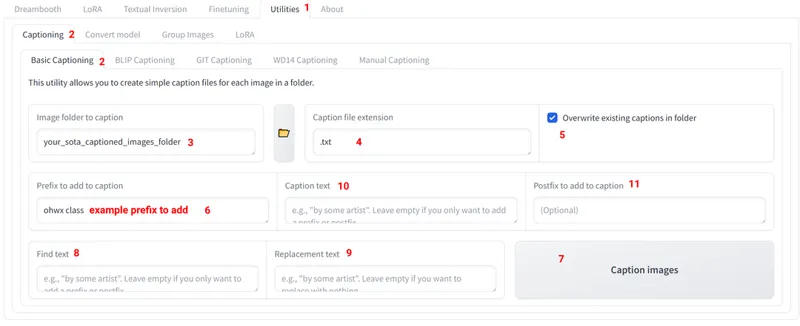
Once you generated captions with our SOTA captioning tools, you can use Kohya GUI's amazing caption manipulation screen as shown below.
You can download the full resolution of below image : Kohya Image Caption.png
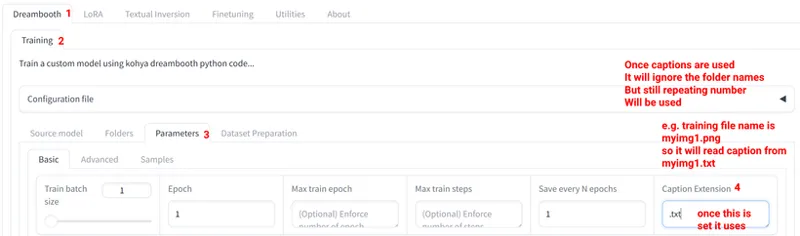
How To Make Kohya GUI To Use Captions Instead Of Folder Names
Once the Caption Extension is set and enabled, it will read the captions from the folder and ignore the folder names.
The repeating count number will be still valid.
You can download below image full size from : Kohya Enable Image Caption.png
SD 1.5 Based Models Configuration
Download best configuration from here : https://www.patreon.com/posts/very-best-kohya-97379147
For SD 1.5 I used 768x768 training, no bucketing (I crop training images into 768x768 aspect ratio and resize them to 768x768) and generate images in 1024x1024.
Use same resolution of training images resolution for regularization / classification images resolution.
Once you become a more experienced, you can enable bucketing and do bucketing enabled different aspect ratio and resolution including trainings
I use After Detailer (ADetailer) with the following configs for SD 1.5
Everything default except below:
Prompt : photo of ohwx man if realism is targeted
If you are targeting stylization such as 3D you need to try with full prompt or like 3D image of ohwx man
Set ADetailer inpainting resolution to 768x768 : Remember we are generating images in 1024x1024 but when inpainting face, it is best to inpaint with native resolution we trained.
The denoise strength I set is 0.5 and I also set separate number of steps for better quality like 70
Here ADetailer settings for SD 1.5 download image to see : SD 1.5 ADetailer Settings.png
I compared 1024x1024 training vs 768x768 training for SD 1.5 and 768x768 performed better even though we generate images in 1024x1024.
Also not all SD 1.5 models will support 1024x1024 resolution. To find which model is best, I compared 161 SD 1.5 models. You can watch its video below:
The Kohya SS GUI config for SD 1.5 automatically uses the best SD 1.5 realism model that supports 1024x1024 image generation and automatically downloads it into your PC.
SD 1.5 Based Models Results & Prompts
20 Images : https://civitai.com/posts/1300478
20 Images : https://civitai.com/posts/1300774
20 Images : https://civitai.com/posts/1300759
What If You Want LoRA For SD 1.5 Based Models?
LoRA is optimized version of DreamBooth training. Therefore, no matter what configuration you use, it will be inferior to the DreamBooth training. Moreover, LoRA has infinite number of configuration combination. Therefore, I don't research LoRA.
Also as mentioned in this paper, https://arxiv.org/abs/2402.09353, LoRA lacks a significant feature : They found that LoRA either increases or decreases magnitude and direction updates proportionally but seems to lack the capability of making only subtle directional changes as found in full fine-tuning. Therefore do full DreamBooth / Fine Tuning and extract LoRA is best.
So what you can do If you need LoRA?
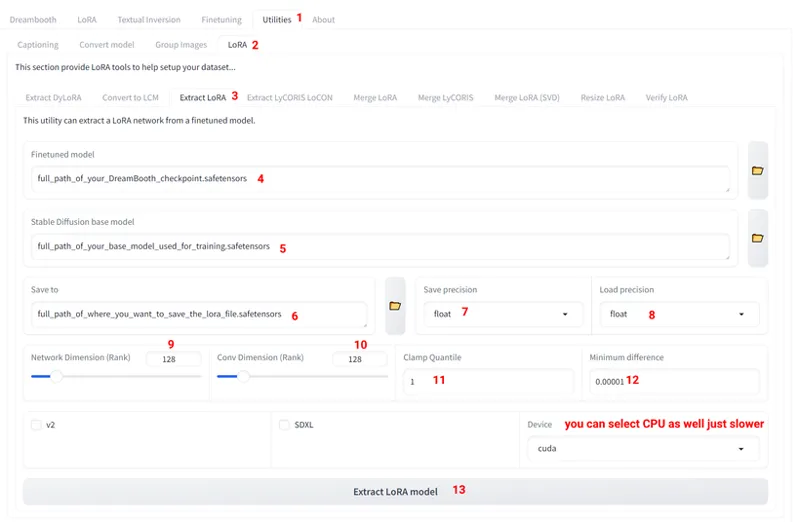
It is so easy. We use Kohya SS GUI LoRA extraction tool. Recently I contacted Kohya for this and he even Improved its logic. Now even low VRAM GPUs can extract LoRA very well.
Open your latest version Kohya SS GUI and extract as shown in below image
The best model that our config auto trains on is Hyper Realism V3 which you can download safetensors file here : https://civitai.com/models/158959/hyper-realism
You need to set your base model whatever you trained on. If you used our default config, you need to download that safetensors file and use it as base.
You can download full resolution of below image : SD 1.5 LoRA Extract.png
SDXL Based Models Configuration
Download best configuration from here : https://www.patreon.com/posts/89213064
For SDXL I used 1024x1024 training, no bucketing (I crop training images into 1024x1024 aspect ratio and resize them to 1024x1024) and generate images in 1024x1024.
Use same resolution of training images resolution for regularization / classification images resolution.
Once you become a more experienced, you can enable bucketing and do bucketing enabled different aspect ratio and resolution including trainings
I use After Detailer (ADetailer) with the following configs for SDXL
Everything default except below:
Prompt : photo of ohwx man if realism is targeted
If you are targeting stylization such as 3D you need to try with full prompt or like 3D image of ohwx man
The denoise strength I set is 0.5 and I also set separate number of steps for better quality like 70
Here ADetailer settings for SDXL download image to see : SDXL ADetailer Settings.png
For realism I still find SDXL 1.0 is best but you can try other models and compare results
Some custom models may require longer training or higher learning rate
SDXL Based Models Results & Prompts
20 Images : https://civitai.com/posts/1238778
20 Images : https://civitai.com/posts/1238769
What If You Want LoRA For SDXL Based Models?
LoRA is optimized version of DreamBooth training. Therefore, no matter what configuration you use, it will be inferior to the DreamBooth training. Moreover, LoRA has infinite number of configuration combination. Therefore, I don't research LoRA.
So what you can do If you need LoRA?
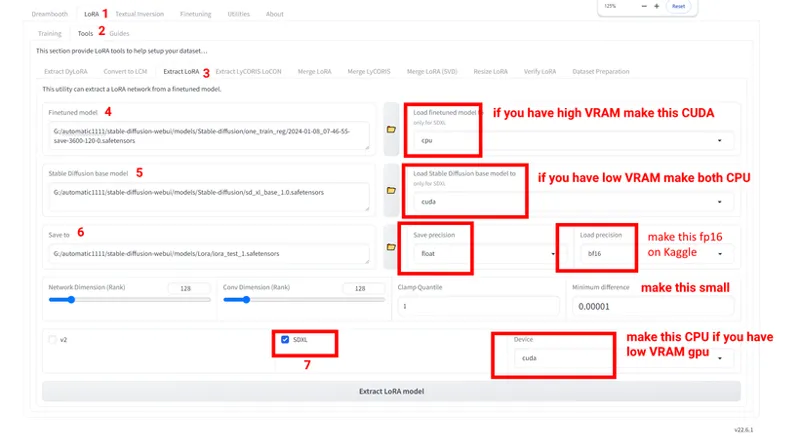
It is so easy. We use Kohya SS GUI LoRA extraction tool. Recently I contacted Kohya for this and he even Improved its logic. Now even low VRAM GPUs can extract LoRA very well.
Open your latest version Kohya SS GUI and extract as shown in below image
You need to set your base model whatever you trained on.
Using LoRA on custom stylized models yields good stylized images
You can download full resolution of below image : SDXL LoRA Extract.png
Comments (46)
I still wasn't happy with some of my results, so I went back to an SD1.5 Dreambooth repository that gave me perfect results, and compared it to Kohya with my parameters, Kohya with your SD15 parameters... And confirmed it. The results of this repository are MUCH better. I am starting to think that there is something wrong with the Kohya training script. If you are interested, I can share my results with you. I have used publicly available training data. Here is the rep: https://github.com/InB4DevOps/diffusers/tree/main/examples/dreambooth Unfortunately, it doesn't support SDXL and I would like to get the same quality in SDXL
I am on your discord now if it's easier to share there. Same name
I've just used extract_locon.py to convert DB to Lycoris, because that's what I have been using for SD15, and it looks great at rank 32. I remember that malcolmrey had a comparison that Lycoris has less quality loss than standard Lora, but I don't know. Might be something worth investigating. I'm gonna stop bothering you now, thank you again :)
i tested standard lora extract it was really good
Do you have a resource that explains why the regularization images are real photos instead of generated by the model? It seems to me that while you *are* preventing the trained concept "ohwx" from bleeding into the whole model and the concept "man", you are at the same time retraining the concept "man" to be something else entirely than what the model thought of it previously. this is especially noticeable with the SDXL base model, that has quite bad knowledge of it, when you generate a series of images with a prompt of "man" instead of "ohwx man"
you got the point actually. initially stable diffusion was trained with real images. therefore we are also providing real man images like initially to obtain best quality
Thank you for this. I'd have never dared to use the full bf16 option, that is even described as experimental in the GUI. But this one seems to be the key to 16 GB, and even 24 GB on runpod fails for me when I don't check full bf16
ye if you dont check it it may fail. our research is for full bf16 and working great
trying to extract LORA, it gives me error on Kaggle notebook v19: FileNotFoundError: [Errno 2] No such file or directory: '"/opt/conda/bin/python" "/kaggle/working/kohya_ss/sd-scripts/networks/extract_lora_from_models.py" --load_precision fp16 --save_precision float --save_to "/kaggle/working/fohwx-woman-xl-realvis-lora.safetensors" --model_org "/kaggle/working/RealVisXL_V4.0.safetensors" --model_tuned "/kaggle/working/fohwx-woman-xl-realvis42024-04-11_16-40-56-save-7200-120-0.safetensors" --dim 128 --device cpu --clamp_quantile 0.99 --min_diff 1e-05 --conv_dim 128 --sdxl --load_original_model_to cpu --load_tuned_model_to cpu'
verify the folder paths : /kaggle/working/RealVisXL_V4.0.safetensors , but the error looks like mistake of kohya : /opt/conda/bin/python i will report it to bmaltais
Hi Furkan, Thank you for all of your amazing work! I'd like to train a model on an art style (simple hand-painted folk art). Do you have any specific tips for this type of training? Should I try to find a base model that already shares some similar characteristics? THanks :)
yes finding model is better. training is same but you should use a better dataset. if you need pro help i am giving private lectures too
I am working recently on this Kohya GUI new version. I guess in the data preparation you need to give input images and pretrained model name or path is -- your base model it can hyperealism.safetensors or realisticVisionV60B1.safetensors.. etc..!! which one you want to have as a base model. Thanks.
true
Hi Furkan! With the new kohya interface everything is getting more complicated... for example, I didn't figured out where to set full precision Float (FP32) for SD1.5 training, and now there are two fields whwrw to input training images (one on the Dataset preparation tab and one more next to "Pretrained model name or path"... I think this version is a bit confusionary... Can you do a screenshot to make this more clear (a screenshot with numbered steps like the one about lora extraction...)?
I agree. I will make a new tutorial hopefully. I am waiting guy to finalize updates. he makes so much right now
Hey, I ended up trying some model merging method stuff mentioned in a reddit post link below and it definitely enhanced things for me. May want to consider testing some of this stuff. I don't agree with some of it because on some things I got worse results like combining 30 years old ohwx woman instead of just using ohwx woman. But in general the low merges of an overtrained or undertrained checkpoint or merging another model in at 0.05 strength did enhance some things. Using more photos from different views too. https://www.reddit.com/r/DreamBooth/comments/1b2gqjb/more_dreambooth_findings_using_zxc_or_ohwx/ editing, I just realized I posted this in wrong post of yours, oops.
yes merging can definitely improve. good tips there.
Hello I`m trying to do it in RUNPOD and .I have an Error I have followed all the instructions in the video: https://www.youtube.com/watch?v=EEV8RPohsbw I have this error: Traceback (most recent call last): File "/workspace/kohya_ss/sd-scripts/sdxl_train.py", line 792, in train(args) File "/workspace/kohya_ss/sd-scripts/sdxl_train.py", line 262, in train train_dataset_group.cache_latents(vae, args.vae_batch_size, args.cache_latents_to_disk, accelerator.is_main_process) File "/workspace/kohya_ss/sd-scripts/library/train_util.py", line 1949, in cache_latents dataset.cache_latents(vae, vae_batch_size, cache_to_disk, is_main_process) File "/workspace/kohya_ss/sd-scripts/library/train_util.py", line 964, in cache_latents cache_batch_latents(vae, cache_to_disk, batch, subset.flip_aug, subset.random_crop) File "/workspace/kohya_ss/sd-scripts/library/train_util.py", line 2285, in cache_batch_latents latents = vae.encode(img_tensors).latent_dist.sample().to("cpu") File "/workspace/kohya_ss/venv/lib/python3.10/site-packages/diffusers/utils/accelerate_utils.py", line 46, in wrapper return method(self, *args, **kwargs) File "/workspace/kohya_ss/venv/lib/python3.10/site-packages/diffusers/models/autoencoders/autoencoder_kl.py", line 260, in encode h = self.encoder(x) File "/workspace/kohya_ss/venv/lib/python3.10/site-packages/torch/nn/modules/module.py", line 1518, in _wrapped_call_impl return self._call_impl(*args, **kwargs) File "/workspace/kohya_ss/venv/lib/python3.10/site-packages/torch/nn/modules/module.py", line 1527, in _call_impl return forward_call(*args, **kwargs) File "/workspace/kohya_ss/venv/lib/python3.10/site-packages/diffusers/models/autoencoders/vae.py", line 172, in forward sample = down_block(sample) File "/workspace/kohya_ss/venv/lib/python3.10/site-packages/torch/nn/modules/module.py", line 1518, in _wrapped_call_impl return self._call_impl(*args, **kwargs) File "/workspace/kohya_ss/venv/lib/python3.10/site-packages/torch/nn/modules/module.py", line 1527, in _call_impl return forward_call(*args, **kwargs) File "/workspace/kohya_ss/venv/lib/python3.10/site-packages/diffusers/models/unet_2d_blocks.py", line 1323, in forward hidden_states = resnet(hidden_states, temb=None, scale=scale) File "/workspace/kohya_ss/venv/lib/python3.10/site-packages/torch/nn/modules/module.py", line 1518, in _wrapped_call_impl return self._call_impl(*args, **kwargs) File "/workspace/kohya_ss/venv/lib/python3.10/site-packages/torch/nn/modules/module.py", line 1527, in _call_impl return forward_call(*args, **kwargs) File "/workspace/kohya_ss/venv/lib/python3.10/site-packages/diffusers/models/resnet.py", line 196, in forward hidden_states = self.nonlinearity(hidden_states) File "/workspace/kohya_ss/venv/lib/python3.10/site-packages/torch/nn/modules/module.py", line 1518, in _wrapped_call_impl return self._call_impl(*args, **kwargs) File "/workspace/kohya_ss/venv/lib/python3.10/site-packages/torch/nn/modules/module.py", line 1527, in _call_impl return forward_call(*args, **kwargs) File "/workspace/kohya_ss/venv/lib/python3.10/site-packages/torch/nn/modules/activation.py", line 393, in forward return F.silu(input, inplace=self.inplace) File "/workspace/kohya_ss/venv/lib/python3.10/site-packages/torch/nn/functional.py", line 2072, in silu return torch._C._nn.silu(input) torch.cuda.OutOfMemoryError: CUDA out of memory. Tried to allocate 7.63 GiB. GPU 0 has a total capacty of 22.15 GiB of which 4.67 GiB is free. Process 451998 has 17.48 GiB memory in use. Of the allocated memory 15.75 GiB is allocated by PyTorch, and 38.13 MiB is reserved by PyTorch but unallocated. If reserved but unallocated memory is large try setting max_split_size_mb to avoid fragmentation. See documentation for Memory Management and PYTORCH_CUDA_ALLOC_CONF Traceback (most recent call last): File "/workspace/kohya_ss/venv/bin/accelerate", line 8, in sys.exit(main()) File "/workspace/kohya_ss/venv/lib/python3.10/site-packages/accelerate/commands/accelerate_cli.py", line 47, in main args.func(args) File "/workspace/kohya_ss/venv/lib/python3.10/site-packages/accelerate/commands/launch.py", line 1017, in launch_command simple_launcher(args) File "/workspace/kohya_ss/venv/lib/python3.10/site-packages/accelerate/commands/launch.py", line 637, in simple_launcher raise subprocess.CalledProcessError(returncode=process.returncode, cmd=cmd) subprocess.CalledProcessError: Command '['/workspace/kohya_ss/venv/bin/python', '/workspace/kohya_ss/sd-scripts/sdxl_train.py', '--max_grad_norm=0.0', '--no_half_vae', '--train_text_encoder', '--learning_rate_te2=0', '--bucket_no_upscale', '--bucket_reso_steps=64', '--cache_latents', '--cache_latents_to_disk', '--full_bf16', '--gradient_checkpointing', '--learning_rate=1e-05', '--learning_rate_te1=3e-06', '--learning_rate_te2=0', '--logging_dir=/workspace/stable-diffusion-webui/models/Stable-diffusion/log', '--lr_scheduler=constant', '--lr_scheduler_num_cycles=8', '--max_data_loader_n_workers=0', '--resolution=4000,4000', '--max_train_steps=88160', '--mixed_precision=bf16', '--optimizer_args', 'scale_parameter=False', 'relative_step=False', 'warmup_init=False', 'weight_decay=0.01', '--optimizer_type=Adafactor', '--output_dir=/workspace/stable-diffusion-webui/models/Stable-diffusion/model', '--output_name=francoV1', '--pretrained_model_name_or_path=/workspace/stable-diffusion-webui/models/Stable-diffusion/sd_xl_base_1.0.safetensors', '--reg_data_dir=/workspace/stable-diffusion-webui/models/Stable-diffusion/reg', '--save_every_n_epochs=1', '--save_model_as=safetensors', '--save_precision=bf16', '--train_batch_size=1', '--train_data_dir=/workspace/stable-diffusion-webui/models/Stable-diffusion/img', '--vae=/workspace/stable-diffusion-webui/models/VAE/SDXL_FP32_VAE.safetensors']' returned non-zero exit status 1. Traceback (most recent call last): File "/workspace/kohya_ss/venv/lib/python3.10/site-packages/gradio/routes.py", line 534, in predict output = await route_utils.call_process_api( File "/workspace/kohya_ss/venv/lib/python3.10/site-packages/gradio/route_utils.py", line 226, in call_process_api output = await app.get_blocks().process_api( File "/workspace/kohya_ss/venv/lib/python3.10/site-packages/gradio/blocks.py", line 1550, in process_api result = await self.call_function( File "/workspace/kohya_ss/venv/lib/python3.10/site-packages/gradio/blocks.py", line 1185, in call_function prediction = await anyio.to_thread.run_sync( File "/workspace/kohya_ss/venv/lib/python3.10/site-packages/anyio/to_thread.py", line 56, in run_sync return await get_async_backend().run_sync_in_worker_thread( File "/workspace/kohya_ss/venv/lib/python3.10/site-packages/anyio/_backends/_asyncio.py", line 2144, in run_sync_in_worker_thread return await future File "/workspace/kohya_ss/venv/lib/python3.10/site-packages/anyio/_backends/_asyncio.py", line 851, in run result = context.run(func, *args) File "/workspace/kohya_ss/venv/lib/python3.10/site-packages/gradio/utils.py", line 661, in wrapper response = f(*args, **kwargs) File "/workspace/kohya_ss/kohya_gui/dreambooth_folder_creation_gui.py", line 99, in dreambooth_folder_preparation shutil.copytree( File "/usr/lib/python3.10/shutil.py", line 559, in copytree return _copytree(entries=entries, src=src, dst=dst, symlinks=symlinks, File "/usr/lib/python3.10/shutil.py", line 513, in _copytree raise Error(errors) shutil.Error: [('/workspace/stable-diffusion-webui/models/Stable-diffusion/reg/1_man/reg/1_man/reg/1_man/reg/1_man/reg/1_man/sd_xl_base_1.0.safetensors', '/workspace/stable-diffusion-webui/models/Stable-diffusion/reg/1_man/reg/1_man/reg/1_man/reg/1_man/reg/1_man/reg/1_man/sd_xl_base_1.0.safetensors', "[Errno 28] No space left on device: '/workspace/stable-diffusion-webui/models/Stable-diffusion/reg/1_man/reg/1_man/reg/1_man/reg/1_man/reg/1_man/sd_xl_base_1.0.safetensors' -> '/workspace/stable-diffusion-webui/models/Stable-diffusion/reg/1_man/reg/1_man/reg/1_man/reg/1_man/reg/1_man/reg/1_man/sd_xl_base_1.0.safetensors'"), ('/workspace/stable-diffusion-webui/models/Stable-diffusion/reg/1_man/reg/1_man/reg/1_man/reg/1_man/reg/1_man/sd_xl_refiner_1.0.safetensors', '/workspace/stable-diffusion-webui/models/Stable-diffusion/reg/1_man/reg/1_man/reg/1_man/reg/1_man/reg/1_man/reg/1_man/sd_xl_refiner_1.0.safetensors', "[Errno 122] Disk quota exceeded: '/workspace/stable-diffusion-webui/models/Stable-diffusion/reg/1_man/reg/1_man/reg/1_man/reg/1_man/reg/1_man/reg/1_man/sd_xl_refiner_1.0.safetensors'"), ('/workspace/stable-diffusion-webui/models/Stable-diffusion/reg/1_man/reg/1_man/reg/1_man/reg/1_man/reg/1_man/v1-5-pruned.ckpt', '/workspace/stable-diffusion-webui/models/Stable-diffusion/reg/1_man/reg/1_man/reg/1_man/reg/1_man/reg/1_man/reg/1_man/v1-5-pruned.ckpt', "[Errno 122] Disk quota exceeded: '/workspace/stable-diffusion-webui/models/Stable-diffusion/reg/1_man/reg/1_man/reg/1_man/reg/1_man/reg/1_man/reg/1_man/v1-5-pruned.ckpt'"), ('/workspace/stable-diffusion-webui/models/Stable-diffusion/reg/1_man/reg/1_man/reg/1_man/reg/1_man/reg/1_man/Realistic_Vision_V5.1.safetensors', '/workspace/stable-diffusion-webui/models/Stable-diffusion/reg/1_man/reg/1_man/reg/1_man/reg/1_man/reg/1_man/reg/1_man/Realistic_Vision_V5.1.safetensors', "[Errno 122] Disk quota exceeded: '/workspace/stable-diffusion-webui/models/Stable-diffusion/reg/1_man/reg/1_man/reg/1_man/reg/1_man/reg/1_man/reg/1_man/Realistic_Vision_V5.1.safetensors'"), ('/workspace/stable-diffusion-webui/models/Stable-diffusion/reg/1_man/reg/1_man/reg/1_man/reg/1_man/reg/1_man/img', '/workspace/stable-diffusion-webui/models/Stable-diffusion/reg/1_man/reg/1_man/reg/1_man/reg/1_man/reg/1_man/reg/1_man/img', "[Errno 122] Disk quota exceeded: '/workspace/stable-diffusion-webui/models/Stable-diffusion/reg/1_man/reg/1_man/reg/1_man/reg/1_man/reg/1_man/reg/1_man/img'"), ('/workspace/stable-diffusion-webui/models/Stable-diffusion/reg/1_man/reg/1_man/reg/1_man/reg/1_man/reg/1_man/reg', '/workspace/stable-diffusion-webui/models/Stable-diffusion/reg/1_man/reg/1_man/reg/1_man/reg/1_man/reg/1_man/reg/1_man/reg', "[Errno 122] Disk quota exceeded: '/workspace/stable-diffusion-webui/models/Stable-diffusion/reg/1_man/reg/1_man/reg/1_man/reg/1_man/reg/1_man/reg/1_man/reg'"), ('/workspace/stable-diffusion-webui/models/Stable-diffusion/log', '/workspace/stable-diffusion-webui/models/Stable-diffusion/reg/1_man/log', "[Errno 122] Disk quota exceeded: '/workspace/stable-diffusion-webui/models/Stable-diffusion/reg/1_man/log'"), ('/workspace/stable-diffusion-webui/models/Stable-diffusion/model', '/workspace/stable-diffusion-webui/models/Stable-diffusion/reg/1_man/model', "[Errno 122] Disk quota exceeded: '/workspace/stable-diffusion-webui/models/Stable-diffusion/reg/1_man/model'")]
hello. that means your disk space ended. please expand your both disk space.
Can I import my dataset of my images in TIFF for improve quality, and 16bits and Wide RGB
sadly not sure. may not work. try PNG
Don’t you think the model gets overtrained with 160 repeats? How many images are in your dataset in this scenario?
yes it may cause over training. i had like 15 images.
A lot of my images would be better off cropped at 1536*768 for example. So I should enable bucketing? Do I need mixed regularisation images? If training a person with face, is it best to just not use classification images? Is the Sdxl 1.0 base still best? I saw you do a comparison with the 0.9 which also looked good. I thought this would mean we can't use Sdxl 1.0 lora etc though.
hello. sorry for late reply. if you have different aspect ratio please try these 2. first try to crop them all into 1024x1024 and train without bucketing. second train without cropping and without bucketing. third train with bucketing. and compare each other. when you have different resolutions yes you need same resolution reg images. so you can give raw images and let script to crop. or use 1536x1536 highest resolution pre-prepared images SDXL 1.0 i find still best for realism. SDXL 0.9 also good. but SDXL 1.0 loras may not work good on SDXL 0.9
(EDIT Update: I was running 40 images at 40 steps, I think this is my problem. Currently attempting to run again at 200 steps.) Hello! To the best of my understanding, I'm following the steps outlined. However, the fine-tuning of Dreambooth (hyperRealism_30_fp32_FullModel), using 40 images with .txt captions, and your tier_1_quality_slow_22GB.json config, any attempt to generate an image, results in only the present of noise, no matter what I do. I'm using an RTX4090, your regulation images for 768x768, I have cropped training photos to 768x768. Kohya_ss produces a 2GB model file and no matter the VAE used, it will not create an image for photo of ohwx woman. Can you offer any insight? The config results in 1600 steps and it finishes very quickly. I'm impressed at how fast the fine-tuned model is created, though could that be why it's not working?
hello. i presume you are trying to train SD 1.5 model right? now do this. make your training images 768x768. use 768x768 reg images. make epoch 1, repeating 200 and save every N epochs. make sure that no mixed precision used. use all float fp32 even model save. it should produce 4 GB checkpoints. after that compare all and let me know
trying that now. currently though, it's okay. However, all 1024*1024 images are deformed. I did training and classification images as 768*768. Used the tier 1 config. generating images at 1024*1024 + using adetailer - but images are all broken and deformed.
it depends on which base model you did training. which was it?
With only 14 training images, should I raise repeats or epochs a bit? Currently with 40 repeats and 1 epoch I'll be at 1120 steps.
ye too low. do 160 repeat 1 epoch
Thank you Furkan... we were waiting for this one! So, to recap everything for a SD1.5 training on Kaggle, I try to make a list apart from the extensive stuff in this article: - Notebook to use: kohya-sdxl-lora-training-on-a-free-kaggle-notebook_v15.ipynb - Settings: /kaggle/working/Kaggle_SD_15.json (or do we have to use one of these: https://www.patreon.com/posts/very-best-config-97381002?) - Training Images: 768x768 n images of the subject - Reg Images: /kaggle/working/man_5200_imgs_768x768.zip OR /kaggle/working/woman_5200_imgs_768x768.zip - Training Images Repeats: 200 - No of epochs: 1 (where to set this one??? do we have to set this in the parameters tab???) - No of saving steps: [(training_images_number)x200x1x2]+1 From this list the step that confuses me is: - what json config to use? the one builth-in in kohys Kaggle notebook or one of most recent configurations files? - do we have to set manually epochs? can you explain where to set 1 epoch properly (in the previous parameters setting the epochs fiels was always "1"...)
built in config in Kaggle loads best params for Kaggle. so use it. number of epochs in options. set it 1. and set repeating 200. i explained this logic in this kaggle video : https://youtu.be/16-b1AjvyBE
I want to train an object. Do I need reg images? And do they also need captioning?
it is hard to find reg images for object so you can skip it. but lets say you are training a chair and you collected chair images. only chair as caption should be sufficient
I have two questions: Could you please explain what the 'buckets' you mention during training refer to? Also, have you experimented with different bit depths in your reference images? I typically use 16-bit images, but I'm wondering if I might achieve better results with 24 bits, or if perhaps 16 or even 8 bits could suffice.
bucketin : https://github.com/kohya-ss/sd-scripts/issues/731#issuecomment-1670457338 it depends. do you lose any quality at 16 bit or 8 bit? if you are losing yes use 24 bit
Hi, is python 3.10.9 sufficient, kohya doesn't seem to work with python 3.10.11 and recommends 3.10.9
Kohya works perfect with 3.10.11. I suggest 3.10.11 which I use as default
I’m using your configuration for training sdxl dreambooth (24Gb) But not only the face is far away the original photo, the clothes is pixelated https://ibb.co/5L06tsz 14 images dataset, 70 repeat. Do you know what’s wrong? I assume regarding the model there might be issues with preparing the dataset. I used online cropping service which for example 3.8 mb images reduced to 140 kb after cropping to 1024x1024.
ye this doesnt look right. you used base sdxl 1.0? what prompt? how many epochs with 70 repeat?
Got it. Regarding the training dataset, what do you think about this solution? For example, we have 7 original photos. We crop them into two sizes: 1024x1024 and 768x1024, and then we enable bucketing. Now, if we generate images in these two sizes, we might get better results than if we only trained on 1024x1024. Have you tested this?
Well I train with my target resolution. If you aim both 1024x1024 and 768x1024 it may work better. by the way SDXL suggested resolutions are posted here : https://twitter.com/GozukaraFurkan/status/1758683196302975099
Furkan, Do you mean first we train the model with sdxl dreambooth and then convert it to lora through extracting tools?! The purpose of this action is to reduce the size of model, is there anything else? Is there any difference in their quality?
it reduces size true. but you lose some quality as well. it is useful especially when you want to generate yourself on stylized models such as on anime models.