
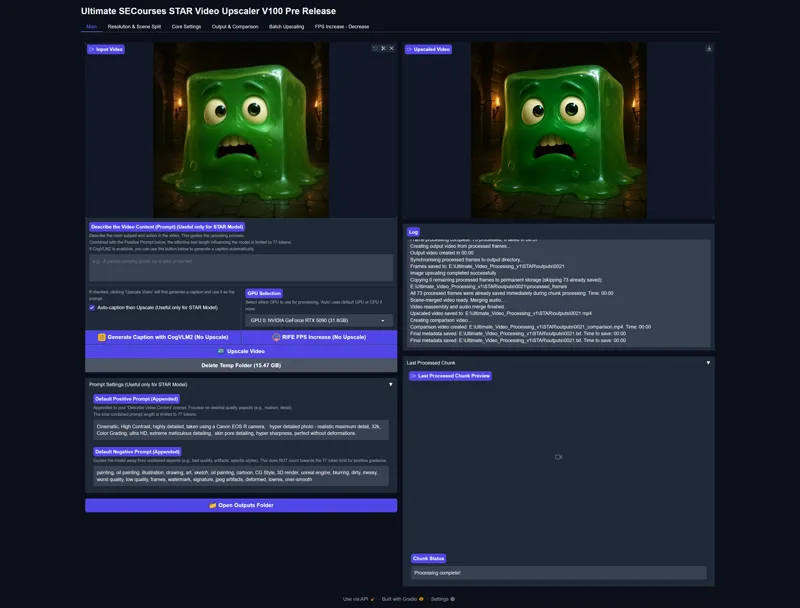


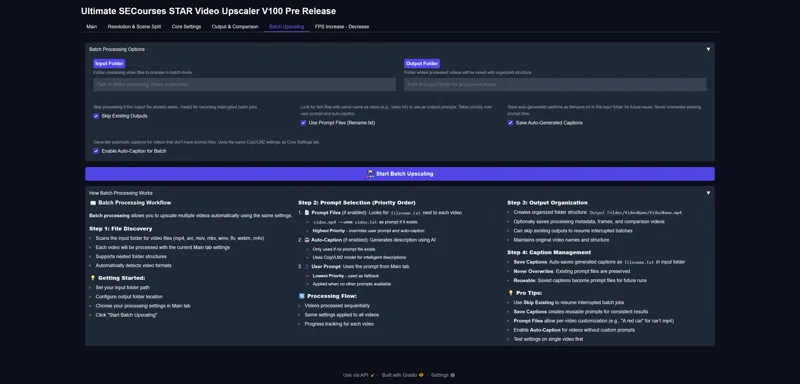


Hopefully Upcoming Ultimate Video Upscaler Almost Ready - Better than TOPAZ AI - Industry Level - Capable of Automatically Upscaling Entire Movies - Please Check All Images and Leave Feedback of Features
Please very carefully check every screenshot and let me know what you think : screenshots_as_zip.zip
What more we can add
What we lack
The app is hopefully almost ready
I have added deterministic upscalers as well and they are dynamic so you can use your own downloaded models as well
Currently we have the followings pre downloaded
• 2x-AnimeSharpV4_Fast_RCAN_PU.safetensors
• 2x_AniScale2_Omni_i16_40K.pth
• 4x-AnimeSharp.safetensors
• 4x-UltraSharp.safetensors
• 4xNomos2_hq_dat2.safetensors
• 4xRealWebPhoto_v4_dat2.safetensors
• HAT-L_SRx4_ImageNet-pretrain.safetensors
• Kim2091-4x-UltraSharp.safetensors
• RealESRGAN_x4plus.safetensors
• RealESRGAN_x4plus_anime_6B.safetensorsThe advantage of deterministic upscalers is that we support batch size upscale (multiple frames upscaled at once and makes it way faster) + they are already ultra fast since they are not diffusion based
What I have in my mind as next:
What I have left in my mind are Cancel feature that will immediately cancel every generation and return back as a video currently running generation
Full preset save and load feature
Making different VRAM presets for target 1024x1024px resolution like 8 GB GPUs, 12 GB GPUs, 24 GB GPUs, 80 GB GPUs etc
Before app is published bronze subscription level price will be raised to 6.99$ from 6.00$
Existing subscribers won't be affected (you continue same price as long as you never cancel) only for new subscribers so you can subscribe now if you didn't yet
New feature added to hopefully upcoming ultimate SECourses video upscaler app after was requested. If you have feature ideas please let me know
Comments (28)
After the recently published Wan22 Lora tutorial, for which I am very very grateful, the next item on my wish list would be the ultimate video upscaler. Any progress there? Thanks in advance for all your efforts!
thank you. yes working on it. even mentioned at this tutorial :D https://youtu.be/EqFilBM3i7s
Is there a time estimate for when it is expected to be published? The result looks very good in the examples.
hopefully in 1 week. so sorry for delay i am making presets and few more thing
This is probably a rediculous request, but it's for an old video I edited that I have been trying to restore. It was transferred a few times over the years and is very dicey now, with wobbly video and edits that can pull the video ever so slightly out of sync for a moment. Can the program help with this by detecting a shot (starting with the first frame in a shot, going through the end frame of that shot) and only do the one shot? I know I would then have to move the playhead and do hundreds of individual shots to clean up the video, but at least by automatically detecting a shot it wouldn't be necessary to also move the in and out put again and again, too. Probaby too niche a feature for most people to need, through.
well i didn't understand you request can you elaborate more?
Can you add SeedVR2: One-Step Video Restoration via Diffusion Adversarial Post-Training to your video enhancer code is released better than STAR? https://iceclear.github.io/projects/seedvr2/ https://www.youtube.com/watch?v=stdVncVDQyA demo please
after published we may add sorry for late reply
Hi Furkan. app looks very promising!. Do you plan to include face restoration feature ? (codeformer / gfp gan)
wow nice recommendation. i am gonna add CodeFormer . it is best right?
Looking forther for the app to test it
great thank you for comment
I would like to see examples in a more dynamic video
yes will do hopefully. still trying to finish all features.
Can you add a very basic editing tool to cut sections of video and export them either directly to the upscale section or as a saved file?
gradio video supposed to have this but let me search this
can Star upscale 720p to 720p that's what i do with Topaz Starlight Mini
720p to 720p is same resolution how do you upscale?
Based on example I see that banding of colors on eyes and cheeks is stronger on upscaled. I think frames should be "restored" or smoother before upscaling. The best would be to see example with generated realistic video with people etc. Because there is a lack of good upscaling video with realistic scenes. Some day I tried your SUPIR upscaler for frames of videos, all was ok but small details like hair was generated with randomly seed so they didn't move but blinked.
this example made with weak deterministic upscale not with STAR.
I have RTX 3090 24GB what is the maximum upscale resolution?
Well there is a huge trade off between max resolution and number of frames window. so if you go with lower number of frames, thus worse quality and consistency, you can go higher res. this model is vram monster but also quality monster
topaz sucks
this will be way better hopefully
The thing is, in the end of the day, you want a diffusion based upscaler for the final output. I've been using Starlight Mini on my PC, it runs locally, it's slow but result is superior. It smoothens out the frames, makes them more cohesive and corrects inconsistencies. When you apply the same technique for each frame, it will be inconsistent, because longer AI videos are made out of many separate clips, which require different handling. That's why diffusion model shines on AI videos. If you have non AI videos, then this upscaler is faster and more reasonable to use. But on AI videos, diffusion is the way to go. I stopped using other Topaz models and only use their Starlight mini. Result is like night and day.
We have Starlight max version not mini on this app :) get a beefy GPU, auto split into scenes and upscale 96 frames at once
that's a lot of upscalers, can't wait to test :-) I don't know if it is something that can be done, but using teachache creates bad or blurry hands for people, could an upscaler do something about that ? (like there are upscalers that try to make faces look better or for photo we have ai enhancers that create new details in photo)
nope upscaler probably wont fix it. upscaler aim is being loyal to the original video but adding more details