
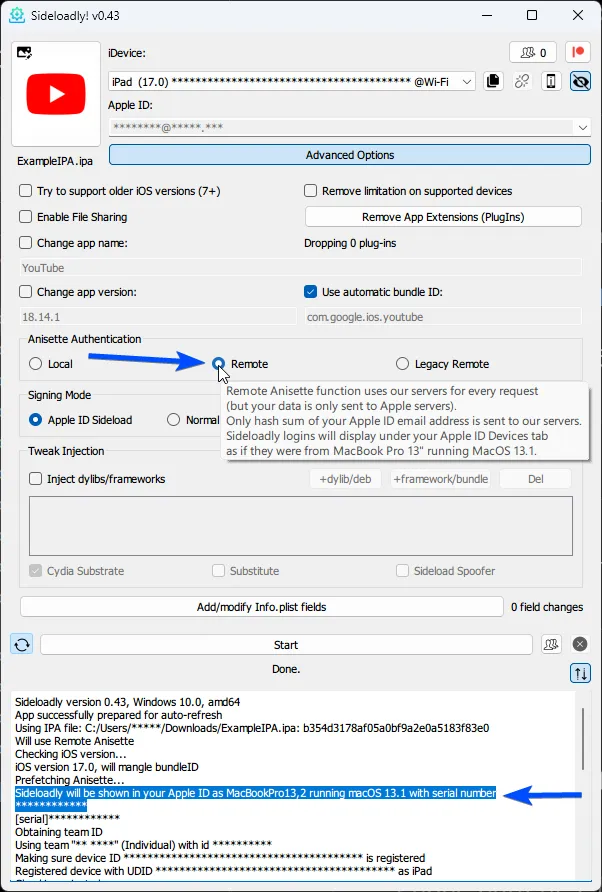
The Updated Remote Anisette
Hello Patrons!
We recently released a new Sideloadly 0.43.0 update today with improvements to the remote anisette feature.
The updated & improved remote anisette will now generate unique anisette data (data that is required for sideloading) per email used. Remote anisette option will generate & grab this data from our servers so it'll work on the latest macOS Sonoma and skip the need for a Mail Plug-In entirely on macOS.
These changes will also resolve any issues you may have with local anisette on Windows & macOS and your Apple ID will no longer be locked as the anisette data will be unique to your Apple ID.
Now with this update being released, we'll be working on improving the local anisette feature for everyone!
Thank you for supporting Sideloadly! <3
Comments (8)
Someone help me 2 hours ago I contracted the service and I go to sideloadly and it won't let me install more than 3 apps
That's the limit. Unless you purchase a Developer, or Enterprise certificate from Apple.
It says "Remote Anisette is not available for you; iTunes Anisette not available; Remote Anisette is not available for you; Cannot continue! If Local Anisette cannot be fixed then you may want to use Remote Anisette (available to our Patreon supporters) as it does not rely on your local system. App successfully prepared for auto-refresh" how do I fix this
I'm having the same issue did you ever get that fixed?
I am getting this error Install failed: Guru Meditation 0db732@934:3aea77 Failed: (9120) Your maximum App ID limit has been reached. You may create up to 10 App IDs every 7 days.
this is completely normal, you need to wait 7 days, uninstall those app that you don't use and after 7 days retry
Im having problem pairing the device.
install itunes, login into itunes then install icloud but don't log into it, make sure to install both of them on the web!