
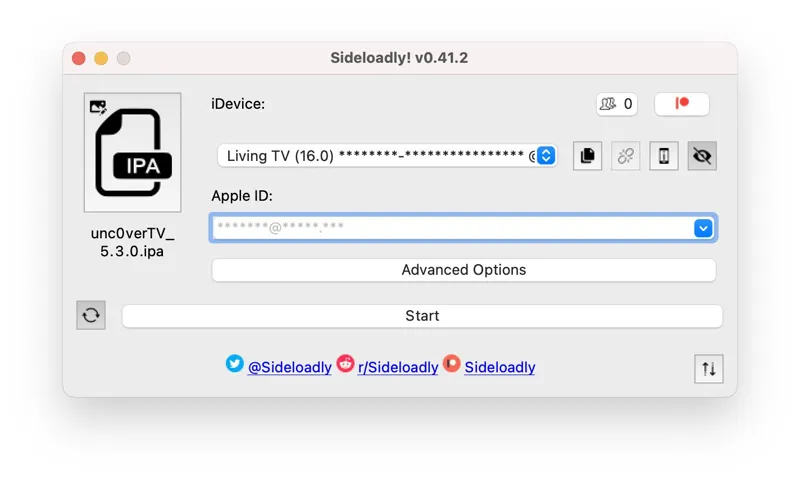
Sideloadly 0.42.0 Update! Apple TV sideloading is finally here!
A new Sideloadly 0.42.0 update was released with various improvements, bug fixes and a long-awaited feature! Here's what's new!
0.42.0 Update Changelog
Apple TV (tvOS) sideloading support is now available! You can now pair & sideload to your Apple TV using Sideloadly!*
Apple TV or tvOS automatic app refreshing is available. Patreon feature.
Implemented support for enabling JIT on already running apps.
Implemented support for UTF-16 encoded plist files that may be declared as UTF-8. This means even more IPA files will be supported.
Hiding sensitive information now also extends to the daemon.
Improved the responsiveness when loading the JIT submenu.
Fixed an issue with the dynamically updating macOS Mail Plug-In which was affecting certain Macs.
Fixed an issue which prevented sideloading on Apple Silicon Macs.
Fixed an issue with JIT on macOS which would fail with error code -27.
Added additional information for troubleshooting the update issue certain users are experiencing.
Various minor improvements & bug fixes.
*tvOS sideloading has only been tested on macOS with an Apple TV 4K which seemingly has no way of pairing on Windows for now. It is possible that USB Apple TVs will work on Windows but we did not have any available to test. Depending on how popular this feature is, we may look into implementing better Windows support.
As always, we'll be monitoring Patreon, Reddit & Twitter to provide support and fix reported issues. Thank you for using Sideloadly!
Comments (6)
i cant find that option (remote app and devices) in my mac, what can i do?
Does this update work for Apple TV 2nd Gen (2021) I’m never done this and about to try it on my Apple TV but figured it was worth an ask. Thank you.
Yes, it should work! If your Apple TV does not have a USB port, macOS (even virtual) will be required.
THANKSSSSS!!!! I will try
Hi, im very interested in install apps in itv 4k, will possible without cable connection? This version haven't. I try find any tutorial but can't not see them, I don't know how pair it
On the latest Apple TV (without USB ports), it’s only possible on macOS at this time. Even running macOS on a Virtual Machine works. For your computer to detect your Apple TV: open Settings > Remote Apps & Devices > Remote Devices and your ATV will become discoverable by your PC.