




Basemental Gangs 4.15.55
It's been a while since the last Gangs update, but I can assure you this is a good one. (At least according to.. well.. me) This update should solve most, if not all, the most common issues players have been having with Gangs. It's taken quite some time to find a good way to solve all these issues, but I think it's safe to say that this version will feel a lot more fluid.
This update changes the core game play, so read the How It Works section!
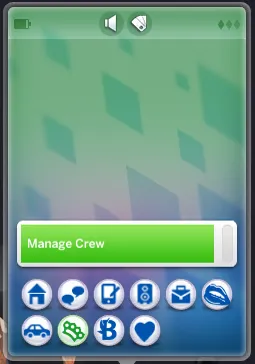
Manage Crew
Manage your gang through your phone
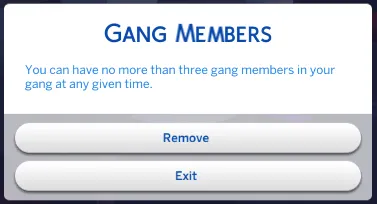
Hire or remove members at will
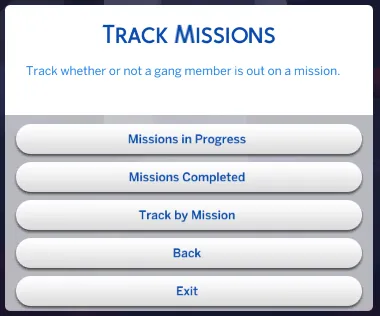
Mission tracking, individual or multiple
Fixes
Fixed issue with locked doors for gang members
Fixed issue with Gangs error logging
Fixed potential bug with "Pass the Torch" Interaction
Fixed potential bugs with disband_gang cheats
Fixed bug with script for checking if Sim is gang leader
Fixed 2 Simkuza tutorial notifications not appearing
Sims that die will now loose their gang member status
New cheats added to enable Gangs
Removed "Replace Gang Members" reward traits
Removed a bunch of hidden traits
Made the mod more cheat friendly
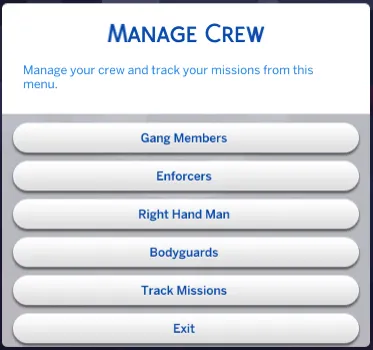
Manage Crew
The hiring and removing of members is now done through a menu you access from your Sims phone, called "Manage Crew".
When you're starting out this will only list "Gang Members" until you have hired your first gang members. Once your Gang Skill Level gets higher you will get access to managing the other available members, as well as the mission tracker.
When you click on, say Gang Members you will have two options, "Hire" and "Remove" However, if you haven't hired anyone already you will only have the option to "Hire", and if you already hired three gang members you will only have the option to "Remove".
If you remove one gang member, you will be able to hire one more. If you remove two out of the three gang members you are allowed to have you will be able to hire two new ones, and so on.
Mission Tracking
Sometimes it's hard to tell whether or not a gang member is still out doing a mission or if they've returned but you simply missed the notification of them returning and they promptly left the premises before you got a hold of them.
To check up on this, you can use the "Track Missions" part of the "Manage Crew" menu. You can either track any mission in progress, or any mission currently completed, or track by specific mission.
Say you want to check if any of your gang members have completed a mission but you missed their return from said mission, you can quickly check this by using the "Missions Completed" option.
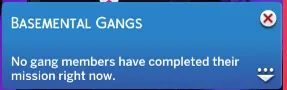
This will give you a notification in the top right corner if one or more gang members to meet those criteria are found.
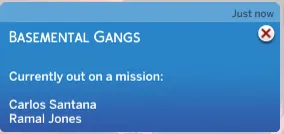
If you simply want to check whether or not any of your Gang Members are currently out on a mission, you use the "Mission in Progress" option. Again, this will give you a notification in the top right corner if one or more gang members to meet those criteria are found.
Lastly, you can track individual missions to check which mission you have already sent someone out on. This might be redundant, but I think it's a fun additional tracking feature.
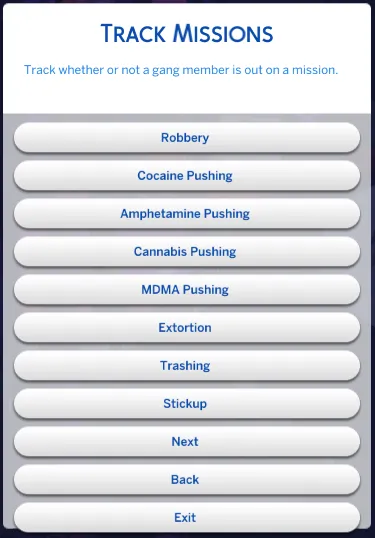
Click "Track by Mission" to get a list of all the available missions for your current Gang Leader Skill Level.
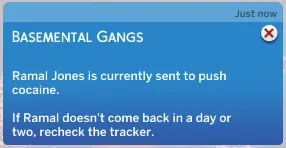
Click on whichever mission you feel like checking up on and you will, like with the aforementioned options, get a notification in the top right corner of your screen that will tell you whether or not someone is out on that mission and if it's completed or not.
Enable Gangs Cheats
In the previous versions you had one cheat you could use to start creating a gang (if your Sim in question wasn't already a drug dealer with a max level in one of the dealing skills). That cheat was bmg.enable_gangs
This cheat still works, and it gives you a max level in cocaine dealing and the required Cocaine Dealer trait.
Now you have three more cheats in case you rather want to max one of the other dealing skills and get the required dealing traits for said skills.
The cheats are as follows:
bmg.enable_gangs (for cocaine dealing)
bmg.enable_gangs_cannabis (for cannabis dealing)
bmg.enable_gangs_pills (for pills dealing)
bmg.enable_gangs_amphetamine (for amphetamine dealing
Gang Members and Doors
Whenever a gang member returned to your HQ from a mission, they did not added to the required venue situation that allowed them to access locked doors.
This will no longer be an issue. The only compromise here is that they will not have "Gang Member" under their name, but rather "Associate". This is to make sure that other Sims you invite to your HQ also get access to the locked doors.
Dead Gang Members
Previously, if a gang member died they would still be a part of your gang as a ghost. This is no longer the case. Once they die they are out of the gang and you will get the option to hire a new gang member to replace the dead one.
Requires: The Sims 4, Get to Work and Basemental Drugs
Delete all the old Basemental Gangs files from your Mods folder.
Download this Basemental Gangs zip file.
Unzip this Basemental Gangs zip file.
Place the files in a folder titled Basemental Gangs in your Mods folder.
Delete the Basemental Gangs zip file.
Delete your localthumbcache.package
Basemental Gangs conflicts with other mods installed that adds custom venues to your game, if you have zerbus Get To School/College mod, LittleMsSams more buyable venues, or other mods that include custom venues delete their Venue Lists.package. (The Venue List.package in this mod includes their venues as well, meaning their mods will still work with only this package installed).
Basemental Gangs does NOT replace Basemental Drugs, but is an addon to Basemental Drugs. Do not delete Basemental Drugs prior to installing Basemental Gangs.