
SillyTavern Xtts & Extras launcher
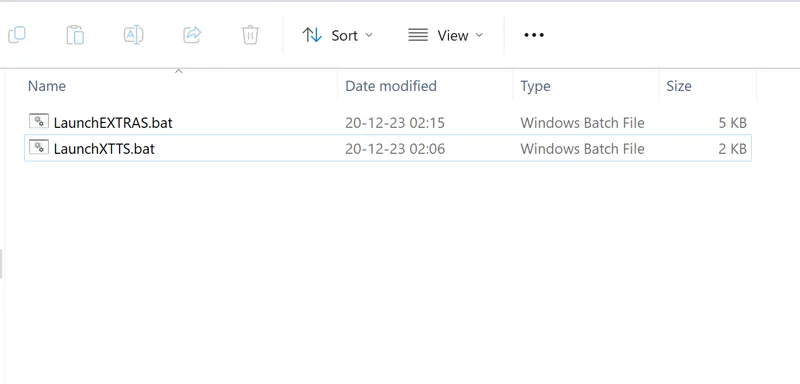
Hey everyone! I've created some simple launcher for the xtts & extras api servers for SillyTavern, a powerful local text-generation UI for character chat, creative writing, storytelling, and interactive fiction.
Watch the video on SillyTavern: https://youtu.be/enWO16x6tRM
Here's how it works:
1. Download the bat files, drag and drop them inside the SillyTavern folder
2. Whenever you want to run either the xtts server or api server run those files
3.???
4. Profit 😎
If you want to modify the arguments or options of the api, just simply edit the files with notepad before launching it.
You of course need to have SillyTavern Ui installed first: https://www.patreon.com/posts/95125999
And as always, supporting me on Patreon allows me to keep creating helpful resources like this for the community. Thank you for your support 😉!
Comments (57)
I trying to use LaunchXTTS.bat to activate TTS server but failed. Please help! E:\AI\SillyTarvenAuto\SillyTavern\xtts\venv\lib\site-packages\transformers\utils\generic.py:441: FutureWarning: `torch.utils._pytree._register_pytree_node` is deprecated. Please use `torch.utils._pytree.register_pytree_node` instead. _torch_pytree._register_pytree_node( E:\AI\SillyTarvenAuto\SillyTavern\xtts\venv\lib\site-packages\transformers\utils\generic.py:309: FutureWarning: `torch.utils._pytree._register_pytree_node` is deprecated. Please use `torch.utils._pytree.register_pytree_node` instead. _torch_pytree._register_pytree_node( E:\AI\SillyTarvenAuto\SillyTavern\xtts\venv\lib\site-packages\transformers\utils\generic.py:309: FutureWarning: `torch.utils._pytree._register_pytree_node` is deprecated. Please use `torch.utils._pytree.register_pytree_node` instead. _torch_pytree._register_pytree_node( 2024-08-07 23:01:47.856 | WARNING | xtts_api_server.server::63 - 'Streaming Mode' has certain limitations, you can read about them here https://github.com/daswer123/xtts-api-server#about-streaming-mode 2024-08-07 23:01:47.857 | INFO | xtts_api_server.server::66 - You launched an improved version of streaming, this version features an improved tokenizer and more context when processing sentences, which can be good for complex languages like Chinese 2024-08-07 23:01:47.858 | INFO | xtts_api_server.RealtimeTTS.engines.coqui_engine:__init__:103 - Loading official model 'v2.0.2' for streaming v2.0.2 E:\AI\SillyTarvenAuto\SillyTavern\xtts\venv\lib\site-packages\transformers\utils\generic.py:441: FutureWarning: `torch.utils._pytree._register_pytree_node` is deprecated. Please use `torch.utils._pytree.register_pytree_node` instead. _torch_pytree._register_pytree_node( E:\AI\SillyTarvenAuto\SillyTavern\xtts\venv\lib\site-packages\transformers\utils\generic.py:309: FutureWarning: `torch.utils._pytree._register_pytree_node` is deprecated. Please use `torch.utils._pytree.register_pytree_node` instead. _torch_pytree._register_pytree_node( E:\AI\SillyTarvenAuto\SillyTavern\xtts\venv\lib\site-packages\transformers\utils\generic.py:309: FutureWarning: `torch.utils._pytree._register_pytree_node` is deprecated. Please use `torch.utils._pytree.register_pytree_node` instead. _torch_pytree._register_pytree_node( > Using model: xtts E:\AI\SillyTarvenAuto\SillyTavern\xtts\venv\lib\site-packages\TTS\utils\io.py:54: FutureWarning: You are using `torch.load` with `weights_only=False` (the current default value), which uses the default pickle module implicitly. It is possible to construct malicious pickle data which will execute arbitrary code during unpickling (See https://github.com/pytorch/pytorch/blob/main/SECURITY.md#untrusted-models for more details). In a future release, the default value for `weights_only` will be flipped to `True`. This limits the functions that could be executed during unpickling. Arbitrary objects will no longer be allowed to be loaded via this mode unless they are explicitly allowlisted by the user via `torch.serialization.add_safe_globals`. We recommend you start setting `weights_only=True` for any use case where you don't have full control of the loaded file. Please open an issue on GitHub for any issues related to this experimental feature. return torch.load(f, map_location=map_location, **kwargs) [2024-08-07 23:02:05,981] [INFO] [real_accelerator.py:158:get_accelerator] Setting ds_accelerator to cuda (auto detect) E:\AI\SillyTarvenAuto\SillyTavern\xtts\venv\lib\site-packages\deepspeed\runtime\zero\linear.py:49: FutureWarning: `torch.cuda.amp.custom_fwd(args...)` is deprecated. Please use `torch.amp.custom_fwd(args..., device_type='cuda')` instead. def forward(ctx, input, weight, bias=None): E:\AI\SillyTarvenAuto\SillyTavern\xtts\venv\lib\site-packages\deepspeed\runtime\zero\linear.py:67: FutureWarning: `torch.cuda.amp.custom_bwd(args...)` is deprecated. Please use `torch.amp.custom_bwd(args..., device_type='cuda')` instead. def backward(ctx, grad_output): W0807 23:02:06.218000 31260 torch\distributed\elastic\multiprocessing\redirects.py:28] NOTE: Redirects are currently not supported in Windows or MacOs. CoquiEngine: Error initializing main coqui engine model: cannot import name 'log' from 'torch.distributed.elastic.agent.server.api' (E:\AI\SillyTarvenAuto\SillyTavern\xtts\venv\lib\site-packages\torch\distributed\elastic\agent\server\api.py) Traceback (most recent call last): File "E:\AI\SillyTarvenAuto\SillyTavern\xtts\venv\lib\site-packages\xtts_api_server\RealtimeTTS\engines\coqui_engine.py", line 289, in _synthesize_worker tts.load_checkpoint( File "E:\AI\SillyTarvenAuto\SillyTavern\xtts\venv\lib\site-packages\TTS\tts\models\xtts.py", line 772, in load_checkpoint self.gpt.init_gpt_for_inference(kv_cache=self.args.kv_cache, use_deepspeed=use_deepspeed) File "E:\AI\SillyTarvenAuto\SillyTavern\xtts\venv\lib\site-packages\TTS\tts\layers\xtts\gpt.py", line 222, in init_gpt_for_inference import deepspeed File "E:\AI\SillyTarvenAuto\SillyTavern\xtts\venv\lib\site-packages\deepspeed\__init__.py", line 22, in from . import module_inject File "E:\AI\SillyTarvenAuto\SillyTavern\xtts\venv\lib\site-packages\deepspeed\module_inject\__init__.py", line 6, in from .replace_module import replace_transformer_layer, revert_transformer_layer, ReplaceWithTensorSlicing, GroupQuantizer, generic_injection File "E:\AI\SillyTarvenAuto\SillyTavern\xtts\venv\lib\site-packages\deepspeed\module_inject\replace_module.py", line 587, in from ..pipe import PipelineModule File "E:\AI\SillyTarvenAuto\SillyTavern\xtts\venv\lib\site-packages\deepspeed\pipe\__init__.py", line 6, in from ..runtime.pipe import PipelineModule, LayerSpec, TiedLayerSpec File "E:\AI\SillyTarvenAuto\SillyTavern\xtts\venv\lib\site-packages\deepspeed\runtime\pipe\__init__.py", line 6, in from .module import PipelineModule, LayerSpec, TiedLayerSpec File "E:\AI\SillyTarvenAuto\SillyTavern\xtts\venv\lib\site-packages\deepspeed\runtime\pipe\module.py", line 19, in from ..activation_checkpointing import checkpointing File "E:\AI\SillyTarvenAuto\SillyTavern\xtts\venv\lib\site-packages\deepspeed\runtime\activation_checkpointing\checkpointing.py", line 26, in from deepspeed.runtime.config import DeepSpeedConfig File "E:\AI\SillyTarvenAuto\SillyTavern\xtts\venv\lib\site-packages\deepspeed\runtime\config.py", line 41, in from ..elasticity import ( File "E:\AI\SillyTarvenAuto\SillyTavern\xtts\venv\lib\site-packages\deepspeed\elasticity\__init__.py", line 10, in from .elastic_agent import DSElasticAgent File "E:\AI\SillyTarvenAuto\SillyTavern\xtts\venv\lib\site-packages\deepspeed\elasticity\elastic_agent.py", line 9, in from torch.distributed.elastic.agent.server.api import log, _get_socket_with_port ImportError: cannot import name 'log' from 'torch.distributed.elastic.agent.server.api' (E:\AI\SillyTarvenAuto\SillyTavern\xtts\venv\lib\site-packages\torch\distributed\elastic\agent\server\api.py) Process Process-1: Traceback (most recent call last): File "C:\Users\Scofield\AppData\Local\Programs\Python\Python310\lib\multiprocessing\process.py", line 314, in _bootstrap self.run() File "C:\Users\Scofield\AppData\Local\Programs\Python\Python310\lib\multiprocessing\process.py", line 108, in run self._target(*self._args, **self._kwargs) File "E:\AI\SillyTarvenAuto\SillyTavern\xtts\venv\lib\site-packages\xtts_api_server\RealtimeTTS\engines\coqui_engine.py", line 289, in _synthesize_worker tts.load_checkpoint( File "E:\AI\SillyTarvenAuto\SillyTavern\xtts\venv\lib\site-packages\TTS\tts\models\xtts.py", line 772, in load_checkpoint self.gpt.init_gpt_for_inference(kv_cache=self.args.kv_cache, use_deepspeed=use_deepspeed) File "E:\AI\SillyTarvenAuto\SillyTavern\xtts\venv\lib\site-packages\TTS\tts\layers\xtts\gpt.py", line 222, in init_gpt_for_inference import deepspeed File "E:\AI\SillyTarvenAuto\SillyTavern\xtts\venv\lib\site-packages\deepspeed\__init__.py", line 22, in from . import module_inject File "E:\AI\SillyTarvenAuto\SillyTavern\xtts\venv\lib\site-packages\deepspeed\module_inject\__init__.py", line 6, in from .replace_module import replace_transformer_layer, revert_transformer_layer, ReplaceWithTensorSlicing, GroupQuantizer, generic_injection File "E:\AI\SillyTarvenAuto\SillyTavern\xtts\venv\lib\site-packages\deepspeed\module_inject\replace_module.py", line 587, in from ..pipe import PipelineModule File "E:\AI\SillyTarvenAuto\SillyTavern\xtts\venv\lib\site-packages\deepspeed\pipe\__init__.py", line 6, in from ..runtime.pipe import PipelineModule, LayerSpec, TiedLayerSpec File "E:\AI\SillyTarvenAuto\SillyTavern\xtts\venv\lib\site-packages\deepspeed\runtime\pipe\__init__.py", line 6, in from .module import PipelineModule, LayerSpec, TiedLayerSpec File "E:\AI\SillyTarvenAuto\SillyTavern\xtts\venv\lib\site-packages\deepspeed\runtime\pipe\module.py", line 19, in from ..activation_checkpointing import checkpointing File "E:\AI\SillyTarvenAuto\SillyTavern\xtts\venv\lib\site-packages\deepspeed\runtime\activation_checkpointing\checkpointing.py", line 26, in from deepspeed.runtime.config import DeepSpeedConfig File "E:\AI\SillyTarvenAuto\SillyTavern\xtts\venv\lib\site-packages\deepspeed\runtime\config.py", line 41, in from ..elasticity import ( File "E:\AI\SillyTarvenAuto\SillyTavern\xtts\venv\lib\site-packages\deepspeed\elasticity\__init__.py", line 10, in from .elastic_agent import DSElasticAgent File "E:\AI\SillyTarvenAuto\SillyTavern\xtts\venv\lib\site-packages\deepspeed\elasticity\elastic_agent.py", line 9, in from torch.distributed.elastic.agent.server.api import log, _get_socket_with_port ImportError: cannot import name 'log' from 'torch.distributed.elastic.agent.server.api' (E:\AI\SillyTarvenAuto\SillyTavern\xtts\venv\lib\site-packages\torch\distributed\elastic\agent\server\api.py)
Any luck?
Having the exact same issue, what did you do to fix it?
I know this video is a little older, but I'm having an issue with getting XTTS to work through SillyTavern. It actually works if I use it through Text GenerationWebUI, but fails when sending replies to the characters in SillyTavern. Here is the error: Output generated in 42.60 seconds (0.33 tokens/s, 14 tokens, context 501, seed 786865685) Exception in ASGI application Traceback (most recent call last): File "C:\Llama\TextWebUI\text-generation-webui\installer_files\env\Lib\site-packages\uvicorn\protocols\http\httptools_impl.py", line 411, in run_asgi result = await app( # type: ignore[func-returns-value] ^^^^^^^^^^^^^^^^^^^^^^^^^^^^^^^^^^^^^^^^^^^^^^ File "C:\Llama\TextWebUI\text-generation-webui\installer_files\env\Lib\site-packages\uvicorn\middleware\proxy_headers.py", line 69, in __call__ return await self.app(scope, receive, send) ^^^^^^^^^^^^^^^^^^^^^^^^^^^^^^^^^^^^ File "C:\Llama\TextWebUI\text-generation-webui\installer_files\env\Lib\site-packages\fastapi\applications.py", line 1054, in __call__ await super().__call__(scope, receive, send) File "C:\Llama\TextWebUI\text-generation-webui\installer_files\env\Lib\site-packages\starlette\applications.py", line 123, in __call__ await self.middleware_stack(scope, receive, send) File "C:\Llama\TextWebUI\text-generation-webui\installer_files\env\Lib\site-packages\starlette\middleware\errors.py", line 186, in __call__ raise exc File "C:\Llama\TextWebUI\text-generation-webui\installer_files\env\Lib\site-packages\starlette\middleware\errors.py", line 164, in __call__ await self.app(scope, receive, _send) File "C:\Llama\TextWebUI\text-generation-webui\installer_files\env\Lib\site-packages\starlette\middleware\cors.py", line 85, in __call__ await self.app(scope, receive, send) File "C:\Llama\TextWebUI\text-generation-webui\installer_files\env\Lib\site-packages\starlette\middleware\exceptions.py", line 65, in __call__ await wrap_app_handling_exceptions(self.app, conn)(scope, receive, send) File "C:\Llama\TextWebUI\text-generation-webui\installer_files\env\Lib\site-packages\starlette\_exception_handler.py", line 64, in wrapped_app raise exc File "C:\Llama\TextWebUI\text-generation-webui\installer_files\env\Lib\site-packages\starlette\_exception_handler.py", line 53, in wrapped_app await app(scope, receive, sender) File "C:\Llama\TextWebUI\text-generation-webui\installer_files\env\Lib\site-packages\starlette\routing.py", line 756, in __call__ await self.middleware_stack(scope, receive, send) File "C:\Llama\TextWebUI\text-generation-webui\installer_files\env\Lib\site-packages\starlette\routing.py", line 776, in app await route.handle(scope, receive, send) File "C:\Llama\TextWebUI\text-generation-webui\installer_files\env\Lib\site-packages\starlette\routing.py", line 297, in handle await self.app(scope, receive, send) File "C:\Llama\TextWebUI\text-generation-webui\installer_files\env\Lib\site-packages\starlette\routing.py", line 77, in app await wrap_app_handling_exceptions(app, request)(scope, receive, send) File "C:\Llama\TextWebUI\text-generation-webui\installer_files\env\Lib\site-packages\starlette\_exception_handler.py", line 64, in wrapped_app raise exc File "C:\Llama\TextWebUI\text-generation-webui\installer_files\env\Lib\site-packages\starlette\_exception_handler.py", line 53, in wrapped_app await app(scope, receive, sender) File "C:\Llama\TextWebUI\text-generation-webui\installer_files\env\Lib\site-packages\starlette\routing.py", line 72, in app response = await func(request) ^^^^^^^^^^^^^^^^^^^ File "C:\Llama\TextWebUI\text-generation-webui\installer_files\env\Lib\site-packages\fastapi\routing.py", line 278, in app raw_response = await run_endpoint_function( ^^^^^^^^^^^^^^^^^^^^^^^^^^^^ File "C:\Llama\TextWebUI\text-generation-webui\installer_files\env\Lib\site-packages\fastapi\routing.py", line 191, in run_endpoint_function return await dependant.call(**values) ^^^^^^^^^^^^^^^^^^^^^^^^^^^^^^ File "C:\Llama\TextWebUI\text-generation-webui\extensions\openai\script.py", line 116, in openai_completions response = OAIcompletions.completions(to_dict(request_data), is_legacy=is_legacy) ^^^^^^^^^^^^^^^^^^^^^^^^^^^^^^^^^^^^^^^^^^^^^^^^^^^^^^^^^^^^^^^^^^^^^^ File "C:\Llama\TextWebUI\text-generation-webui\extensions\openai\completions.py", line 555, in completions return deque(generator, maxlen=1).pop() ^^^^^^^^^^^^^^^^^^^^^^^^^^ File "C:\Llama\TextWebUI\text-generation-webui\extensions\openai\completions.py", line 440, in completions_common for a in generator: File "C:\Llama\TextWebUI\text-generation-webui\modules\text_generation.py", line 36, in generate_reply for result in _generate_reply(*args, **kwargs): File "C:\Llama\TextWebUI\text-generation-webui\modules\text_generation.py", line 122, in _generate_reply reply = apply_extensions('output', reply, state) ^^^^^^^^^^^^^^^^^^^^^^^^^^^^^^^^^^^^^^^^ File "C:\Llama\TextWebUI\text-generation-webui\modules\extensions.py", line 231, in apply_extensions return EXTENSION_MAP[typ](*args, **kwargs) ^^^^^^^^^^^^^^^^^^^^^^^^^^^^^^^^^^^ File "C:\Llama\TextWebUI\text-generation-webui\modules\extensions.py", line 89, in _apply_string_extensions text = func(*args, **kwargs) ^^^^^^^^^^^^^^^^^^^^^ File "C:\Llama\TextWebUI\text-generation-webui\extensions\coqui_tts\script.py", line 144, in output_modifier output_file = Path(f'extensions/coqui_tts/outputs/{state["character_menu"]}_{int(time.time())}.wav') ~~~~~^^^^^^^^^^^^^^^^^^ KeyError: 'character_menu'
Ignore this. It's an issue with the coqui_tts extension. The XTTSv2 works without enabling it in Text Generation WebUI. My bad.
im having a similar problem it says the following "Microsoft Windows [Version 10.0.22621.3085] (c) Microsoft Corporation. All rights reserved. C:\Users\Gwumbles\Desktop\AI_Bot_bs\silly_tavern\SillyTavern>C:\Users\Gwumbles\Desktop\AI_Bot_bs\silly_tavern\SillyTavern\LaunchXTTS.bat Traceback (most recent call last): File "C:\Users\Gwumbles\miniconda3\lib\runpy.py", line 197, in _run_module_as_main return _run_code(code, main_globals, None, File "C:\Users\Gwumbles\miniconda3\lib\runpy.py", line 87, in _run_code exec(code, run_globals) File "C:\Users\Gwumbles\Desktop\AI_Bot_bs\silly_tavern\SillyTavern\xtts\venv\lib\site-packages\xtts_api_server\__main__.py", line 46, in from xtts_api_server.server import app File "C:\Users\Gwumbles\Desktop\AI_Bot_bs\silly_tavern\SillyTavern\xtts\venv\lib\site-packages\xtts_api_server\server.py", line 1, in from TTS.api import TTS File "C:\Users\Gwumbles\Desktop\AI_Bot_bs\silly_tavern\SillyTavern\xtts\venv\lib\site-packages\TTS\api.py", line 12, in from TTS.utils.synthesizer import Synthesizer File "C:\Users\Gwumbles\Desktop\AI_Bot_bs\silly_tavern\SillyTavern\xtts\venv\lib\site-packages\TTS\utils\synthesizer.py", line 11, in from TTS.tts.configs.vits_config import VitsConfig File "C:\Users\Gwumbles\Desktop\AI_Bot_bs\silly_tavern\SillyTavern\xtts\venv\lib\site-packages\TTS\tts\configs\vits_config.py", line 5, in from TTS.tts.models.vits import VitsArgs, VitsAudioConfig File "C:\Users\Gwumbles\Desktop\AI_Bot_bs\silly_tavern\SillyTavern\xtts\venv\lib\site-packages\TTS\tts\models\vits.py", line 10, in import torchaudio File "C:\Users\Gwumbles\Desktop\AI_Bot_bs\silly_tavern\SillyTavern\xtts\venv\lib\site-packages\torchaudio\__init__.py", line 1, in from . import ( # noqa: F401 File "C:\Users\Gwumbles\Desktop\AI_Bot_bs\silly_tavern\SillyTavern\xtts\venv\lib\site-packages\torchaudio\_extension\__init__.py", line 45, in _load_lib("libtorchaudio") File "C:\Users\Gwumbles\Desktop\AI_Bot_bs\silly_tavern\SillyTavern\xtts\venv\lib\site-packages\torchaudio\_extension\utils.py", line 64, in _load_lib torch.ops.load_library(path) File "C:\Users\Gwumbles\Desktop\AI_Bot_bs\silly_tavern\SillyTavern\xtts\venv\lib\site-packages\torch\_ops.py", line 933, in load_library ctypes.CDLL(path) File "C:\Users\Gwumbles\miniconda3\lib\ctypes\__init__.py", line 382, in __init__ self._handle = _dlopen(self._name, mode) FileNotFoundError: Could not find module 'C:\Users\Gwumbles\Desktop\AI_Bot_bs\silly_tavern\SillyTavern\xtts\venv\Lib\site-packages\torchaudio\lib\libtorchaudio.pyd' (or one of its dependencies). Try using the full path with constructor syntax. (venv) C:\Users\Gwumbles\Desktop\AI_Bot_bs\silly_tavern\SillyTavern\xtts>" im not exactly sure what i did wrong but i used your one click install bat files
I'm having the same issues as those listed above. Getting told....C:\Users\myuser>C:\Users\user\OneDrive\Desktop\LaunchEXTRAS.bat The system cannot find the path specified. python: can't open file 'C:\\Users\\user\\server.py': [Errno 2] No such file or directory (extras) C:\Users\user>C:\Users\neoda\OneDrive\Desktop\LaunchXTTS.bat The system cannot find the path specified. The system cannot find the path specified. C:\Users\user\miniconda3\envs\extras\python.exe: No module named xtts_api_server
are you correctly running the launcher from the sillytavern folder? Is the xtts folder present inside the sillytavern folder?
LaunchEXTRAS seems to be working fine (at least it is creating a server running on localhost) but when I try to run LaunchXTTS it wont even open the cmd, it looks like it tried but then no window opens, any idea of what could it be?
open a command prompt window and drag and drop the launchxtts inside and press enter, should give you an error code at least, see what's wrong
FileNotFoundError: Could not find module 'Z:\_AI\SillyTavern\xtts\venv\Lib\site-packages\torchaudio\lib\libtorchaudio.pyd' (or one of its dependencies). Try using the full path with constructor syntax.
I too am having issues with the XTTS2. Upon running the LaunchXTTS.bat, I get a windows warning. I ignore the warning and run the file anyways, then A command window appears and immediately closes out a millisecond later, and I am unable to run the XTTS server to connect SillyTavern.
well what does the error says?
I know this might not be the best place to ask this question, but can anyone recommend some good model for NSFW roleplay that not get lost and can follow leads/ideas etc.? Most of the time despite character or the model it gets confused, lost and start talking gibberish. They are fine for a quick session, but if i want to get more from them, like expand or continue its just gone. As far as i remember the best results I've ever got were on the site that used jailbroken openai but they they moved form that to custom model and the quality is gone. Any suggestions? Oh, and i run on 16GB nvidia, but for a good model i am willing to upgrade/expand since for almost a year it is my holly grail to find some good model/character combination.
this has to do with context lengh, you need to choose models with as much context lengh as possible but the more context lengh, the more vram it's gonna use. For your GPU, I might recommend trying this one: https://huggingface.co/TheBloke/dolphin-2.6-mistral-7B-GPTQ but obviously even this model after a while will get confused, they all have limits
Following error. Prior to attempting ton install LaunchXTTS.bat, I used your OCI's to install SD / Koyah & ST basic install (LaunchEXTRAS.bat also throws an error LaunchXTTS.bat O:\SillyTavern\SillyTavern\xtts\venv\lib\site-packages\pydub\utils.py:170: RuntimeWarning: Couldn't find ffmpeg or avconv - defaulting to ffmpeg, but may not work warn("Couldn't find ffmpeg or avconv - defaulting to ffmpeg, but may not work", RuntimeWarning) 2024-01-18 14:17:46.460 | INFO | xtts_api_server.modeldownloader:install_deepspeed_based_on_python_version:47 - Python version: 3.9 2024-01-18 14:17:46.460 | ERROR | xtts_api_server.modeldownloader:install_deepspeed_based_on_python_version:64 - Unsupported Python version on Windows. 2024-01-18 14:17:46.469 | WARNING | xtts_api_server.server::62 - 'Streaming Mode' has certain limitations, you can read about them here https://github.com/daswer123/xtts-api-server#about-streaming-mode 2024-01-18 14:17:46.469 | INFO | xtts_api_server.server::65 - You launched an improved version of streaming, this version features an improved tokenizer and more context when processing sentences, which can be good for complex languages like Chinese 2024-01-18 14:17:46.470 | INFO | xtts_api_server.RealtimeTTS.engines.coqui_engine:__init__:103 - Loading official model 'v2.0.2' for streaming v2.0.2 O:\SillyTavern\SillyTavern\xtts\venv\lib\site-packages\pydub\utils.py:170: RuntimeWarning: Couldn't find ffmpeg or avconv - defaulting to ffmpeg, but may not work warn("Couldn't find ffmpeg or avconv - defaulting to ffmpeg, but may not work", RuntimeWarning) > Using model: xtts CoquiEngine: Error initializing main coqui engine model: No module named 'deepspeed' Traceback (most recent call last): File "O:\SillyTavern\SillyTavern\xtts\venv\lib\site-packages\xtts_api_server\RealtimeTTS\engines\coqui_engine.py", line 289, in _synthesize_worker tts.load_checkpoint( File "O:\SillyTavern\SillyTavern\xtts\venv\lib\site-packages\TTS\tts\models\xtts.py", line 772, in load_checkpoint self.gpt.init_gpt_for_inference(kv_cache=self.args.kv_cache, use_deepspeed=use_deepspeed) File "O:\SillyTavern\SillyTavern\xtts\venv\lib\site-packages\TTS\tts\layers\xtts\gpt.py", line 222, in init_gpt_for_inference import deepspeed ModuleNotFoundError: No module named 'deepspeed' Process Process-1: Traceback (most recent call last): File "C:\Users\johnw\miniconda3\lib\multiprocessing\process.py", line 315, in _bootstrap self.run() File "C:\Users\johnw\miniconda3\lib\multiprocessing\process.py", line 108, in run self._target(*self._args, **self._kwargs) File "O:\SillyTavern\SillyTavern\xtts\venv\lib\site-packages\xtts_api_server\RealtimeTTS\engines\coqui_engine.py", line 289, in _synthesize_worker tts.load_checkpoint( File "O:\SillyTavern\SillyTavern\xtts\venv\lib\site-packages\TTS\tts\models\xtts.py", line 772, in load_checkpoint self.gpt.init_gpt_for_inference(kv_cache=self.args.kv_cache, use_deepspeed=use_deepspeed) File "O:\SillyTavern\SillyTavern\xtts\venv\lib\site-packages\TTS\tts\layers\xtts\gpt.py", line 222, in init_gpt_for_inference import deepspeed ModuleNotFoundError: No module named 'deepspeed'
try this: go the xtts folder, click on the folder path type cmd press enter, this will bring the command prompt window and there type venv\Scripts\activate then press enter and then type pip install deepspeed then press enter if that still doesn't work for some reason, then edit the launchxtts.bat file and remove the deepspeed argument
whatn sould i do when it sais TTS Provider not ready. TypeError: Failed to fetch
Where does it say that? Also you can try refreshing the tts provider by clicking on the refresh button
resolved reinstalling, now launching the LuancXTTS.bat says ImportError: DLL load failed while importing transformer_inference_op: impossible find the specified module
dm me the full error log
it automatically close, running from prompt says that No module named xtts_api_server, but it's installed it
if it automatically closes that's usually your antivirus stopping the file from running further, disable it and try again.
I get the following error after following all the steps (I think) TTS Provider not ready. TypeError: Failed to fetch After I click on launchTTS file, I get the following error: More information: https://developers.google.com/protocol-buffers/docs/news/2022-05-06#python-updates Traceback (most recent call last): File "D:\OneDrive\Documents\GitHub\sillytavern\SillyTavern\xtts\venv\lib\site-packages\xtts_api_server\RealtimeTTS\engines\coqui_engine.py", line 289, in _synthesize_worker tts.load_checkpoint( File "D:\OneDrive\Documents\GitHub\sillytavern\SillyTavern\xtts\venv\lib\site-packages\TTS\tts\models\xtts.py", line 772, in load_checkpoint self.gpt.init_gpt_for_inference(kv_cache=self.args.kv_cache, use_deepspeed=use_deepspeed) File "D:\OneDrive\Documents\GitHub\sillytavern\SillyTavern\xtts\venv\lib\site-packages\TTS\tts\layers\xtts\gpt.py", line 222, in init_gpt_for_inference import deepspeed File "D:\OneDrive\Documents\GitHub\sillytavern\SillyTavern\xtts\venv\lib\site-packages\deepspeed\__init__.py", line 9, in from .runtime.engine import DeepSpeedEngine File "D:\OneDrive\Documents\GitHub\sillytavern\SillyTavern\xtts\venv\lib\site-packages\deepspeed\runtime\engine.py", line 16, in from tensorboardX import SummaryWriter File "D:\OneDrive\Documents\GitHub\sillytavern\SillyTavern\xtts\venv\lib\site-packages\tensorboardX\__init__.py", line 5, in from .torchvis import TorchVis File "D:\OneDrive\Documents\GitHub\sillytavern\SillyTavern\xtts\venv\lib\site-packages\tensorboardX\torchvis.py", line 11, in from .writer import SummaryWriter File "D:\OneDrive\Documents\GitHub\sillytavern\SillyTavern\xtts\venv\lib\site-packages\tensorboardX\writer.py", line 15, in from .event_file_writer import EventFileWriter File "D:\OneDrive\Documents\GitHub\sillytavern\SillyTavern\xtts\venv\lib\site-packages\tensorboardX\event_file_writer.py", line 28, in from .proto import event_pb2 File "D:\OneDrive\Documents\GitHub\sillytavern\SillyTavern\xtts\venv\lib\site-packages\tensorboardX\proto\event_pb2.py", line 15, in from tensorboardX.proto import summary_pb2 as tensorboardX_dot_proto_dot_summary__pb2 File "D:\OneDrive\Documents\GitHub\sillytavern\SillyTavern\xtts\venv\lib\site-packages\tensorboardX\proto\summary_pb2.py", line 15, in from tensorboardX.proto import tensor_pb2 as tensorboardX_dot_proto_dot_tensor__pb2 File "D:\OneDrive\Documents\GitHub\sillytavern\SillyTavern\xtts\venv\lib\site-packages\tensorboardX\proto\tensor_pb2.py", line 15, in from tensorboardX.proto import resource_handle_pb2 as tensorboardX_dot_proto_dot_resource__handle__pb2 File "D:\OneDrive\Documents\GitHub\sillytavern\SillyTavern\xtts\venv\lib\site-packages\tensorboardX\proto\resource_handle_pb2.py", line 35, in _descriptor.FieldDescriptor( File "D:\OneDrive\Documents\GitHub\sillytavern\SillyTavern\xtts\venv\lib\site-packages\google\protobuf\descriptor.py", line 561, in __new__ _message.Message._CheckCalledFromGeneratedFile() TypeError: Descriptors cannot not be created directly. If this call came from a _pb2.py file, your generated code is out of date and must be regenerated with protoc >= 3.19.0. If you cannot immediately regenerate your protos, some other possible workarounds are: 1. Downgrade the protobuf package to 3.20.x or lower. 2. Set PROTOCOL_BUFFERS_PYTHON_IMPLEMENTATION=python (but this will use pure-Python parsing and will be much slower). More information: https://developers.google.com/protocol-buffers/docs/news/2022-05-06#python-updates Process Process-1: Traceback (most recent call last): File "C:\Users\vaivi\miniconda3\lib\multiprocessing\process.py", line 315, in _bootstrap self.run() File "C:\Users\vaivi\miniconda3\lib\multiprocessing\process.py", line 108, in run self._target(*self._args, **self._kwargs) File "D:\OneDrive\Documents\GitHub\sillytavern\SillyTavern\xtts\venv\lib\site-packages\xtts_api_server
do not install sillytavern and webui in a One drive folder. Install that on your pc, desktop folder or somewhere else
when i go to launchxtts.abat the windoow just closes and nothiung happens
I had the same issue, I had installed Python 3.12, not Python 3.10. It will not work with 3.12. I removed Python, installed Python 3.10 and its now working correctly. **Forgot to add - Re-install sillytavern using the full installer.bat file once you have the correct Python installed.
I finally got this working (installed LaunchXTTS before running Silly Tavern for the first time did the trick) but my AIs voice is all choppy and slow. Any recommendations on how to fix?
what's your GPU? And how slow are we talking about here?
I seem to have it working, but there is no voice comming back, when I look into the TTS folders "model, outpu & speakers" all 3 of them are empty, that in return means there is no voices to choose from under the settings i Silly Tavern. Anyone got an Idea where to go from here? :/
Make sure you have auto generation option enabled
In the launch_extras.bat the first command is "cd SillyTavern-extras" (which fails on mine as there isnt one) - are we supposed to create a SillTavern-extras folder somewhere in our sillytavern folder and if so what do we put in it? right now it's not allowing to save an updated expressions file.
the extras folder is supposed to be automatically installed with the 1 click installer, so you shouldn't have to do anything
bro your installer not only made my antivirus crazy but it wiped my sd (python) out - not impressed. having to reinstall from backup :/
There is nothing in this installer that would wipe a python installation, the antivirus one is always a false positive, I usually recommend people not to use antiviruses anyway, you don't need it with the build in windows protection
I used the installers as well at trying to install manually
In your case you might need to completely uninstall python and reinstall it manually, you probably had an already installed bad python version, use this one instead: https://www.python.org/ftp/python/3.10.6/python-3.10.6-amd64.exe
did anyone get this to work yet? getting similar errors, i've tried excluding folder from antivirus, installing deepspeed pip install and removing deepspeed line. on launch window pops up and vanishes in a second: "Unable to import torch, pre-compiling ops will be disabled." even after i run pip install torch in same folder
if the window vanishes that's indeed because of the antivirus / firewall blocking the file from running further. I usually often recommend to people to not install any antivirus to begin with since you don't need it anymore on windows but try to disable it completely before running the installer again in maybe another folder
Hmm, once everything has started and I am receiving the webURL and I try top open it it states '404 Not Found' in the console. But looking there it seems to change the port address in the error message. I have tried http://localhost:8020, Localhost8020, 127.0.0.1:8020 and the error messages seem to add random ports. Do you have any ideas?
To add to this: This is what the log says: INFO: Started server process [5772] INFO: Waiting for application startup. INFO: Application startup complete. INFO: Uvicorn running on http://localhost:8020 (Press CTRL+C to quit) INFO: 127.0.0.1:63220 - "GET / HTTP/1.1" 404 Not Found INFO: ::1:63237 - "GET / HTTP/1.1" 404 Not Found INFO: ::1:63237 - "GET / HTTP/1.1" 404 Not Found INFO: ::1:63334 - "GET / HTTP/1.1" 404 Not Found The 404's are attempts
Also stuck on deepspeed module not found.
try this: go the xtts folder, click on the folder path type cmd press enter, this will bring the command prompt window and there type venv\Scripts\activate then press enter and then type pip install deepspeed then press enter if that still doesn't work for some reason, then edit the launchxtts.bat file and remove the deepspeed argument
When I try to run the LaunchXTTS.bat files I get the following error: D:\AI-ST\SillyTavern>LaunchXTTS.bat D:\AI-ST\SillyTavern\xtts\venv\Scripts\python.exe: No module named xtts_api_server
I was able to get this resolved by going through the "1-Click INSTALL Coqui Text-To-Speech For Webui" again and making sure that was working correctly. That fixed this issue. However, it caused a new issue in that now when the Text gen model and Coqui XTTS model and silly tavern are running they are using 14 GB of VRAM and the responses time goes from 5 -7 seconds to 80-90 seconds on my 8GB VRAM RTX 3070. I wouldn't mind using one of the cloud based services to fix this if it is low cost, like the one advertised on chub.ai. That might be a good video to make...?
Using your 1 click installer I got everything running in SillyTavern, However when I try to do this I can get the LaunchExtras.bat to work but when I try to run LaunchXTTS.bat the cmd prompt opens for a half a second and closes. It doesn't load the server like you show in your video. Any ideas?
usually when a cmd prompt opens and close by itself it's because of some antivirus blocking the file, so disable it or create an exception and try again
When i start LaunchXTTS the command window opens, but then nothing happens except the slash iron flashing. waiting for input
you might need to wait a little bit when you launch it for the first time
Getting an Error. "ModuleNotFoundError: No module named 'deepspeed'" when using the XTTS bat
Here is what is says on line 2: xtts_api_server.modeldownloader:install_deepspeed_based_on_python_version:64 - Unsupported Python version on Windows.
There are no files, buddy.
Very Sorry about that! Just uploaded the files now
cant see the files
Sorryyy! Just uploaded the files now
Thanks a lot for sharing! Where are the files, though? 😉
Sorry about that! Just uploaded the files now