
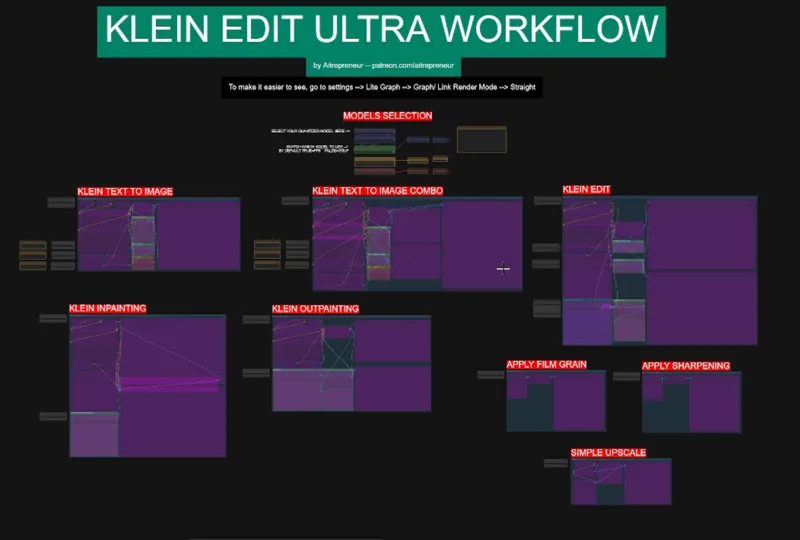
KLEIN 9B ULTRA EDITING AI KING WORKFLOW!
Hey everyone! I’ve just released a new video on THIS IS THE MOST VERSATILE FREE NANO BANANA COMPETITOR RIGHT NOW! called “FLUX2 KLEIN". An insanely good model that can do everything: Text to image, image editing, inpainting, outpainting and all of that with super fast generation speed on low vram! AND it keeps getting stronger AND stronger because the LoRA ecosystem exploded, and with the right workflow you can do EVERYTHING! JUST INSANE!
You can check out the video right here: https://youtu.be/N7j3lvenDcU
I also created a 1-click installer for the Webui for my Patreon supporters for Local AND Runpod, that you can find right here: https://www.patreon.com/posts/151396161
Here the link to the manual install guide: https://pastebin.com/swhD4aDD
Down below you will also find the KLEIN_EDIT_ULTRA_WORKFLOW.json for you to use!
As always, supporting me on Patreon allows me to keep creating helpful resources like this for the community. Thank you for your support - now go have some fun😉!
Comments (31)
There is any way to ADD more IMAGE REFERENCES to your Workflow? KLEIN EDIT I think it support up to 4 image as references, thanks
Technically, you can but in my experience it doesn't work well, anything more than 2-3 and you lose coherence almost entirely
I am unable to install these nodes: SetNode GetNode FastFilmGrain FastLaplacianSharpen ColorMatch GrowMaskWithBlur ResizeMask
have you used the installer? is comfyui + nodes up to date?
Is there a negative prompt panel? Where is it please?
Klein models do not support negative prompts.
hello, im new at this, how would i add a checkpoint to this workflow?
depends what checkpoint you are talking about here?
im getting this error , in Text to image , Prompt execution failed Prompt outputs failed validation: FastLaplacianSharpen: - Required input is missing: images
Great workflows! Nearly everthing's working, producing really nice images. Really enjoyable to use them. Thanks for your work and it's awsome that your workflows don't end in some kind of untrackable spaghetti code. Great! I'm still looking for an understandable guide for using rg2tree switches making it possible to automatically switch model and clip loading based on pre-defined settings (like standard, quality, cinematic e.g.). But I have problems to get the "Klein Inpainting" workflow to work. It always get stuck at the KSampler. I tried a Flux.2 Klein 9b Q5_KM Model in conjunction with a Qwen3 8B GGUF but it always stops at the same node. My rig has a vintage i5-6600k, 16GB of RAM and a RTX2070 with 8GB VRAM. In general it works flawless despite of the waiting time, but the Klein Inpainting workflow freezes my machine.
I can't download the 3 installers you mentioned in your video about FLUX2 KLEIN.
The node "comfyui-vrgamedevgirl" crashes Comfy UI whether I install it manually or within the Manager. What other nodes will work for the two parts needed?
how to control seed value??
this workflow juust errors out for me there isnt a thing i can do to get it to work i load the models and followed the video but i just get error after error missing vae missing loader, math errors ....whats happening
Is there any negative prompting?
All my images have bad anatomy!
The Flux-Klein model seems to have issues with distorted limbs. Twisted arms, hands the wrong way round, odd proportions for limbs etc. This is something that does not happen in z-image using the same prompts
I have been meaning to ask this for a while now, as I have seen it before, and I'm not sure why it is happening. With your KLEIN EDIT ULTRA WORKFLOW (Klein Text to Image & Klein Text to Image Combo), the width is set to 1920px, and the height is set to 1080px. But the rendered images get baked as 1920px x 1072px. Why are we losing 8 pixels in the final images? Keep up the great work. Thanks, -David
Because 1080 isn't dividable with 16 and that is what the model works with. So you should give it a number that is but if you do not it will auto correct it for you.
I imagine this is awesome, but i couldn't get past the Qwen 3 Clip... no link to the download, and the only download i could find was 3 seperate files.... that being said i watched the you tube video as it was super informative anyway.
https://huggingface.co/silveroxides/FLUX.2-dev-fp8_scaled/tree/main
so where is the loras? is not at hugging face
Civitai there is a note at the right of the place you load the models with links in the workflow.
thank you again for your knowledge
So far I’m enjoying the Klein more than any other image generator I’ve played with! I keep getting this missing node tho when I open the workflow, I’m still able to generate, but idk if it’s holding anything back. I’ve looked in missing nodes and dont see it anywhere to download? “Install Required - LayerUtility: ImageRemoveAlpha”
It is from the ComfyUI_LayerStyle you should be able to install that from the ComfyUI manager. Otherwise you can also git clone it to your custom_nodes folder.
Thank you for the workflow. I hadn't tried Klein until now. What are your thoughts on adding a second pass with ZIT for skin quality and realism?
Yeah I tried and it works really well, however for this video I wanted to ONLY use klein, hence why I trained the specific Detailer lora for that. But yeah a second pass with ZIT kinda eliminates the needs for the detailer lora but increases the generation times though since klein do 4 steps instead of 8-9 for ZIT
Dude you are always one step ahead I love it. I was just reading about this model and wondering how to try it out...SOLVED!
the GOAT delivers!
Thank you