
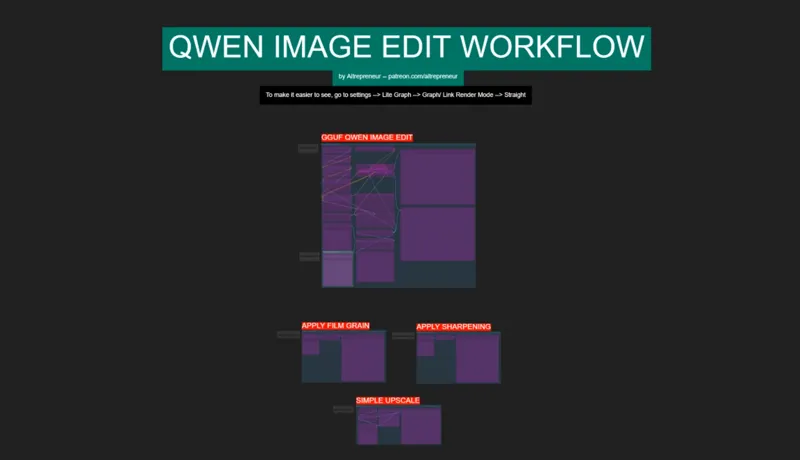
QWEN IMAGE EDIT NEW MULTIMODAL AI IMAGE EDITING KING WORKFLOW!
Hey everyone! I've just released a new video on "THE NEW MULTIMODAL AI KING!", called "QWEN IMAGE EDIT" made by the same team that created Qwen image. A multimodal model that is able to automatically edits images with incredible precision and that follows your prompt better than Kontext.
You can check out the video right here: https://youtu.be/6EVVV2lUMFU
I also created a 1-click installer for the Webui for my Patreon supporters for Local AND Runpod, that you can find right here: https://www.patreon.com/posts/137036485
Here the link to the manual install guide: https://pastebin.com/aYMsWDmr
Down below you will also find the QWEN_IMAGE_EDIT_WORKFLOW.json for free for you to use!
As always, supporting me on Patreon allows me to keep creating helpful resources like this for the community. Thank you for your support - now go have some fun😉!
Comments (34)
It's not NSFW, when you remove the clothes, an intimate "clothing" is added.
How do I change the seed to be random?
Hello I’m having trouble understanding which membership to choose that has the 1 click install to run image to video locally and which it is. Can you point me in the right direction
About mat1 mat2 error: https://github.com/comfyanonymous/ComfyUI/issues/9423 "It's GGUF node issue. Replace "ClipLoaderGGUF" with "Load Clip" and download qwen_2.5_vl_7b_fp8_scaled.safetensors" https://huggingface.co/Comfy-Org/Qwen-Image_ComfyUI/tree/main/split_files/text_encoders Configure loadclip with the file above in models/clip and type qwen_image Device: default
This ACTUALLY WORKS!!! 3080, 10 GB VRAM
error: TextEncodeQwenImageEdit mat1 and mat2 shapes cannot be multiplied (5292x1280 and 3840x1280)
I also have the same error. I solved by using normal Load CLIP node using the qwen_2.5_vl_7b_fp8_scaled.safetensor also don't forget to change the type to qwen _image
RunPod CUDA Error: CUDA error: no kernel image is available for execution on the device CUDA kernel errors might be asynchronously reported at some other API call, so the stacktrace below might be incorrect. For debugging consider passing CUDA_LAUNCH_BLOCKING=1 Compile with `TORCH_USE_CUDA_DSA` to enable device-side assertions. I ran an RTX Pro 6000 on RunPod (221 GB of Memory)
also, quick side note, in your instructions for RunPod it says "click here for the comfyui template (aitrepreneur/comfyui)", but there is no link I can find for clicking. I believe it just needs a quick update to the template.
So.. Any LORAs for Qwen Image-Edit?? There's a LORA Trainer for Image-Edit (yes, for EDIT) but I can only find 1 or 2 LORAs. [TRAINER: LoRA Training for Qwen-Image & Qwen-Image-Edit : https://github.com/FlyMyAI/flymyai-lora-trainer]
The link in this post appears to be a repo that requires the FlyMyAI API, which you have to pay for. It looks to be an advertisement.
sooooo for anyone having the "shape '[1, 16, 51, 2, 80, 2]' is invalid for input of size 4177920" to error, if you look over to the right of the model loader. make sure the qwen vae is selected. even if you see it open it again and select the qwen_image_vae.
How to keep the Characters consistent. I get everytime a different set of people.
we need reference image set for text to image, otherwise its just random stuff all the time
Hey! It perfectly works for me on Runpod! Is there a way to download LoRas directly from Runpod interface? To avoid upload in the pod manually? It's very looooooong.... and slooooooow....
use Port 2999 to upload the lora, then once it's done go back to the port 8888, and your lora file will be in the workspace folder, you can then cut it then paste it inside the comfyui/models/loras folder, then go back to comfyui press "r" to refresh the lora list and then select the lora
For the mat1/2 issue, I had luck updating the "comfy-gguf" node through the comfy-ui manager
Whenever I try 2 pictures,and try to use the prompt (Make the 2 characters hug each other) I get this error : "mat1 and mat2 shapes cannot be multiplied (5408x1280 and 3840x1280)" I tried with (Switch latent) enabled, and disabled, same error everytime. I used 1024x1024 square resolution, then used 1024x576 wide, same result everytime. The pictures I used are also squares, one is 800x800 the other is 976x976 Any idea what is the problem here?
Never mind. As someone mentioned here, I downloaded Qwen2.5-VL-7B-Instruct-mmproj-BF16.gguf and placed it in text_encoder folder, and the error is gone. But why ??
If you're having the mat1 and mat2 shapes cannot be multiplied (5336x1280 and 3840x1280)" error don't forget the "UD" in the name. It mattered for me. EXAMPLE: If you're using Qwen2.5-VL-7B-Instruct-UD-Q4_K_S.gguf text encoder alter the name of Qwen2.5-VL-7B-Instruct-mmproj-BF16.gguf to: Qwen2.5-VL-7B-Instruct-UD-mmproj-BF16.gguf It required the "UD" !! took forever to figure that out ^^;
my file is Qwen2.5-VL-7B-Instruct-UD-Q4_K_S.gguf text encoder, i couldnt get it to work by changing tis name, using the Q5_K_S text encoder is working for me with the Q4_K_S image edit model, tho it takes long (~35 secs per iteration) on the 4 steps flow
Hi, how would this work for say changing clothing styles on 10 people? My wife and I worked on changing the clothing on her staff to 1600s clothes. Got there in the end with a hodgepodge of tools.
Guys, this is the solution to "mat1 and mat2 shapes cannot be multiplied": https://github.com/city96/ComfyUI-GGUF/issues/317#issuecomment-3201314483 After doing that, reload your clip node or simply restart the entire thing
getting errors wit this workflow "mat1 and mat2 shapes cannot be multiplied" everything's updated, used update_comfyui_and_python_dependencies.bat and still getting same error
ok the issue was that I didn't download Qwen2.5-VL-7B-Instruct-mmproj-BF16.gguf but after downloading it and placing it in the text_encoders folder now it runs fine but it's weird because I don't see any node loading that file.
Same issue here. Someone on Reddit posted: "I guess the problem is using gguf for clip encoder. If you use fp8 safetensors instead, it'll be fine. Until they update the gguf nodes to fix the issue." Where can I download fp8 safetensors??
Sorry, my mistake. I didn't download the mmproj file as instructed. I just put it in the text_encoders folder and it worked. No more mat1 and mat2 error
it's nice but the self censoring is off putting, you can get NSFW but not like with SDXL, and if i want disney, I will go to florida. (not your fault of course).
yes same problem for me, i updated comfy and the nodes # ComfyUI Error Report ## Error Details - **Node ID:** 93 - **Node Type:** TextEncodeQwenImageEdit - **Exception Type:** RuntimeError - **Exception Message:** mat1 and mat2 shapes cannot be multiplied (5320x1280 and 3840x1280) ## Stack Trace ``` File "C:\Users\evile\Documents\ComfyUIWebUI\ComfyUI_windows_portable\ComfyUI\execution.py", line 496, in execute output_data, output_ui, has_subgraph, has_pending_tasks = await get_output_data(prompt_id, unique_id, obj, input_data_all, execution_block_cb=execution_block_cb, pre_execute_cb=pre_execute_cb, hidden_inputs=hidden_inputs)
its working now, i just remember i was in the nightly version, so i go to normal version and reinstall the nodes and work.
Ive got the same issue. did you guys get a solution?
Update comfyui using the update bat file inside the update folder and update all the nodes via the manager.
i got this error : "TextEncodeQwenImageEdit mat1 and mat2 shapes cannot be multiplied (5336x1280 and 3840x1280)" could you help please?
Got the same error. Was tried to update comfyui and all nodes to newest version and it not help at all.