
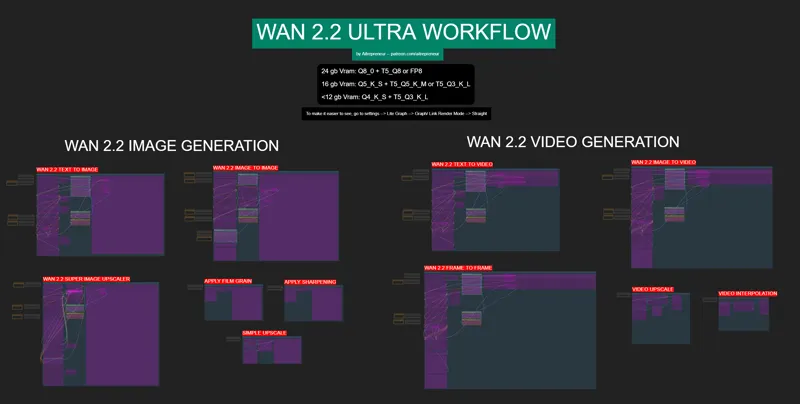
WAN 2.2 ULTRA VIDEO & IMAGE WORKFLOW!
EDIT 07 AUGUST: I UPDATED THE WORKFLOW AND INSTALLERS TO ADD THE NEW IMAGE TO VIDEO 4 STEPS LORAs AS WELL AS THE NEWLY UPDATED TEXT TO VIDEO 1.1 4 STEPS LORAs.
THEY ARE FINALLY HERE AND YOU CAN USE THEM TO SPEED UP YOUR IMAGE TO VIDEO GEN IN ONLY 4 STEPS!
THE NEW 1.1 TEXT TO VIDEO LORAs ARE BETTER THAN THE 1.0 ESPECIALLY FOR TEXT TO IMAGE GENERATION BUT FOR TEXT TO VIDEO I STILL RECOMMEND NOT USING LORAs FOR THE FIRST HIGH NOISE MODEL (FIRST PINK LORA NODE). FOR BETTER MOVEMENT AND QUALITY!
YOU CAN WATCH THE SHORT UPDATE VIDEO HERE: https://youtu.be/aTGAiZe6SXU
EDIT 05 AUGUST: I UPDATED THE WORKFLOW TO REMOVE MAGCACHE SINCE SO MANY PEOPLE HAD ISSUES WITH IT SO IF YOU HAD THE ERROR:
KSamplerAdvanced 'NoneType' object has no attribute 'to' EITHER DISABLE MAGCACHE OR DOWNLOAD THIS NEW WORKFLOW. I WILL REUPDATE IT ONCE THE MAGCACHE NODES WILL SUPPORT WAN 2.2.
Hey everyone! I've just released a new video on the NEW WAN 2.2 MODELS! Simply the best Text to Video, Image to Video AND Text to image models ever released to date. Better motion, better style, better quality, just better in every single way! Capable of creating lifelike videos and images with incredible motion in only a few minutes. The age of movie creation at home as started, jump on the hype train right now while you still can!
There is just no competition for Wan right now....it wins on everything...
You can check out the video right here: https://youtu.be/L_fU_pP_MQU
I also created a 1-click installer for the Webui for my Patreon supporters for Local AND Runpod, that you can find right here: https://www.patreon.com/posts/135728905
Here the link to the manual install guide: https://pastebin.com/8jNxWZBm
Down below you will also find the WAN2_2-ULTRA_WORKFLOW.json for free for you to use!
As always, supporting me on Patreon allows me to keep creating helpful resources like this for the community. Thank you for your support - now go have some fun😉!
Comments (134)
I have a problem with the template on runpod, after i update comfyui, if i refresh the page comfyui is not available anymore it goes error: Code d’erreur : 403 Forbidden
Just add a / at the end of the url then press enter
I had this workflow installed before but I lost it. Now I installed everything again and when I run a IMAGE to VIDEO, the result get so blurry, I don't know what to do. This didn't used to happen
This workflow uses custom nodes you haven't installed yet. FastLaplacianSharpen FastFilmGrain
This solved my issue: pip install torchaudio==2.9.1 --index-url https://download.pytorch.org/whl/cu128
a1111
The image to video part of the workflow doesn't seem to be utilizing the image I uploaded. Any thoughts?
does not work at all
also have "Some Nodes are Missing" - Fast Group Bypasser, Label (rgthree), FastLaplacianSharpen, FastFilmGrain.
took 5 minutes to render 4 second clip at 1280x544. Using RTX 6000 ADA.
I've tried this three times and each time the manager disappears. I also get errors for Fast Groups Bypasser and Label.
the quality of the videos generated from the images are very poor.
Hey guys, can you help me please, when I drag and rop the workflow to comfyui in runpod, a error message appea "Some Nodes are Missing" - Fast Group Bypasser, Label (rgthree), FastLaplacianSharpen, FastFilmGrain. Then i close the pop up, and it doesnt work at all the tool
Hey, I had the same issue and fixed it on RunPod by installing the missing nodes manually in Jupyter. Here’s what I did: - Open JupyterLab (Port 8888 in RunPod). - Go to the Terminal. - Run these commands one by one to install the missing custom nodes: cd /ComfyUI/custom_nodes git clone https://github.com/city96/ComfyUI-GGUF.git git clone https://github.com/wallish77/wlsh_nodes.git git clone https://github.com/rgthree/rgthree-comfy.git git clone https://github.com/VRMonster/ComfyUI-Video-Enhancement-Nodes.git - Once installed, go back to ComfyUI, Update all and Restart it (use the restart button in the Manager tab). - Reload your WAN2.2 workflow, it should now open fine without the FastLaplacianSharpen or FastFilmGrain errors. If you still get FastLaplacianSharpen or FastFilmGrain errors: - Go to Custom Nodes Manager → Search for “Video Enhancement Nodes” (by VRGameDevGirl). (That pack contains FastLaplacianSharpen and FastFilmGrain.) - Install it. -- Restart comfy and reload your WAN2.2 workflow, it should now open fine without the FastLaplacianSharpen or FastFilmGrain errors.
The videos with a single character lora turn out decent, but when I add more than one the results are not great. I'm unclear on what strength I should be setting the lighting lora, and the additional single lora at for the best results. I've googled and researched for hours, and tested it and it seems like the high noise for lightning needs to be at 3 and the low noise lightning at 1.5. Then when I add the single character lora keeping both low and high at 1 produce good results. When adding a 2nd charcter lora it throws everything off and I cant seem to find the sweet spot in that situation. If you could clarify what the ideal strength for each lora in the power lora loader that would be very helpful.
BTW, the commands to install stuff that you used in the video are not in the video description or this Patreon post. I had to type them manually. tail -f comfyui.log
chmod +x WAN2_2-ULTRA-AUTO_INSTALL-RUNPOD.sh ./WAN2_2-ULTRA-AUTO_INSTALL-RUNPOD.sh
i get noisy pictures when using text2img
Bro u are the goat for not gatekeeping this
When using Image to Video I end up getting a loop. For example, my last attempt I had a man taking off a jacket and turning. Everything worked great and did exactly what I wanted the first 2.5 seconds, but it just reversed the final 2.5 seconds to return to the start point. Sorry if this is an obvious fix, very, very new to using AI models and workflows. What I want is a full 5 second video of the person removing the jacket and turning their head towards the camera at the final frame.
it sounds to me like you had ping pong turned on in the video compiler at the end.
is there anyway to output the last frame instead of the first with the i2v? please help chat gpt lead me down a rabbithole
I have a problem, everything works fine ,but the image looks latent noise, like there is no good image just noise, i dont use loras and my comfy is updated, and iam sure i used the correct two models , anyone had this?
Yeah, I've done everything right and every image I generate looks like absolute garbage. Weird ghosting, bad anatomy everywhere, blur, something is wrong and i cant figure it out. I'm about to go back to flux.
When I try to create a video from image I'm getting an error shape '[1, 16, 45, 2, 80, 2]' is invalid for input of size 4838400 2025-08-28T19:56:44.226416 - Prompt executed in 23.27 seconds ``` ## Attached Workflow Please make sure that workflow does not contain any sensitive information such as API keys or passwords. ``` Workflow too large. Please manually upload the workflow from local file system. ``` ## Additional Context (Please add any additional context or steps to reproduce the error here)
Is there a way to clear VHS_VideoCombine Preview from last generations when opening up Comfyui?
I'm getting 5 of the custom nodes IMPORT FAILED, any fix??
if i always get "pause" does that mean i ran out of memory? 100%|████████████████████████████████████████████████████████████████████████████████████| 2/2 [00:58<00:00, 29.03s/it] gguf qtypes: F16 (694), Q4_K (356), Q5_K (44), F32 (1) model weight dtype torch.float16, manual cast: None model_type FLOW Requested to load WAN21 loaded partially 4762.706980926514 4760.3907470703125 0 Attempting to release mmap (264) (RES4LYF) rk_type: res_2s 100%|████████████████████████████████████████████████████████████████████████████████████| 2/2 [00:56<00:00, 28.50s/it] Requested to load WanVAE D:\ComfyUI_windows_portable>pause Press any key to continue . . .
Hi, when I use txt2Img I get image but with "wave". It's especially visible with hairs. The image is not clear (and not beautifull). I don't understand why I don't have the same image than you. I use the both wan2.2-T2V... and umt5-xxl-encoder-Q5_K_S and Wan_2.1_vae. As sampler I use Euler Beta. (I have a rtx4090). What I have missed ?
My problem is near fixed after an update of Confyui. But I find the eyes of the generated character ... bad. Expecialy, for photorealistique fantasy character. Maybe I have miss a setting...
Whenever I try to use the workflow, i get this error Prompt execution failed Prompt outputs failed validation: Power Lora Loader (rgthree): - Return type mismatch between linked nodes: model, received_type(WANVIDEOMODEL) mismatch input_type(MODEL) Power Lora Loader (rgthree): - Return type mismatch between linked nodes: model, received_type(WANVIDEOMODEL) mismatch input_type(MODEL) i'm new to comfyui can you help pls
1+ bumping this
I have tried this workflow on both windows and mac on windows, takes about 500 to 600 sec to generate ~5 sec vid, extremely good quality been trying on mac however, can't get pass ksampler step 0 to step 2, keep getting stuck anyone using this on mac and have success?
Tried to do image to video and image gets cropped but also whole video is just blurry and can barely see original image details in the back
what is the best way to use a lora with this workflow? please for wan 2.1 and 2.2 loras
same as with other models...put the lora in the lora folder, then load it with the node and then use the trigger word in the prompt
New to this but my .jason file is missing the on off option. I tried to run updates and still not resolved. little help would be great. Thank you
dm me screenshots
the above work flow ``` Loading aborted due to error reloading workflow data TypeError: (intermediate value).removeWidget is not a function ```
I have same error. Maybe because ComfyUI update?
Whenever i generate a image in wan 2.2 ultra, it just produces a white image. wan2.2-i2v-a14b-highnoise-q4_k_s,wan2.2-i2v-a14b-lownoise-q4_k_s , umt5-xxl-encoder-q5_k_s, wan_2.1_vae,wan2.2-lightning_t2v-v1.1-a14b-4teps-lora_high_fp16, wan2.2-lightning_t2v-v1.1-a14b-4teps-lora_low_fp16
because you are using the image to video model instead of the text to video
For some reason in my wan 2.2 ultra workflow. under the wan 2.2 image generation, i dont have the magcache section at all. its just missing
It was removed ... EDIT 05 AUGUST: I UPDATED THE WORKFLOW TO REMOVE MAGCACHE SINCE SO MANY PEOPLE HAD ISSUES WITH IT SO IF YOU HAD THE ERROR.
Hi! I wanted to run your batch on an Amazon EC2 instance but Windows server 2025 is throwing a 16 bit compatibility error. Ive dug into the batch file with Grok and dont see any applications that would cause that. any ideas?
install git for windows
i have a 4090 with 24gb of vram but it always goes out of memory even if i use Q4_K_S. My starting image is 768x1365 pixels and i set to create 49 frames.. any help?
update your nvidia drivers
I have this idea if you can solve it One of the biggest limitations for most creators right now is the short video duration—typically capped at around 5–10 seconds. A potential solution could be to split longer prompts into connected segments. Each prompt could continue the story by using the final frame of the previous segment as a visual input for the next. This would allow creators to build seamless, longer videos that feel continuous.
Yeah we can already do that, I'll try to make a good workflow for a future update
Literally.... Cant get anything to work. Nothing. Followed all the steps. Very dissatisfying.
just send me a dm
How can I apply a mask so that it only affects a portion of the image when I do img2img in Imagen with WAN 2.2?
already responded
Please help. im new to this patreon and ai and everything What does this mean? Prompt outputs failed validation: UnetLoaderGGUF: - Value not in list: unet_name: 'Wan2.2-T2V-A14B-LowNoise-Q8_0.gguf' not in ['Wan2.2-I2V-A14B-HighNoise-Q4_K_S.gguf', 'Wan2.2-I2V-A14B-LowNoise-Q4_K_S.gguf', 'Wan2.2-T2V-A14B-HighNoise-Q4_K_S.gguf', 'Wan2.2-T2V-A14B-LowNoise-Q4_K_S.gguf'] UnetLoaderGGUF: - Value not in list: unet_name: 'Wan2.2-T2V-A14B-HighNoise-Q8_0.gguf' not in ['Wan2.2-I2V-A14B-HighNoise-Q4_K_S.gguf', 'Wan2.2-I2V-A14B-LowNoise-Q4_K_S.gguf', 'Wan2.2-T2V-A14B-HighNoise-Q4_K_S.gguf', 'Wan2.2-T2V-A14B-LowNoise-Q4_K_S.gguf'] Just note, i used the auto installer to install everything and updated it Also if i shouldn't post this here, where should I?
same... now im trying to download manually search exact file in google to hugface, they are about 15gb each
Very cool and works great. Any chance of getting a video+image to video workflow? I could probably look one up, but your stuff is good and I'm incredibly lazy. lol
This!
I keep getting this error on the latest Image to Video workflow: "UnetLoaderGGUF cannot reshape array of size 6730640 into shape (5120,3520)" I'm using the Wan2.2-I2V-A14B-HighNoise-Q5_K_S and Wan2.2-I2V-A14B-LowNoise-Q5_K_S models for my 24 VRAM 3090. Any ideas on where I start troubleshooting this?
See Nils Johan Anti below. Looks like you have a corrupted file.
I reveived this message. My GPU is a 4070 super. KSamplerAdvanced Given groups=1, weight of size [5120, 36, 1, 2, 2], expected input[1, 32, 21, 90, 160] to have 36 channels, but got 32 channels instead
I had this problem, too. I solved it by updating ComfyUI and all the custom nodes! Try that.
image to video is not working at all ... I can't fix it :(
Any advanced video to video workflows lined up? Control nets ect, image and text is great but thats all available in comfy by default. Eager to have real control like in vace 2.1
Is there any database for 2.2 lora's I can check out and download somewhere? I don't think I understand what to filter for in Civitai
What is the max number of frames everyone able to achieve? Also what about FPS?
what loras can run along side this workflow? meaning model type. i tried one of my older loras and was told in the code that its not the proper lora model. or do we have to wait for them to be released under a model type of wan 2.2?
if anyone else is getting this error: UnetLoaderGGUF cannot reshape array of size 25885840 into shape (5120,14688) one of ur gguf files is corrupt, check the file sizes and redownload the corrupt one from here: https://huggingface.co/QuantStack/Wan2.2-T2V-A14B-GGUF?show_file_info=LowNoise%2FWan2.2-T2V-A14B-LowNoise-Q8_0.gguf
Isn't it more prone to censorship than 2.1 though?
in Frame to frame with the new workflow all I get is to 73% and then comfyui sits there doing nothing more. I have waited an hour and it has not changed.
this is so good, wan2.2 is faster and better. thank youuuu
This new workflow rocks! About 4x faster than WAN2.1 on my puny 3070TI with 8 GB VRAM. 480x840 81 frames I2V.
I tried the img2Video, but the result is a blurry video. I didn't change anything from the values of the workflow. Is the Manual tutorial https://pastebin.com/8jNxWZBm updated also specially the Lora files? EDIT: I also tried the Text2IMG , and I get bad results, the images are blurry. I downloaded all the models and loras manually. I use the Q5 because I have 16 VRAM, 5070 Ti.
I have updated the manual install guide, check out my update video description, send screenshots of the parameters but you are probably using the incorrect model in the first nodes
Works great so long as I don’t generate too many frames at once. (I’m using a 4090 on Runpod)
Yup but that's the limit of the model the more frames, the more vram it uses and the less coherent the video becomes if it becomes too long
Sorry i'm running text to image and i get stuck on the first ksampler, around 33%. -- Attempting to release mmap (63) (RES4LYF) rk_type: res_2s 0%|
If this is the first time, sometimes it takes a while to load the model, the next few times are faster but if you have low vram and low ram this could be slow
MAGCACHE just got updated to support WAN 2.2 :)
yes but not supported inside comfyui yet, it will be next week
Cool workflow as asual. Do you have any tricks to make a Control net like you did with 2.1 ? I gave it a try but was unsuccessful.
that's because you need the Vace Wan 2.2 model, which doesn't exist. yet
In your video you’re generating videos 1280x720.. I can’t even get my 5090 to generate 512x512 without getting OOM errors the low pass seems to take up 100% vram and the clear vram node seems to do nothing. Any idea what I’m doing wrong here?
yeah that's definitely weird, have you changed any settings that can explain that? Like the number of frames?
The Fantastic Talking GGUF node doesn't work, it has a bug when connected to rgthree's Power Lora Loader Node. That is what is causing the WANVIDEOMODEL to MODEL error. Deleting the folder ComfyUI-GGUF-FantasyTalking inside custom_nodes fixes it.
yup that's correct, I'll fix it now
Text to Image works fine, Text to Video works fine but when I try to use Image to Image or Image to video the output doesn't match the input Image. All the settings are not changed so I don't really know what's going on. Any help would be appreciated. Love your work
probably because you are not using the correct model, you need to select the I2V model for image to video. For image to image, it's up to the denoise value, the higher the value the more different the final image will be from the starting image
Is there anyway to define the timing or degree of the blend between frames in the Frame2Frame workflow? In some instances it works well, in others the transition is almost just a cut between images. Thanks!
Just be very precise in your prompt with lots of details (you can use chatgpt to help embelish the prompt)
So the BOSS walked me through a fix. The 1st Unet Loader needs the T2V High Noise as well as the 2nd Unet Loader needs the T2V Low Noise versions. He uploaded a new installer and .JSON workflow. I am very new to this and this got it working. The new installer does not have the MagCache.
FyI getting this error on the first and last frame. WanFirstLastFrameToVideo cannot access local variable 'clip_vision_output' where it is not associated with a value
because you haven't updated comfyui, update it using the comfyui update bat file in the update folder
I get the following error, any ideas? Prompt execution failed Prompt outputs failed validation: Power Lora Loader (rgthree): - Return type mismatch between linked nodes: model, received_type(WANVIDEOMODEL) mismatch input_type(MODEL) Power Lora Loader (rgthree): - Return type mismatch between linked nodes: model, received_type(WANVIDEOMODEL) mismatch input_type(MODEL)
dm me some screenshots
why am i always getting a cross fade effect on videos made with I2V?
maybe your prompt? you can read the prompting guide: https://alidocs.dingtalk.com/i/nodes/EpGBa2Lm8aZxe5myC99MelA2WgN7R35y
I get this when I load your json and run -- any ideas? Prompt outputs failed validation: UnetLoaderGGUF: - Value not in list: unet_name: 'wan2.2_t2v_low_noise_14B_Q8_0.gguf' not in ['Wan2.2-I2V-A14B-HighNoise-Q8_0.gguf', 'Wan2.2-I2V-A14B-LowNoise-Q8_0.gguf', 'Wan2.2-T2V-A14B-HighNoise-Q8_0.gguf', 'Wan2.2-T2V-A14B-LowNoise-Q8_0.gguf'] UnetLoaderGGUF: - Value not in list: unet_name: 'wan2.2_t2v_high_noise_14B_Q8_0.gguf' not in ['Wan2.2-I2V-A14B-HighNoise-Q8_0.gguf', 'Wan2.2-I2V-A14B-LowNoise-Q8_0.gguf', 'Wan2.2-T2V-A14B-HighNoise-Q8_0.gguf', 'Wan2.2-T2V-A14B-LowNoise-Q8_0.gguf']
yes, I updated the workflow, just did a small mistake, just select the correct model for your GPU
Have you tested with wan2.2_ti2v_5B_fp16? I got better results with this model and no Lora with some I2V images. Not sure if you've had a chance to test or have an opinion. By the way thanks for all of your work on this, and the great wf. I still have to test the F2F, but really excited about it.
yes I did, it's decently "okayish" for image to video but text to video is an absolute abomination, I get better results with the 1.3B model
Any reason you are using WAN_2.1_VAE instead of WAN_2.2_VAE?
yes, the wan 2.2 vae is only for the special 5B model
Thank you so much, that workflow template is absolute gold.
It seems to get stuck after the first ksampler, I see how it generates the diffusion but it doesn't move on to the second refinement ksampler. In the LORA LOW loader node, a red circle appears over the clip joint—could something be disconnected?
send some screenshots
Having a problem getting this workflow to work. i'm getting errors for the Ksampler (advanced) saying there is 'no bong_tangent' so I changed it to Euler, then it told me there is no res_2, and changing that to simple it told me 'NoneType' object has no attribute 'io' Previously this ComfyUI install was updated and created with the Wan2.1 podrun.sh I did update all comfyui from the manager. and I restarted it.
you need to use the installer or manually install the https://github.com/ClownsharkBatwing/RES4LYF node
I use a 3060 12gb and with i2v mode, with a 720x480 image I generate a video in around 8 min with pretty nice results. Is there a way to speed up the video generation ?
Making the resolution smaller for the output video will help
I am getting all sort of weird artifacts in the image, mainly a blue and red glow.
you are probably using the incorrect model, like text to video for image to video or something similar
Prompt outputs failed validation: UnetLoaderGGUF: - Value not in list: unet_name: 'wan2.2_t2v_low_noise_14B_Q8_0.gguf' not in ['Wan2.2-I2V-A14B-HighNoise-Q8_0.gguf', 'Wan2.2-I2V-A14B-LowNoise-Q8_0.gguf', 'Wan2.2-T2V-A14B-HighNoise-Q8_0.gguf', 'Wan2.2-T2V-A14B-LowNoise-Q8_0.gguf'] UnetLoaderGGUF: - Value not in list: unet_name: 'wan2.2_t2v_high_noise_14B_Q8_0.gguf' not in ['Wan2.2-I2V-A14B-HighNoise-Q8_0.gguf', 'Wan2.2-I2V-A14B-LowNoise-Q8_0.gguf', 'Wan2.2-T2V-A14B-HighNoise-Q8_0.gguf', 'Wan2.2-T2V-A14B-LowNoise-Q8_0.gguf'] Prompt outputs failed validation: KSamplerAdvanced: - Value not in list: scheduler: 'bong_tangent' not in ['simple', 'sgm_uniform', 'karras', 'exponential', 'ddim_uniform', 'beta', 'normal', 'linear_quadratic', 'kl_optimal'] - Value not in list: sampler_name: 'res_2s' not in (list of length 40) KSamplerAdvanced: - Value not in list: scheduler: 'bong_tangent' not in ['simple', 'sgm_uniform', 'karras', 'exponential', 'ddim_uniform', 'beta', 'normal', 'linear_quadratic', 'kl_optimal'] - Value not in list: sampler_name: 'res_2s' not in (list of length 40) Did not changed anything just raw .json from you
This has to do something with a custom node RES4LYF, but I did not figured it out for myself yet. Did you use script for installement or did you install it manually?
I tried running I2V A14B Q4 on both GPU and CPU and I get the same error for both: !!! Exception during processing !!! 'NoneType' object has no attribute 'to' ChatGPT thinks that the models are not loaded properly or not connected properly in the flow. But if it works for other people then it should not be a problem :/ I did a fresh install so I'm really not sure what could be wrong. Anyone else have that error? Usually I can run AI without issue on my PC, but this is the first time I'm using ComfyUI
I have exact same error
KSamplerAdvanced 'NoneType' object has no attribute 'to'
disable MagCache to make it work
Do Wan 2.1 T2V loras work with this setup?
only for the low noise model as I explained
all i get are blank images. i ddnt change anything except disable MAG like you instructed in your video. I dont have any problems with your 2.1 template so not suure what the issue is.
Can you send screenshots?
This is awesome! I have one issue only with the Frame to Frame workflow, any ideas where I should look? "WanFirstLastFrameToVideo cannot access local variable 'clip_vision_output' where it is not associated with a value"
because you haven't updated comfyui
will it run on a 40 gig vram, 32 gig ram ryzen -radeon- with no gpu? i have the specs i just dont have a dedicated gpu ! AMD
already responded on the other post
Getting KSampler issue with: ``` KSamplerAdvanced 'NoneType' object has no attribute 'to' ``` ideas? latest comfy with nodes installed. T2I generation.
yes don't use the magcache nodes as I explained in the video until it gets updated for wan 2.2
Fresh install. getting this error on running t2i and t2v with A14B Q8 CLIPLoaderGGUF cannot reshape array of size 14110877 into shape (4096,7040)
have you used the installer? looks like you don't have the correct text encoder loaded, in the workflow it's the umt5-xxI-encoder-Q5 K_S.gguf
hi great work dont see WAN2_2-ULTRA_WORKFLOW.json link
It's there though..https://www.patreon.com/file?h=135728889&m=510916320 I don't understand why it's always the json file that people can't see when it's there
Can the 2.2 I2V models fit into existing wan2.1 workflows?
maybe the low noise model