
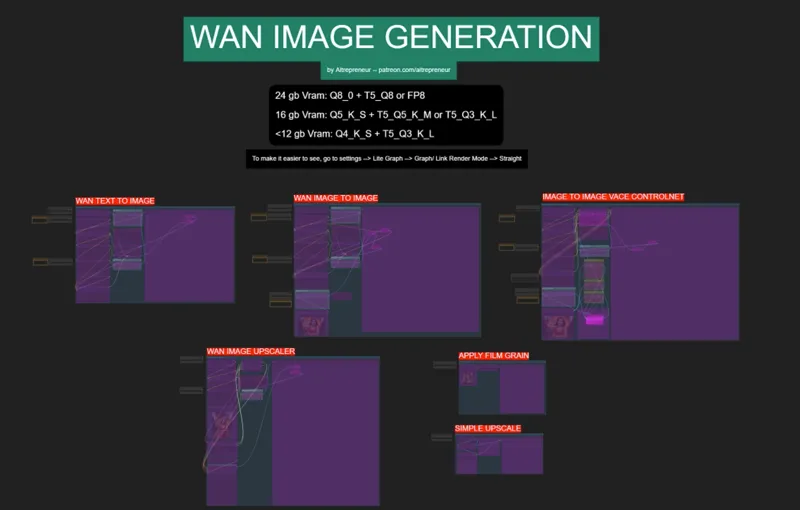
WAN IMAGE AI KING WORKFLOW!
EDIT 21 july: I ADDED THE INPAINT WORKFLOW. It works pretty well and it works with loras as well, soo...try it out...
Hey everyone! I've just released a new video on the TRUE IMAGE AI KING that was hiding in plain sight! A model originally built for video… that turns out to be the BEST FREE IMAGE GENERATOR I’ve ever seen! It beats Flux, HiDream and everything else with insane quality, perfect prompt following, massive LoRA support and controlnet inside ComfyUI!
You can check out the video right here: https://youtu.be/oOGiYy7cTFw
I also created a 1-click installer for the Webui for my Patreon supporters for Local AND Runpod, that you can find right here: https://www.patreon.com/posts/134046848
Here the link to the manual install guide: https://pastebin.com/h8aV1n84
Down below you will also find the WAN_IMAGE_GENERATION.json for free for you to use!
As always, supporting me on Patreon allows me to keep creating helpful resources like this for the community. Thank you for your support - now go have some fun😉!

Comments (36)
magcache is not working, can i change it for another thing?
This fix it "Try this and replace line 13 only with "from comfy.ldm.lightricks.model import LTXBaseModel" For both nodes.py and nodes_calibration.py in MagCache folder"
llama-anon/not-flux-kontext-dev-clothes-remover has been censored by hugging face and removed from civitai. Any suggesting on where it can be downloaded?
I'm trying to test the upscaler, but I get this error: Prompt outputs failed validation: SamplerCustomAdvanced: - Required input is missing: noise - Required input is missing: sampler - Required input is missing: sigmas All nodes appear to be connected
Failed to get input node 0 for group node child 433:1 with slot 1 whenever i try to generate anything
Same problem.
I am basically using the vanilla worklflow that was distributed yesterday. I just change the models in the model selector to the Q5_K_S ones accordingly (top high noise, following the low noise). However when i generate an image with "text to image" i get only noise in the output. Anyone has the same behaviour?
Hi, thanks for the awesome content! I am having issues with the control nets, they are being ignored. Any hint on how to solve the problem would be great. Thanks!
Hi, I have tested your workflows and Im having an issue with the control net one. It completely ingores the control net image. could you help me find out why?
Work great yesterday now getting error. I redownload a fresh workflow and still got error SyntaxError: Unexpected non-whitespace character after JSON at position 4 (line 1 column 5) https://imgur.com/xdJqI63
dm me screens of the parameters before the generation
Thanks for sharing, I don’t know why the mask isn’t working; I draw it in the mask editor, but it doesn’t integrate the shape or the scene lighting.
Send some screenshots
https://civitai.com/models/1295569?modelVersionId=1464208 how i can use this base model to this wan imagen generator? it is possible?
this is a simple image to video model, it doesn't generate images, what you see is just images that were converted into videos, you can have the same results with the normal image to video wan model
how to change the install path? to another drive?
The installer installs comfyui where you have placed the installer, also it's a portable version so you can take that folder and move it anywhere you want
everything works great, beautiful, realistic hands and texture! i've tried to activate in power lora my own trained character, but it seems that this model doesn't activate it. Maybe I should add something more to the workflow but if you know that this model won't work with trained loras pls give me an answer in other way I will try and try and try :D
It does work with loras but it's Wan so you need to use a lora trained on the Wan model, each loras correspond to the model they were trained on
Great workflow! how can i use other models (.checkpoint?)
This is for wan, other models need other workflows (most are on patreon here)
When using the Image to Image I am getting the following error: WanVaceToVideo shape '[1, 104, 8, 71, 8]' is invalid for input of size 478400 All parameters are at default, but I've also tried to set the resize to no, bit it always jumps back on
Dm me screens of the parameters
i was trying to run with the default settings with nothing changed, i tried the text to image workflow and now half of my screen turned black. What should i do? What am i doing wrong? I have RTX 4060 8gb, CPU is Ryzen 5 3600.
Half of your screen?? That's sounds like an hardware issue, restart the pc maybe and try again
Hi there! We’ve been trying to reach out regarding a potential paid collaboration opportunity. I’ve sent messages to the email you listed on YouTube and also tried DMing you on Discord (from Clio). If there’s a preferred way to contact you, we’re happy to reach out there instead. Just hoping to connect — thanks and hope to hear from you!
WAN 720p long video workflow when?
Hmm good question, can't say when for sure
Where is the .Json
I don't understand why people can't find it, it's on the page, it's called WAN_IMAGE_GENERATION.json https://www.patreon.com/file?h=134046660&m=499005226
Hey, I've had this with the last workflow involving depth detection, among the others. I always get an error when trying to enable and run a prompt. DepthAnythingV2Preprocessor [Errno 2] No such file or directory: 'E:\\AI\\ComfyUI Workflow\\ComfyUI_windows_portable\\ComfyUI\\custom_nodes\\comfyui_controlnet_aux\\ckpts\\depth-anything\\Depth-Anything-V2-Large\\.cache\\huggingface\\download\\EheDQYkKfRTio82VDltlF5Af82M=.a7ea19fa0ed99244e67b624c72b8580b7e9553043245905be58796a608eb9345.incomplete' I'm still a noob with this stuff, so sorry in advance. I'm sure something just didn't download properly. I also get this one: DWPreprocessor [Errno 2] No such file or directory: 'E:\\AI\\ComfyUI Workflow\\ComfyUI_windows_portable\\ComfyUI\\custom_nodes\\comfyui_controlnet_aux\\ckpts\\hr16\\DWPose-TorchScript-BatchSize5\\.cache\\huggingface\\download\\XpuFPiTnQg6On60IeT6uJ5VKfTw=.d86a0b2b59fddc0901a7076e9f59c9f8602602133ed72511c693fd11eea23d91.incomplete' GPU: Geforce 5070 TI (16gb VRAM) CPU: AMD Ryzen 7 9800X3D
I managed to get Pose working by switching to "dw-ll_ucoco_384.onnx", but none of the ckpts for depth anything work. I thought my VPN was causing issues with downloading, so I turned it off, but maybe I need to turn it off an run the install again? I dunno.
stock workflow with q5 models you get this error if you do not disable magcache: KSampler Given normalized_shape=[5120], expected input with shape [*, 5120], but got input of size[1, 16, 1, 90, 160]
what workflow and which parameters?
I don't see where is the workflow
Look up, is there