
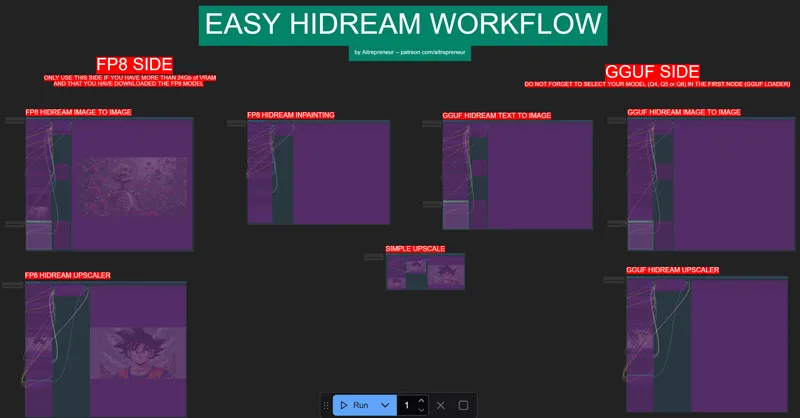
HIDREAM EASY TEXT-TO-IMAGE WORKFLOW!
EDIT: TO USE THE WORKFLOW DO NOT FORGET TO UPDATE COMFYUI! DO NOT use the manager to update comfyui, the manager has been broken for months, to update comfyui correctly, go inside the update folder and run the update_comfyui_and_python_dependencies.bat file (do not forget to continue the install once it asks you to press any button) then, once the update is done, relaunch comfyui and re drag and drop the workflow inside.
Hey everyone! I've just released a new video on "THE NEW IMAGE GEN KING ! ", called "HIDREAM". Simply THE BEST AND MOST POWERFUL AI TEXT TO IMAGE AI MODEL TO DATE! It's just amazing!
You can check out the video right here: https://youtu.be/OeKRc2CjAmA
I also created a 1-click installer for the Webui for my Patreon supporters for Local AND Runpod, that you can find right here: 1-Click INSTALL HIDREAM TEXT-TO-IMAGE NEW AI KING ComfyUI WebUI! | Patreon
Here the link to the manual install guide: https://pastebin.com/hvU8w7y5
Down below you will also find the HIDREAM_EASY-WORKFLOW.json for free for you to use!
As always, supporting me on Patreon allows me to keep creating helpful resources like this for the community. Thank you for your support - now go have some fun😉!
ps: Sorry for the lack of news lately, I've already talked about it before, so no need to talk about it again but thanks for your support and patience, much love❤️

Comments (71)
I am unable to find the node - Upscale by Factor with Model (WLSH) Thoughts anyone?
i think this workflow really need an update, its censored
This is producing censored images. Am I mssing a step?
Do you ever plan to do a HiDream LoRA training guide video? You mentioned some interesting points in your video such as the fact that the dev model is better and that the provided settings were no optimal for training and I'd love to hear some more details about that as well as to know which training client you prefer (ai-toolkit, diffusion pipe, etc.)
The workflow is just empty when I load it...
click on the fit to view icon on the bottom right
Hey I downloaded it and did a fresh install and it works great but the image to image is broken on my install. says the following: Prompt execution failed Prompt outputs failed validation: ImageResizeKJv2: - Value not in list: device: '2' not in ['cpu', 'gpu'] every run across this error before? any idea how to fix it? it's just effecting the image to image
I figured this out for anybody else that gets this error. in the workflow device option switch it to cpu or gpu
This is absolutly awesome. I would love to see a video about how to train LORAs with one trainer. I can't seem to get it to work.
After installing the Hidream "Update" to a prior installation of Flux with using your 3.1 Workflow - Suddenly the 3.1 Workflow gives me OOM exceptions when creating from text. Image to Image still works fine. I tried a completely new installation into a new folder of the "old" 3.1 workflow, but It leaves me with missing nodes (tried all your fixes from troubleshoot video) but still have those errors: workflowFlorence workflowFlux Controlnet workflowNodes 3 workflowXLabs Sampler workflowAdetailer workflowoutpaintflor workflowfaceswap2 workflowfaceswap3 workflowREACTORFACESWAP workflowpullflo workflowpulidtxt workflowpluidlux workflowfillparam workflowPULIDREDUX workflowREDUXOTHERPARAM workflowshaker workflowLiveparam workflowLIVEPORTRAITIMGPARAM workflowLIVEPORTRAITVID2VIDPARAM workflowLTXPARAMTEXTOVIDGGUF workflowLTXPARAMTXTFP workflowLTXIMAGETOV workflowhuynyav2vparm do you have any hint for how to resolve either? Happy with either fixing the combined comfy flux + hidream or just having the flux only restored (since I find the flux results superior to hidream)
Yip same here, hope this can be fixed
Hey AIT, I tried substituting in the full model instead of the DEV model (Quant 8) and it failed...just produces garbage. What else do I have to change in the text to image GGUP or FP8 workflows to use the full model instead of the DEV model? Is there a difference in quality?
Hi my friend. I tried to use your workflow, but one node "workflowloader" refuses to get installed. I wonder why. I have Hidream in another workflow running, but was curious about your workflow. Is that "workflowloader" essential? could it be substituted? I am running the desktop-version of ComfyUI, in which it is a little complicated (for me) to install via pip... . so usually I try to do everything using the manager. (yes, I updated everything). What package does the missing node "workflowloader" belong to? I am using 4060TI 16GB, so I would use the right GGUF-side. ------------------------ Actually now, I saw, this node is the image-loader in your img2img-workflow. In the worflow the name was "workflowloader" (and red because missing), and in your YT-Video, it is only called "loader". I can see that is has some more options than a normal image-loader. Can you tell me what package it is from, and if the additional options are really needed (and why?)
Where can I find the workflowhiinpai nodetype? It's the only Missing Node Type.. everything else seems to be fine
open the manager and update all the nodes
this cant produce nsfw stuff? I have tried and it doesnt seems to work
depends what I suppose, you can also go on civitai and look for specific hidream lora for that and take inspiration from the prompt used on that lora page
Hiii, Im trying to make it work on an AMD gpu with 6gb vram, any advice or tips? Im installing HIP SDK and I think this method uses Zluda.
For amd you need the special zluda comfyui install
Yeah the JSON file doesn't work nothing appears when you drag and drop into ComfyUI
As showed in the video, click on the fit to view icon on the bottom right
-------- Downloading ComfyUI -------- % Total % Received % Xferd Average Speed Time Time Time Current Dload Upload Total Spent Left Speed 0 0 0 0 0 0 0 0 --:--:-- --:--:-- --:--:-- 0 43 1974M 43 850M 0 0 355k 0 1:34:41 0:40:45 0:53:56 421k curl: (18) end of response with 1179463021 bytes missing Download failed. Press any key to continue . . . Terminate batch job (Y/N)?
Hi @Aitrepreneur, one Q, I saw in some foros that having Triton helps with the overall speed. Does the auto installer do this? thanks
I have a special installer for that but I'm keeping it for future video, still need to test it on a 5000 series gpu
Like many others I went through the process and it just came up with a blank canvas... before realising I needed to update first. I DID get it working but I had to cross a few bridges. Here is what I did. Skip the bits that already work fine for you. ----------- I followed the instructions and failed to get the updates working as highlighted in the original post. Just kept getting these errors: Traceback (most recent call last): File "E:\ComfyUI_windows_portable\update\update.py", line 66, in ref = repo.lookup_reference('refs/remotes/origin/master') ^^^^^^^^^^^^^^^^^^^^^^^^^^^^^^^^^^^^^^^^^^^^^^^^^^^ KeyError: 'refs/remotes/origin/master' This is because git has NEVER been run locally against the repo so it is lost. That was an easy fix... From the ComfyUI folder run: git remote -v git fetch origin That lets me run the update file "update_comfyui_and_python_dependencies.bat" as described above. Then I restarted ComfyUI using "run_nvidia_gpu.bat" I dragged in "HIDREAM_EASY-WORKFLOW.json"... It STILL came up blank. At this point I was about to give up. However on quitting the current ComfyUI instance and just restarting it AGAIN - it all burst into life and works as shown in the video. It remembered I had dragged in the JSON file but this time the UI was visible on the canvas. A few extra steps that a "one click" but I thought I would let you know how I eventually got success. Try the updates a couple of times, try dragging in the JSON file and do the odd restart of ComfyUI
I had high hopes, but the image-to-image outputs are quite underwhelming. I'm using the full model with everything at the highest settings on a Mac, and sometimes the images come out without limbs. I don't know if it's because I'm on a Mac.
its giving me a blank workflow when I add the json
Its probably not centered right. Click the "fit view" symbol on the bottom right. Its a frame icon.
idk why he doesn't mention this but if you still cant get the nodes to work and not using the installer: use the installer, When you run it put it in a empty folder were u can drag the nodes and the models to were they need to be. u can also just stop the install after the nodese finish, here are some nodes that the comfy manager isn't detecting for some reason.. Aitrepreneur i love you and your work man but u really gotta understand that alot of the stuff you take as common sense is complex to some of your fans especially if their in unique scenarios like the desktop app which dose not have a update_comfyui_(i forget this part).bat but you keep telling them to click it regardless.
Because my installers and files and tutorials are based on the portable version (which for me is the best version since you can use it anywhere with not specific requirements and move folders freely)
This isn't a technical question but a stylistic one. It kind of looks like HiDream has the character staring at the camera problem. One of the things that made Flux so powerful was that poses were more varied. An image detail can be massaged with a number of techniques, but if the pose is not dynamic you are kind of stuck. How is HiDream at more candid poses?
I downloaded the FP8 and getting this Prompt outputs failed validation: QuadrupleCLIPLoader: - Value not in list: clip_name1: 'clip_l_hidream.safetensors' not in ['clip_g_hidream.safetensors', 'llama_3.1_8b_instruct_fp8_scaled.safetensors'] - Value not in list: clip_name3: 't5xxl_fp8_e4m3fn_scaled.safetensors' not in ['clip_g_hidream.safetensors', 'llama_3.1_8b_instruct_fp8_scaled.safetensors'] VAELoader: - Value not in list: vae_name: 'ae.safetensors' not in ['taesd', 'taesdxl', 'taesd3', 'taef1']
were there any issues during the install of the models and nodes? then have you updated comfyui using the update_comfyui_and_python_dependencies.bat file?
Is it really slow for everyone else? It is taking me 45 seconds to do generations on an RTX 5090: - euler 20 steps - 720x1280 - dev Q4 gguf model
If you have a 5090 use the fp8 side, its much faster
really dumb question, but how do we access it afterwards? like i got it to work but then it crashed. but now since its a different installer everyhings different.
Just run the run nvidia gpu.bat file
Thanks for sharing, much appreciated :) I find it very impressive how it can handle multiple styles out of the box with such detail. I am however very sceptical about the NSFW claims, the few tame prompts that I have tried (for testing only ofc!) were incredibly underwhelming.
I mean...I'm not sure what prompt you used but I got full on view...you can also use loras to make it even better, that's what they are for as well
Aitrepreneur node "workflowloader" is broken on ur WF
Simply updating comfyui to the latest version is enough if you have used the installer. DO NOT use the manager to update comfyui, the manager has been broken for months, to update comfyui correctly, go inside the update folder and run the update_comfyui_and_python_dependencies.bat file (do not forget to continue the install once it asks you to press any button) then, once the update is done, relaunch comfyui and re drag and drop the workflow inside.
as I replied to a similar post earlier, I have even tried imputing the exact same prompt as was in the video however I keep getting this error: Prompt execution failed Prompt outputs failed validation: UnetLoaderGGUF: - Value not in list: unet_name: 'hidream-i1-dev-Q8_0.gguf' not in ['hidream-i1-dev-Q4_K_S.gguf']
you need to select the model you have downloaded like it says in the workflow, by default it's the Q8 but if you have downloaded the Q4 ks you just need to click on the model node and select the available model.
Any help here? Prompt outputs failed validation: UnetLoaderGGUF: - Value not in list: unet_name: 'hidream-i1-dev-Q8_0.gguf' not in ['hidream-i1-dev-Q5_K_S.gguf'] PS: Can you just create a batch installer that solves the issue with the 5x series regarding PyTorch and the whole 'No kernel image is available for execution on the device' topic? That would be amazing :D
you need to select the model you have downloaded like it says in the workflow, by default it's the Q8 but if you have downloaded the Q4 ks you just need to click on the model node and select the available model.
Please, share the site link with the artists
https://jamesiv4.github.io/preview-images-huggingface/
Missing Node Types When loading the graph, the following node types were not found ImageResizeKJv2 (In group node 'workflow>loader') workflow>loader
same here, but i installed a new KJNodes with: git clone https://github.com/kijai/ComfyUI-KJNodes.git but after that this still shows up.. https://i.imgur.com/PG60MEB.png
Thanks for this workflow! But there is one detail that bothers me. In GGUF I2I the fast groups bypasser for FP8 ADD DETALS IMG TO IMG cannot be deactivated. I click on it, it turns off for a moment and switches back to "yes" instantly. All other switches work.
Woops, you're right, nice catch! Just correct and reuploaded the workflow, redownload it from this post and redrag and drop it inside comfyui 👍
This workflow is showing blank for me. Nothing on the screen
It's not blank, as said in the video, click on the fit to view icon on the bottom right
Hi guy, thanks for all the work you do... Happy being a supporter! 2 questions. 1. Is there a way to get it not "load partially 5629.675.xxx etc every run? It seems it loads the same thing each time. 2. I got the Hi-dream to work with fp8 on my new sys, WOOT, can I add Framepack to it? if so what's the safest way to not wreck my currently working comfyui
if it's loading partially that means you don't have enough vram for that, maybe use the gguf side instead. For Framepack, it's a separate webui and it's a portable version as well so it will not affect your comfyui install either
Unexpected architecture type in GGUF file, expected one of flux, sd1, sdxl, t5encoder but got 'hidream' I am getting this error. I used the model and node downloader. I choose option 2 for 12-16GB I think it said.
if you are using an already existing comfyui version, once you have updated comfyui to the latest version and all the nodes, just redrag and drop the workflow inside comfyui again and select the corresponding GGUF model for your GPU (in your case it will be the Q5 ks)
literly everything loaded fine except for the inpaint node, its red and just has "workflowhiinpai" and all the data inputs are "unknown" and idk why. comfy auto updates and and i updated all my nodes and restarted but its still not loading
if you are using an already existing comfyui version, once you have updated comfyui to the latest version and all the nodes, just redrag and drop the workflow inside comfyui again
Indeed, hope the fix will be comming :)
For those saying it looks blank, try clicking the "Fit View" button on the bottom right.
Thats the solution. Thank you!!
I'm having the same issue. Everything downloads but then when I load the workflow it's blank. I'm going to start waiting a day or two after you release these videos because it never works the first time :/
It's not blank, as said in the video, click on the fit to view icon on the bottom right
Could anyone please tell me where I can get the "workflowloader" node from? I can't find it anywhere under modules and on github so I'm probably not searching for the right thing.
I also have this issue. Latest install of KJ nodes and ComfyUI and still I get this error. Please let us know the solution. Thank you :)
Got comfy installed using the one click installer. Seems to load Comfy OK but when I drop the .json into comfy it is completely blank.
You need first to make full update of ComfuUI by going to update folder and choose update_comfyui.bat file. Later try to load it and zoom out as much is possible. On my place the workflow with one missing node from imagetoimage was on down-right side
hmm, The installer completes, and there is nothing in the workflow when its dropped into comfyui, no errors, just nothing there
on right bottom, try click full view, for me solved this
Really, looking forward to giving this one a spin! Take care !