
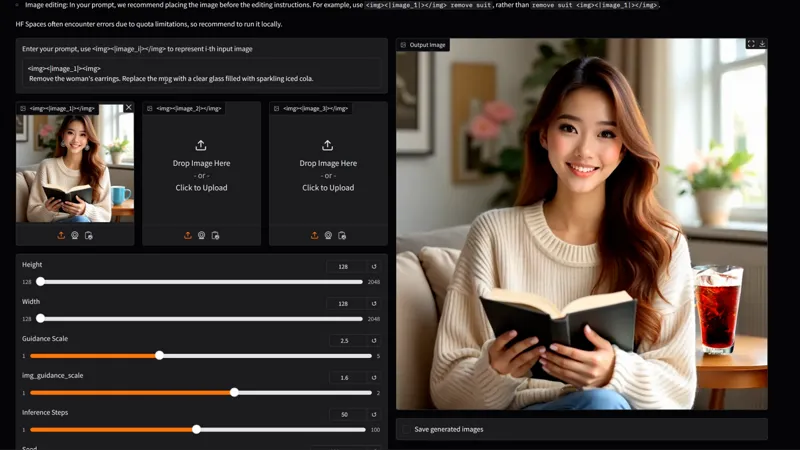
1-Click INSTALL OMNIGEN WebUI!
Hey everyone! I've created a 1-click installer for the AI image model tool “OmniGen”, which combines image generation, image-guided workflows, composition control, and prompt-based image editing inside one simple WebUI.
!!PLEASE READ THE POST BEFORE DOING THE INSTALL!!
Omnigen uses a lot of Vram to run but if you don’t have a powerful gpu with more than 16gb of vram, then enable “Offload model to CPU”.
The “separate_cfg_infer “ option should be checked as well for everyone.
Make sure that you have the correct python 3.10.11 installed and added to path, any other version than the 3.10 might cause issues during install and during the webui’s use.
Hey everyone! I've created a 1-click installer for the AI image model tool “OmniGen”, which combines image generation, image-guided workflows, composition control, and prompt-based image editing inside one simple WebUI.
HOWEVER people do not understand that they are missing out on some INSANE potential here when combined with my ULTIMATE ALL IN ONE WORKFLOW, making this one the most interesting, underrated and versatil ai image tool ever made! It’s insane!
You can check out the video right here: https://youtu.be/zoqhCyy589o
The installer of course automates the entire install process for the webui!
LOCAL INSTALL
1. Download the OMNIGEN_AUTO_INSTALL.bat
2. Run the bat file
3. Wait for the install to finish
4. Hold ctrl and left click on the local url
5. ???
6. Profit 😎
IF YOU ARE USING RUNPOD:
1. Create an account if you haven't already: Runpod
2. Click on Pod (on the left side) then click deploy
3. Choose a GPU with at least 24gb of VRAM (a cheap 3090 or an A30 are great), then click modify template and choose the pytorch 2.1 template, then edit the template and choose 80gb for both the container and volume disk, then deploy on demand
4. Go to my pods, wait for everything to finish and then click "connect", then "Connect to Jupyter Lab [Port 8888]"
5. Then drag and drop the OMNIGEN_AUTO_INSTALL-RUNPOD.sh file on the left side of the UI then click on the "Terminal" icon on the right side on the UI
6. Copy and paste these two lines then press enter:
chmod +x OMNIGEN_AUTO_INSTALL-RUNPOD.sh
./OMNIGEN_AUTO_INSTALL-RUNPOD.sh
7. Wait for everything to be installed
8. Click on the public url and have fun😎
As always, supporting me on Patreon allows me to keep creating helpful resources like this for the community. Thank you for your support - now go have some fun😉!