

FLUX - THE BEST IMAGE AI MODEL EVER MADE!
Hey everyone! I've just released a new video on how to install the newest AI model tool called "Flux" that allows you to generate any images you want from text, exactly like Stable Diffusion or Midjourney or Dalle3 but just like Stable Diffusion it is free and open source. However the quality of the generation is leaps and bounds compared to any other models, it's just insane, amazing quality and the generation follows the prompt extremely well, making it the most powerful and flexible image AI model there is right now, period, it’s just fantastic.
You can check out the video right here: https://youtu.be/stOiAuyVnyQ
I also created a 1-click installer for the Webui for my Patreon supporters for Local AND Runpod, that you can find right here: https://www.patreon.com/posts/109398241
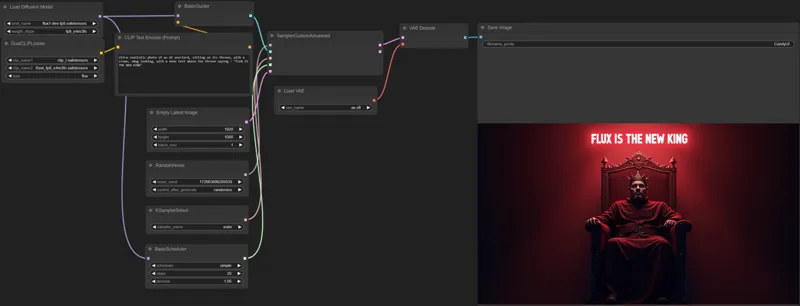
Down below you will also find the comfyui workflow for free for you to use, for both image generation and Image to Image!
As always, supporting me on Patreon allows me to keep creating helpful resources like this for the community. Thank you for your support - now go have some fun😉!
Comments (11)
Hi ! First thanks for all ! i got this error while trying to generate an image : RuntimeError: mat1 and mat2 shapes cannot be multiplied (1x1280 and 768x3072)
SamplerCustomAdvanced mat1 and mat2 shapes cannot be multiplied (1x1280 and 768x3072)
second best. the best offline ai gen has boobs. flux has not boobs.
Couldn't get this to run, it just crashes; set it in a new CMD window to record the process. Looks like it can't download the ComfyUI file or find it - can I do this manually, or is there a simpler fix? Enter your choice (A or B) and press Enter: a Do you want to download the FLUX SCHNELL Model? A) YES B) NO Enter your choice (A or B) and press Enter: a Git already installed. Downloading ComfyUI... % Total % Received % Xferd Average Speed Time Time Time Current Dload Upload Total Spent Left Speed 0 0 0 0 0 0 0 0 --:--:-- --:--:-- --:--:-- 0 0 0 0 0 0 0 0 0 --:--:-- --:--:-- --:--:-- 0 curl: (35) schannel: next InitializeSecurityContext failed: CRYPT_E_NO_REVOCATION_CHECK (0x80092012) - The revocation function was unable to check revocation for the certificate. Extracting ComfyUI... 7-Zip 24.04 (x64) : Copyright (c) 1999-2024 Igor Pavlov : 2024-04-05 Scanning the drive for archives: ERROR: The system cannot find the file specified. ComfyUI_windows_portable_nvidia_cu121_or_cpu.7z System ERROR: The system cannot find the file specified. Extraction failed. Please check the downloaded file and try again. Running on NVIDA4090 32GB RAM
try this one: https://we.tl/t-HN4NRcozO7
Where do you put the .safetensors file? I put it in ComfyUI > models > checkpoints....but I get an error when I try to process an image.
you don't need to put any files anywhere manually, everything is done automatically. Just update comfyui and load a workflow
The Automatic Downloaded "unet" model "flux1-dev-fp8.safetensors" is 11GB. But on huggingface.co/Kijai/flux-fp8 ther is a "flux1-dev-fp8.safetensors" with 16GB. Whats the Difference?
I don't see any 16gb one, where do you see that?
Working flawlessly on my 4070. Are we correct in assuming there is no negative prompting yet for this model? I am having a hard time only providing positive prompts.
Flux doesn't support negative prompts but you can "hack it" with a special workflow here: https://we.tl/t-OLS3DFWQWg First update comfyui. Load the 03 workflow json file, then go to manager, click on "Install missing Nodes manager", there you will see 2 entries: Dynamic Thresholding Extra Models for ComfyUI Click on the checkbox to select the 2 entries then click install then click restart to restart the webui. Then you can write a prompt, add negative prompts