

GTAV Upscaler AIO Build 10 - Major Overhaul
This is the new GTAVUpscaler AIO build Overhaul, featuring all three upscaling technologies (DLSS, FSR3, and XeSS) and all three frame generation methods (DLSS FG, FSR3 FG, and XeFG), now with a new menu and more options:
DLSS Multi-Frame Generation for RTX 40 and RTX 50 series GPUs.
XeSS Multi-Frame Generation for GPUs from all vendors.
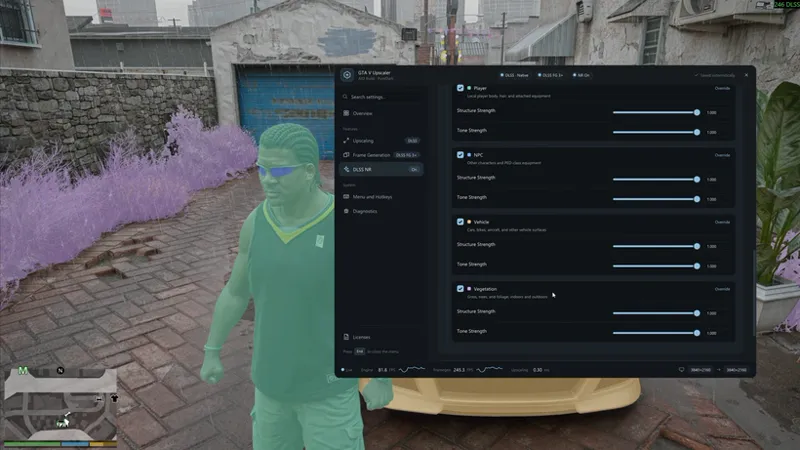
DLSS NR with configurable presets and settings, and mask groups specifically for GTA5.
Multi-GPU support with GPU assignment controls and per-GPU timing graphs.
A new menu for configuring features and viewing diagnostics.
Switch frame generation backends on the fly without restarting the game.
A new, less intrusive motion vector injection method for improved compatibility.
An installer for easy installation
Changelog
Build 10 (V1.10.0)
Features
Added an all-new motion vector injection method for improved compatibility and lower CPU overhead.
Added a new, redesigned menu that is more attractive and easier to use.
Improved multi-GPU performance, allowing game rendering and NR/Frame Generation to run more efficiently across two GPUs.
Each DLSS NR pass now supports independent GPU selection, input resolution, model preset and execution point.
Added NR Mask Groups to adjust effects separately for the player, NPCs, vehicles and vegetation.
Switch Frame Generation backends and the GPUs used for FG/NR in real time, without restarting the game.
Updated Streamline to 2.14.6, adding support for DLSS FG Preset C, which can improve frame rates.
Added a lossless PNG screenshot hotkey, with an option to automatically hide UI in screenshots.
Added a standalone installer that automatically detects the installation location and lets you merge or overwrite existing configuration files.
Bug Fixes
Improved compatibility with FiveM, QuantV and NVE.
Fixed issues with exclusive fullscreen.
Fixed compatibility with NVIDIA Smooth Motion.
Fixed missing or incorrect motion vectors on various characters and vehicle parts.
Fixed several black-screen, freezing and crashing issues when switching display modes or FG/NR settings.
Fixed cases where NR affected HUD colors, caused UI to disappear, or failed to appear in the final image.
Download
I only distribute updates via discord.
Link your discord account to patreon and click the Join Server button under membershop page.
Download updates in #gta5-downloads channel.
Installation
Read it on Discord.
Comments (12)
hi there i subscribed and i dont know how to join and get the dlss for fivem can you help me please and add me on discord
Usually it's just a Join Server button on patreon, it's a patreon feature, you just need to link your discord on patreon.
wheres the discord link at?
I can’t log into the Discord server
Usually it's just a Join Server button on patreon, it's a patreon feature, you just need to link your discord on patreon.
How do i buy it
Yeah thats negative there is no join link button and when you click on connect to server it does nothing and i paid for it
You know what's funny is that whenever I read about someone complaining about not being able to join discord, and I search for their discord id in the server, I always find them already in the server. You are the exact case, you are already in the server.
I am also not seeing any links or anything giving the option to join discord.
I installed the new version in gta 5 legacy, but when I turn on dlcc, nothing happens, nothing works.
Hi, I subscribed to the first membership tier, but I still can't join the Discord server. I've tried everything, including waiting, refreshing, disconnecting and reconnecting my accounts, and even leaving and rejoining the Discord servers linked to my Patreon account. Unfortunately, nothing has worked, and I still haven't received the bot's verification message
what `bot's verification message`? There should be a Join button on patreon and that's the only thing you need to click to join the linked server.