
GTAV Upscaler AIO Build 08
This is the new AIO build that features all 3 upscaling techs (DLSS/FSR3/XeSS) and all 3 framegen techs including DLSS Multi-frame Generation for RTX 50 and the new XeFG which works for all vendor's GPUs now..
When selecting None as the Framegen method, it will work as upscaling-only and be free of the overhead of dx12 interop which FG requires.
Changelog
Build 08
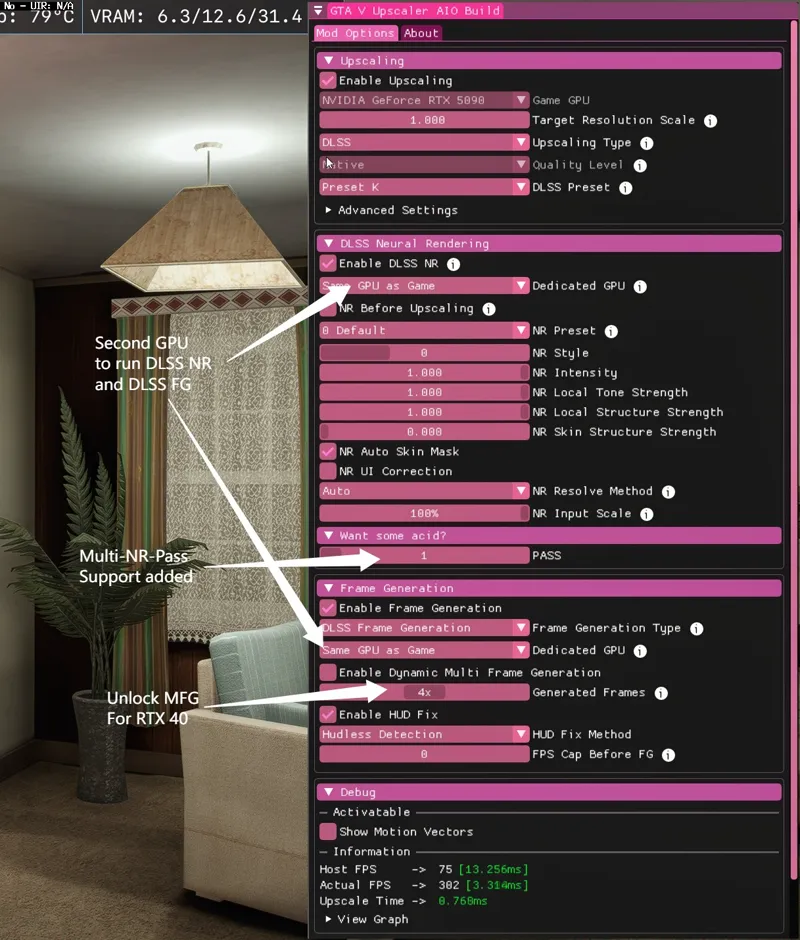
1. Unlocked DLSS MFG for RTX 40 series thanks to the [RTX40MFG-Unlock](https://github.com/dashdogy/RTX40MFG-Unlock) project
2. Support for using a second GPU to run FrameGen and/or DLSS NR
3. Added DLSS NR Input Resolution Scaling option to gain performance.
4. Added acid trip options, you can do multiple DLSS NR passes if you want.
5. Added D3d12 Device Lost Detection and Recovery.
It means when something goes wrong with d3d12 interop, instead of freezing the image, it can now recover from it.
Build 07
1.Added DLSS Neural Rendering! Requires RTX 40/50 GPU
2.DLSS NR works fine with DLSS Frame Generation.
Download
I only distribute updates via discord.
Link your discord account to patreon and click the Join Server button under membershop page.
Download updates in #gta5-downloads channel.
Installation
Read it on Discord.
Comments (25)
Hello I seem to be having trouble joining the discord apologies for any trouble I was just trying to enjoy your fantastic work, any help would be much appreciated thank you so much and have a great day.
IF YOU CAN'T JOIN DO THIS In Patreon, click your profile → Settings → Connected Apps. Select Discord → Connect, then authorize your Discord account. If it already says connected, leave it connected. Look for PureDark’s server and a Join Server button. Patreon documents this account-linking process for membership access.
i payed for memberhip and cant join the discord for reason? so i can download then files
refreshed a couple times now, unlinked and relinked my discord account which has other servers connected with patreon working fine, but this servers "join server" button just sends me to the discord homepage. even in the patreon settings it just reprompts me join the server but doesn't say anything's connected like the other discords
where can i join the server after i buy? doesnt see where i can joim
Paid Supporter, Discord linked as eman_107, Join Server does not add me, can I get a direct invite?
Everything works fine ya'll. You link your Discord and it'll automatically send you a discord invite. Thanks again for updating!
smh discord link dont work at all
discord link dont work
link doenst work for me nether
si no me envian en link del discord, tendre que denunciar esta cuenta por scam
no he podido ingresar al discord, ya desvincule y vincule la cuenta, pero el enlace me sigue sin funcionar...
Could you tweak it so we doesnt get much input delay/Latency?
The Discord button worked for me, so it’s probably some kind of credential/account conflict between Discord and Patreon. If you’re having trouble, try disconnecting and then reconnecting your account on both Discord and Patreon.
cannot join please give me the invite link?
Try disconnecting and reconnecting your discord account, and make sure the Discord account linked to Patreon is the same one you're currently logged into on Discord.
bro you scamming like hell.. like why not put the file on the patreon where it is paid and then have Q & A in the discord..
link not working
UPDATE: Disconnect/Delink discord. Go to settings connected apps, link your discord. Once done scroll down to your connected servers and you'll see PureDark. Click "Join Server"....it worked for me....clicking Join server from the membership page was the one that was giving me issues. Hope it works for yall
nope, not working.
discord link is not working please send me in my inbox
Scammer or what? I cant join Discord and I have payt
I had no problem joining discord.. the link is in the membership section under 'Quicklinks'
your discord link is broken please do fix it
Hi, I already purchased the membership and click the join discord button, but it just took me to a blank channel is there any way to trouble shoot it?