
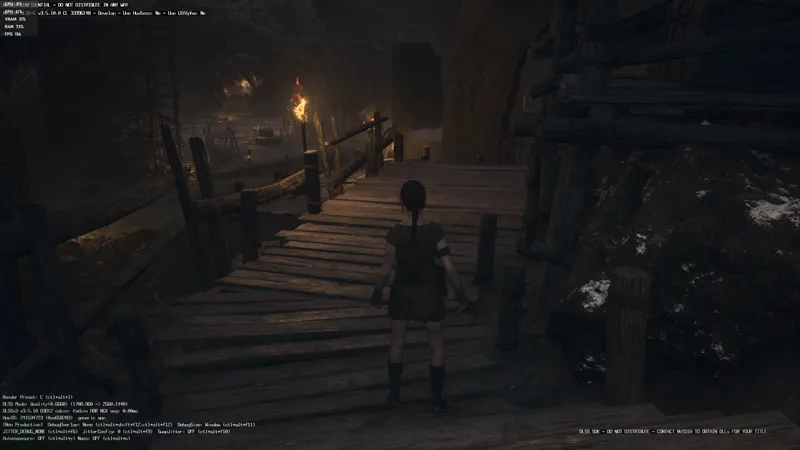
Dragon's Dogma 2 DLSS3 Enabler 01
Since this mod only enables the game's own hidden DLSS3 implementation, it's now released for free. All I ask is that you link to this post when redistributing.
You still need to have a RTX 40 series GPU in order to use DLSS3!
Installation
1. Extract to the game's root folder and overwrite the file (you can make a backup first).
2. You need to turn on DLSS and Reflex in the game settings of course.
3. In the game you can press END to toggle DLSS FG (default on).
Update: People are reporting having crashes/freezes with FG, probably the reason it's hidden at launch. But still a lot of people reported having no issues at all after hours of playing, so try it and see whether you can use FG. If not you'll have to wait for the official patch to fix it.
Update2: Some people have reported that capping the FPS can reduce the chance of freezing, like capping it to 90 in Nvidia Control Panel. Or you can try capping it to 60 in-game, and with FG it's actually capped at 120.
Comments (37)
I think people reporting crashing is just becasue they run out of VRAM. In 4K with Quality DLSS and FG, I have overall almost 14 GB VRAM full on my 4080 Super. No crash on my end after hours playing.
Nah it was just the mod breaking the game somehow. It's now been fixed since the last update. Nothing in the patch note mentions it but game with the mod works perfectly now. I even got reshade running with it and have had no crashes all day. Even after closing the game and reopening which is what was causing crashes initially after installing the mod the first time
I'll never understand how it is one person can fix this and make it work right, but a company with millions of dollars and a fleet of programmers can't or refuses too? Great work Dark.
To be fair PureDark just enabled a option that was disabled by the developers in this game. With that contribution the community as a whole has been able to figure out some ways to increase the stability of DLSS3 with this title, that was likely the reason DLSS3 was disabled by the devs in the first place as the crashes seem to vary with GPU models and venders. Sadly this game seems to be poorly optimized in general and has chosen to implement Denuvo on top of that causing additional strain and instability likely also affecting the stability of DLSS3 implementation on this title. Regardless I am thankful PureDark did release this mod and hopefully the Devs are paying attention and use the information to fix their implementation.
Brooo you saved my wife! This literally doubles my fps in towns, and greatly reduces the GPU strain outside of town. There's some artifacting around edges, and I do experience freezes and crashes, but they're well worth it.
PureDark you're this shit bro. Always coming in with the FPS fixes on new games.
Set your refresh rate 120hz or below it fixed the freezes/crashing for me so it's worth a shot.
DLSS on Quality, Reflex is on, frame rate went from barley 50fps to 170 - 180. I'm not sure if this was intentional, or it's not working. Everything else in my graphics settings is on High. If so thank you PureDark what a champ.
When I turn on FG the game freezes the image, after less than 5 minutes of playing
This is just my theory but it seems the game can freeze when it tries to autosave with FG on. This happens occasionally and I havent been able to replicate this so cant confirm it yet.
Nah, it freezes for me at random intervals....can be mid fight with a giant ogre or just running around the wildnerness. Usually happens around the 30-45 minute mark for me on my 4080/11900KF rig
DLSS looks very bad in this game, even the quality setting. However with this mod I noticed after enabling DLSS and then disabling, frame generation is still on! Thank you PureDark 🙏
Has anyone checked if dlssg-to-fsr3 works with this mod yet?
As far as I know, it does, I had a buddy tell me about it.
Game look blurry but especially in fullscreen if you switch in borderless without this mod, image quality is best. For the peoples who playing in streaming with steam on steam deck or Rog use only moonlight the quality is beetter than steam.
I'm literally clueless. Can I run FG without DLSS?
No currently you can't. Only when you enabled DLSS in-game can DLSS FG work.
Does Dragons Dogma do any bans of any sort? Is there any risk in using this?
DLSS Quality is really soft in this game. Is there any way to control the internal rendering resolution?
It's actually the lack of a sharpen filter, the built-in DLSS has no sharpener. Maybe I can slide one in
Anyone else using this and getting a red filter over the game? The FPS is great, but it looks like I am playing the game while wearing red-tinted glasses. I'm not sure how to fix it
try disabling Vsync and enabling NvidiaReflex
Thanks man! Really came through for us.
Dude, from 44 to 70 FPS at the press of a button...
any plan to have this working with 30 series soon?
DLSS3 is only for 40 series cards
Do you have one that works for the RTX20 line?
this will work on the RTX20 line.
Hey when I enable this it turns the screen a dark purple as if theres a fliter over it, is there a fix for this? already updated my drivers
turned reflex on and now up to 120 fps! thanks for the help <3
Awesome thanks bro I bet they are gonna update it in like a day lol
I doubt it since people are reporting having crashes/freezes with FG, probably the reason it's hidden at launch. But still a lot of people reported having no issues at all, so it's a hit or miss at this point. It would be a miracle that they can fix it a day after launching, or they would've done it sooner and launch with DLSS3 enabled lol
Amazing work man! Happy to support your work
Truly amazing work ser!
Damn, this is amazing. Thank you. Went from high 90-110 to 160+
Thank you. Does it help to alleviate the slow downs in the city?
In my experience, it can vary a bit. But I usually break 70-80 if I have RT off in the dead center of the city, and the side streets I can get past 100 pretty often. On a 4070 and Ryzen 7 5800X