

🎁 [BG+] PiMP: The Retched Phone Apps -- [9/10] 🚧 Post incomplete.
⚔️ TS4: BASE GAME+ ⋆ 🚀 11/28/24 🌠 NIL ☄️ 9/7/25
🔄 9/4/2025 -- Check Announcements [🌐] if this isn't up-to-date [🌐].
⚙️ These are ZIP archives. See "BASIC INSTALL INSTRUCTIONS" for more info.
🛟 You can request assistance or report issues in the Comments (post a new comment so that Patreon notifies me), in the Troubleshooting Community Chat if you're a member, or via Direct Message if I'm online on Discord. P.S. I prioritize Patreon due to the shoddy internet.
⚠️ Mirrors will get updated as soon as the internet permits.
☆// ⋆ TOTES "SIMPLE" MOD DESCRIPTION:
This reorders the APP CATEGORIES in alphabetical order.
The ZIP contains an individual PACKAGE file for each app category so that you can fine-tune your Phone UI easily with Sims 4 Studio. In the future I might release individual overrides for custom third-party app categories.
This has "soft" Pack requirements, meaning some apps are only available if the corresponding Pack is installed (and enabled), but the mod will work just fine without them:
High School Years (EP12) is required for "Social Bunny" and "Trendi".
Lovestruck (EP16) is required for "Cupid's Corner".
P.S. The "Notebook" app category is hidden because it's empty. I assume EAxis created it with the intention to use it, but then created the "Notebook UI" instead. It lacks an icon that matches the others.
⋆ ── ─ ─ ─ ─ ─ ─ ─ ─ ─ ─ ⋆ \\🎁// ⋆ ─ ─ ─ ─ ─ ─ ─ ─ ─ ─ ── ⋆
⛔// ⋆ FILENAME UPDATE - DELETE THESE OLD FILES:
sej_PiMPOvrd_Phone_*
sej_PiMPOvrd_Phone_Business.package
sej_PiMPOvrd_Phone_Camera.package
sej_PiMPOvrd_Phone_CupidsCorner.package
sej_PiMPOvrd_Phone_Entertainment.package
sej_PiMPOvrd_Phone_Home.package
sej_PiMPOvrd_Phone_Notebook.package
sej_PiMPOvrd_Phone_Shopping.package
sej_PiMPOvrd_Phone_Social.package
sej_PiMPOvrd_Phone_SocialBunny.package
sej_PiMPOvrd_Phone_Travel.package
sej_PiMPOvrd_Phone_Trendi.package
☆// ⋆ NOTICE MY POST ATTACHMENTS, SENPAI:
🎁 SFS Folder -- PENDING™
🎁 GDrive Folder -- PENDING™
☆// ⋆ RELATED BOOTY:
👑 PiMP Collection -- https://../collection/915117
🗺️ PiMP: The Retched Phone Interactions -- https://../posts/138570164
☆// ⋆ COMPATIBLE THIRD-PARTY BOOTY:
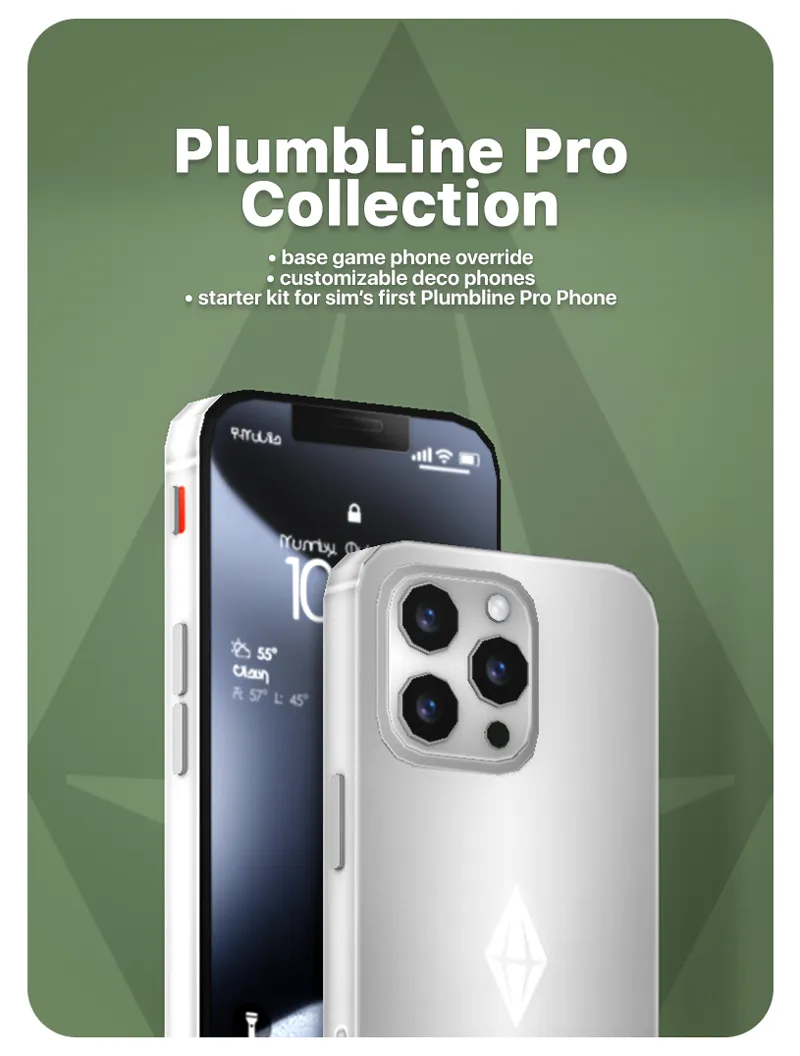
🎀 Plumbline Pro Collection -- https://../posts/124438990
🎀 Wonderful Whims -- https://turbodriver.itch.io/wonderfulwhims
⋆ ── ─ ─ ─ ─ ─ ─ ─ ─ ─ ─ ⋆ \\🚧// ⋆ ─ ─ ─ ─ ─ ─ ─ ─ ─ ─ ── ⋆
☆// ⋆ TABLE OF CATENTS:
COMPATIBILITY NOTES FOR THIRD-PARTY MODS -- Self-explanatory.
PIMP MEANS PIE MENU PRIORITY -- I know, I'm a wizard with acronyms. 😹
PROGRESSION -- This is not a change-log. ⚡
BASIC INSTALL INSTRUCTIONS -- Drag 'n drop, replace files, etc. ⚙️
ZIP CONTAINS -- A complete list of this project's archives and files.
☆// ⋆ COMPATIBILITY NOTES FOR THIRD-PARTY MODS:
This mod will conflict with any third-party mod that reorganizes EAxis' app categories.
This mod should be compatible with any third-party mod that:
Adds custom app categories.
Adds custom interactions to custom app categories.
Adds custom interactions to EAxis' app categories.
Overrides the Phone object to change the mesh and/or textures.
Overrides EAxis' app category icons.
The "INTERACTIONS" side of this mod will conflict with any third-party mod that modifies EAxis' app interactions, but I don't know of any mods that do that.
☆// ⋆ 🇵 🇮 🇲 🇵 MEANS 🇵 🇮 E 🇲 ENU 🇵 RIORITY:
I need to redo this section and explain this better.
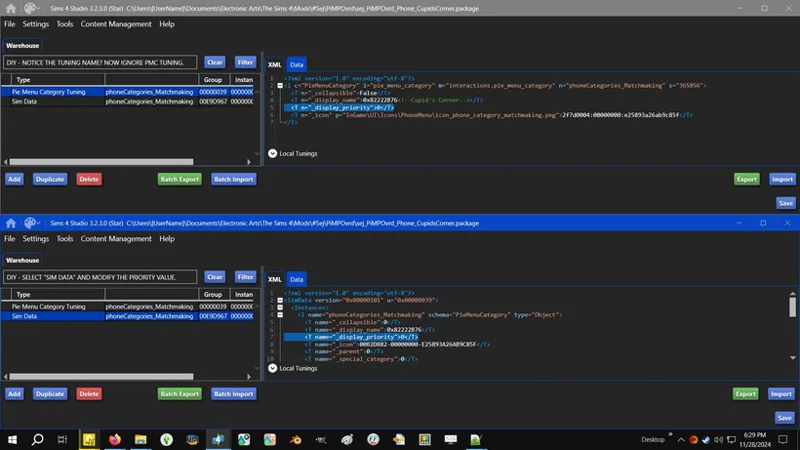
"Pie Menu Priority" (seen in Interaction Tuning resources as "pie_menu_priority") is the command used for "Interaction Tunings" numerical value that defines the order of interactions in our Pie Menus, the order of the Apps in the Phone, the order of the interactions in those Apps in the Phone, etc., et cetera.
I gave a crash course on this back when I first published this mod. Nothing has changed where "pie_menu_priority" is concerned so it should still be valid.
Also, I should explain the difference between "pie_menu_priority" and "_display_priority".
"pie_menu_priority" and "_display_priority" are functionally the same.
The difference is that "pie_menu_priority" is used for "Interaction Tuning" resources, and "_display_priority" is used for "Pie Menu Category Tuning" resources. In layman's terms, the former is the files in a folder, and the latter is the folder, e.g. the App tiles in the Phone and the categories in the Pie Menu. It's in the name, yeah?
☆// ⋆ PROGRESSION - THIS IS NOT A CHANGE-LOG:
⚡ 9/10/2025 -- INTERACTIONS COMPLETE BUT I'M SPLITTING THIS POST!
The (2) parts of this mod function independently of each other. You don't need one for the other to work, and I don't want to confuse Simmers more than I already do with my walls of text and multiple variants. <PONDERS> Should I split my variants into individual posts?
⚡ 9/9/2025 #3 -- HOW ABOUT A PIE MENU?
I need to finish my CAS Filters update and do some PiMP-ing.
PiMP is supposed to overhaul all of our Pie Menus, one at a time. Not only can I overhaul Pie Menus, I can also create custom Pie Menus and custom interactions for anything.
I even know how to make them work (for sims) without XML Injector or LOT51.
What have I been doing with my time?! <PONDERS> Oh, right. I've been BUGFIXING and BAND-AIDING EAxis' !@#$ because they refuse to! Catdammit. 😹
⚡ 9/9/2025 #2 -- "BUSINESS" IS A NIGHTMARE!
(147) interactions ain't easy to juggle - at least not in (1) PACKAGE.
Here's what we're working with and here's the order I'm considering:
(26) basic interactions including middle school (children) and high school interactions.
(14) university interactions.
(51) career-specific interactions.
(+47) "Take PTO" interactions.
(4) small business interactions.
(13) "Buy" interactions for owning businesses.
Most of these interactions are hidden.
The headache is the sheer number of interactions we're working with and the fact that I like my mods in some kinda order, both for me and for you in case you want to edit it. I'm considering splitting my PACKAGE then MERGING it back together for release.
⚡ 9/9/2025 #1 -- WOULD YOU LIKE TO LEARN HOW TO MAKE PHONE APPS?
Once upon a time I flexed my ego and said I know how to do a number of things, and I just don't because it's either not a priority for me or I have no use for it yet.
We need to get back into D.I.Y. before the knowledge I've accumulated gets lost to recesses of my fragmented mind.
⚡ 9/8/2025 -- THE PHONE IS TRASH, BUT YOU ALREADY KNEW THAT!
After hours upon hours of toiling away behind "Social" interactions, I have come to the mind-blowing conclusion that the Phone is trash. Yes, you heard right, I said the Phone is trash! 😹
On the bright side, "Social" interactions are now reordered, and I can apply what I learned to "Business" interactions.
The problem with "Social" and "Business" is threefold:
EAxis has stuffed too many interactions into "Social" (63) and "Business" (147).
"pie_menu_priority" doesn't work properly for Phone interactions. "0" to "9" works fine, "10+" don't play nice with "1" to "9", and anything over "29" is wonky - at least from my "limited" hours of troubleshooting.
Furthermore, when using the same value for (2) or more interactions, they do not order alphabetically, which is how it works with Pie Menus, unless of course EAxis broke it recently and I just didn't notice because I haven't been focused on Live Mode.
I don't think I'll be able to finish "Business" tonight. Maybe tomorrow. I need a nap.
P.S. Not every app needs re-ordering. I might not do "Shopping", "Social Bunny", or "Travel", but everything else except "Business" is complete - that's "Camera", "Cupid's Corner", "Entertainment", "Home", "Social", and (1) little modification for "Trendi".
⋆ ── ─ ─ ─ ─ ─ ─ ─ ─ ─ ─ ⋆ \\⚙️// ⋆ ─ ─ ─ ─ ─ ─ ─ ─ ─ ─ ── ⋆
☆// ⋆ BASIC INSTALL INSTRUCTIONS:
The following options must be enabled for this mod to work properly:
✅️ GAME OPTIONS » OTHER » "Enable Custom Content and Mods"
—
These are ZIP archives. They can be opened or extracted with:
Windows Explorer on Windows -- https://../windows/zip-and-unzip-files
Finder on Mac -- https://../mac/zip-and-unzip-files-and-folders
I personally use 7-Zip for all of my zipping needs. It's free and it's open-source:
7-Zip for Windows -- https://7-zip.org
—
This ZIP archive contains a "#Sej" folder and sub-folder for better mod organization.
1️⃣ EXIT the game.
2️⃣ DOWNLOAD the ZIP archive.
3️⃣ OPEN or EXTRACT the ZIP archive.
4️⃣ DRAG 'N DROP or MOVE the "#Sej" folder into the following folder:
Documents » Electronic Arts » The Sims 4 » "Mods"
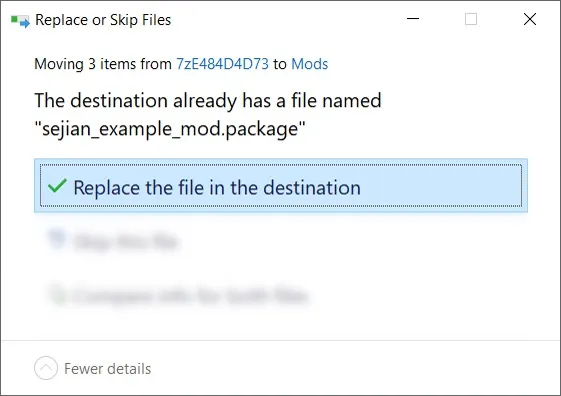
5️⃣ Choose "Replace the file in the destination" if prompted to "Replace or Skip Files":
6️⃣ LAUNCH the game.
☆// ⋆ ZIP CONTAINS (0) TS4SCRIPT + (11) PACKAGE:
This is a simple Tuning override.
This should NEVER contain TS4SCRIPT files, BATCH files, EXE files, or anything other than PACKAGE files, my "#Sej" folder, and a sub-folder.
This section exists as a reminder that we are in someone's crosshairs.
Rogue TS4SCRIPT files, BATCH files, EXE files, etc., encountered where they don't belong could contain malicious PYTHON script or other !@#$ that will attempt to infect your device and steal your personal information when executed by you or the game. Malware can ruin lives. Don't !@#$ around.
🗜️ sej_PiMP_Phone_Apps_[YYMMDD]_[RELINFO].zip
📁 #Sej » PiMP
📄 sej_PiMP_Phone_Apps_Business.package
📄 sej_PiMP_Phone_Apps_Camera.package
📄 sej_PiMP_Phone_Apps_CupidsCorner.package
📄 sej_PiMP_Phone_Apps_Entertainment.package
📄 sej_PiMP_Phone_Apps_Home.package
📄 sej_PiMP_Phone_Apps_Notebook.package
📄 sej_PiMP_Phone_Apps_Shopping.package
📄 sej_PiMP_Phone_Apps_Social.package
📄 sej_PiMP_Phone_Apps_SocialBunny.package
📄 sej_PiMP_Phone_Apps_Travel.package
📄 sej_PiMP_Phone_Apps_Trendi.package
⋆ ── ─ ─ ─ ─ ─ ─ ─ ─ ─ ─ ⋆ \\🚧// ⋆ ─ ─ ─ ─ ─ ─ ─ ─ ─ ─ ── ⋆
EVERYTHING BELOW THIS LINE IS "OLD POST" AND IS BEING CANNIBALIZED FOR "NEW POST" (ABOVE).
⋆ ── ─ ─ ─ ─ ─ ─ ─ ─ ─ ─ ⋆ \\🚧// ⋆ ─ ─ ─ ─ ─ ─ ─ ─ ─ ─ ── ⋆
🇵 🇮 🇲 🇵 stands for 🇵 🇮e 🇲enu 🇵riority!
by intentionally disregarding any semblance of UI order? It's extremely annoying. My PiMP Overrides are my personal take on fixing this - no excessive icons, no sensory overload, just some simple order.
The Retched Phone Overrides - I totes meant to type "retched" instead of "wretched" because I feel like retching every time I open the Phone (that's my story and I'm sticking to it) 😹 - currently modifies the PRIORITY of the "Apps" on the "Home Screen" to put them in alphabetical order. Future releases might reorder the contents of each "App".
You'll find 🎓 DIY instructions at the very end of the post for fine-tuning the order if alphabetical doesn't work for you, or you can 💜 REQUEST a personalized override in the comments. Reorder the following list and include it in your request - Business, Camera, Cupid's Corner [EP16], Entertainment, Home, Notebook [unused and hidden], Shopping, Social, Social Bunny [EP12], Travel, Trendi [EP12].
There are currently THREE (3) INDIVIDUAL ARCHIVES containing a total of ELEVEN (11) OVERRIDES, and ONE (1) ALL-IN-ONE ARCHIVE containing all ELEVEN (11) OVERRIDES.
──── ⋆⋅☠️ SO MANY THINGS...
──── ⋆⋅☎️ LIKE THIS! ESPECIALLY THIS!
Reordering the apps is quite simple actually. I zeroed the Priority settings to get them alphabetical but we could also customize the order by fine tuning the Priority instead of zeroing them.
I'm not 100% sure about the .PACKAGE filenames but I will try to work with what they currently are for any future feature releases.
Initially I had THREE (3) merged .PACKAGES - ONE (1) for Base Game, ONE (1) for HSY, and ONE (1) for Lovestruck - and it worked when all I intended to do was reorder the "Home Screen", but I might also reorder the interactions available in each "App" and as mentioned in the comments, some of these things have a ton of hidden interactions that only appear under certain circumstances but also originate from different PACKS. I haven't figured out how I'm naming these additional .PACKAGES yet.
⚔️ "HOME SCREEN" - BG + EP12 + EP16
EP12 is HIGH SCHOOL YEARS, and EP16 is LOVESTRUCK. Having these overrides in your game without those PACKS installed shouldn't cause catastrophe, but just in case, you have the option to remove them or not install them without any hassle.
🆕🦄 sej_PiMPOvrd_Phone_HomeScreen_AiO_[...]
Contains all ELEVEN (11) individual overrides for BG, EP12 and EP16 listed below. Cheers!
🦄 sej_PiMPOvrd_Phone_HomeScreen_BG_[...]
Contains EIGHT (8) individual overrides that modify PRIORITY for the following "Apps" to achieve alphabetical order: Business (Work), Camera, Entertainment, Home (Household), Notebook [unused and hidden], Shopping, Social, and Travel.
🦄 sej_PiMPOvrd_Phone_HomeScreen_EP12_[...]
Contains TWO (2) individual overrides that modify PRIORITY for the following "Apps" to achieve alphabetical order: Social Bunny (Social Media), and Trendi.
🦄 sej_PiMPOvrd_Phone_HomeScreen_EP16_[...]
Contains ONE (1) override that modifies PRIORITY for the following "App" to achieve alphabetical order: Cupid's Corner (Matchmaking).
──── ⋆⋅🎙️ THE MORAL OF THIS STORY IS...
One of these days I will figure out how to focus on one thing at a time, y'know, after I finally do every random thing that comes to mind. 😹
I hope the filename doesn't bother anyone. I can be juvenile, sorry.
──── ⋆⋅🎓 IT'S OKAY WHEN IT'S IN A 3-WAY!
I'll expand this as necessary in the future.
HERE'S YOUR CRASH COURSE ON PRIORITY AND HOW IT APPLIES TO PIE MENU CATEGORIES - "APPS" ARE PIE MENU CATEGORIES:
PRIORITY is NUMERICAL and sorted in DESCENDING ORDER, meaning the higher the number, the higher the PRIORITY and the higher on the "list" it'll appear, e.g. "Travel" with PRIORITY "10" will appear before "Business" with PRIORITY "2".
EAxis uses "0" to "10" but you can experiment with numbers higher than "10". My temporary AXGW "Switch" Pie Menu Interaction has a PRIORITY of "69". I told you, I can be juvenile. Going above "10" is how some third-party mods stay above everything else, like MCCC, which really annoys me. 😹
If you group Pie Menu Categories or Pie Menu Interactions with the same PRIORITY, they will order themselves alphabetically depending on the STRING text, NOT the TUNING name, e.g. "Business" is the STRING text (aka this is what you see it as in-game), but internally the TUNING name is "Work". "Cupid's Corner" is the STRING text and "Matchmaking" is the TUNING name. It's important to know this because TUNING files are often named differently than what you see in-game. So, if I group "Matchmaking" and "Work" together with PRIORITY "7", they will order themselves alphabetically as "Business" then "Cupid's Corner", but if I want "Cupid's Corner" before "Business" I'll have to use a higher PRIORITY for "Matchmaking" aka "Cupid's Corner". Get it?
HERE'S HOW TO FINE-TUNE MY OVERRIDES TO REORDER YOUR "HOME SCREEN" HOWEVER YOU DESIRE:
1️⃣ Grab the "OPEN BETA VERSION" of Sims4Studio here ("COMMUNITY TESTED" is outdated as of typing this) - https://.../download-sims-studio-open-version
I should probably check the install instructions on S4S' website and write my own if they're trash.
2️⃣ OPEN any one of the ELEVEN (11) override .PACKAGES.
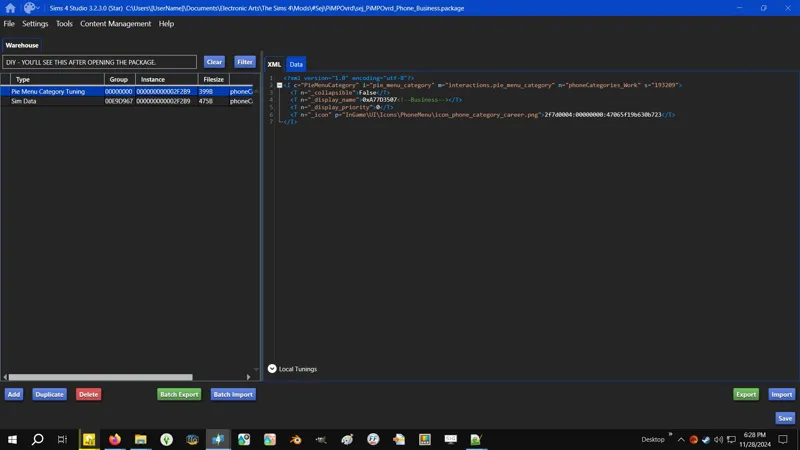
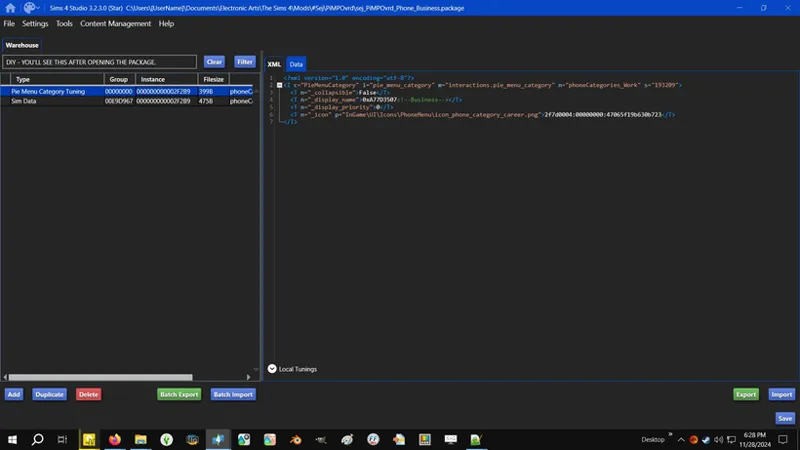
Inside you will see TWO (2) "resources" (I often refer to these things as "files").
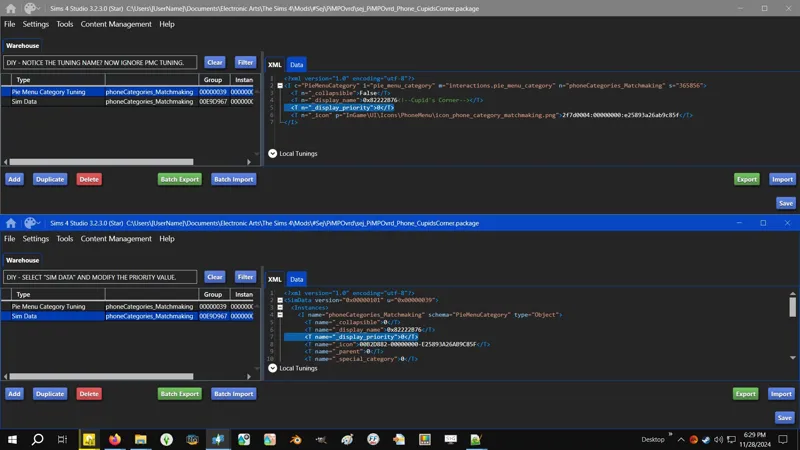
For Pie Menu Categories you only need to modify the values in the "Sim Data" resource.
I included the "Pie Menu Category Tuning" resource for future modding purposes. You can ignore it or change the PRIORITY to match.
3️⃣ CLICK/SELECT the "Sim Data" resource and look for "<T name="_display_priority">0</T>" and change the "0" to a different number then click "SAVE" on the bottom right of the S4S window.
My overrides are all PRIORITY "0" - remember what I said above about grouping?
If you want "Cupid's Corner", "Social Bunny" and "Trendi" at the top and in that alphabetical order, you can group them all as PRIORITY "10", but if you want "Trendi", "Social Bunny" and "Cupid's Corner" in that order at the top, you'll need to fine-tune each - "Trendi" with PRIORITY "10", "Social Bunny" with PRIORITY "9", and "Cupid's Corner" with PRIORITY "8".
Start with "10" and work your way back to "0" to maybe save yourself some work if you want to change something later on.
You can leave the rest of them on "0" if you only want to reorder certain "Apps", but if you want to reorder them all, you'll need to fine-tune each of their PRIORITY values.
You can ignore "Notebook" since it's unused and hidden. I included it because EAxis might use it in the future or I might use it.
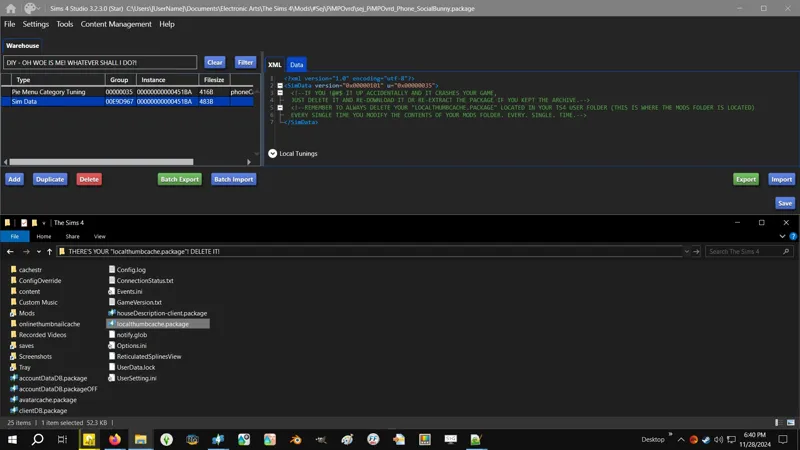
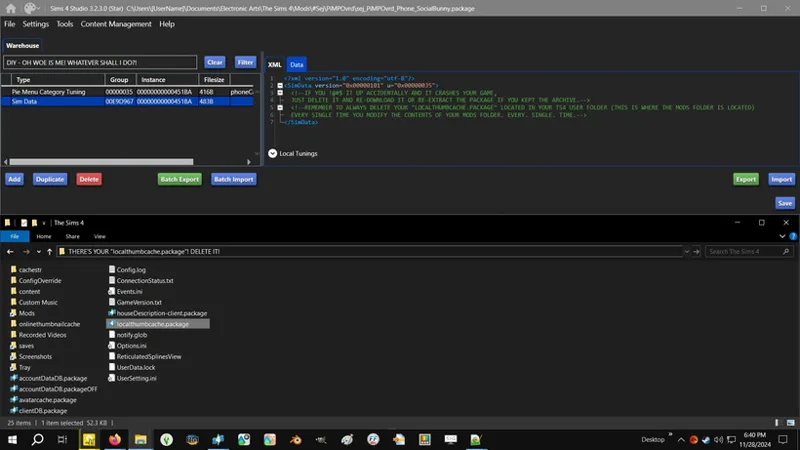
*️⃣ DO NOT MUCK AROUND with anything else. If you do and something breaks, just exit the game and delete the .PACKAGE, then delete your LOCALTHUMBCACHE.PACKAGE and re-download it or re-extract the .PACKAGE if you kept the archive.
HERE'S YOUR BRICK WALL COURSE ON PRIORITY AS IT APPLIES TO INTERACTIONS IN "APP" PIE MENU CATEGORIES:
Everything said previously applies, except these are in ASCENDING ORDER, meaning the lower the number, the higher the PRIORITY and the higher on the "list" it'll appear, e.g. "Open Cupid's Corner" with PRIORITY "1" will appear before "Go on Blind Date" with PRIORITY "2".
There's more coursing to do when I resume these overrides.
Comments (8)
Thank you so much for this! If I use Wonderful Whims (it comes with an app), will it impact anything, or the ww phone app will just be last? Thnx so much, this mod is much needed!!
I had a look in Sims 4 Studio. There's no conflict, but WW's custom App might appear first. I'll pop it into my game and see what it looks like in Live Mode and either make the necessary adjustments to the App override side of my mod, or I can make a "patch" for WW.
Woot woot, it works perfectly!!
Glad to hear it! 😸
is this compatible with the latest patch as of 9/6/25?
It might not be. I will check and update it if necessary. I can't play without my PiMP mods, but I also haven't been in-Live recently to focus on them (or finished the ones that have been stuck in PENDING). I apologize.
OMG I can't wait for this because alphabetical order YAS! Are you also, perhaps, planning to reorder any of the menu options in each app...? 👀
I might. I can. "But in what order?" is the question. I've added TWELVE (12) new screenshots - TWO (2) concerning the "app tiles" and ONE (1) of each "app". Got any ideas? I'm open to suggestions. 😹 As I said in the "fourth" screenshot, I'm certain I can reorder, rename, and re-categorize, and I know we can create new "app" categories, but that last one I'll only do if someone requests it or if I come up with a brilliant idea for something, because my biggest gripe with the Phone is that we can't just scroll on the "Home Screen" to see the other "apps". I'm just musing - a scroll bar might be easier to accomplish than resizing the tiles but I don't think I'm versed enough in SGFX modding to do it yet. ⚡ From what I'm seeing, there's also a ton of "app" interactions that only appear under certain circumstances, e.g. "Business" has at least ONE-HUNDRED AND FORTY (140) interactions. So here's what I'm gonna do, I'll release the overrides to reorder the "Home Screen" first then work on the "apps". Other "apps" don't have as much as "Business", e.g. "Entertainment" only has like a dozen.