

Shuffle Me v0.3.5 Small update - Introduction
Hey, it's Sifa :D
Today's update doesn't bring much changes to the main game. Though for me it's quite an important update, because finally I got a chance to test some advanced modules in our Campaign Builder system.
(download links at the bottom as usual)
New Campaign Intro
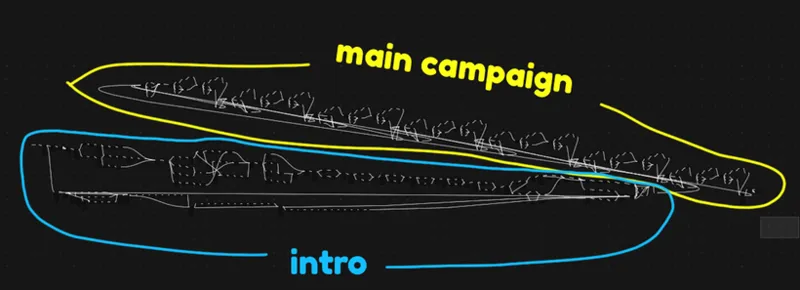
First, we've added a new intro. It should help new players to get familiar with the game mechanics without tons of different mechanics at the very beginning. However, it's not just a tutorial. During the introduction you can get yourself better starting equipment, and with some effort you can even unlock some Gender upgrades or strong cards.
Also, the introduction is quite complex, since the whole idea was to test how choices work and how much we can achieve using the current modules. In the end I made quite a complex introduction. The structure is probably more complex than the campaign itself xD
But it's not as perfect, so don't expect too much. We are missing modules that allow us to make "cutscenes", like trigger animations with specific characters or alone, trigger events, etc. So for now "what's happening" is written in text...
Also, we lack unique characters and proper dialogue system. So again, it's just written in text events and choice events...
Next, I need Devoidex to add these modules, and also add at least 1 or 2 unique characters to improve the intro before I start building the actual big campaign.
Everything else works mostly fine. Yeah, sometimes there are too many clicks, but it's mostly because of events where I need to give a bunch of gear at once. Later, we might add some quality of life improvements, so instead of making 5 "specific clothing" modules in a row, we can make 1 module that has 5 specific clothes in it. The same about the other rewards.
We'll be adjusting this stuff over the next few weeks.
Better widescreen support
It's an important step towards mobile support :D
(this part is written by Devoidex)
Before our first Godot release of Shuffle Me, we had left a setting on to allow window resizing to freely change the size of the game's "canvas," growing or shrinking the space for the game world and UI stuff as needed. We remembered to actually try this in one of our last internal playtests and it was a disaster-- none of our UI was in a reasonable place, stuff overlapped the characters weird, and it was very easy to see the default gray "void". I didn't really know how to deal with Godot UI stuff that well at the time, and it wasn't worth the time to fix properly. Instead, we changed a project setting to force the game to the 16:9 aspect ratio we designed for, so players couldn't break it too badly.
Of course, in order to force an aspect ratio, the engine has to draw ugly black bars in any other window space to have the game fit as intended. We knew from the start that this was a poor compromise, especially since we eventually want to release an Android version, where screen sizes are effectively random.
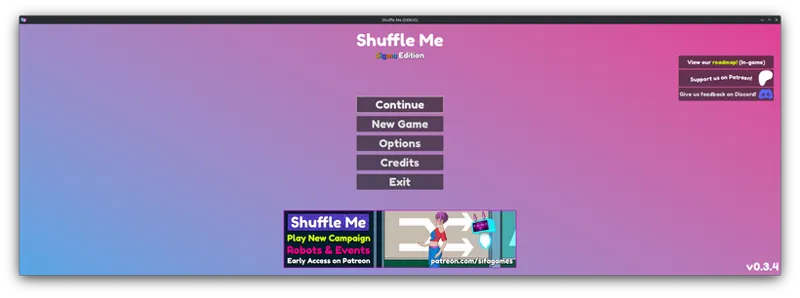
So, for v0.3.5, I changed that Godot setting to "keep height," scrunched my window size to something like 2500x500, and started fixing the UI to work that way:
Most of our UI was fixable by just changing the main "anchors" to keep controls at screen center rather than sticking to the upper left corner by default.
That said, we don't always account for the wider perspective you can have this way-- for example, you can see an extra "discard" deck for "exhausted" clothing that we had placed off-screen for a "normal" 16:9 aspect ratio. If you have a particularly wide screen, let us know what you'd want us to use that space for.
Also, that setting was named "keep height," meaning that we only support wider aspect ratios (landscape) rather than taller ones (portrait). Might still have some black bars above/below the game in some situations. It's a lot more work to get the UI looking right with a portrait display...
Next Steps
(Sifa again :D)
So, as I've already mentioned, we are going to work with Campaign Builder more, to add cutscene and event modules.
Devoidex added the ability to put unique idle animations for enemies, so we'll add more of those for our next release.
I think I'm going to make panties for the next release, too. I'm not sure if we're going to implement them to the game straight away, because we still need to deal with our undressing system. I don't like it when there are so many layers. Pants, legwear, panties. The undressing system is also very time consuming to make mechanics for, because we need to add special effects on the cards that can undress player or require access to specific body parts.
I think a rework of Shield mechanics will be implemented in 1 or 2 weeks, based on when I can rebalance shield cards and items xD
Also I want to add the ability to send us requests for specific cards/animations in discord. Because sometimes I struggle to create names for the cards. So maybe people who like the game can help me with that. From the other hand, it's like a free commission, so I think it's a win-win situation xD I will let you know when we add that on Discord, don't worry :D
Shuffle Me v0.3.5 Changelog:
Added a new complex introduction to the "Floors" campaign
Added a bunch of new campaign modules:
"Simple" choices and dialog events:
Binary choice with "dialogue"
Choices with XP costs
"Dialogues" without choices
Awards of specific action cards, items, stats, and even perks
Different campaigns can now have different starting equipment sets
Default difficulty is now set to "Easy"
Enabled display support for aspect ratios wider than 16:9 (e.g. "ultrawide" screens, web version, smartphones eventually)
i.e. no more black bars on sides (pillarboxing) for unusual window sizes. "Portrait" window sizes may still show black bars above/below (letterboxing).
Fixed most UI views to work better with varying screen sizes, though we don't always utilize the full display that well.
Updated all 3rd party plugins to their latest versions
Fixed incorrect text on results screen after winning certain campaigns