
Downloading and Installing VaM1
Virt-a-Mate (VaM or VaM1 for short) is our first application, the very popular adult-oriented sandbox platform for creating interactive 3D experiences. VaM1 is now feature complete and is no longer receiving major updates, but continues to thrive with a very active community. Start with VaM1 for the maximum amount of features and content! VaM2 is our next generation Virt-a-Mate application that is still in early development and is covered HERE.
Backer Level Information
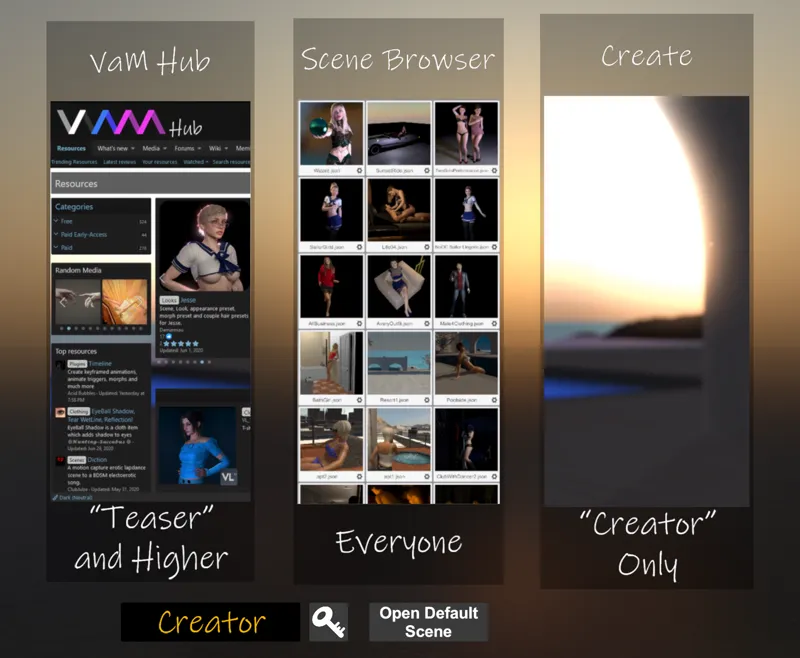
VaM1 can be downloaded freely by anyone to access the demo content. Backers get exclusive content based on backer level. The breakdown is below:
Free = Access to the "Free" build of VaM1. Ability to load the built-in demo scenes. Note these scenes are outdated content and don't represent all that VaM1 can do. To see what VaM1 is capable of, we recommend checking out the thriving community content on our official content site, The VaM Hub . You will need "Teaser" or higher backer level to use Hub content within VaM1.
Teaser Subscription = Access to "Teaser" builds of VaM1. VaM1 "Teaser" builds unlock nearly all capabilities except the following limitations:
You cannot save scenes or packages
You cannot create new animations
You cannot add new atoms (objects) to the scene
Entertainer Subscription = Access to "Entertainer" builds of VaM1. VaM1 "Entertainer" builds unlock the ability to save scenes and packages, allowing you to save your changes and share with others. "Entertainer" builds have the following limitations:
You cannot create new animations
You cannot add new atoms (objects) to the scene
Creator Subscription = Access to "Creator" builds of VaM1. VaM1 "Creator" builds unlock the ability to:
Create new animations
Add new atoms (objects) to the scene.
Create limitless scenes and content.
Downloading and Installing VaM1
Step 1:
Click this link to get the installer/updater: VaM1 Installer / Updater Direct Download
Unzip the installer/updater zip file downloaded above into a new folder if you are performing a new install, or unzip to your current VaM1 directory if updating an old install. IMPORTANT: Do not choose a folder that is admin-rights protected, such as the Program Files directory.
Step 2:
Navigate to the folder you extracted the zip file into. Run VaM_Updater.exe to begin the automatic install/update process. You may need to tell windows to make an exception by clicking “run anyway”. This process may take several minutes. If you have any issues running the installer/updater, see Troubleshooting Tips below.
Step 3:
From the same folder you installed VaM1 into, run VaM.exe to get started. If this is the first time you have started VaM1, you will be presented with a EULA and opt-in/opt-out panel, which is explained in more detail here:
https://hub.virtamate.com/wiki/first_time_user_page/
Complete the settings on this panel, review the EULA, and click continue if you accept the settings and EULA. You will be taken to the normal startup screen you will see each time you open VaM1.
Step 4:
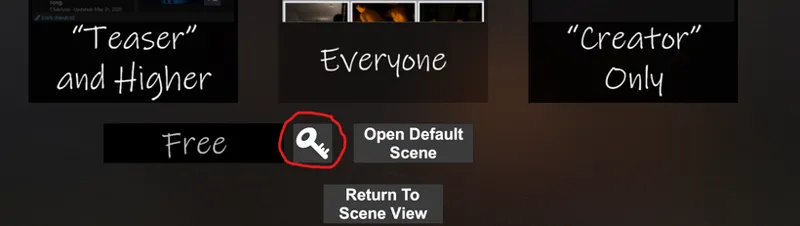
If you are a Patreon backer, you can use your backer-specific key to unlock extended features and content in VaM1. When the application opens and you have completed the first time user page as covered in Step 3, you will be presented with a screen that has a button you can click to enter the key, as highlighted here:
Be sure to enter the key exactly as shown; keys are case sensitive. If copying/pasting, be sure that no extra spaces or lines are accidentally copied.
Versions 1.21 and 1.22 "Creator" key post: https://www.patreon.com/posts/release-1-21-and-77429610
Versions 1.21 and 1.22 "Entertainer" key post: https://www.patreon.com/posts/release-1-21-and-77429613
Versions 1.21 and 1.22 "Teaser" key post: https://www.patreon.com/posts/release-1-21-and-77429611
If you are running an older version of VaM1, you may find your keys here: https://www.patreon.com/meshedvr/posts?filters[tag]=Keys
Getting Started
We recommend you check out the official wiki to help you with VaM1's interface and features: https://hub.virtamate.com/wiki/
Several community members have made YouTube video tutorials covering a large range of topics, including videos specific to getting started with VaM1:
From Captain Varghoss ( Patreon: https://www.patreon.com/captainvarghoss )
https://hub.virtamate.com/resources/youtube-tutorials.6672/
Older tutorials from JustLookingForNothin:
https://hub.virtamate.com/resources/vam-tutorials-channel-on-youtube.4991/
The official VaM Hub ( https://hub.virtamate.com ) contains more guides and forums if you get stuck. The Hub also hosts a plethora of community content that can be most easily found and used by using the in-game Hub browser. If you have other issues or questions you can also contact us by direct message here on Patreon or on Discord.
Troubleshooting Tips / FAQ
Windows is asking to make an exception, or my virus scanner is warning me about running the installer/updater…
Windows and other virus scanners may flag the updater exe with a false positive and you will need to indicate to Windows to run it anyway. Updater programs commonly have this issue due to their self-updating nature. This updater was developed in-house on a clean computer and is safe to use.
I am receiving the error message “could not create SSL/TLS secure channel”...
This error happens because you are either using the older version of updater which no longer works and/or you are running Windows 7. Please re-download the installer/updater using the link at the top of this post, and Windows 7 users should see the following post: https://www.patreon.com/posts/windows-7-users-35039570
I am having other issues running the updater…
Please see the following link: https://trello.com/c/zWZxIKRw
VaM1 will not recognize my key…
Be sure that your key version matches the version of VaM1 you are running. If you are running a new install, your version is 1.22.
If you are copy/pasting your key, be sure that no extra spaces or lines have been accidentally copied. We recommend typing directly into the key box. Keys are case sensitive, so make sure letters are capitalized.
VaM is crashing after I have downloaded and installed using the updater…
Please see this link for common issues and fixes: https://trello.com/c/c5WWHlnn
Do I need VR in order to enjoy VaM1?
Not at all! VaM1 is fully-featured in desktop mode, and in fact many creators prefer to use desktop mode when perfecting their characters or scenes.
However, for the fullest immersion we do recommend experiencing VaM1 in VR.
What are the system requirements for running VaM1?
VaM1 requires a Windows PC (Windows 10 or 11 recommended) with a DirectX11 compatible video card to run. VaM1 does not run natively on MacOS, Oculus/Meta Quest, or other standalone VR headsets. Standalone headsets can generally be used to remotely connect to the Windows PC running VaM1 through Steam Link, Meta Link, Virtual Desktop, or similar software.
VaM was built for VR, but can also run in a desktop mode.
Due to the nature of an extensive body physics system, as well as simulated hair and clothing systems, we recommend the following:
Intel i7-10XXX series or higher (3.6Ghz or higher)
Nvidia 3080 GPU or higher
16GB RAM or higher
VaM1 favors high single-thread CPU performance for overall framerate, but does utilize all CPU cores to an extent. In many cases today, this favors Intel CPUs. VaM1 hair and cloth simulation also tend to run better on Nvidia GPUs at this time due to how they seem to handle compute shaders more efficiently.
Issues with VaM crashing after download and install using updater?
VaM_Updater link for common issues and fixes: https://trello.com/c/zWZxIKRw
VaM common issues and fixes: https://trello.com/c/c5WWHlnn

Comments (476)
How can I download this app
Cómo lo instaló gratis
Why doesn't mine work? well The key works, but after I click the teaser, it just says "failed to fetch hub info"
Why doesn't mine work? The key works, but after I click the teaser, it just says "failed to fetch hub info" ?
Hello. I just installed the updater. Tried to run the game, and it gets stuck in a black screen. Is this happening with somebody else?
"Dear MeshedVR team, I have been following your project for a while and really appreciate your work on VaM and VaM2. I would like to share a suggestion that I believe many users would love. Have you ever considered releasing a simplified, standalone version of the game specifically optimized for Meta Quest (without requiring a PC)? Even if it means scaling down some of the complex physics, graphics, or clothing simulations, having a mobile APK version that runs directly on the headset would be amazing and highly accessible for players who don't own powerful gaming computers. Thank you for your time and for considering this feedback! Best regards, Dima"
Hello, I’m having a UI rendering issue in VaM. I’m using a 4K OLED display, and the VaM interface text looks blurry/pixelated. The UI scaling also behaves incorrectly — if I increase the UI Scale, the interface becomes too large and gets cut off, but lowering it makes the text very unclear. I already tried changing: UI Scale settings Render Scale settings Windows DPI scaling High DPI compatibility options but the issue remains. It looks like VaM’s UI scaling/rendering is not handling 4K resolution or high DPI displays correctly. Is there any recommended setting or fix for 4K monitors to make the UI text sharp and properly sized? Thank you.
Vam calin
links dont work for demo
Why does this need UAC access now? It didn't before. I was going to install until that popped up
还没开发好吗 快点啊
many joints bug-.-
This looks like a wonderful project, I unfortunately could not get this to work on my laptop, Memory/RAM issues. I hope this goes far, keep up the good work!
Yeah VaM1 is a demanding application. Thanks for trying it out. Our next generation project VaM2 should be able to scale better to work on lower-end hardware.
Hi I can't find the scene in the vam hub. Where can I get the game?
Does anyone have a video tutorial on how to create scenes and everything
Everything should be in https://hub.virtamate.com/index.php
i deleted my VaM a few months ago,now i bout the creator version and click the vam updater,but nothing happens,it like starts to open it but nothing happens,is there a another link somewere for me to download VaM??
I'm trying to open the updater/installer on windows 11 and its not working
It is missing the .var files for VamX
I cannot find the Supervam in the VAM hub anymore
Are we going to get a VR floating menu in VAM2 any time soon?
Hi, Where can I download this older version 1.20.0.10? thanks
Can someone please explain the simple way to get this working on a meta quest 3s
connect your quest to your PC using quest link or Virtual Desktop streamer, start the VAM Updater, click Launch VR. It just works.
Considering the nature of the updater, it would be nice if this page indicated the collective size of the files that automatically download.
Good afternoon, I can't find a link to the complete build with the latest updates for VaM2 with VR mode. Can you provide a link?
https://www.patreon.com/posts/vam2-beta1-1-has-134352549
Good afternoon, I can't find a link to the complete build with the latest updates for VaM2 with VR mode. Can you provide a link?
I have a question, are there gonna be any more updates for VAM 1 ?
Download Speed is so slow with the updater
Are you able to download on meta quest 2
is there a patch that lets you use your own body movements to control the body movements in possession mode?
Crazy late for that big upgrade :(
How can i install the games ?
Help me, failed to fetch hub info
Do I have to be subscribed with Voxy AND you? because I paid there first before I was here. plus, can I just unsubscribe whenever I want and still keep the Virt-A-Mate?
You can just pay for 1 month and keep using VaM afterwards. Voxta has a subscription though because they have ongoing costs if you use their services.
It says Fatal Error when i try to download
When you're running the updater? this is a very stubborn issue that just seems to keep coming back. Keep re-running it. It will pick up from where you left off, and will finish eventually.
To download base game I downloaded the updater zip above, extracted it, then ran that extracted file as administrator. You may be able to run the extracted file without running as admin.
"The VaM2 Addon Kit and VaM2 Beta1 will release before the end of 2024." Where is the toolkit for download?
I was using wireless plugged in a cable and the hub is working again, for anyone wondering how to fix the Fetching Hub issue. Use a Lan cat 6 Cable. Dont use Wifi something to do with the security on the wifi stops the hub from making contact with you game.
How to download on MAC?
Fetching Hub never loads ? Used to work perfectly
Insane qualty, congratulations, the level of image quality, lighting, physics and optimization it's just amazing. In 2D and VR ... Please continue this amazing work, thanks
It looks good a bit confusing to use the UI will take some getting used to with the current Drop down menu trees. Thank you Everyone for your hard work. Can't wait to see this progress.
I heard Vam 2 was out. I had no idea. Where do I find it?
1st beta will be released most likely in the next few hours.
downloaded the updater but nothing happens when i click it?
Ssl problem
hello. new to VAM. Having trouble initially as some of the menu items seem to be missing / cut-off at top of screen. For example clothing. not sure if this is an aspect ratio problem with monitor. cannot load looks, scenes or access some basic functions. Any help would be appreciated.
found ui offset - menu items now accessible - thks
why is not something like this in main menu to get key from im searching to get creator key for few days now still no clue on how to navigate on this complex site xd
Downloaded it but the vam hub isn’t avalanche
Available? Sorry
I have a little problem, I don't know how, but somehow the clothes and everything they wear is kinda transparent and i can actually see the body underneath.. is there way to fix this? when i run this first time it wasn't like that.. is that some crappy plugin that i have to find and delete ?
How do I install the game??
What the hell man? How do i just download the installer? why is this so difficuly?
Fatal Error happen on me when i download the files in vam_updater, when the middle of downloading, the speed of download drop to 1 kb/s
Please see this link. I might suggest using a VPN to see if that helps with the issues. https://trello.com/c/zWZxIKRw
VAM work for MacOS and for Apple computers??
for real im looking for this answer
I cant dowload the game, fatal error.
hallo miteinander gibt es eine Möglichkeit das Programm auf deutsch zu setzen ? mein Englisch ist schlecht :-( Gruß
Hello. I've been able to download and run the scenes, but I can't seem to get the VR hands to toggle, even though it's an option in the scene.. sometimes I see a red and blue ball where my hands would be but no hands... is there something I'm missing? I have a Meta Quest 2. thanks.
Sorry if I'm replying a bit late, but you need to click on "user preferences" (after clicking on the top left button with three lines on it while in-game), then into "VR 2" and you should see a tab called "hands" somwhere below in that menu. There is a "left hand choice" and a "right hand choice" where you can select which hands you want, I use "male 2". And be sure to click on "use collision" as well. :) Hope this helps.
can't find the discord link, help?
Hi I'm a new member and haven't been very succesfull in dowloading and using scenes. For example some of the scenes I downloaded don't seem to appear in the hub browser (searched by name but bothing) and the one that are there are loose (not a complete scene i suppose), kinda lost pls help
Hi.. I am getting an error when i try to install the vam-updater, i get this message: saying (FATAL ERROR): EULA.html. Pls. Help!
Hello. I get Fatal Error Occured when installing. It's not on an SSD. I tried with VPN on as well. And pretty sure folder has full permissions. Seems to be at your end. Isn't there a whole package download without the updater we can download?
are the base1 and add on files included when using vam_updater.exe? Was looking for the links and notice they're gone now so I wanted to confirm this if that's OK. I also found this link to a page on the hub explaining how to use the vam_updater.exe with various commands for fixing/get rid of old files etc, this might be of good use to someone: https://hub.virtamate.com/resources/utility-vamupdater-always-use-the-latest-addons.20004/
pourquoi quand j'installe le jeu il marque erreur fatal a chaque fois
Please try using a VPN. You can also look the log file created in logs/patch.log in a text editor and it might have more info.
This is where u got problems with the security installation message?
oui c'est exacte
Why is the publisher of vam updater unknown ?
Hi and not sure If you've had any success about not being able to "RUN" the software? You need to just click on the "more info" tab and then "run anyway"
Can someone please help me? Or give me a refund? I have wasted hours on trying to get this to work.
Is there going to be any updates to this?
There won't be any more updates to VaM1. We are focusing everything on VaM2. We will provide VaM2 progress updates and beta releases in separate posts in the future.
Please help! I can't install this software. It always gives me a "timed out" error. What is happening?
You might want to try using a VPN when running VaM_Updater.exe. It is possible your internet provider is blocking or restricting access to our servers and CDN.
I give up with this. What a waste. I've spent hours trying to get anything to work. At best I get a screen showing something, but I'm not inside the scene, it's like watching it on a computer in vr? Every single guide on how to get it to work skims past a particular aspect, or asks you to find something elsewhere. I feel like I'm trying to get into the cool nightclub when really everyone is having fun down the pub.
VaM_Updater does not allow to run, I get the folowing screen : Windows protected your PC Microsoft Defender SmartScreen prevented an unrecognized app from starting. Running this app might put your PC at risk. More info App: VaM_Updater.exe Publisher: Unknown publisher
Do I need to run VAM updater if I already installed the game on Steam ?
Nothing happens when im trying to run VaM_updater. The money went there, but luckily it wasn't much.
It is possible Windows quarantined the application and won't let it run. You may need to make a security exception to run it.
What's up guys? Been waiting for some sort of an update for a long time now.
keep getting "fatal error occured" when trying to install
No news, no updates, nothing for such a long time :(
Notice for Mac users: I've succeeded running VaM 1.22 on Apple M1 Max with MacOS Sonoma 14.1.2 using Crossover utility (by CodeWeavers). Scenes load, animation plays, characters are interactable. - For the bottle in Advanced mode check D3DMetal (hair shader doesn't work and all characters are bald if unchecked). I also use MSync and High Resolution Mode flags, while DXVK and ESync ones are unchecked. - Haven't tried installing VaM into a new bottle yet. My existing one also has Microsoft .NET Framework versions 3.5 and 4.7.2, and Steam installed. Not sure if any of this installs libraries&stuff that are required for VaM to run. - Performance is smooth (60fps?) in default scenes (e.g. a shower one.)
Why so difficult a download process?!?!!? Just make it a simple executable and be done with it.... no need for convoluted shit ugh
What is so difficult about it? Create directory, put VaM_Updater.exe in there and execute. It is a portable app and you are able to store multiple instances on your pc. Great.
Vam 3d is lagging how to make faster ?
how can use in meta quest 3? i don t have PC
you cant
If I start the program by Launch Desktop or Launch VR (or even without the updater) I only get a black screen. Nothing´s loading or anything. Windows 10. GPU and CPU is high end. What´s the problem?
Computer performance differences,Have you considered software rendering mode? Not real-time animation
VaM and upcoming VaM2 were designed to be real-time VR applications first, so no we have not considered offline rendering. It may be a consideration in the future for VaM2 with some kind of built-in path tracing mode for making screenshots.
Hi, I'm using a Macbook Air but the updater zip download doesn't work with me. Can I get any help?
VaM requires a high-end Windows based PC. If your MacBook Air has an Intel-based CPU you could try Wine or install Windows on another partition using Boot Camp. If you have an M1 or M2 MacBook Air (the newer ones), your laptop cannot run VaM.
Install Snafu: I ran into a bug where it wouldn't download a sailor outfit. Then I realized the oblivious, the directory I was installing to was only 2 GB, and I was trying to install a VR game...I rebuilt my VeraCrypt directory to 50GB and migrated the updater. The installer worked perfectly after that. The total space used to install VaM version 1.22.0.3 was 18.8 GB. Usually, I look up the Recommended Specifications for a program before trying to install it but was unable to find that for this program after a cursory search, so I went with trial and error.
I'll warn you now if you start grabbing community content from the Hub browser in game you will quickly be well over 50GB!
So is this project dead? It's been radio silent for months, any eta for 2.0? this year? 2025? Also can anyone pls give me a link to the Discord?
Far from dead! I'm not giving estimates on 2.0 at this time. A lot more info from me on VaM2 (previous 2.X) is on the vam2 channel on discord. You can link your Patreon to Discord here: https://www.patreon.com/settings/apps
can you run on Mac
where do i download????
This post explains how to download and install. Everything you need to know is in this post you are asking the question on.
Download slow fix it.
If you are experiencing slow downloads, try using a VPN to see if that corrects it. Depending on where in the world you are this could improve the download speeds due to where the CDN endpoints are and their current cache state.
Yo just wanted to say this is the single most unfriendly piece of porn software I've ever used. The UI is god awful and you don't even have a character creator? All the scenes, even the simplest take 1-5 minutes to load. You really should communicate more on what VaM is and what it isn't.
VAM isnt a Game, Its a platform for simulation. If you dont know how to create characters and scenes, you can simply download them from the hub. Perhaps your hard drive isnt fast enough. All scenes load under a minute for me. He explains exactly what VaM is and isnt. Says its a sandbox and simulator. Not a plug and play porn game.
apologies; when trying to open the config, the desktop mode or even the application itself I am met with an error 'The application was unable to start correctly (0xc0000005)', the updater is still able to open but nothing else is.
The key isn't working...
Make sure you type it in exactly as shown. Make sure you have 1.22 version of VaM installed and are using the 1.22 key. If all of that is correct, try running VaM_Updater.exe, click Options, select 1.22.0.3 as desired version and click Sync / Repair Core, and then try again to run VaM and enter the key.
i dont see the zip file to dl the game
It is the 1st link in this post. Updater Zip Download link.
this game just crashes my steamvr after 10 seconds
shit pc xD
Longtime VRPorn Entertainer, new Creator. Awesome stuff these last few years thanks!
Fatal Error- There should be 'VaM_Data' folder next to the executable ....what should I do?
just crashes, messaged patron - no response. : (
I can not have the VaM.EXE working. I get the message VaM..EXE stop working repeatedly . I program stop VaM.EXE working. I run windows 7. Idid fix the registry correctly as i was instructed and I install the VaM in Vam DR folder, Yet i can not have it working.
the download speed is so bad, at first i was getting 100kbps and then there was a problem and whole download stopped, now im barely getting 500bps.
Oh my god, the download speed of the updater is beyond terrible, I have 300mbps download speed and this thing is 15 hours on and still have not finished installing and downloading (Now downloading at 66 bytes per second). I'm sorry but I'm refunding and unsubscribing this.
Hey, it's only letting me get version 1.20.77.13 when I try installing, but I got the creator membership. Also it claims that the game can't access it's own files when I gave the damn thing it's own folder within a desktop folder.
Your desktop might be admin protected. I recommend trying another folder like C:/VaM or similar to install to.
sorry, Wie kann ich neue Bilder in Virt-a-Mate bringen ???
Was meinst Du mit neue Bilder?
eie kann ich neue Bilder in virt-a-mate bringen ???
Hi there, my VAM is ver 1.20.77.9 up to now and now noticed there are many of upates and patches, should I install all these? thanks for your advice!
Yeah I would highly recommend it if you are a current subscriber and have access to the new keys required for 1.21/1.22 versions. Thank you.
Meshed vr is the best!
man love installing twice because I cant read.
Heyooo I came this across in Steam, now I'm here for some testing, why was it out of steam tho ??? So far it's mindblowing good !
HI IS VAM X stand alone ? or is it an add on to vam ?
if accessing the installer via NoMachine remoting software, you may just see a text window with a list of versions. The rest of the UI is hidden. Use local keyboard or microsoft remote desktop to see the installer properly.
updating impossible, download speed of 8 kb/s
These are the errors I got after updating > VAR file AddonPackages\ddaamm.hair_bun.4 (1).var does not use integer version field in name .. !> VAR file AddonPackages\ddaamm.hair_long12.2 (1).var does not use integer version field in name .. !> VAR file AddonPackages\ddaamm.hair_long5.3 (1).var does not use integer version field in name .. !> VAR file AddonPackages\Hunting-Succubus.EyeBall_Shadow.4 (1).var does not use integer version field in name .. !> VAR file AddonPackages\Hunting-Succubus.Eye_WetLine_Test.1 (1).var does not use integer version field in name .. !> Exception during zip file scan of AddonPackages\MacGruber.LogicBricks.8.var: ICSharpCode.SharpZipLib.Zip.ZipException: Cannot find central directory at ICSharpCode.SharpZipLib.Zip.ZipFile.ReadEntries () [0x00000] in :0 at ICSharpCode.SharpZipLib.Zip.ZipFile..ctor (System.IO.FileStream file) [0x00000] in :0 !> VAR file AddonPackages\MonsterShinkai.Yoon-Ji.latest.var does not use integer version field in name .. !> VAR file AddonPackages\prestigitis.clothing-190601.1 (1).var does not use integer version field in name .. !> VAR file AddonPackages\prestigitis.clothing-200427.1 (1).var does not use integer version field in name .. !> VAR file AddonPackages\Ramsess.Korean_HairPack.1 (1).var does not use integer version field in name .. !> Exception during zip file scan of AddonPackages\SupaRioAmateur.Sub_Demi_Eyes.3.var: ICSharpCode.SharpZipLib.Zip.ZipException: Cannot find central directory at ICSharpCode.SharpZipLib.Zip.ZipFile.ReadEntries () [0x00000] in :0 at ICSharpCode.SharpZipLib.Zip.ZipFile..ctor (System.IO.FileStream file) [0x00000] in :0 !> VAR file AddonPackages\V2.___UniversalMorphCollection___.100 (1).var does not use integer version field in name .. !> VAR file AddonPackages\V2.___UniversalMorphCollection___.100 (2).var does not use integer version field in name .. !> VAR file AddonPackages\vamX.1.17 (1).var does not use integer version field in name .. !> VAR file AddonPackages\vamX.1.17 (2).var does not use integer version field in name .. !> VAR file AddonPackages\vamX.1.17 (3).var does not use integer version field in name .. !> VAR file AddonPackages\vecterror.ColorCorrect.1 (1).var does not use integer version field in name .. !> VAR file AddonPackages\vecterror.ColorCorrect.1 (2).var does not use integer version field in name .. !> VAR file AddonPackages\vecterror.ScalpMidBase.2 (1).var does not use integer version field in name .. !> VAR file AddonPackages\vecterror._MorphCollection_.12 (1).var does not use integer version field in name .. !> Duplicate package uid Chokaphi.DecalMaker.26. Cannot register !> Duplicate package uid ClockwiseSilver.SilverExpressionTool.2. Cannot register !> Duplicate package uid ClockwiseSilver.SilverHJ.3. Cannot register !> Duplicate package uid ClockwiseSilver.SilverKiss.1. Cannot register !> Duplicate package uid everlaster.HairLetLoose.2. Cannot register !> Duplicate package uid everlaster.TittyMagic.7. Cannot register !> Duplicate package uid hazmhox.vammoan.20. Cannot register !> Duplicate package uid LFE.AutoPupil0.8. Cannot register !> Duplicate package uid LFE.ExtraAutoGenitals0.3. Cannot register !> Duplicate package uid LFE.Vibrator0.3. Cannot register !> Duplicate package uid SuperVAM.Metropolis.1. Cannot register !> Duplicate package uid TGC.Asset_NooN_BDSM_Collection.1. Cannot register !> Duplicate package uid TGC.Asset_SexToys.1. Cannot register !> Duplicate package uid TGC.Clothing_NooN_FetishBoots.1. Cannot register !> Duplicate package uid TGC.Clothing_NooN_LatexGloves.1. Cannot register !> Duplicate package uid TGC.Clothing_NooN_MinimalBra.1. Cannot register !> Duplicate package uid TGC.Clothing_NooN_MinimalPanty.1. Cannot register !> Duplicate package uid TGC.Clothing_NooN_NipplePasties1.1. Cannot register !> Duplicate package uid TGC.Clothing_NooN_TapeGag.1. Cannot register !> Duplicate package uid TGC.Clothing_Ravenous_EvilNurseSuit.1. Cannot register !> Duplicate package uid TGC.Clothing_Richabri_LingerieChemise.1. Cannot register !> Duplicate package uid TGC.Clothing_Richabri_LingerieCollar.1. Cannot register !> Duplicate package uid TGC.Clothing_Richabri_LingerieWristbands.1. Cannot register !> Duplicate package uid TGC.ENV_NooN_DirtyCell.1. Cannot register !> Duplicate package uid TGC.ENV_NooN_MedievalCells.1. Cannot register !> Duplicate package uid ToumeiHitsuji.DiviningRod.4. Cannot register !> Duplicate package uid VeeRifter.AutoLabia.3. Cannot register !> Duplicate package uid via5.Cue.2. Cannot regi !> Missing addon package vecterror.AnKe.latest that packagevecterror.AnKe_RW.7 depends on !> Missing addon package Mr_CadillacV8.Corset_A_5_Textures.latest that packagevecterror.AriGran2021.4 depends on !> Missing addon package Mr_CadillacV8.Ibanez_RGD421.latest that packagevecterror.AvLa_Scene.3 depends on !> Missing addon package Mr_CadillacV8.Dress_I.latest that packagevecterror.DaiRid.3 depends on !> Missing addon package Ramsess.RShair_bf_07.latest that packagevecterror.DrBe_2021.1 depends on !> Missing addon package VamDazzler.VamDazzler_Morphs.latest that packagevecterror.EmBro.3 depends on !> Missing addon package AmineKunai.Black_Transparent_Top.latest that packagevecterror.EmiBlun.3 depends on !> Missing addon package Mr_CadillacV8.YoVi_Outfit.latest that packagevecterror.EmiBlun.3 depends on !> Missing addon package AnythingFashionVR.yellow_bikini_bottoms.latest that packagevecterror.EmWa_RW22.2 depends on !> Missing addon package Jackaroo.JarExpressions.latest that packagevecterror.EvGre.2 depends on !> Missing addon package Jackaroo.AerithSexy_Jar.latest that packagevecterror.GwStV2_Scene.8 depends on !> Missing addon package NoOC.Lilith.latest that packagevecterror.GwStV2_Scene.8 depends on !> Missing addon package Jackaroo.AerithSexy_Jar.latest that packagevecterror.GwSt_Scene.8 depends on !> Missing addon package NoOC.WarriorNun-Araela.latest that packagevecterror.JeLa_evo.6 depends on !> Missing addon package AnythingFashionVR.blue_shorts.latest that packagevecterror.JesAlb_RW.7 depends on !> Missing addon package particle_pinnacle.breathing_morphs_and_animations.latest that packagevecterror.MegFox.1 depends on !> Missing addon package JoyBoy.Female_Nipple_Piercings.latest that packagevecterror.Missandei_Scene.3 depends on !> Missing addon package AnythingFashionVR.blackWhite_skirt.latest that packagevecterror.StTh_pack.1 depends on !> Missing addon package AnythingFashionVR.Knickers_1.latest that packagevecterror.StTh_pack.1 depends on !> Missing addon package NoOC.Lis-Chloe.latest that packagevecterror.StTh_pack.1 depends on
It appears you have multiple problems. 1. You have downloaded var files from the Hub multiple times and they get saved with (1), (2), etc. at end. VaM requires you use the original files names. I suggest removing all of these duplicates you have. 2. You have some corrupt var files. I suggest deleting those. The ones that have these errors: Exception during zip file scan of AddonPackages\SupaRioAmateur.Sub_Demi_Eyes.3.var: ICSharpCode.SharpZipLib.Zip.ZipException: Cannot find central directory 3. After you remove the duplicates and broken vars above, open Package Manager inside VaM (the Box icon), then click Scan Hub For Missing Dependencies. Click Download All. That should fix many of your missing addon package errors, but it might not fix all of them. If some of these are not hosted on the Hub, you will have to seek out the original source to install them.
Hey there! Noticed that in 1.22 (both release and patch), moving up and down (on the y axis?) no longer works in VR. Using a Meta Quest 2 & OculusClient. Normally this function is controlled with the right controller joystick. Worked in previous releases.
You probably have Navigation Lock Height set as that is the default setting on new installs. You can disable this by clicking "Click for more options" button on the UI panel, and then deselect "Navigation Lock Height". This is a user preference and will stay as you set between sessions.
Updates HANGS at icudtl.dat ... 😓 And i have to kill the task and run again sync/repair all, my 1.20.77.9 version, to be able to launch vam again, or it will launch only an Empty screen. Howto fix this plz ?
Run VaM_Updater.exe, click Options, click 1.20.77.9 (I recommend at least updating to 1.20.77.13), and click Sync/Repair Core. Let it complete. Don't launch VaM until it successfully completes. If it doesn't, restart your computer. It may be holding icudtl.dat file open. Another possibility is that file is somehow marked as read-only or inaccessible and the updater can't update it. You may have to find it and manually delete it.
Everything is working great. However, for some reason whenever I add VamX to a scene, I keep getting the error message that I have an old version of the VamX Base 1 installed. I have downloaded and installed the newest Base as well as the newest VamX version 1.27. Everything is correctly placed into the AddonPackages folder, so I'm not sure how to resolve this. This is my only issue so far.
I get error messages whenever I run this now. Mostly claims I'm missing several addon packages. I tried using the new key, the key was accepted but I'm still getting the error messages.
You may really be missing some addon packages or have them disabled. If you downloaded addons but didn't download all of the dependencies you will get those errors. You can open Package Manager using the button for that on the toolbar, then look in the Missing Packages section. You can click the button Scan Hub For Missing Packages... to see if they can be found on the Hub and download them. You can also click Missing Dependencies tab to see which addon packages are causing the problem. You could remove them or try to fix the missing dependencies. If you are encountering other errors during scene load, they may be related to the missing packages.
After installing this new version of Vam, do I need to reinstall the latest version of VamX?
It should just work if you updated from your existing install of VaM. If you created a new folder to install to you would need to install vamX into the new folder as well.
Not going to lie, for me, vam just seems to be getting worse. With the latest updates everything is basically broken. I tried a fresh install and the same issues and bugs arise. Long load times when moving atoms around when using vam x. Simply opening up vamx menu glitches everything out for about 10 seconds. Breathing sound in vam x doesnt work at all now. Frame rate drops to unusable levels. Changing positions in vamx takes about ten seconds to load. The list goes on. I've tried going back to previous states. No luck. I had a version (not sure which one) from like a year ago and that works smoothly. It's just frustrating. I feel like this is a project car that just keeps breaking do no matter what I do. I hope theres good news down the pipeline. I know a lot of folks are not having such a hard time but there are a lot who do and there doesnt seem to be a fix. Ive tried lots a stuff but it takes so much time and effort that I spend more time doing that than actually using vam. I'll keep supporting you guys but I really hope theres a light at the end of the tunnel.
I wonder what you and the others have in common that it's not running so well. For me the performance has DRASTICALLY improved since the last update. All i can say is to roll back to that good one from a year ago using VaM Updater. Clearly there's a particular file, option or change that isn't playing well with your system and I hope you're able to work it out. The QoL is real with these recent updates.
I keep trying to install but the updater says there was a fatal error. Anyone know what to do?
Wow can confirm ,loading times are also much shorter. Good Job
Hi , I miss the scenes, looks and clothes, wich I have loaded from hub in the former version. How I can import this in the new version? Thanks!
If you updated to 1.21 you need to enter the 1.21 key to unlock the full functionality. The keys posts are linked above in this post. If you don't have access to 1.21 keys (not currently subscribed) and you still have the 1.20 keys, you can roll your version back to 1.20 by doing the following. Run VaM_Updater.exe, click Options, select 1.20.77.13 in Desired Version, and click Sync/Repair Core. This will get you back to 1.20 and all features should be unlocked already with your previously installed 1.20 key.
After updating, game runs much much better for me. Memory leaks fixed etc.. Having said that, for those deciding to update, you will LOSE your creator key
I've been trying to install the game for a long while now, I keep getting "Fatal Error, Exception during version sync: System Exception: Failed to download "..../..../VaM_Data/Managed/ZFBrowser.dll. Aborting"" and don't really know what to do at this point. I've tried removing all related files and re-installing, running as administrator as well as tried installing older versions but it all leads to the same error.
If you have a virus scanner or other protection product it is possible it is putting this file into quarantine for some reason. Also try a new install in a different folder or drive. There is a log file creates in logs/patch.log that you can open in a text editor which might have more information.
i lost my creator key after updating... this fkd
1.21 requires a new key. You can resubscribe to creator and get the new key or you can continue to use 1.20 forever with your existing key. To change back to 1.20, run VaM_Updater.exe, click Options, select 1.20.77.13, and click Sync Core. You only lose access to the new features/tweaks/bug fixes that are in 1.21.
I openen the Rar file and clicked the installer. It downloaded everything but ofcourse it didn't install properly because I didn't read the instructions first. But there is about 10gig on my C-drive gone now. Does anyone know where winrar actually puts these files when running the Updater from within the rar file? I checked the windows temp folders but can't find them..
It is usually windows temp folder if you use windows unzip, but if you are using something else like WinRar or 7zip it may put them somewhere else. You will have to search to see.
Hey guys. So I loaded up the new VAM and pretty much every scene ends up with physics explosions. I can see some alignment issues, not sure if that is the cause. Did I miss something? Things worked fine in those scenes prior to the upgrade
Nothing has changed with scene loading or physics in this release. You can try going back to 1.20.77.13 and see if that changes what you are seeing. You can run VaM_Updater.exe, click Options, select version 1.20.77.13 from the dropdown, and click Sync Core. When it completes you can launch VaM and try it out.
I'm trying to add a scene but I'm not sure where to put it, I found a spot named the file .vac but when it loads it's mostly broken what do I do?
VAC files are the old way of handling scenes. What you need is a VAR file. VAR files go directly into your VaM\AddonPackages folder
I recently reinstalled VaM with the latest one 1.20.77.13 and I'm having problems using my thumbsticks to move vertically up or down in scenes while using my Quest 2 with Virtual Desktop. This used to work with my previous install of VaM by using the the right thumbstick and moving it up or down. I've tried loading a different controller profile in SteamVR but no luck. I don't see any settings inside the program. Is there a trick to making that work besides having a keyboard nearby to hit the z or x keys?
open a scene and go to "Click for more options" (its above edit mode) and activate "Navigate Lock Height"
I'm having an issue where my Index controller are simply not recognized in game, no matter what I do. I've tried a repair, nothing. They work in all games + steam menu but no in game.
Did you install additional plug ins like Vr Perf kit? That happens sometimes, I would do a fresh CLEAN install, not just a repair, delete literally everything
Read?
Where isa the ACTUAL download link. Too many links on this page
https://cdn.virtamate.com/Release/VaM_Updater.zip
This doesn't work on Vive. Have tried various online suggestions. Waste of money.
This does work on Vive. Make sure SteamVR is running first and everything else is working properly. Then run VaM.exe. It should load into SteamVR. What happens when you launch VaM.exe? Please reach out to me via PM to see if we can get it working for you.
I cannot find where to load YOUR scenes into VAM, only see the default scenes that come in VaM plus in the hub store downloads. After I've downloaded your scenes from here, where do I install them to?
I am using a surface pro with windows 11 and link for entertainer is not working. i have added exception in firewall
and why i can't join the discord?
maan download updater is so slow
It loads onto my number 2 monitor. How do you get it to start on main number 1 monitor?
Why any single time I launch VAM I have to alternatively opt for beta / non-beta Steam VR to have the flash pointer working in game? It's SO annoying.
I get nothing but a black screen when launching either desktop or VR. anyone have any ideas?
press m
where the hell is the link to download it? I can only see the updater
Download the updater, put it in a folder and run it. Then it will download everything else.
Great program for sure. But, Indeed, more frequent progress updates would be great. Some sort of timeline would be good as well. Will VaM 2 be released this year? Did I miss this info? I didn't see a timeline or milestones on the HUB. Except the post in February suggesting several more months to finish the core...it is coming up on several months, is the core almost complete as suggested?
just got involved with vrm for virtrual sensual video production. i appreciate all your efforts and will continue to support. Look forward to VAM 2
It is a bit dissapointing that there is no posts since 2 months ago. As a member I exepcted more activity and information. Anyway it is an incredible framework, specially for VR. Thanks
Hi all
so this updater downloads file by file. Really slow
error system.exception failed to download
i keep getting a fatal error while installing through updater
for some reason, i cannot see my mouse pointer,i/m using steam vr with Index
How on earth do I make this work on Shadow? I've been trying for four days now to download it and I'm up to 1.89GB. I've tried changing the installer folder - no good I've checked with ResMon and I'm getting between 9bps (yes - bytes per second) up to the dizzy heights of 48kps. Am I missing something? I've completely turned off all firewall and virus protection and I'm signed in as an administrator. Using it on my own PC is a no go since I'm still rocking a 4790k with a GTX 1060 6gb - yes I told you I'm poor without telling you I'm poor :D
The only way I was able to get it working is to use the updater on my local machine and copy the entire folder to Mega, then sign into mega on Shadow and download the contents of the folder. After doing that everything worked smooth as butter, even with remotePC and an Oculus Quest 2! Hope this helps you out!
future releases being what and WHEN?
Do I pay once and I'm good or what's up qith that. I been a part for a few months now do I need to still pay?
You can cancel at any time and continue to use the version(s) you received during backing. You will only miss out on future releases. Thank you.
I guess since Meshed VR working on 2X we not getting liquids soon...the guy not able to finish feels wrong :D
how do i add custom scenes
I'm installing the virt-A-mate, how to do play it? like i wanna play it in vr.
No option to change which drive it's downloading to?
You extract the VaM_Updater.exe file in the zip file to whatever folder and drive you want to put it on. Then run the VaM_Updater.exe from in that folder and it installs it there.
Point is where can I download it
Hi there I was wondering why the Vr version takes me directly to the editor then proceeds only to load.
having issues with the updater. Giving me a fatal error over vam data file.
If you run the downloader directly out of winrar where does the extract go? Asking cuz i made a mistake and now have no idea where the download went lol.
Winrar probably extracted to a temp folder in C:\Users\[yourid]\AppData\Local\Temp\ You can clear your temp files with windows cleanup to get rid of the extra data. I suggest trying again using instructions above to extract the updater exe to a folder where you want VaM to be installed and run again in that folder.
I'm frustrated trying to download VaM with VaM_Updater. Most recently it crashed with a FATAL ERROR message after downloading 18GB. My observation is that VaM_Updater appears to open a new connection for each of hundreds of small files, first trying to connect to the main server, failing, then connecting to the backup server. All those opens and closes must be killing your server. There are more efficient ways to do this. As an experiment I used 7-zip to archive the 18GB that I was able to download. Using extreme compression, the result was a single 14GB VaM.7z file or or 29 volumes of 500MB each. 7-zip is free for every platform. If you feel that it is necessary to provide updates of individual small files, this can be done efficiently using git by distributing an archive of a git repository and having the customer us git update to install the changes, or by running the existing VAM_Update against the uncompressed archive.
The updater can resume after failure. The updater also has a way to repair installs and this requires the individual files. We are using two global CDNs (main and a backup) for distribution so this isn't really killing any specific server. Normally only the files that are missing or don't match a checksum are attempted to be downloaded. This is optimal for bandwidth and network usage in all cases. Just rerun the updater and it should resume where it previously failed. You may also have some other error that is preventing the download to complete. You can check logs/patch.log in a text file to see the details.
Coming from different simulation environments, I think that Meshed VR is taking a very customer friendly approach. We should appreciate the amazing work that has been done by what I think is mainly one person.
I understand both sides, but do bear in mind that eliminating 2.X from the equation completely, they have still developed an incredible piece of software with 1.X. And I think people here would overwhelmingly prefer a well-thought out successor that required some waiting rather than a cash grab and a mediocre release.
Can't, in good conscience, keep giving yall money with no playable updates in nearly a year. Sorry.
I understand your concern, and I have told people to come and go as needed since we can't really deliver updates this early in 2.X development. I have mentioned many times that 2.X would take a long time to develop. 1.X had the benefit of being worked on part time for several years before the Patreon project even launched. 2.X was started from scratch while 1.X was still being developed. The 1st playable alpha for 2.X will be out very soon. Please do come back when you feel there has been substantial work completed. Thank you for your contributions to get us this far.
Can we play 2.x beta version...
I also cannot get it to launch the downloader and install
Have you followed the instructions above? There is a link to help with issues with the installer. Common problems are 1. not placing VaM_Updater.exe into a non-admin folder 2. not flagging VaM_Updater.exe as safe in Windows Defender or other anti-virus software 3. incompatibility with some software https://trello.com/c/zWZxIKRw/1440-vamupdaterexe-issue-help
Could someone please direct me to a guide of how to install this? I have supported it for almost 2 years now, and have occasionally used it. There have been a number of updates since last year and I have lost track what the best way to run it now is. Has it improved in terms of performance since say June last year?
I would make a clean install and follow the instructions in this post (Downloading VaM section) on how to install. I think it has all the details you would need.
I need a little help that I can't get away until today. For every scene that I load, I have to confirm every plugin and that's really annoying how do I get it turned off?
The VaM updater keeps syncing to about 75% then stopping is there a way to fix this or continue syncing
Have only had a couple hours to play with VaM thus far but am quiet intrigued, as both a creator and long time Daz Studio user. Looking forward to playing around with this over the next few months.
Hi, for people wants to know...i have a Mac Mini M1 and i have parrallels ( Demo ) arm windows 11 virtualization with VAM going. For a basic model and running 30 frames VAM is not bad. Imagine what the M1 Pro or Max can do. Windows is also very snappy...But acutely the new coming up macbooks are amazing and is it in the future possible to run VAM 2.0 native on ARM? or consider it to port?
How do I download this to my smartphone?
Downloads are consistently failing. Any documentation why?
Can you run this on a Mac?
update on this one. If I run 2 instances of the game at the same time the first one crash, and the second start. I cant frikken figure this shit.
I dont want to. I must to get the game started. If i start only one it crash. If i start two at a time the one crash and the second start as it should.
it wont start. I get the VaM logo with a red exclamation mark. I dont have citrix. I done everything i could find at google and nothing seem to work
I am just about to get started and will download later this evening. What is a good example for a non admin protected location to download to?
Your browser will likely put the updater zip file into a Downloads folder. You should make a new folder on your computer. For example C:\VaM. Then place the VaM_Updater.exe that is inside the zip file into that new folder. Then run VaM_Updater.exe from that folder you extracted to. Admin protected folders are things like C:\Program Files
Where is the download? I can only find the updater download
The instructions are in this post. You download the updater, then extract the updater to a new folder that is not admin protected (i.e. don't put on your desktop or in Program Files). Then run VaM_Updater.exe that you extracted into that folder. This will allow you to install VaM in that folder. This program serves as both installer and updater.
I cant find the custom looks ive downloaded via the Hub. How can i load them ?
I've downloaded it, and it's looking great. I'm really impressed with the physics, and just over all feel of it. Good work.
How do you download this for quest 2?
You can run it only from PC - either as desktop app or as PCVR using steamVR. You will need link cable, Airlink or Virtual Destop too. And - before You will get disappointed - You need really powerful PC for VaM in VR.
hi I can,t find a way to set my head cam at my head. i must sit is there a way to adjust for sitting?
Can someone help me? no matter which scene I turn on the sound always jumps like a record? No song plays through properly, there are always dropouts, I can't find the fault
nothing happens when i run the updater :(
If it doesn't start at all, it may have been quarantined by windows or your anti-virus software. Also make sure you have followed instructions above. Extract VaM_Updater.exe from the zip file to a new folder that is not admin-protected, and then run VaM_Updater.exe that you extracted.
Got it. After the initial download I just went into game it didn't give me the option. After restarting I got the 3 panel and entered the key thank you.
Just an fyi I downloaded the game. It never asked me for a key
The key entry is done within the game on the screen where you see 3 panels. If you don't enter a key you are using the free version without any additional unlocked features.
Hey there, the creator key doesn't work for me, just installed 1.20.77.9, ran updater, opened desktop version, typed key manually and got "invalid key". Game installed in secondary SSD, so no WIndows C:\ issues. Thanks for any help!
Make sure you are typing in the key from the Creator key post linked above in this post. Make sure to put the full key in with C at beginning followed by 5 numbers. You could cut & paste from the key post just to be certain.
i just downloaded but my quest 2 controllers dont work in vr, only in desktop. does anyone know a fix?
I'm new to this & still experimenting. I'm curious to know whether VAM works with PS4 Move controllers. I know they work on PC via Bluetooth, after installing Steam's Driver4VR & doing some calibrating. Anyone doing this?
My PC is very capable. i7 with 16 GB RAM. It runs VaM pretty smoothly. Now I just need to know what VR headset people are using.
For VR, the GPU is a large factor. I would recommend 1080Ti or higher. Some of it depends on the headset and what resolution or super sampling you run it at. Also if your CPU is not really high end you might not be able to sustain the 80 or 90 fps to match most headsets refresh rate which is what is ideal. My top recommendation would be the Index. A cheaper option is one of the Quest headsets connected with Oculus Link cable or the new wireless connection option if you have a good wifi router.
So what kind of headset are people using?
I've been using desktop mode but want to switch to VR. Can I use my PSVR?
VaM only runs on high-end PC, so the VR headset has to be capable of connecting to PC, which PSVR is not capable of.
Anyone tried this on Oculus Quest via Air Link? Wireless would be awesome.
with Coulus Quest it works great, but you need a good internet connection. It works also with a low bit connection but i makes not that fun.
Are these old instructions still up to date ?
Yes
Where do I export dependencies and purchased scenes?
NEED HELP!!! Can't actually download it, it keep showing - Fatal Error Occured error during inti::system.Net.Webexception.................socketexception, sockets.networkstream...plaplapla
Is there a way to delete a downloaded file from the main menu and not just a file that you where able to edit?
some files reach more than 100% , even 250% while downloading , is this normal?
I know it's May...any updates?
Was afraid of that, got like 300gig of stuff 🤣
I needed a clean install to get this to work, any smart way of getting my old downloads back from my old version? (that is in a different folder)
Just copy the Saves/, Custom/, and AddonPackages/ folders over from your old install.
刚刚安装,打开程序是黑屏,是什么原因
Please change way as Boddy Trigger works(and Trigger spheres). Now you can only have set action for one concrete atom that trigger or all of them. Idealy it would be as if you choose trigger atom for each attached action individualy. So you can eg set diffrent behaviour for vagina trigger for dildo and diffrent for penis. Please consider it if not for current version then for VAM 2.0. 2) Please add default body trigger for anus just like with vagina. Anal sex is one of biggest fetish and its kinda ommit in VAM. Add just 3 triggers just like for vagina. On enter, inside and deep one :D
I'm using VR but my controls won't show up (like the spheres or hands). Is there any way to fix this? I'm using HTC Vive.
It could be one of two things. You might have broken SteamVR bindings which would cause the controllers to not work at all, but what you are describing seems to indicate just the graphical elements are not appearing. That is a user preference. Open the UI and select User Preferences tab, and then go to the VR 2 tab. In there you might have hands turned off (Left and Right Enabled toggles or have None selected in Hand Choice)
Hi and please ... I have : VaM1.20-Downloader_Premium I installed it. nad what now ? VaM 1.20.77.9 Patch Released and a 2.X Progress Update or Updater Zip Download What exactly should I press now to install the PATREON update tiery "creator?"
The instructions are all in this post. Click the 'Updater Zip Download' above and save the zip file. Now extract the contents of the zip file to a new folder where you want to install VaM. Make sure it is not admin-protected. Then in that folder, run VaM_Updater.exe and click Install. It will download VaM to that folder. Once downloaded, run VaM.exe and there will be a place to enter your Creator key. That is it.
what vr headset do you recommend for VAM? Do you think an occulus quest 2 would do the job?
Can confirm OQ2 is perfect for this - my PC is RTX 2060 with 16GB ram no issues so far
where is game save location
Everything is in the folder where you ran VaM_Updater.exe. The instructions above were to make a folder to run VaM_Updater.exe in where you wanted VaM installed. Scenes are then stored in Saves/scene folder and other custom content is in Custom/ folder.
Thought I could run this in Wine on Mac. Turns out you can't. Oh well, it was $2.
Sorry you couldn't get it to work. My project is set up as pay at first-of-month so you can just retract your pledge and you won't be charged.
I just joined. Is there much support here? I hope so as great product. I get some real bad stutters in vr when a scene loads up and the occasion mega crash where i have to reset my pc.
I responded to your DM, but the best option is to join the Discord or the Hub and ask there. Thank you.
the game crashes randomly almost evry 10min i have SAPPHIRE Radeon NITRO+ RX 5700 XT 8G OC Special Edition card
Check if you have virtual memory turned on. VaM can use a lot of memory and that can result in a crash if you don't have a lot of RAM and/or you have virtual memory off. If you are overclocking, overvolting, or undervolting anything, you might try to turn all of that off to see if it improves stability with VaM.
My VAM is crashing everytime I get asked to allow a plugin. EVERY SINGLE TIME
Can you PM me the contents of c:/Users/[yourid]/AppData/LocalLow/MeshedVR/VaM/output_log.txt? It might have a clue as to why. My only thought is the var file preference is not able to be saved correctly. Make sure you have VaM running in a directory that is not read-only or admin protected.
Any chance of getting a plain zip download of the version itself? The updater doesn't wanna run on Linux using Wine (tried various versions and workarounds).
We don't offer zip files because we do frequent updates that are small patches (100-200MB) while the full install is 16+ GB. VaM itself is probably not going to work very well or at all through Wine either.
A new version of the updater is out that should remedy some of the issues around not being able to download files reliably. There is now a backup CDN when the main CDN does not deliver a file correctly.
Will it work with Oculus Quest headsets?
VaM requires a high-powered PC, and if you have that you can run VaM on the PC through Oculus Link (cable) or Virtual Desktop
i cant update. i makes an error around 75% at update :/
What is the error? There should be a log in logs/patch.log that has more info.
I just updated to the last version. Everything I had, it's gone. EVERYTHING! Is there a way to get it back? I don't see a point in starting all over with everything I worked on. I'd be out.
I responded on the other message you left on the other post. You can also PM me. I'm certain the updater did not delete your files as it can only update officially delivered files.
OK, Im trying to download VAM 1.20 for thr first time. Clicking on the download just rums around in circles. What am I missing ????
It should just work if you followed the instructions listed here. The download link above should prompt your browser to save a zip file. Once you have the zip, extract the updater exe inside to a new folder and run that exe to download VaM. It isn't clear from your message if you can't download the zip or that the download after running the exe is not working. VaM_Updater.exe creates a log file in logs/patch.log that might provide some useful information.
As a creator, scenes would get completed faster if I could allow my creation to be controlled by another real person (my girlfriend) via the motion trackers on the headset. By tracking her movements outside the headset, her real-time motions could control the figure in VR world. One would think this is possible now. Is it?
Me too, When you start the VaM Updater "Fatal Error Occured Error during Init :: System.Net.WebException: Operation timed out" appears in VRM can not be downloaded. Need Help
Please join the discussion over here: https://hub.virtamate.com/threads/fatal-error.5098/ I'm working with the CDN as some users from Japan reported similar issue and I'm working with the CDN to see if it can be resolved.
The security system for plugins is crippling. Please allow us to either remember our choice or dismiss the feature.
It only asks you anytime it has to overwrite a file outside of the plugin safe area. If a plugin needs to write very frequently, it should be updated to use the new area that does not require confirmation.
Won't install Streaming Assests, VaM is unblocked and I have already looked at the site to fix this issue but it still wont work
What is the specific error you are getting from the installer?
i can play in no vr mode ?
Yes VaM includes a desktop monitor mode.
Will this work with the Samsung Odyssey?
Yes. You will need to run SteamVR to use it with any WMR headset.
hello , is it possible to record a 3d vr clip from scene animations to wacht later wieth vr headset? like quest or something?
Fatal Error Occured Exception during version sync System.Exception . what is the problem ? Cant install the game , please help
There is a link included in the Downloading VaM section above that shows some common issues with the updater. Please check it out here: https://trello.com/c/zWZxIKRw
How to connect my Oculus 2 headset????
use the Oculus app lol
Hi, installation ends with the incorrect hash exception "VaM_Data\StreamingAssets\m_4_mat" file
Please retry and let me know if you get failure on same file. Thank you.
Hi, I downloaded the latest updater and put it in a folder on my F: drive (so no admin rights needed) and ran the updater as an Administrator - but I get an error right at the beginning, here's the log file: [MVR Patcher - 1/2/2021 5:02:30 PM] Start [MVR Patcher - 1/2/2021 5:02:31 PM] Downloading versions index file...: [MVR Patcher - 1/2/2021 5:02:31 PM] Error during Init: [MVR Patcher - 1/2/2021 5:02:31 PM] System.Net.WebException: The underlying connection was closed: An unexpected error occurred on a receive. ---> System.IO.IOException: Cannot determine the frame size or a corrupted frame was received. at System.Net.Security._SslStream.StartFrameBody(Int32 readBytes, Byte[] buffer, Int32 offset, Int32 count, AsyncProtocolRequest asyncRequest) at System.Net.Security._SslStream.StartFrameHeader(Byte[] buffer, Int32 offset, Int32 count, AsyncProtocolRequest asyncRequest) at System.Net.Security._SslStream.StartReading(Byte[] buffer, Int32 offset, Int32 count, AsyncProtocolRequest asyncRequest) at System.Net.Security._SslStream.ProcessRead(Byte[] buffer, Int32 offset, Int32 count, AsyncProtocolRequest asyncRequest) at System.Net.TlsStream.Read(Byte[] buffer, Int32 offset, Int32 size) at System.Net.PooledStream.Read(Byte[] buffer, Int32 offset, Int32 size) at System.Net.Connection.SyncRead(HttpWebRequest request, Boolean userRetrievedStream, Boolean probeRead) --- End of inner exception stack trace --- at MHLab.PATCH.FileManager.DownloadFileToString(String url) at MHLab.PATCH.Install.Installer.Init() Did a bunch of searching for a fix but nothing worked; Please let me know how to fix this.
This is most likely a firewall blocking the updater. Please disable any firewall you might have running or exempt the updater and try again. Thank you.
can u release a video on how to properly run the program?
There is a getting started section in this post, including a link to a new users video. Please try that 1st.
i try to install a older version using the instaler, but it just gets me back to the newest version every time, just imposible to use another one, what can i do?
There should be no reason to use an older version of the installer. With the latest installer you can choose older versions of VaM by going into the Options area and choosing a specific version of VaM you would like to install.
If you have experienced incorrect file hash errors, please try again. I have cleared with CDN cache and also tweaked the settings to hopefully make it work better going forward. I'm also working on an improved updater which can use a backup CDN when the main CDN does not return the correct results or is offline.
I keep getting the same error : m_7_mat is incorrect.
I keep getting incorrect hash and it aborts, is there any way to fix this? I've tried many different versions. Thanks!
download updater, unzip file, and open. It will install the latest version to your computer
do i need a base version of the game or do i just download the updater?
No window opens. I get the little, blue spinny thing for a few seconds. Then, that just goes away. I went to that link and didn't find anything helpful. Downloaded the installer again, restarted, and same.
Don't find patch.log file.
New to VAM. Windows 10 machine. Downloaded the updater. When open, nothing happens. Ideas?
File is not blocked confirmed via properties.
I've been trying to install this for several days through the updater. It will download about three or four files really fast, then the speed will drop to 0 and the application will freeze. Running the updater again will only download the next 3-4 files and the speed will drop to 0 again. Really frustrating - is there a workaround for this or another way to download VaM without the updater?
same here
Not sure if this is something wrong on my end, but I get blue screen of death each time running the updater (KMode Exception Not Handled) - I updated my drivers but that didn't seem to help
Nvm, fixed it! If anyone else runs into this, for me it was my Comodo Antivirus software.
win 10 rtx 2070
failed to download globalgamemanagers after 5 retries. any ideas?
I'm getting fatal error
Hi there, I have a wee Problem updating game, I am using version 1.17 at the moment without much issue but I'm trying to update to 1.20, however I have downloaded the updater from "Patreon" but every time I try to run it I just get this error " Fatal Error Occured Error during Init:::System.Net.WebException:The request was aborted:Could not create SSL/TLS secure channel. at MHLab.PATCH.FileManager.Dowloadfiletostring(stringurl) at MHLab.PATCH.Install.Installer.Init()" Any advice would be greatly appreciated, I am using Windows 7 & GTX 1080 GPU. Many thanks
Hi - please see this post. It is most likely your issue: https://www.patreon.com/posts/windows-7-users-35039570
Move or delete that folder and run the update again. It might aswell come up with a new error and also find the folder and move or delete it from your vam directory. The files it gets an error on it also shows you the path. Hope this helps
Of you get fatal error boys then it also says where it gets ot on.
getting fatal error to
Please post or DM me the error you are seeing. Thank you
Can you offer a torrent version of the launcher with the game files already in the folder? The launcher downloading seems very unstable. I keep getting download failed errors. A torrent seems more convenient and I especially appreciate them since I am on a slower connection.
The problem with a torrent is you will have to download all of VaM everytime there is even a small update. The 1.20.1.4 update over 1.20.0.X versions is only about 200+ MB, while all of VaM is 16+ GB. I'll be releasing 1.20.1.5 version soon, and you would not want to have to download everything again just for a small update. I am working on improving the updater with a backup CDN which should greatly improve the reliability.
Getting Fatal Error Occured while running VaM_Updater. Failing to download a_cis_mat repeatedly, any fixes?
me too
When I run the updater it works for at couple of seconds, and then notning. What to do?
Getting an issue in desktop mode where the menus wont show up. Where do I post a bug report?
https://hub.virtamate.com/forums/vam-bug-reports.9/ Make sure you are actually in desktop mode. Launch using the desktop shortcut provided. If you launch in VR mode, you would have to hit the M key to see the monitor interface.
There hasn't been any progress activity on Trello in nearly a month. Questions posted about the inactivity have gone ignored. I hope everything is OK.
I'll be posting an update about progress and plans within the next 2 days. Sorry for the delay and lack of communication. It has been a difficult month.
Any updates on the next build coming?
I'll be posting an update about progress and plans within the next 2 days. Sorry for the delay and lack of communication. It has been a difficult month.
hmm..is it just me or downloading takes...well..hours? new here...not sure if that's the norm or because im downloading from start.
Mine had been downloading for _days_, leaving my PC on overnight, and all that. Looked like it was going to take days longer, even. Then I noticed that it went faster while I was using my computer. A bit of experimentation later, and I discovered that it went much faster when I was uploading something, anything, to anywhere. So, I started uploading a 500MB copy of my video drivers to OneDrive, and my VAM download was done in 15 minutes. No idea why that should matter, but having outbound internet traffic on my machine dramatically increased the VAM download speed.
How do I use plugins in VR? Haven't figured it out yet. :|
Running 1.20.4 with Oculus Rift S shows jitter in the beginning and then crashes the system. Never had any problems with 1.19.
Problem is solved with 1.20.0.6 - thank you!!
HTC Vive Cosmos controllers do not work .. u can see the movement of hands but no buttons nor sticks work... A fresh install into a new folder made no difference and neither does custom buttons for the controllers, also reinstaliing steam VR makes no difference.. 1.9 was fine 1.20 is not.
Please try this. Download this zip, and extract the file inside into your VaM install folder in the Assets/VaMAssets/SteamVR_Bindings folder. The file in this zip should already be there. This version should work much better. https://cdn.virtamate.com/Release/bindings_vive_cosmos_controller.zip
editing here is aweful .. i will try again
HTC Vive Cosmos controllers do not work .. u can see the movement of hands but no buttons nor sticks work... A fresh install into a new folder made no difference and neither does custom buttons for the controllers, also reinstaliing steam VR makes no difference.. 1.9 was fine 1.20 is not.
VIVE (original) controller input not working in the menus for me too.
Max, I had a similar problem with another .var file failing to download. And as far as I read we are not alone. Apparently there are some temporary problem with the access to some files on the server. Re-starting doesn't help, I suppose that the updater has a bug not allowing to overvrite a partial downloaded files correctly. But there is a solution: delete everything, the whole VaM Installer folder, and start a clean installation again. Keep fingers crossed and by the second or third fresh installation it should proceed to the end.
In this case the problem is likely an unpacked var file that the updater is not able to overwrite. I need to improve the error handling in this program to report this better. The fix is to move the unpacked var folder to another folder name and retry. Or you could delete that unpacked var folder if you don't care about the contents. If you unpacked it you might have made changes though.
Updater crashing - where is a build to download?
What is the error message? The updater is the official way to get VaM updates as it makes you only have to download a small portion for each update instead of 16GB.
The Virtamate.com website appears to be down. I keep getting "connection refused" errors trying to download the installer, or just directly going to it.
Are you still having an issue? It is working now and I don't see any downtime notices from my provider. The updater is hosted on different server than the Virt-a-Mate Hub site.
The real time lip sync plug-in does not seem to work anymore. I tried it in 1.18 and it works, but not in 1.20?
It's not unusual for plugins to break when new updates come out. The plugin authors usually come out with a fixed version within a week or two.
I'm getting a Fatal Error; Filed to download JayC_Re-animator.Hair_Curly_Bob.1.var after 5 retries. Aborting at MHLab.PATCH.Install.Installer.DownloadFile(String remote, String local) it goes on... Help? I tried Sync/Repair All and Sync/Repair Core and I'm met with the same error. I looked on the Trello site but couldn't find anything to my solution.
Just delete ur addon packages and retry. store ur packages somewhere else before ofc so u can just put them in afterwards again. the downloader seems to download certain addons wich is causing this error when u got these stored in there alredy :D
Can't get updater to run, followed the guide and still doesn't run
I am running win10 but I get a Fatal Error indicating problems with creating a protected SSL/TLS channel.
I subscribed to see what this is all about. I wasn't really expecting VaM to support any platform besides Windows, but I was hoping to put in some of my own time to see if this can be run via Wine or Proton. Unfortunately it's either impossible or way above my head thanks to the updater program. I really like what this project is doing to move character design in VR forward as well as hopefully replace the problematic video recording method for virtual pornography, and I hope to see the community or developers one day bring it to all platforms.
I tried to find information about this software. How to use it, how to change characters, how to install stuff properly. Some tutorial videos on youtube, some information on reddit. But actually using the "GAME" as you call it is impossible to me. I have managed to download and install new models and load them by "load scene". But then what? Is this a game? Do I have to be a professional editor? How to change a char in a scene without ending up editing for 10 minutes inside the thousands of settings. I am very disappointed. Play mode? Edit mode? What the heck am I looking at? How do I "play" ? I load a scene, navigation is THE HORROR, the model stands there, I don't know what the billion settings do or mean, there is no explanation. What do you want me to do, become a professional animator and sit in front of settings the whole fucking day? This is a mess and I can only shake my head at you people endorsing total beginner to buy and use this like hey it's just a little "work" - WTF I'm done with this shit
I suggest to look at a simpler video. It does look daunting the first time. I struggled at first, but after play with the slightly clunky interface, it will start to make sense.
Latest "Entertainer" key post: Do not work !!!!!
Make sure you followed the info above for applying keys (match version and use exact copy of the text - capitalize the letter at beginning). Also make sure you did not install VaM in an admin protected directory or it won't be able to save the key file during apply.
Hash error while downloading c_ai_mat. Slow and downloads keep failing. Not a great first impression. Is there not a faster download option for paying members? I have been trying for 4 hours now.
What country are you in? I'm using a global CDN, but there are some regions that may still have issues.
same by me
Please check the issues post that was linked above: https://trello.com/c/zWZxIKRw
fata error ocured
Please check the issues post that was linked above: https://trello.com/c/zWZxIKRw
updater starts but give error
Is there any way I can make the download faster, on steam games I get around 30 megabits a second, this installer is only taking 200 kilobits a second?
Megabytes*
ok thank you
14,80 € ?
I can't help with specific billing, but you might check your exact pledge amount on your memberships page to make sure it is $8 US equivalent (for Creator tier). Many countries charge VAT on top of that, and I'm not sure about conversion rates and fees Patreon or payment provider might charge. Patreon support could more fully answer you questions in this regard.
Why it is debited a sum to an account now almost Twice in money?
Sorry my Englisch ist not so good
Hello. would need with a small thing sometimes urgently help. If I did not like to shift from a scene a person functioned this after which I have moved them she lands over and over again on the starting point? how was the figure settled and how I solve this?
Look, this is clearly a great product,and I hate to be a downer, but, WHY THE FUCK CANT I CHANCGE THE CAMERA ANGLE BY CLIKING AND DRAGING THE BACKGROUND!? Every user and there brother is going to automatically go for the camera rotation instantly, and there is none! If you have reasons for not clicking and dragging the camera, that's cool, but the average user is going to get this for their laptop or pc.and automatically Try to change the camera angle, fail, and flip out. Where is my model? where did my scene go? Why cant I drag the camera back to it? If the game/tool isnt self explanatory where is the tutorial?
Yes, documentation has not been our strong point. We will be working on that as well as improved new-user experience. VaM was designed for VR 1st, desktop 2nd. There are tutorials listed in this post above that you are responding to. You can also try to ask questions on the new hub at https://hub.virtamate.com. To answer your specific question: middle-mouse-drag pans around, right-mouse-drag rotates camera around a focal point. Mouse-wheel zooms in/out. Lastly, you can hit tab to toggle an FPS mode where WASD and mouse look are active. Tab turns it back off.
Is it compatible with Mac?
No it is not. I have updated the about page to clearly show VaM is targeted for high-end Windows PC using DX11-compatible GPU.
i just waited 2 hours for it to download and now i have to download it again.... what???
The updater will only download files that are not already present or are corrupted. There should be no need of a re-download. If the updater is closed and restarted, it can resume where it left off.
I just got my new patreon entertainment, why are all the girl's hair missing?
Do yourself a favour and use this aswell: https://www.reddit.com/r/VAMscenes/comments/gh73ym/easy_mate_iv_top_rated_free_content_with_a_main/ It's all the content in the browser and has been maintained to work with the current version so nothing is missing and makes it MUCH easier for newcomers :)
When we will see a full release? i' d rather buy to play instead of pay to play.
When you subscribe and get a key, that key will work forever. So you have bought that version of the software. When there's a major update, though, a new key is needed for the new version, so you need to decide whether to buy a new key, or stick with the version you have.
You guys should follow AntiZero's lead and create a Quest version. It would be a game changer. I will have to cancel my subscription until there is a quest version like Captain Hardcore
VaM is and will always be pushing the edge of performance. I'm planning to make 2.X more scalable to accommodate more hardware, but I don't think it will ever be able to run on Quest.
Can't use updater, just says aborted.
Please see this post: https://trello.com/c/zWZxIKRw
can someone help, i am unsure about the .VAR files, how do i open them/use them no explanation on these files??
thank you
I need help this thing is screwed up I haven't had an update since 1.16. I'm on windows 7 and have tried all the updates and reg fixes I would just like my copy please.
Explain exactly what is happening in the #help section on discord and someone will help you through your issues. https://discord.gg/Vj2Nmr
Why does one get no answer? Does Leap inflexion still function with 1.19.2.2?
Leap motion should still work. If it doesn't, that's a bug and should be reported in the #bugs channel on discord. https://discord.gg/Vj2Nmr
Funktioniert Leap Motion Sensor noch mit 1.19.2.2 ?
is the LEAP Motion for 1.19.2.2 Kompatible ?
hey so i believe i have installed it but the window where it says launch desktop or vr i cant get past?
Hi can anyone please show me how to stop the menu from popping up all the time, I shut it down in any scene and it pops up aggghhh! so frustrating please help
Hey, who is the girl on the farthest right on the banner up here on the Patreon page?
When using Oculus, every time I come near a person atom, it draws a line to a node and displays the name - how do I turn that off? Doesn't matter if I'm touching nothing, or if I've changed it to not display unless the menu is open, etc... that line/label is always there and it is driving me insane. Please help
Please PM me for direct support. Thank you
hello your vam is not working on mac
VaM requires a high-end PC running Windows (10 recommended)
bonjou votre vam ne focntionne pas sur mac
Where do we go to download your older scenes?
Older scenes are included in Saves/scene/MeshedVR/ folder.
I have a red exclamation mark on the window of VAM launcher, and then the program closes. any tips to fix this ?
I dont understand how to download the actual game
i had put the updater file in a new folder. when i start it, it makes three new files (logs, config and MHLab.PATCH.dll, and then nothing more. the folder is not write-protected... :-(
Please see this link. There are some programs that prevent successful operation of the updater: https://trello.com/c/zWZxIKRw
i think the zip download comes down as an exe not a zip.
This key is not working.
Make sure you match key version to the version of VaM you are running. If you didn't opt into the beta, you will be on 1.18, not 1.19.
Sorry guy´s, but i donmt understand, where get my key after pay?
The links to the keys are in the post above, right in "Keys" section.
@Meshed Your game is in VR graphic and the idea is incredible. However, simple interactions are missing. e.g. I want to build a room and do things with the "lady" without creating complex things like scenes. I hope you plan something simple, less demanding. Quasi finished poses,
VaM is meant as a sandbox for creators, but there are lots of scenes created by other users that you can download from the official Discord on VAMScenes on reddit. 1.20 will be adding a quick scene wizard and some content aimed at faster creation to allow more quick action without as much work.
@Meshed VR Hey guys, ever considered an other payment platform? Patreon is blocking my payment and their support utterly sucks. I'd be more than happy to support you using anything else that works!
To confirm: Since march 19 the new updater shows 1.19.0.5. That is the first time it found an update since 2019/12/21.
Peace and love and Russia-gate is a bunch of baloney. Stay safe!!! Viva Chavismo!!!
For those having trouble I stuck the zipped folder in a new folder I created on my desktop called VAM Updater. I then extracted the zipped folder and openend it up and the installer worked that time. For what I did this all again, I do not know.
holy crap that worked! thanks man.
VaM 1.18.2.1 was released 2019/12/21 . I am confused as to the purpose of this post.
OK I figured it out and am now installing VaM 1.18.2.1
same here
Error during Init::System.NetWebException: The request was aborted: Could not create SSL/TLS secure channel. at MHLab.PATCH.FileManger.DownloadFileTo String(String url) atMHLab.PATCH.Install.Installer.Init()
SAMEEEE!! You ever get this figured out? Did you try a clean install? Did it work?
It says:
Fatal Error keeps occurring.
No matter how hard I try the game will not go into VR mode on my oculus rift. I'm struggling to get it to work and could use some help. It seems like it always runs in desktop mode
I suggest making sure your have your Oculus software fully up-to-date, and then try a restart. Make sure Oculus Home is running and working before you launch VaM.
When is Japanese available?
I repay visits twice a year, I'm impressed everytime with progress. Game is more stable than ever and I would like be able to apreciate the core of this game, the custom part. But custom creation and file system is a total mess. Where to copy files? custom directory or save? Download or scene? no creators seem to uses the same file/install system, some uses their name, other has scene/texture or whatever folder, other just copy file to custom, far than all custom creation work and loading time is not great. It's big work in progress. I suggest to make sure you instore a good file sharing structure so that it is easier for creators and downloaders. Then complete the ingame download page. I manage to download and install few custom content and i love what creators are able to make and i love how the customable this game/tool is.
Upcoming 1.19 release includes a new package builder and package system for just that. It will make sharing and using content a lot easier.
Installed your great software today and I am very excited about it!
I cant get my right controller to go up and down either. Navigate lock height is checked
Checked means you can't move up and down, meant to be used to allow game to act more like FPS which will follow a surface. Unchecked allows you free movement in all axis.
Oculus Right Controller Free / up / Down funktioniert nicht mehr? Bitte helfen Sie ????
geht wieder?
Amazing work. I just pledged for an Entertainer yesterday and want to upgrade to Creator but they want to charge me another $8. No credit for Entertainer I just pledged?
thats not how that works kirk once you select a rank and pay, you got that rank for a month. you want to upgrade, you get it at the next billing cycle.
Will this ever be available on the oculus quest?
You can play it via oculus Link. Doubt that the Quest can handle this game in terms of FPS.
Is it possible to disable the chaperone circle? SteamVR (1.9.16) does not allow that anymore in the normal nor advanced nor developer settings. Also the suggested manual "collisionbounds" which can be added to the steamvr.vrsettings do not remove the chaperone. This means you will always see it, even projecting through the models and objects.
WMR controllers. I am constantly moving up. Slow. It is impossible to lock in place.
Please see: https://trello.com/c/e15ktUiV
I have WMR. They just released a new version of their software. My controls work on steam vr but not the game. I update to the newest version and I can't get a trace on my controller. When I use the pause menu on steam VR, the controllers work again without any delay.
I'll check it out to see if I can determine the issue. One suggestion is to make sure Steam and SteamVR is running before launching VaM.
I ran the updater, downloaded the game, closed it. but, when I came back it made me reinstall it. how do I make sure it stays downloaded? or is this a bug?
Make sure you have followed the directions above and have put the update exe into a new directory that is not admin-protected, and then run it. Make sure you remember this directory as this is where the updater will place the files.
where do I download the base game? having some trouble finding it
You run the updater.
Cant log in as a Entertainer.Is there a new key?
I just updated the post with some info on keys. Match key version to version of VaM you are running. Keys are found in the posts area. Shortcut above.
the updater keeps saying me "fatal error, failed to download..." ^^
If you or anyone else encounters this issue, you can PM me the contents of logs/patch.log and it should give me a clue as to what the issue is.