
1.18.2.1 Beta Released - Lots More Custom Hair Features
Use VaM_Updater.exe to get the update. If you are new to VaM and don't have this updater see https://www.patreon.com/meshedvr/overview "Downloading VaM" section for instructions on how to download and install VaM.
I will be away out of town for about a week without access to my dev computer, so I won't be able to do any patches for a while to fix any issues. Due to this constraint I'm releasing 1.18.2.1 with beta status.
Since this is a beta, you must select the Beta Opt In checkbox near the bottom right of updater to get this update.
Custom hair (1.18.1 and 1.18.2) is now considered complete (although there may be some patches to fix issues). 1.19 work will begin after the short break. 1.19 will return focus to other areas of VaM needing attention. More details in coming weeks.
Enjoy and thank you for your support!
Release Notes:
Features:
Hair V3 style rigidity painting – gives much more control over how style holds
Custom hair scalp support – allows using DAZ duf mesh import to serve as the scalp to grow hair from
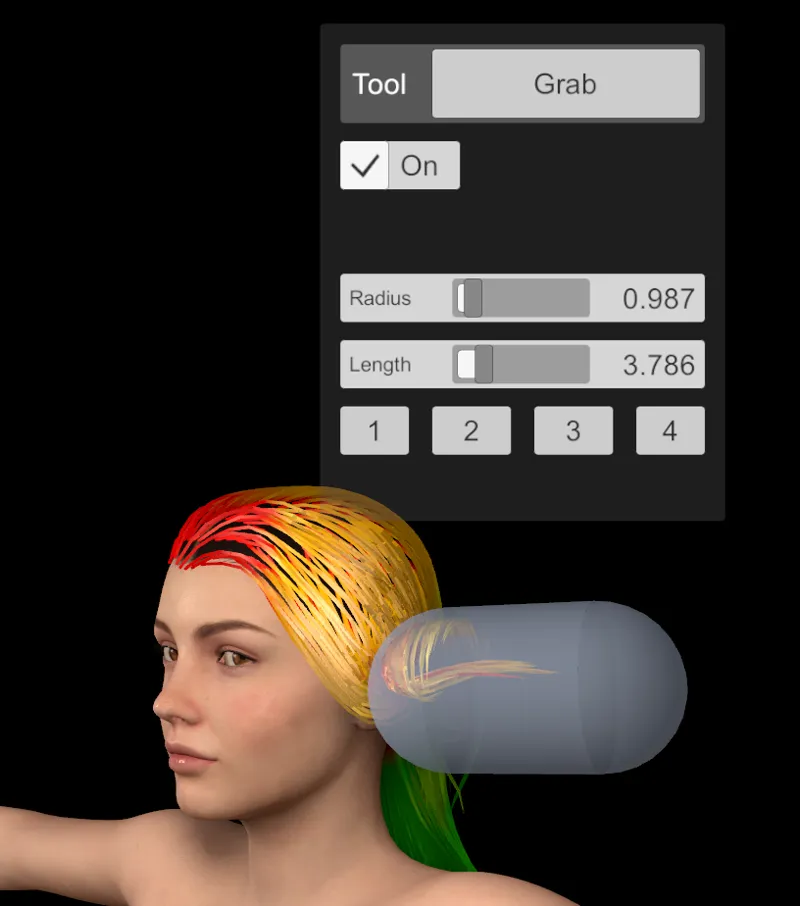
New hair style tool – Grab – makes it easy to make bends and twists and move sections of hair
Added ability to use skin directly as a scalp
Added hair sub-style support, which allows styling hair and saving the style data as a preset without having to make a complete new hair item
Added copy/paste/default ability for all hair sim params and materials to make it easy to copy setup between multi-part hair styles
Copy/paste buttons added to all color pickers
Two additional shader options added for hair V3 – Thicken and ThickenMore – meant for very short or buzz hair
Tweaks:
Style joint creation is now multi-threaded and does not hang the app when calculating
DAZ clothing and hair import now supports all extended characters in DAZ files
Controller hands collision now saves as user preference instead of always starting off by default
Bug Fixes:
Fixed issue with hair shader type not restoring properly for custom hair
Fixed player lock navigation height not working
Comments (19)
Looks good. Do you still use a Unity?
I just downloaded this new update and can't seem to move vertically. I can't move up in vr mode. Can someone please help?
We need an asset/looks/etc store for VAM. Like Daz3D has, but for interactable content. Or, an easy way to 1-click add Daz store content to VAM.
i'm trying to download it for the first time, when i click the overview link in here, i just get the list of posts again
Is the avery skirt glitched for anybody else? You can see objects through it when you look at the back of it
In the desktop mode, the command bar and text is all tiny when using a 4k monitor. Also, you need a user-friendly way to stream to an Oculus Go. The average user is not going to be a skilled do-it-yourselfer when it comes to things like alvr.
UI scaling, my bad.
Hi, sorry maybe I am stupid but I can't seem to download it.... I tried clicking the download link in this post but it just takes me back to this page....
Could you add an option to adjust the scale of the VR hand? 🙂 those being way bigger than mine affect the realism, thank you very much!
is it possible to control the Fleshlight launch with the game? That will be a super update
Awesome, looking forward to it, and 2.0 performance improvements.
Looks great!! Are female VR hands still planned at some point?
Wow excellent, this is super, custom heir completed, now you can focus on something else.
At first I was like "okay" but now that I've tried making some custom hair, I can say that this update is AMAZING. Thank you so much, Meshed for giving us such powerful tools!
Cant seem to find this download section in the "overview" area
Thank God custom hair is done. Now you can focus on more important things.
That!
The download section can be reached by clicking on the "My Membership" tab, then clicking "show more" on the first post, "Who is MeshedVR". Then scroll down.
Thank you, I couldn't find it anywhere.