If you're having trouble running the game please check this post! 如果您运行游戏有问题,请参考这个帖子
Hi all,
In this post, I’ll discuss several known issues that might prevent your computer from running this game.
1. If you can't open that giantessplayground.exe shortcut and can't see building destruction, all you need to do is
Delete the previous giantessPlayground.exe shortcut
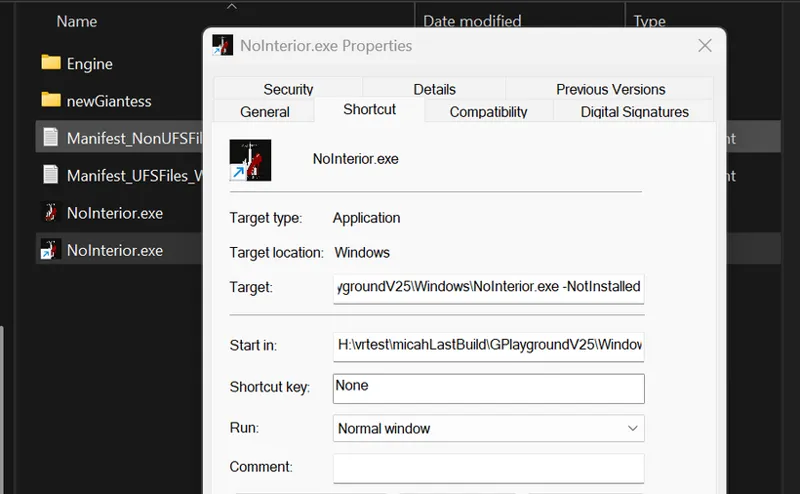
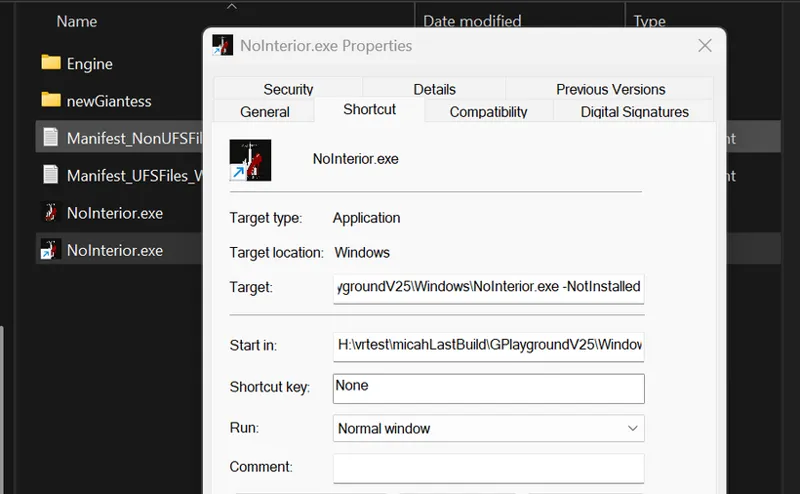
Right-click on NoInterior.exe and create a shortcut of it
You can rename it if you want to.
Right-click on new created shortcut file, select the properties:
Inside Properties, add -NotInstalled at the end of the Target (remember to add a space before -NotInstalled)
This should fix the building destruction issue for you.
2. If your computer is equipped with an Intel 13th/14th Gen i7/i9 CPU and crashes immediately upon launching the game, please try updating your BIOS or limiting your CPU voltage. You might be encountering the same issue I experienced with my own system.
3. If you’re encountering DX12-related issues: Please update your graphics driver to the latest version. This should typically resolve the problem. However, note that Intel Arc series GPUs do not fully support DX12 features. If you’re unfortunately using an Arc series GPU, please DM me directly for a refund.
If you encounter any other issues please feel free to send me a personal message or leave a message here! I'm eager to help!
Is it normal for my settings not to save? also for some reason my building destruction isn't working but everything else is.
G
GiantessGameUE5 · March 11, 2025
Sorry building destruction settings doesn’t work in this version🤦🤦🤦 the setting is supposed to be saved? I’ll check if it works on my side
L
Lee Shaun · March 3, 2025
I can’t even download the the new version. :(
G
GiantessGameUE5 · March 3, 2025
Hi, sorry for my late reply. May I know what you have encountered?
M
MW2366 · March 1, 2025
Alright, I've figured out the grab mechanic in this game, so here's a tutorial: 1. Press Tab, this is the red targeting reticle that'll show up on objects if you're close enough. 2. Once the object has been targeted by Tab: PRESS Q. This will initiate the animation of picking the object up from the object's point of view. DO NOT SWITCH CAMERAS. 3. WAIT for the animation to finish, the character will stay still with object in hand from the object's point of view. DO NOT SWITCH CAMERAS. 4. NOW you can press any of the onscreen buttons. Targeting pedestrians seems to make duplicates of them when done interacting. 5. There seems to be a cooldown effect when Tab and Q are used. At least from my experience so far.
G
GiantessGameUE5 · March 1, 2025
Thanks for sharing this 😂😂😂 yea I need to polish the grabbing system soon
l
lyy · February 28, 2025
我这边付款方式被拒绝。。。这烂玩意又在抽什么风
G
GiantessGameUE5 · February 28, 2025
可能是paypal验证的问题……不知道之前paypal有出过问题么?
S
Sleepy panda · February 25, 2025
A few bugs. If you pick up a car you cant release it and at the moment no buildings can be seen just people and the windows of cars
G
GiantessGameUE5 · February 26, 2025
Emm, that’s something I haven’t tried haha, I’ll test it later myself
S
Sleepy panda · February 25, 2025
My only issue is my controller can only pause and change the settings
G
GiantessGameUE5 · February 25, 2025
🥺🥺sorry I haven’t added controller to the current game yet. I’ll update it in the future
Y
Yealsbitchin56 · February 25, 2025
So far only issue im having is just the mouse interacting with the menu as in its mostly not tracking well or hitting different options? Any fix?
G
GiantessGameUE5 · February 25, 2025
Ah, please change the resolution to something else and change back. I guess that’s probably I was testing on my PC with 4k resolution and that settings somehow affected