
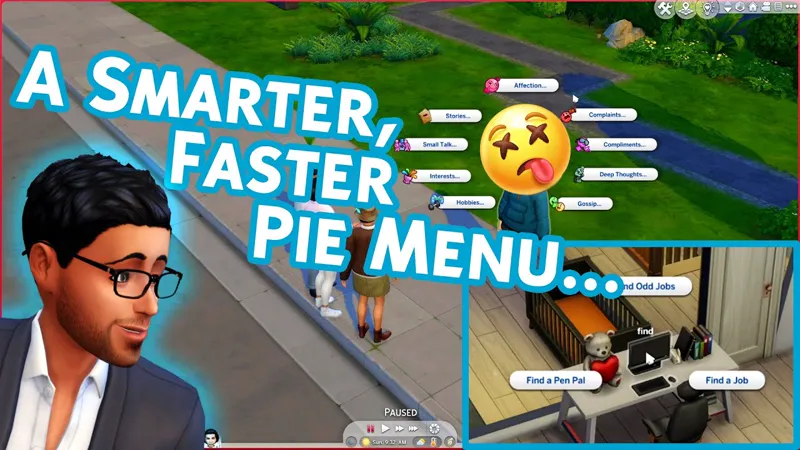
Smarter Pie Menu: Searchable Interactions V2.0
SPM v2.0 is now public!
I quickly received a lot of feedback on SPM after release, so I've created a v2 with several improvements.
V2.0 Updates
All subcategories with a single result will have the result brought to the top pie menu when searching, as long as there is room for all of them. This prevents unnecessary clicking through categories like "Mean" just to see a single result.
A settings button has been added to the pie menu, which is only visible when using the shift+click pie menu (cheat interactions)
The settings button gives you two options currently:
Change Search Mode
Change Search Text SizeChange Search Mode lets you pick between search always being enabled, or you can activate the search by pressing T or the Enter key.
When using a key-triggered search mode, activating the search will display "search for..." so you know the search is active.
Search Text Size lets you change between the normal text size and a larger option for those who have trouble seeing the normal text size.
===========================
Simply open the pie menu and start typing whatever interaction you want, it will narrow the results for you. When there's only a single interaction found, you can press enter to run the interaction.
Features
Searchable Pie Menu: As soon as the pie menu is opened, you can type to filter the interactions. If results are found, the menu will refresh with the filtered results.
Press Enter to Select: If your search returns a single result, you can press enter to immediately select that interaction.
Time Controls with Search Active: Hold alt and press `, 0, 1, 2, or 3 to set the respective time.
Pan Camera with Search Active: Press the arrow keys for the respective directions. There is a small delay before moving which is unavoidable due to the core game engine restrictions.
Really happy with how it's turned out. 😊
If you find the mod useful, please consider supporting me by joining me here on Patreon when/if possible. It's always appreciated! 🧡
Installation
Install by opening the zip and dragging the "Tmex-SmarterPieMenu.package" to your mods folder. That's it!
Conflicts:
Only known conflict at this time is Dark UI
This One Mod Will Have You Pausing The Sims 4 80% Less!👀 (YouTube)
Comments (31)
First of all, I want to say that I love this mod and I can’t ever play the game without it. I refuse to. But I have a question. There’s a mod called auto pause on pie menu by thepancake1 that I think is essential as well however, I cannot get them both to work together because they both edited the same thing which is stated in the description of his mod. I was wondering if there was any way you could’ve made it compatible or maybe even incorporated it into this mod if possible? Would some sort of collaboration be something you would be interested in? It’s just an idea. If you could even explain to me how I personally can make them work together I would love that. I know nothing about modding myself, but I’m willing to learn if it means I can make these two mods work together. Sorry to bother you with this.
thanks ! app❤
ocupp mucho este mod pero con la actualizacion del 12 de mayo no me sale :(
I adore this mod, all of yours really are always in my game! I was wondering though if you could add an auto pause when you open the menu? I use mouse only whenever I can so using the keyboard for speed is harder for me. Regardless though thank you!!!
Sure, I'll add it to the to-do.
When I put it in my game and opened the pie menu started typing nothing happen does it work with the March 26 updated ?
yeah i did it twice idk why it wont work
Hi, Mexi. I just wanted to let you know that, through a process of elimination, I've found that this mod prevents the game from even launching. One by one I took off all my CC and mods, and as soon as I took this one off, the game started. I see it hasn't been updated for nearly three years, so maybe you should test it out yourself. I don't claim to be an expert at all, I'm just telling you what happened. This mod is awesome and I hope I can use it again soon. Thank you! <3
https://forums.ea.com/idea/the-sims-4-bug-reports-en/failed-to-launch-error-when-using-cc/13264167
Would it be feasible to add a function of easily queueing up interactions? For instance shift clicking an interaction doesn't close the picker and you can queue up the same interaction again or another one of your choice until you either quit out or click an interaction normally.
for some reason i can't get this to show in my game.
Don't know if it's intentional or not but with the search mode option(with T or Enter), it automatically goes back to search mode whenever I go to a second tab of the pie menu sort of making the option useless. Like if I click on another sim it will be in non search mode but once I click the friendly tab, it automatically goes back to search mode.
Hi Tmex, this mod is an absolute lifesaver, I don't think I could go back to playing without it. Thank you. I have two comments / requests if I may: - Would it be possible to have the alt-modifier work all the time, not just when the pie menu is active? For muscle memory it'd be nice to have the consistency. Also, I sometimes have a small delay when opening the pie menu (I don't think that's related to your mod) but say I click to open the pie menu and immediately try to pause the game by pressing alt+`, it doesn't work until the pie menu has actually loaded. If the keybind would be uniform whether the pie menu is open or not, that'd be alleviated. - Where I am from, the US-International is the default keyboard layout. With it, certain punctuation marks become sticky as to create accents on letters (E.g. pressing ` followed by an e makes an è). So if I pause the game using ` and then open the social menu and start typing to search, the ` is "loaded up" and I either print an ` (if the letter can't have an accent) or make an accented letter. I'm not sure what an obvious solution would be to this, but perhaps you could give it a thought?
As the code is actually in the pie menu's UI file, it can't work until the pie menu has loaded. For the second issue, I'm not really sure what you're explaining. I would probably need to a see a video of it, but I'd also be curious what happens if you type into the cheat console for example. The pie menu is just taking a regular textfield input so it should be identical to typing in any other field in the game.
does pink ui conflict with this too?
Heyo! Is it possible to turn off numbers? Idk if it's too much to ask though :/ I just keep getting annoyed when I want to speed up/pause my game/etc and end up searching the numbers instead lmao T-T xD Other than that I absolutely LOVE this mod!! ♥
Not currently but if you change the trigger setting to not always be on, you can use both
Thank you. This mod is wonderful! It works regardless of the language of the game.
I am having visual problems with BetterBuildBuy. Will that be updated soon? I miss it!
HI mexi! I have a question regarding your cheats when it comes to shift+click are the options to start fires and create sims no longer an option? i think like a month ago i was able to shift+click and do all kinds of cheats, but now there are only 4 options: create animal, teleport here and tool options and the gear for the smarter pie menu settings. there were so many other cheats available and now i cant find them. could you please help me?
You'll need to enable the debug interaction cheats with something like mccc, or adding my always testing mod might be enough
I can’t wait to try this! Looks amazing!
Hi. Sorry to be one of those annoying people, and I'm not bothered by the current setting but my job has put my brain in permanent copy edit mode about this: have you considered changing "normal" text size to "default" or "standard"? Again, I don't personally care and if you prefer to keep the wording as is that's obviously your choice. I just thought I'd share the thought that particular part of my brain had immediately while watching the video.
Love this!
Put your mod back in after removing that stowaway trait and all is working well! No new exceptions! And your mod works GREAT!! LOVE IT!! Thanks so much for being so responsive!! I'm a huge fan of you and your mods. Thanks!! :0)
i am getting the same exception just wondering if its to do with a trait after reading your comments, what trait did you find that was causing the problem please?
Unfortunately, after I installed this I started getting exceptions. This one came up. Last Module Called: whims_tracker.py Last Function Called: _generate_whim_buckets_for_type_and_whimset Error message: Exception in Sim Timeline: Exception resuming Element (AttributeError: 'NoneType' object has no attribute 'guid64'), CategoryID: whims_tracker:1357 I removed the mod and the error isn't coming back. Could your mod be causing this?
I wouldn't think so, but might have something to do with the interactions being moved out of categories. What were you trying to do in game when it happened?
Thank you so much!
💞🌸💞
Thank you TM. This mod is unbelievably useful.