
Better BuildBuy v1.6.4 - Update for 4/28/21 Patch
DOWNLOAD REMOVED AS THIS IS AN OLD VERSION.
FIND LATEST AT https://TwistedMexi.com
Minor update to BBB for the 4/28/21 game patch.
If your buttons appear distorted, you need to grab this update.
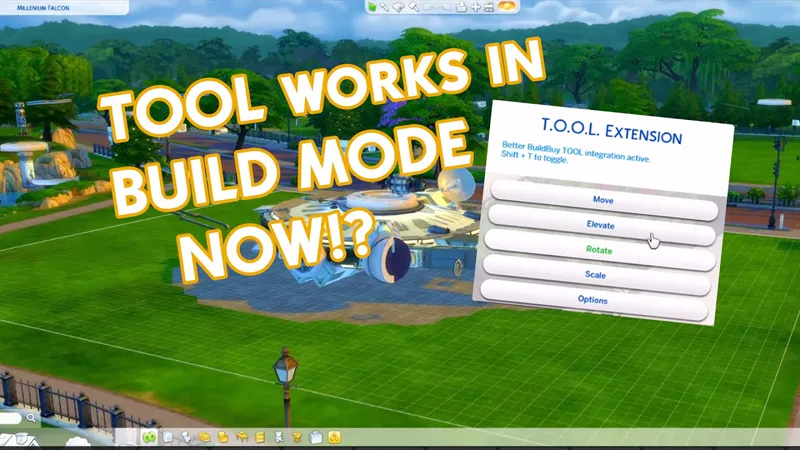
Did you know you can use TOOL in build mode if you're using Better BuildBuy? Grab TOOL here!
Better BuildBuy Quick-Start
You don't have to use Organized Debug for TOOL. Just don't check the filter.
Do NOT install buildcam or expandable catalog separately. They're included in BBB.
Do NOT use debug or liveedit cheats. Use their respective filters instead.
Filtersare different! Please don't ask where your CC went.
Filters work as follows:
Hide Maxis - Hides all regular objects that aren't debug, liveedit, or cc.
Debug - Shows debug objects, replaces the need for the debug cheat.
LiveEdit - Shows LiveEdit objects, replaces the need for the liveedit cheat.
Custom Content - Shows Custom Content objects. Off by default, be sure to check this if you want your CC visible.
Filters stay set even when you close your game, so you'll only need to turn CC on once if desired.
Press 1 to toggle catalog size.
Press Tab to activate Freecam mode in build.
If you'd like to use Organized Debug, open the game and open your buildbuy filters. Scroll to Better BuildBuy and select Organized Debug. You'll receive a pop-up and will be told to restart. After doing so, Organized Debug is active. When you're done building, turn it off and restart again to remove the CC markers on debug items.
If you're completely new to BBB, I recommend watching my original tutorial.
Install Instructions
⚠ FOLLOW IT WORD FOR WORD. ⚠
1. Delete any existing copies you have for BBB.
2. Open the "TwistedMexi's Better BuildBuy v1.6.4" zip and drag the "Tmex-BetterBuildBuy" folder inside to your mods root. (No subfolders!)
3. That's it! Don't restructure or move the files in any way
NOTE: On Mac, .zip files may automatically be unzipped when downloaded.
In that case, drag the newly downloaded folder to your mods.
EDIT:
Italian translations added.
Credit: xISYx
Thanks.
DOWNLOAD REMOVED AS THIS IS AN OLD VERSION.
FIND LATEST AT https://TwistedMexi.com
Comments (32)
I also can't place items/objects. I'm confused. I have uninstalled, reinstalled, and repaired. Any advise?
You have an outdated copy of BBB somewhere in your mods folder (or you've installed an old copy of a conflicting mod, like expandable catalog) Delete all copies and get a fresh one using https://twistedmexi.com It will always point you to the newest copy.
When I download it, it breaks the UI options in the top right. Game is updated and it's the only CC I have. :(
wait so if I have TOOL already and want to download this mod, i have to delete the TOOL mod?
No it just means to make sure both are new copies.
love it! You’re genius!
Oh I kept forgetting to ask this, so I'll do it now. When I check Purchased, it tends to show only Pack items and hides Base Game stuffs. Could you add a BG button too?
Hi again, I took out my mods folder, putting the newest BBB in incorrectly on purpose. I got a message from BE telling me it was loaded wrong and my options were unlocked and purchased. So I added the mods folder back, installed the BBB correctly and got NO message and the options, unlocked, purchased, and custom content. I still don't see organized debug filter (which I like} but if this is correct, then I'm fine with learning a new way of working within the newly organized way. Last night, I re installed everything and I was able to get Paranormal stuff pack back. Thanks, Carol
There has to be a conflict installed somewhere, the Organized Debug option is still there under Better BuildBuy at the bottom of the filter panel (you have to scroll down) If you still need help, we can assist more using my Discord. Invite link on https://TwistedMexi.com
When installed, I do not see "organized debug" anymore. My choices are Unlocked, Purchases, and Custom content. When I check Unlocked or CC, then the choices to use the tool to build walls and pools/fountains disappears. Debug only works manually. Also, when all of this happened it was right after updating to the new BBB and tool programs. At the same time, Sims4 thinks I have Paranormal stuff pack, but it's not installed. Origin thinks I have it and it's installed, so they don't have any options I can see. I spent an hour with them on chat and they couldn't solve it. I'm not sure of the two problems are related, but they started at the same time. Thank you for your work and for your help! Carol
Hi Carol, this usually means a conflicting mod was installed. Known conflicts are: Expandable Catalog Buildcam Edit Lights in Build mode
I did a trial again and when I have your mod installed my CC is gone, nothing shows up anywhere, whether I search or filter. Like I said, I’m not new to CC. Been using it for 10+ years. I removed BBB and my CC returns without issue. I’ve had BBB installed previously and never had issues until this update. So I won’t be re-installing it until either a new (fixed) version is released or at all... thanks for your other mods, they are great, this is the only one I have ever had any issues with.
As I already mentioned, the mod isn't broken so there's nothing to fix on my part. I'm sure you're not new to CC but like I said, the filter behavior is changed and you need to check a "Custom Content" filter in the filter panel (right side) under Content. Most players aren't used to using this filter as it isn't normally needed in order to see CC in the catalog. If you're still having issues, please come to our discord so we can offer help.
When I have BBB installed I cannot see ANY of my CC despite having it enabled for both pkg and script mods. I am not new to CC by any means and I removed BBB from my mods and it is fine, put it back and again no CC. I have it put directly in the mods folder as it should be (the only mod I don't have organized into another folder) and when I go to the side menu to "organize" my catalog, it says I don't have it installed correctly and gives me errors when I know for a fact it is installed correctly. Can you check into this?
It's not a mod issue, else it would be an issue for everyone. The CC not showing is likely because you haven't checked the CC filter under "content". It has to be turned on once but it'll stay on after that. The error only happens if it can't detect the script mod. If you're still getting that error, we can help in my discord, so we can share files and screenshots easily. Invite on https://TwistedMexi.com
When I have BBB installed, I can no longer see certain items in the catalog. A good example is the PenguinVision TV. I can search for it by name, and it comes up in the auto-complete list, but when I click on it, it's not in the search results. If I disable BBB I can see it again. Am I missing something in the filters or doing something wrong?
It's either not installed correctly or you have another piece of cc that overrides that object, and have not turned on the cc filter on the bb filter panel yet
Question...Why is it that we cant do "Extract Here" in our mods folder? It appears to have the same result?
It's explained more in my Mod Organization video but basically there's multiple extract options, people often end up hitting the extract to "folder name" option and then have to ask our support team why their script mod isn't getting loaded. Answer is it's too deep in the mods folder. Just having them open it and drag it is easier to explain and less likely to lead to confusion.
I'm having a problem in CAS where it doesn't fit on the screen. Anything that I can do to fix it?
I don't currently have any CAS mods. Best guess would be CAS More Columns or some sort of CAS Slider mod that needs updated.
Hi TwistedMexi! Thank you for all your hard work! This mod and TOOL continue to become more and more incredible. I was wondering if it would be at all possible to add a feature where BB mode always starts from the Build Section (ROOMS, WALLS, ETC), instead of the lot specific items tab. I'm asking this because I use a lot of CC in my game, my mods folder is about 300gb large now and as a result loading build mode takes a while. Regardless, thank you for all your hard work!
I can't thank you enough for this update.
Hey! When I upgrade to this version from the previous (following the proper instructions of deleting the previous folder before installing the new one), my game launches to a white screen and cursor. Curiously, it also does this if I just delete BBB. Tried repairing the game and removing other mods. The game really seems to want the previous BBB installed. Not sure what to try from here!
Make sure your game is up to date. If it is, try a new mods folder with only BBB installed.
My game breaks if I have it in my game. I have the 1.71 patch
Your game is out of date.
Wow. You are awesome! Thank you!
Thanks Dove!
You are so fast! Thank you!!! 🤗💕🤗
After we drag the "Tmex-BetterBuildBuy" folder inside our mod root folder, can we edit the name of the "Tmex-BetterBuildBuy" folder? I always like to put the version number in the folder (I would want to put "Tmex-BetterBuildBuy v1.6.3")
Technically you can, but in general I recommend against that as less-than-careful players might end up with duplicate installs.