
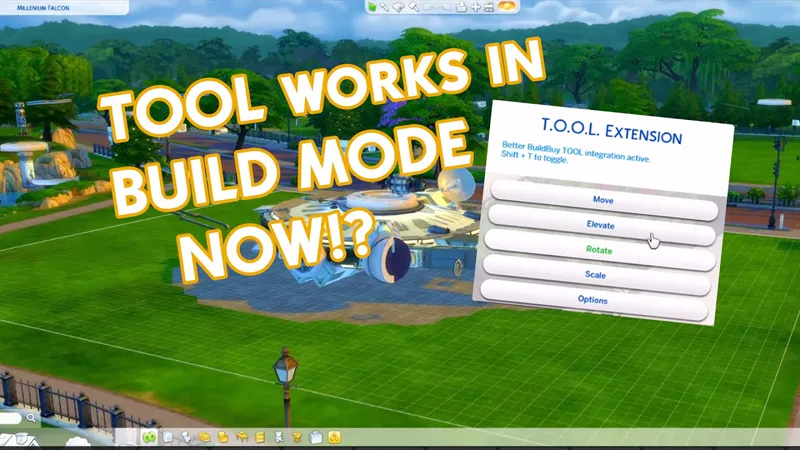
TOOL v2.2.2 Build Mode Integration & Better BuildBuy
So as many of you are already aware, TOOL can now be used in build mode if you are also using Better BuildBuy. I've included a link to BBB at the bottom of this post, but in the future you'll need to download each from their own respective post.
(TOOL still works without Better BuildBuy, just not in build mode)
EDIT: Sorry for the frequent updates, this should be the last for a bit. After discussing TOOL with some builders, it was decided that having TOOL selections clear when you close TOOL mode is not a good workflow.
So TOOL v2.2 and BBB v1.6 now allow you to keep your TOOL selection, whether you switch from TOOL to build, or build to live. I believe this improvement will be a very welcomed one. 👌
TOOL Improvements:
TOOL Selection Persists - You can now select objects for TOOL and they'll stay active no matter which mode you switch to.
Better Group Box Markers - a full box is now shown with a golden leg, the golden leg indicates which corner will be moved on the next click.
Delete Group - You can now delete groups of objects with TOOL using button in TOOL options.
Reliable Undo/Redo - Improved the calculations for undo/redo so it's consistent even if you've selected different active objects.
Current Scale - If you have the cheat console open, opening the scale menu will print what the object's current scale is.
Squish Warning - If you have the cheat console open, it will tell you when an object is going to squish instead of rotate.
TOOL Quick-Start
The usage is the same as regular TOOL, except you will automatically be placed in TOOL mode any time the TOOL dialog is open.
Toggle TOOL in build mode by pressing Shift+T
In addition, shift+clicking surfaces will automatically place a group box marker. This can be used in combination with the Toggle Group button to highlight many objects at once.
When the TOOL extension is open, ctrl+z and ctrl+y will handle the TOOL undo/redo instead of the buildbuy undo/redo. Buildbuy undo still works when TOOL is closed.
If you're new to TOOL entirely, refer to my original tutorial.
Better BuildBuy Quick-Start
You don't have to use Organized Debug for TOOL. Just don't check the filter.
Filters are different! Please don't ask where your CC went.
Filters work as follows:
Hide Maxis - Hides all regular objects that aren't debug, liveedit, or cc.
Debug - Shows debug objects, replaces the need for the debug cheat.
LiveEdit - Shows LiveEdit objects, replaces the need for the liveedit cheat.
Custom Content - Shows Custom Content objects. Off by default, be sure to check this if you want your CC visible.
Filters stay set even when you close your game, so you'll only need to turn CC on once if desired.Press 1 to toggle catalog size.
Press Tab to activate Freecam mode in build.
If you'd like to use Organized Debug, open the game and open your buildbuy filters. Scroll to Better BuildBuy and select Organized Debug. You'll receive a pop-up and will be told to restart. After doing so, Organized Debug is active. When you're done building, turn it off and restart again to remove the CC markers on debug items.
If you're completely new to BBB, I recommend watching my original tutorial.
Translation Credits:
Dutch by @TychoXR
Install Instructions
⚠ FOLLOW IT WORD FOR WORD. ⚠
1. Delete any existing copies you have for TOOL or BBB.
2. Open the "TwistedMexi's TOOL v2.1 RC1" zip and drag the "Tmex-TOOL" folder inside to your mods root.
3. Open the "TwistedMexi's Better BuildBuy v1.5 RC1" zip and drag the
"tmex-BetterBuildBuy" folder inside to your mods root.
4. That's it! Don't restructure or move the files in any way.
NOTE: On Mac, .zip files may automatically be unzipped when downloaded.
In that case, drag the newly downloaded folder to your mods.
EDIT: TOOL and BBB was removed because it is now out of date. Grab the latest version using TwistedMexi.com
Comments (42)
Hi! I just got a pop-up in my game that there is a new version of BBB and I'm not sure there is? - just wanted to let you know :)
There is. Twistedmexi.com
I'm not sure if anyone else has had these problems, but I really want to make this mod work! 1: All of my refrigerators are missing except for a few, namely the ones from some of the expansion packs are there. Base game and others are missing. This is with the mod installed, whether or not Organized Debug is turned on. 2: I can't find any of the live edit debug objects, no matter how many times I enable live edit objects in the cheat console. They're not there in Organized Debug under Live Edit, and they're not in debug if I turn OD off.
We can help on my discord. Link on https://TwistedMexi.com The mod is working on the current patch.
Hi there! Another Mac user. I've followed the instructions and it won't work. My TOOL mod also is not working anymore. Can you assist?
Please use my discord server for support, it's easier to get info there. Link on TwistedMexi.com
não consegui instalar o build buy não consigo pegar os objetos para por no mundo.
Means you have an extra, old copy of one of my mods installed. We can help on my discord. Link on TwistedMexi.com
♥♥♥Thank you so much for your amazing mods!!! It would be lovely if you had the description in Spanish and a quick tutorial on your YT channel too!!! Por favor y Muchísimas gracias! ♥♥♥ Likiss170 en Origin y Twitter ♥
YES! Thank you so so so much for this update to the mod! <3
Hello. First time TOOL mod user here. I am just curious does the mod have any known conflicts with other mods as I can't get into either build/play mod in the game with it installed. It crashes.
We can help in my discord. Invite link on https://TwistedMexi.com
I'm trying to install BBB and winrar will not let me drag or cut/paste the folder. Advice?
Try 7zip instead
Hello, I'm trying this mod for the first time. First of all, thank you for all your hard work! I'm having an issue and I don't know if it's a bug or not. I can't seem to move any groups of slotted objects (for example a table+attached chairs, or a table with objects placed on top the normal way) without them disappearing. I've tried with "Snap to Terrain" both on and off. Thanks.
Move slotted objects only by their parent
I cant place stairs now
You are a true lifesaver. The last version of the TOOL mod didn't work in my game for whatever reason and I was a bit frustrated. The new version works as it should. I am mega happy and thank you from the bottom of my heart for your hard work. Finally I don't need the annoying cheats anymore and the possibility to increase the build/buy catalog makes it much easier. I only build with CC and it is a constant search.
Thank you! That was a headache going back and forth form build to live mode.
Awesome!! Thank you!
Also the better build and buy doesn't filter out maxis stuff when I click hide maxis. This is the first time I've used it though.
The filter does work, it's bypassed when you use the eyedropper or search, by design. It will go back to filtering when you browse to a category.
Hi, I just downloaded myself, and I can't seem to rotate on a certain axis (I don't know which one it is, its the one that should make it rotate onto the front or back). Instead it seems to be scaling the object instead? Or squishing it
Some objects just do that. Nothing we can do about it.
You Rock, TwistedMexi!!! Thank you 😊
I installed both updated versions, after deleting the older ones. I went into build mode, was able to place/build rooms...but I can't place windows, doors or furniture. Please help :(
That's a symptom of the versions before the Bunk bed patch. There must be a duplicate copy somewhere in your mods folder.
Hi, I'm not sure if someone has this problem as well, but when I have your mods on I cannot change roof endings. I can click on them in the menu but I can't apply them to my roof - nothing happens. The problem is solved when I disable your mods. Do you have any idea how to solve that?
Sounds like you have a copy of BBB from before the game patch somewhere, thats the bug that was caused by it. Search and delete all copies of my mods from your game, then grab fresh copies from this post.
Had to edit - my apologies... this is why T-Mexi created a tutorial.
Not sure what was here before but either way, no worries!
God. I have done this so many times, yet somehow I cannot get it right. My computer is set to where everything is auto downloaded into my mods folder. So, there sits a zip archive. What do I do with it now? Apparently dragging the folder above to mods root isnt working.
I -highly- recommend not downloading stuff to your mods folder. The game can sometimes read the download file in addition to the installed mod and it's just asking for trouble. Set your downloads to another folder and then double-click the downloads there. When they open, you'll see a folder inside. Drag that folder to your Mods folder and you're done. Clean out any existing files you already had in your Mods.
First time user of both these and I had so much fun playing around with it last night
So this the new new NEW update?? 😅😅
Thank you for doing this!
TOOL is not showing up in my game for some reason, I did testing cheats on and did shift+left click but it didn’t show up in the menus... I did it in live mode
T.O.O.L. is a script file + a package file. Make sure it is either directly in your mods folder for best results OR you can go one folder deep. If you go any deeper with script files, they will not show up.
i ALWAYS wished for this. u the bomb babe💎
this is so exciting!!! thank you so much <3
Is this like a new NEW update?? Because I just updated it 😅
Its the public release, if you got the RC3 from last night then it's the same. :)