
T.O.O.L. Public Release
🚨🚨 THIS IS AN OLD VERSION. 🚨🚨
Due to it getting linked so much, I've deleted the files for it. Please always use TwistedMexi.com to ensure you're using the latest version. Google will usually send you to the wrong post.
What is TOOL? Well, TOOL... Takes Objects Off Lot. It's a way to give players more real-estate for objects, and gives you 100% control over the objects position and rotation, on or off the lot.
Features:
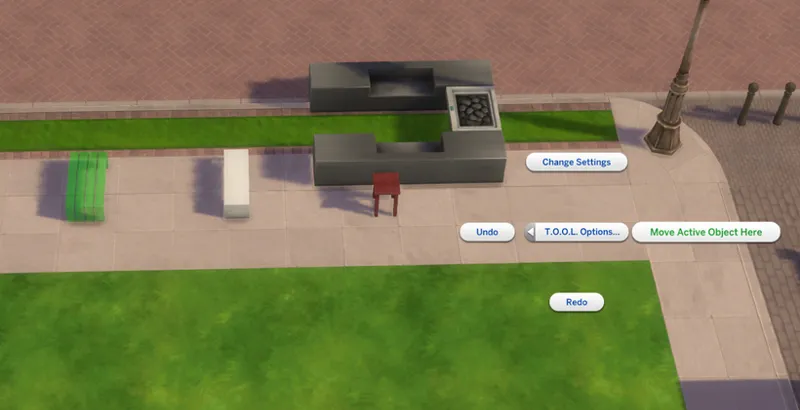
Point & Click Move - Lets you mark an object as active, which lets you then shift-click where you want it to go and TOOL will immediately move the object to that position.
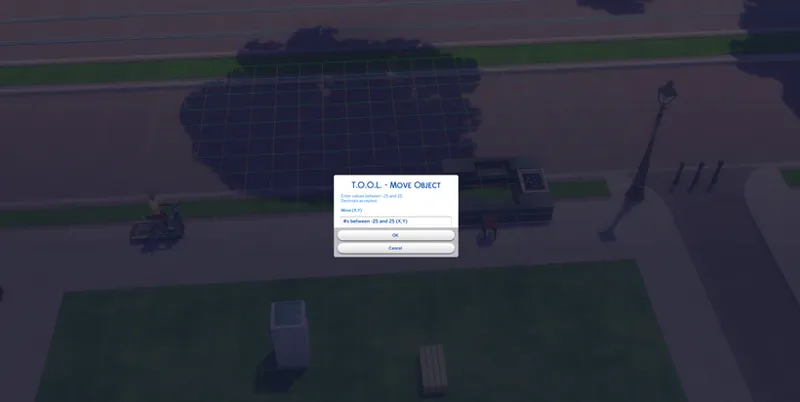
10x10 Grid Visualizer added when moving. If you prefer the original cross-axis visualizer, you can toggle it off in settings.
If you open the cheat console before moving, it will print the new coordinates of the object.
Tips
This requires testingcheats true. You can use my AlwaysTesting mod to skip entering this each time. (I've included a link in this post)
Use it by shift-clicking any object and selecting the TOOL menu.
Settings and Undo/Redo options are available by shift-clicking anywhere on the ground.
When moving or rotating, visualizers will be shown to help you figure out which way is which.
The visualizer colors can be changed in the settings menu.
When moving, you should enter a number pair (x,y) for example : -5,10
Start with small numbers, it's easy to lose your object if you're not careful. Undo can be used to get the object back.
Snap To Terrain will force the object to the correct ground height when moved.
Snap Camera to Object will move the camera to the objects new location when moved.
It's a lot easier to see what you're doing if you move your camera to the left or right of the object you're moving. That's it, it'll take a bit of practice to get good at it, but I hope you all enjoy :)
🚨🚨THIS IS AN OLD VERSION. 🚨🚨
Due to it getting linked so much, I've deleted the files for it. Please always use TwistedMexi.com to ensure you're using the latest version. Google will usually send you to the wrong post.
Comments (75)
This is not working with the new expansion. It causes the new world to stay in a white screen without loading. To get out of it I have to exit to the main menu. Once I removed it I had no issues getting to the new world.
Use the regular version instead of the movabledialog for now.
Does anyone know if this is working with the new update?
How would I go about moving that tree, then, since I can't select it as an active object?
Is it outside of the walkable area? If not, it should be selectable. If it's outside those bounds there might not be anything you can do unfortunately
Can I use this to move objects that started off lot to a different spot off lot? I'm trying to build, and an off-lot tree keeps clipping through the camera when I try to get a look at the lot from the front. Can I use this to get the f**k rid of that god damned tree?
World objects are reloaded from a static file each time the zone is loaded, so yes you can move some stuff that starts off lot but only until you leave that zone. Should be fine if you just need it moved for building
Maybe I can provide some insight for those having difficulty. I was able to successfully use this mod in an active household. With a sim selected, I 'shift+click' a chair and the Tool menu showed up. I couldn't figure out how to use this mod on a lot that is under construction. Hope this helps.
The instructions were clear that the mod can only be used in Live Mode, it just doesn't work.
It's definitely not a conflicting mod, this is the only thing I have in my mods and its not working for me either!
This doesn't work. Do you think there is a conflicting mod?
Still not working for me as well. I tried it on normal lots in all the worlds, but the item seems to only rotate 1 way no matter what option I choose for it. It also still goes smaller or just disappears which shouldn't happen it I just rotate something 10 or 45 degrees. I think it is because of a game update or new pack? Hope we get an answer soon on this :)
Much like everyone else who's been commenting recently--the mod doesn't seem to be working for me. I'm not sure if it's from a game update or something, but I figured I'd comment. I did the installation correctly as far as I know, as well. :)
What folder do I put this in?
Mods
I cannot get this to work, and I see many others are having the same experience. Any idea on why or when a fix/update will happen?
Not working for me. I already owned the red shelf mod, but the T.O.O.L mod will not work. I deleted and redownloaded them and they still don't work. When I "shift + right click" all I get is "Set Objects as Head" and "Reset Object (debug)"
That's what's going on with me at the moment, it did work originally but now I have the same problem. I tried reinstalling it too.
Hi there, what a great mod! Thanks for this :) It gives us a lot of creativity options. I do have a problem though. I want to use this mod in an apartment in CL and i red above other people having problems in apartment too, cause of the grid?? I simply want to rotate an object 90 degrees, so it lays on the floor but somehow the axes do not match up where the item rotates. My object either disappears, goes smaller (?) or rotates on the floor, no matter what axe change I make. How can I do this?
great work :) how do i use this on the second floor of an apartment?
Hello, I need urgent help, I have a problem with the program, I have the scripts activated as it says in the instructions, I literally followed everything it says, I even activate the testing cheats and when I enter the game it does not appear in construction mode or during the way of life, please I need help because I would love to use it in my game and take advantage of this mod
I'm having the same problem! I have CC and script enabled, I manually type testing, I even deleted and redownloaded....I even took out all my mods and left only this one and it still doesnt show. I can shift click on objects in Live Mode but only "Set as Head" and "Reset Object" appears. PLEASE HELP US!!
The program is working perfectly for me, but I can't make sense of where things go on the axies. For example, I'm trying to place a window on the outside wall of an apartment. I have the window placed 1 square away from the outer wall, so I figure entering (1, 1) would make sense to move it, but it places the window on the floor beneath where I want it to go. Any other number shoots the window too far, and I'm even trying decimals. Am I not understanding something about this? Btw, thank you so much for this mod and for the alwaystesting!!! They seem to be real game savers for me, once I can figure them out of course :)
You'll want to shift click the ground and change your tool settings so snap to ground is off. As for movement, the grid that appears is the x, y grid that the object will move on.
Good with mods, but for some reason this doesnt work. Is it broken?
My version of the game is 1.55.105.1020
I have everything activated and active the trick but I can't get it to work and tried in a thousand ways but I can't get it to work
twistedmexi, help me !!! even though I have enabled mods and scripts , the mod does not work since the last update :( in fact I have tried everything ( yes I have enabled mods and scripts ) , I have testing cheats on and I shift-clic the objects but still nothing , while it worked before help .....
There is a second older version, the first one in fact, it is kept up to date for those for whom this version is incompatible. I have the first version and everything is fine, don't hesitate to test.
Hello, I have a question. I am new to the whole mod thing. I've played The Sims since day one, almost 20 years now...I usually play with no mods but I have been wanting to be able to do more. Can you please explain to me or direct me to where a discussion is located on how to use this tool? I downloaded it last night and couldn't get it to work in my game but maybe I am doing it all wrong? Thank you for any advice or assistance :) Continue the great work!
You'll probably need to enable mods and script mods in your gameplay options if you haven't used mods before
For some reason the grid is rotated a bit in some of the City Living apartment, making it really hard to move stuff :/ EDIT: Here's a screenshot of the rotated grid in one of the apartments https://imgur.com/AQw62DV
This mod wont work on my sims 4 any tips? I’m trying to remove and replace the windows on my apartment
This Mod wont work no matter what I do. Any tips.
me too
you are an absolute GENIUS!! THANK YOU SO MUCH FOR SHARING THIS!!
On UNI area sims cannot use objects that placed on off-lot space. they show up balloons over head like "cannot reach object"
¡Buenísimo! Soy un seguidor tuyo Español y he de decirte, que con este mod, por fin, podré tener la libertad que quiero, a la hora de construir y decorar, ya sea un hogar, solar comunitario o incluso en mismo barrio. ¡Gracias! <3
there are some objects out of lot placed by default like trash can. It can be moved by T.O.O.L but it keep reset to it original places everytime you reload the game. Is this happen for me only or the default placed objects can't be move at all? I have the latest mod and latest version of the game.
The default objects are reloaded from a static file each time you leave the zone
thank you for your hard work and time
Much love from here <3 TY for all you do
About to try this awesomeness out! I really wanted to use teleporter to take cool pics outside of lots.
First Off , Again, I Love this Mod! It adds a new dimension to gameplay so thanks for that!!! Just one question , when I elevate an object and then use x,y to move it automatically goes back to ground level. I'm trying to place objects in mountains. Am I doing something wrong or is that even possible with the current version?
Open tool settings by shift clicking ground. Toggle the snap to ground option off
You have my support! Thanks!!!
Appreciated 😃
You Sir are a Genius! Thank You SOOOO much for this! Got rid of a bed that was sitting in the middle of a pathway in Sulani. Much appreciated !
you're downloads doesn't work
Have you considered asking for help before accusing someone of being a fraud? Just maybe I could assist you.
you are a fraud
Does this mod still work for the new update?
Yep
Oh. You know you probably said that like 967 times and I probably missed it even though I read it lol Sorry.
No worries
I'm having a weird issue. I have a home in NewCrest, and next to it in a "public" area is a skating rink that was set on the lot in a really weird place. I wanted to make it look better by centering it on that lot, I did that. Came back after taking my household into CAS via MCCC and everything had been reverted back to the orginal configuration. I have has this happen 2 other times in different worlds. Once with that horrible bathroom plonked down in the middle of Forgotten Hollow (who the hell thought THAT would be a good idea) and once in Sulani. Just thought I would see if that is normal or if I am doing something wrong? Thanks! <3
Did you save?
amazing!
OMG! I had a drone stuck outside my apartment in sims 4 and i spend 2 hours trying to find a mod that allowed me to delete or move it. Thank you for this mod!!!!
Well! It's official! You've earned a new Patron!
still not working after reinstalling shift button only adds multiples of objects, does it confilct with mc?
You use it in live mode, not buildbuy
Thanks for this!It´s great! <3
Is there any possibility to move more object to the same place? For example the teleporter?
Wow...amazing!
I am new to mods. It says i need an app. Not sure how to proceed.
What do you need help with?
Perhaps one of our more accomplished YouTubers could show this process in use. I think it would help those of us more tech-challenged! :)
You have to stay in a lot of proximity. I tested a piece of beach with two loungers, the Sims do not go there, no routing out of the lot. There was a fishing sign on this beach, you have to stay near this marker to place a functional object, it can work in these conditions. Move, but within reasonable limits, see activities planned off-lot and use this small corner to develop activities and more. Bakie has a signposted routing, but it is transparent off construction but I think some of the visible barriers, I think, would allow him to go, maybe off the lot, to think!
I've noticed that a food stall taken off the lot become unfunctional. Can this be fixed?
Probably not as those types of items depend on the lot type
Doesn't work for me:(( I get this LE: https://yadi.sk/d/HUW7lkzTj6W03w
Please try redownloading now.
OHHHHHH MYYYYY GAAAAAWWWDDDD!!!!!!🤷♀️😍
Wow! Genius. No more words.