
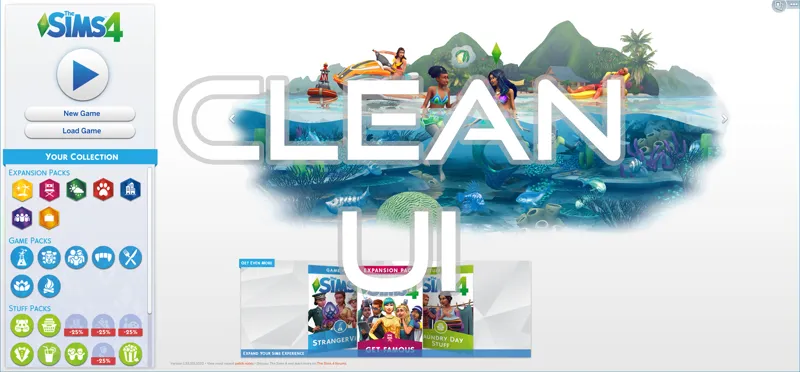
Clean UI Public Release
Don't like the new UI, or is it even causing migraines? No worries with this mod - get the original minimalist UI back with a single package download.
This version works in all languages and is compatible with UI Cheat Extensions.
I hope you all enjoy! Thank you for the support!
Edit: Woops, a conflict with UI Cheat Extensions worked its way back in, but it's gone now. If your UI is missing in game, please re-download!
Edit 2: If you're getting a black screen on the main menu, you need to either delete options.ini or open it in notepad and change the "animaticpack" value to 1000. Save it and restart the game.
Comments (50)
for some reason i cant find it in my mods folder
How do i delete it
Not gonna show up, why though? Also, I don't see the old rebrand
Hello! Sorry to bother you, but I've just downloaded the actual version, and it's broken. The same old problems with green in the main menu and in the gallery. Also please check the selfie menu, I'm not sure it's okay now, cause last time that problem had appeared, the selfie menu was broken, too. Thank you in advance! Please take a look at the screenshots http://images.vfl.ru/ii/1578674562/6e13879b/29163040.png http://images.vfl.ru/ii/1578674565/644922cb/29163041.png http://images.vfl.ru/ii/1578674569/2e098814/29163043.png
I have one question, the packs after the style change of course don't have a "older version" but the icons are a big reason for why i'm using this mod... Will you or maybe someone else change the new icons to fit into the old style? Or will they forever be the new ones?
Hey this mod is messing with the icons in-game such as the phone, season icons and more, they are switched around and when i highlight over them they switch to other things that are also not correct
Update to the newest. Twistedmexi.com
Just FYI to anyone using MCCC, this mod conflicts with that one and will cause your icons to be random when teleporting a sim or changing their outfits via MC Dresser. Yes, I'm using the updated version of this mod and MCCC.
There shouldn't be a mod conflict with that. You'd need to test with only this mod and mccc to verify that
Hello! Thank you for the quick update. It seems like everything is fixed except for the icons in the gallery. I think it's this mod because it only happened after I put the updated version back in.
It's definitely this mod -- I took it out again (the updated version from today) and the gallery icons are back to normal.
Hello! I'm sorry to bother you, but the last update (1.55) has broken your mod. Some details of the interface look too green, and there is a mess with the Sim panel's icons, also the selfie menu looks broken. Please take a look at the screenshots http://vfl.ru/fotos/23e2218327782637.html http://vfl.ru/fotos/d68e4bb027782638.html http://vfl.ru/fotos/9f79cab127782639.html http://vfl.ru/fotos/feb79a7227782640.html http://vfl.ru/fotos/b93a57a727782641.html http://vfl.ru/fotos/d994416327782642.html
See the update from today
This is the best mod that was ever created. When I saw it works I started crying because I was so happy. You're a hero we need, but don't deserve, thank you.
Hi I love this pack so much but I have a problem. Every time i log in my screen is black. I play on mac but I have no idea what notepad, animation 1000, I am very confused do u think u could help me out. Thanks!
In your ts4 folder there's a file called options. Open that in a text editor and search animaticpack. Replace the number with 1000
hallo ich wollte mitteilen das bei mir wenn ich das outfit wechseln will das die eikens sich vertauschen. ansosten liebe ich den mod
Thank you!
Hi, I'd just like to say thankyou for this mod, I love it so much. I have a small issue though. I am on a mac so I only have text edit not notepad. When i open the package in text edit, it comes up in weird symbols and not English. Can you please advise me about how to fix the black screen issue? In addition to this everything happens quickly. e.g the plum bob on the loading screen goes around fast, when i hover over a neighborhood it flashes with that white highlight rapidly.
Open the options.ini file in your ts4 folder, not the package file.
HELP: I set options.ini, the "animaticpack" value to 1000. First I liked to have my "old" screen back. After a while I decided to reset to the "blue screen" though. But whatever I do, like deleting the mod, starting a new game, repairing the game, etcetera : the number keeps stuck on 1000. It won't change. I don't have a backup of it, so now I just need to know the valued number of this setting so I can put it back manually . But What is this number exactly???
The number changes based on whichever animation you scroll to. You don't need to edit it manually to go back to the new ui.
Bless you! Thank you so much! <3
the old UI is so pleasant! thank you very very much!
Thank you! I haven't download the actualization because just a few seconds watching the teaser images triggered a big migraine. BTW is this mod compatible with the MCCC?
Yes, it's compatible
Thank you THANK YOU <3
If this stops me and others from having a seizure you could be saving lives THANK YOU
Hello, this mod conflicts with scumbumbo's Dark/Even Darker Progress Circle on MTS. Is there any chance you could make this mod compatible?
If you rename the darker screen mod so it comes after mine alphabetically it should work
Thank you seriously!
Thank you so much
Its funny how some people cry about new main menu :D Its main menu. I wont be in main menu more like few seconds anyway..
A few seconds... every time you open the game. It's also every time you travel with the new loading screen. If you like the new theming, go for it, but nothing wrong with having a choice. For me personally, it was straining my eyes.
I tested your mod in my game, just this mod, with no other, and came across a menu with black screen background. When I clicked on the change render button, the white background appeared, and the renders also appeared, getting normal. I play the game in Portuguese - Brazilian. Maybe it needs some correction? https://imgur.com/ffa9ef11-a56a-4fdc-97a4-d17022b655d4
You need to go into your options.ini file and change animaticpack to "1000"
does this work with thekixg's og icons mods? (here https://thekixgofficial.tumblr.com/post/186357474044/do-you-like-the-new-ui-but-cannot-get-used-to-the)
You don't need it if you're using my mod, the old icons are already included
TMEx, I found 1 "glitch". I use the DerShayan Fanart world maps, and all world maps worked (show up) with your pre-release version but their map for Strangerville. With your "public released version, all of their maps are gone in world view. It's not a real game changer but I thought you'd like to be aware of it. I verified by taking CleanUI out and the maps returned. No other issues were found and gameplay is not affected. I still love the "restored" interface you've given back to us.
Actually, I have all of DerShayan maps and this clean UI mod works but when I start the game the main screen is black; I can still see the pack icons and the arrow to switch the pack artwork. When I click the arrow then the black square goes away and looks normal. THANKS AGAIN!
wtf
Thank you so much for doing this so quickly!
Thank you,I have said for three years that Modder's like you know what Simmers want and that EA should take lesson from Sim Modders.
Thank you!
I don't think it's compatible with weerbesu's "UI Cheats Extension". My game interface is missing, and clicking can't jump out of other interfaces. It's normal for me to take out UI Cheats Extension. It's normal before I use this mod.
You're right, a conflicting file accidentally got included again, the download has been updated so please re-download.
Still, yes, and still enjoying is mod. Thanks again!
Thank you! 🤗
And obviously you will recreate every new pack icon into the old style too, right? ;)
Haha, I know you're half-joking here but actually I do intend to, contingent on figuring out how to add new slots to the UI files :) A poll will be held to vote on colors.