
Better BuildBuy v4.5: Maker Kit Compatibility
V4.5 Changes:
Updated filter panel and catalog to support the new Maker Kits.
A feature update coming soon will add a toggle to show the marketplace button in the future. It will remain off by default. For now it is still off entirely. You can still access the marketplace from the Main Menu.
========================================
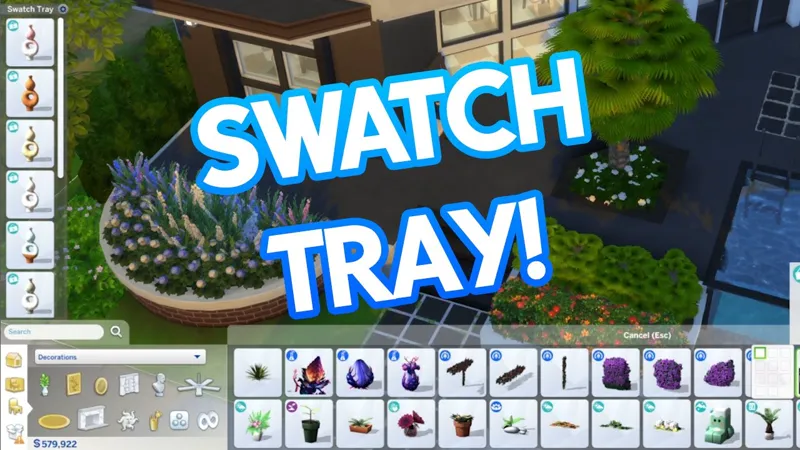
Better BuildBuy v4.0 introduces the Swatch Tray feature, a slide-out tray that sits on the left side of your screen. When you select an object that has swatches to pick from, this tray will appear and display the full thumbnail of every swatch for that object. You can select the swatch you'd like from this tray and place it.
This option is on by default but can be disabled in the Construction Center or by clicking the settings gear icon at the top right of the tray.

The tray settings also offers two additional options.
Keep Open on Placement - Off by default. This will keep your last set of swatches visible even after you finish placing the object. Useful if you plan to place many different variations of the same object.
Show Info - On by default. This toggles the Info Panel that pops up when you hover over an item in the swatch tray.
V4.5 Changes:
Fixed black screen Main Menu issue from marketplace patch.
V4.4.2 Changes:
Organized Debug updated for Royalty & Legacy debug/liveedit content.
Fixed an issue with some toys not showing in the toybox purchase menu
Fixed Dynasty and Nobility titles not appearing over sims.
🚨🚨🚨🚨🚨🚨🚨🚨🚨🚨🚨🚨🚨🚨🚨🚨🚨
🚨🚨🚨🚨🚨🚨🚨🚨🚨🚨🚨🚨🚨🚨🚨🚨🚨
YOU MUST REFRESH YOUR ORGANIZED DEBUG
REFRESH STEPS:
1. TURN IT OFF, RESTART GAME.
2. TURN IT ON, RESTART GAME.
🚨🚨🚨🚨🚨🚨🚨🚨🚨🚨🚨🚨🚨🚨🚨🚨🚨
🚨🚨🚨🚨🚨🚨🚨🚨🚨🚨🚨🚨🚨🚨🚨🚨🚨
V4.4.1 Changes:
Fixed a follow-up bug with the Favorites Loader that could prevent favorites from loading.
This is still not the pack update, and another update will be required when the pack releases. No need to refresh Org Debug until then.
FAVORITES NOTE: Favorited non-primary swatches currently only show in favorites if you turn on the color filters.
V4.4 Changes:
Fixed a bug that could prevent Favorites from loading when items were favorited from certain catalog views.
Fixed an exception when opening the Royalty & Legacy pack preview from the world selection screen.
Another update will be required when Royalty & Legacy pack releases to update the Organized Debug. No need to refresh Org Debug until then.
V4.0Swatch Tray added
Construction Center updated for Swatch Tray toggle.
Swatch Tray settings menu implemented.
Swatch Tray updates the selected swatch in the main catalog in order to sync up auto-counter colors.
====PREVIOUS UPDATES====
V3.4.2Updated compatibility for the 5/27/25 Patch
Placeholder button for Swatch Tray added to Construction Center
Catalog refreshed to fix an issue with ghost essences.
Italian and Swedish translations added
====================================
v3.4 - Business and Hobbies Updates
Updated for compatibility with Business and Hobbies Patch
Updated Organized Debug for Business and Hobbies items.
I've added a CC Report feature for easily sharing and assessing your CC builds. This is accessed via a new Construction Center button, which will grow with time to become your main point of access for Better BuildBuy's future settings, features, and help guides. Favorites have also received an improvement in behavior.
Added a Construction Center button to the filter panel. This will become the main hub for future Better BuildBuy features and options.
Added a CC Report option to the Construction Center menu, which will generate a list of all CC packages used in your current build.
The CC Report will open in your browser, and has an "Export Spreadsheet" option at the bottom, where you can add a column for links to the creators' CC pages.
Enhanced the favorites system so that favoriting a swatch variant won't require you to have that color selected in the filters in order to see the favorite. This was causing some players to mistakenly think the favorite hadn't been saved.
Color filters can still be used in favorites view to exclusively filter to the selected colors.
===GENERAL INFO===
🚨🚨🚨🚨🚨🚨🚨🚨🚨🚨🚨🚨🚨🚨🚨🚨🚨
🚨🚨🚨🚨🚨🚨🚨🚨🚨🚨🚨🚨🚨🚨🚨🚨🚨
YOU MUST REFRESH YOUR ORGANIZED DEBUG
REFRESH STEPS:
1. TURN IT OFF, RESTART GAME.
2. TURN IT ON, RESTART GAME.
🚨🚨🚨🚨🚨🚨🚨🚨🚨🚨🚨🚨🚨🚨🚨🚨🚨
🚨🚨🚨🚨🚨🚨🚨🚨🚨🚨🚨🚨🚨🚨🚨🚨🚨
New to Better BuildBuy? This video will help you get started quickly.
Ever wanted to be able to pin the objects you use the most?
Better BuildBuy now has a favorites category that allows you to do just that!
Here's a quick start, in addition to the tutorial video above.
Features:
Easily favorite objects with your mouse middle click (track pads can usually middle click with 3 finger tap or by pressing left and right buttons simultaneously)
Favorites will stay even between mod versions.
Debug and LiveEdit categories will automatically turn on the corresponding filter if it's not on when selected. This will avoid the "my debug is empty" issue.
Inventory automatically turns on the debug filter if it's not on when selected, due to the frequency that debug objects end up in inventory.
Added Feature Update Notifications
Favorites Quick Start:
Middle (wheel) click your mouse on an object to mark it as a favorite. You'll see a teal bookmark appear when favorited.
Go to Browse by Function and set the dropdown to Favorites to show all of your favorited items.
While in favorites, you can middle click to mark the object for removal from favorites. This is indicated by a small red bookmark.
Removal is confirmed when you leave favorites or leave build mode.
Notes:
When you favorite an item in a category that has "new item" markers, they will be removed temporarily. This is necessary because of how the catalog recycles cells for each object. The new object markers will return when you change categories.
This currently works only on objects and not build items like floors, wallpapers, etc.
I have plans to expand this feature in the future, but feel this is a perfect starting point.
====PRIOR UPDATES=====
v3.3 - Life & Death Patch Updates
Updated for compatibility with Life & Death Patch
Updated Organized Debug for Life & Death items.
Significantly optimized Favorites load time.
Fixed debug or swatchless objects missing from Favorites.
As a result of above, favorited non-primary swatches now only show in favorites if you turn on the color filters.
Fixed two scenarios that caused the CC Build Report to fail or get stuck.
v3.2.6 - 2/27/24 Patch Updates
Updated UI files for compatibility with the 2/27 patch.
Removed the Shopping Cart menu button because... well, I mean do I really need to explain why? Just no.
v2.11.4 UPDATE:
Fixed kit filters since EA has now separated kit filters natively.
v2.10 UPDATE:
Organized Debug updated for Growing Together's content.
Fixed a bug with the Skill bar icon not showing.
v2.9 UPDATE:
Updated the expandable catalog to support the room catalog. Access per the usual "~" or "1" key toggle.
v2.8 UPDATE
BuildBuy filters have been updated to include a select all in the following sections: Color, Style, Expansion Packs, Game Packs, Stuff Packs, Kits
Better BuildBuy now detects if a player has left the mods list in the main menu turned on while having a large amount of mods, which can cause much longer load times unnecessarily. It will explain and offer to turn the list off for you.
Removed non-buildbuy kit filters from filter panel.
Updated EA Desktop permission fix instructions.
v2.7.1 UPDATE: Anyone who has reinstalled TS4 using the new EA Desktop app may have ran into a UAC error when trying to turn on BBB's Organized Debug. This is due to EA Desktop's file permissions defaulting to read-only. v2.7.1 finally has an automatic fix for this, and BBB will fix the TS4 permissions on your behalf. If you have User Account Control turned on (the windows "are you sure?" messages), you'll be asked to allow "icacls.exe" to run. This is normal and is BBB attempting to repair your TS4 permissions for you. Click yes and BBB will be able to turn on Organized Debug without issue.
Originally designed for Create-A-World's Lighting Editor, the color wheel control for lighting is coming to Better BuildBuy.
It's still accessed via shift+clicking lights in build mode, but now the control includes complete control over the lighting color. For support with existing builds, the control still includes the EA preset swatches.
Yes, the lighting does share through the gallery.
No, the lighting does not make your build CC.
As always, if you experience any issues please come to discord.twistedmexi.com to report them.
New to Better BuildBuy? This video will help you get started quickly.
Public release now available!
=======PREVIOUS UPDATES=======
Welcome to BBB v2.5!
Two main changes - firstly, I've added MOO and Ignore Unlocks to the BBB options.
They can be found under the Organized Debug checkbox.
Secondly, my discontinued BuildBuy Deletion Fix mod has been renewed as part of BBB's features. For those unaware, this was a cheat that stopped BuildBuy from deleting anything, allowing you to make changes like wallpaper or modifying architecture without losing your objects. This is now an option in BBB's filter panel. Unlike the other options, it does not persist between sessions. This is intentional, as you should only turn it on while necessary and turn it back off immediately after. Undo may not work for anything you do with it on. You will also receive a pop-up when turning it on, reminding you of this. No, the pop-up is not negotiable, it's one extra click and is still much faster than typing the old cheat. Without it, our support team would be inundated with players asking why they can't delete objects.
Updates:

Added new "permission denied" error message for the few users who kept getting the desync message over and over, making the actual issue more clear to the user.
The two warning files inside the tmex-betterbuildbuy folder now delete automatically after first successful run, to reduce chances of player confusion
Added a MoveObjects toggle to the BBB filter options. Do NOT use the cheat anymore. Setting will persist.
Added an Ignore Unlocks toggle to the BBB filter options. Do NOT use the cheat anymore. Setting will persist.
Added BuildBuy Deletion Protection to BBB filter options. Setting will NOT persist, by design.
Updated light editor logic to allow cloning of rooms using shift.
=================
ORIGINAL BETTER BUILDBUY INFO
(This video will help you get started quickly.)
New Features:
Having Organized Debug on no longer causes your lot to be marked as CC. That means you no longer have to restart the game constantly.
A Light Editor has been added to build mode, with a dropdown for light selection. You can access it by shift+clicking any light.
Debug/LiveEdit Objects for packs you don't own will no longer appear in the catalog.
"Kit" pack filters have been split into their individual kits, so you can pick exactly which kit you want to see.
Added a "Desync" dialog message. There's a few occasions where Organized Debug can be left in a bad state, for example after deleting your resource.cfg. This new dialog will show when organized debug needs reset. If you get it, all you should need to do is restart your game once and then you can continue using it as you normally would.
Did you know you can use TOOL in build mode if you're using Better BuildBuy? Grab TOOL here!
Better BuildBuy Quick-Start
You don't have to use Organized Debug for TOOL. Just don't check the filter.
Do NOT use debug or liveedit cheats. Use their respective filters instead.
Do NOT use MOO or Entitlement Cheats. Use their respective filters instead.
Do NOT install buildcam or expandable catalog separately. They're included in BBB.
Filters are different! Please don't ask where your CC went.
Filters work as follows: Hide Maxis - Hides all regular objects that aren't debug, liveedit, or cc. Debug - Shows debug objects, replaces the need for the debug cheat. LiveEdit - Shows LiveEdit objects, replaces the need for the liveedit cheat. Custom Content - Shows Custom Content objects. Off by default, be sure to check this if you want your CC visible. Filters stay set even when you close your game, so you'll only need to turn CC on once if desired.Press 1 (number row) to toggle catalog size.
Press Tab to activate Freecam mode in build.
If you'd like to use Organized Debug, open the game and open your buildbuy filters. Scroll to Better BuildBuy and select Organized Debug. You'll receive a pop-up and will be told to restart. After doing so, Organized Debug is active.
If you're completely new to BBB, I recommend watching my original tutorial.
Install Instructions
⚠ FOLLOW IT WORD FOR WORD. ⚠
1. Delete any existing copies you have for BBB.
2. Open the "TwistedMexi's Better BuildBuy v4.5 Official" zip and drag the "Tmex-BetterBuildBuy" folder inside to your mods root. (No subfolders!)
3. That's it! Don't restructure or move the files in any way NOTE: On Mac, .zip files may automatically be unzipped when downloaded. In that case, drag the newly downloaded folder to your mods.
Uninstall Instructions
Hate to see you go, but if you are, it's best if you do the following first:
1. Open your game with the mod installed.
2. Turn off Organized Debug in your filter panel.
3. Close your game.
4. You may now delete the mod.
New CAW & Better BuildBuy Feature: Swatch Tray | The Sims 4 (YouTube)
Comments (102)
the ui showed up on my better exceptions report due to the new update
mine as well
Hello! I am having an issue with BBB. It gives me an UI exception and says that the folder is too deep, although it is not. I am not able to use the discord because it says that I am not able to accept the invite. Can someone help? I really need this BBB mod in my game.
We really need to use discord to troubleshoot thoroughly but usually if that's happening and you're certain it's installed correctly, it's because you have a conflicting ui mod in. If you have better exceptions you can run a conflict report from the welcome menu and find it.
Hey Tmex! I have a question I hope you can help me with. BBB is one of my absolute must-have mods, and I've used it for ages without issues. But I had to outsource my mod folder due to size to another partition, and I linked to it via Windows command (mklink). But since then, my game can't recognise BBB; all other mods work fine. :( I am using the most recent version of Sims and BBB. The files weren't altered or buried too deep; just the initial folder was renamed to fit my order inside the mods folder. Using the original one didn't change the behaviour. The original error message: Incorrect Better BuildBuy install! Script mods are on but you either modified BBB's files or you installed BBB too deep in your mods folder. Make sure the folder with the exact name "tmex-BetterBuildBuy" is the one directly in your Mods folder. Re-read the install instructions on the download post and follow them EXACTLY. Do you have an idea to help me?
BBB does have issues with symlink folders due to the way it has to install organized debug. If you're sure BBB is in the root folder of whatever your game is reading as Mods then it's probably not fixable without putting it back in the original folder. One option is to symlink a subfolder in your mods instead, and put any mods that have to be in the root in your normal mods, then keep stuff like cc in your symlinked folders
hi! let me know if this is better to ask in your discord, but do you know of any mods that are compatible with BBB and while also getting rid of the marketplace section on the main menu? and if not, do you plan on updating to be compatible with custom homescreens that have this feature? :) no worries at all either way, i know it's not that deep but it would be nice if all my mods could get along, lol!
This is amazing! Definitely a must-have mod for me. That said, the 'Packs' filters aren't working - they both show 'Base Game' as the only item in the list. The other pack CC is visible in the BB menu, I just can't filter it.
Please come to discord.twistedmexi.com to troubleshoot
Are there any mods that that conflict with Better build buy? I keep getting a message that it's installed wrong but I've read the description and I've followed the instructions to a T. Any help?
Quite a few. You can run a conflict scan using Better Exceptions or come to discord.twistedmexi.com for help
so i'm really new to mods so please be nice. i've tried to add this one in and followed the exact steps and it doesn't show this in my mods during start up or even in my build mode to even turn on. what am i doing wrong.
The new update of this isn’t working for me it’s says it’s broke.
same here
I love to play with this mod but right now Better Exceptions is tagging it as needing an update, Is there possibly one in the works
If it says ALL Mods in the detection type at the top then that report is not telling you any of the mods listed are broken. Come to discord.twistedmexi.com for support
Thanks!! Any progress on categories?
Ciao dopo l ultimo aggiornamento non riesco a trovare piu i nomi dei pacchetti ...questa mod puo filtrare i singoli pacchetti?Grazie mille
hi so im wondering if this is updated to current patch because i had it in my game (i updated my game) but when i open game and it goes to start screen its all black, and the home is in dark blue lettering and cant see anything else. i removed it and it worked fine.
Yes it works fine on the current version. The issue you described was caused by main menu mods a few patches ago so maybe you had another UI mod buried in your BBB files. Try a fresh download
Oi! O meu jogo atualizou ontem e o mod não está funcionando, nem o TOOL.
Patches usually disable mods. Make sure you re-enable them in game settings
Hey twisted, i'm having an issue where my games fails to save when i install the mod how do i fix this?
This mod doesn't touch the save process at all, but make sure your game is fully up to date
Hi! My game is not updated to the latest update. Is it possible for me to have an outdate version of this mod? Because I cannot access the UI of build mode when I have this installed. Thank you!
You'll need to update. My mods are only supported for the latest game version.
Thank you for this lovely MOD! Appreciate everything you do, must have been so much work going into this!
I use edge as my standard browser and i do not have any problems downloading the files of this and T.O.O.L. Therefore I think its a browser problem indeed as mensioned by @amy holladay.
For those having trouble, try downloading in another browser. I had the empty zip problem, too - downloaded several times through Firefox with no luck, but then tried Microsoft Edge and it downloaded perfectly. Thanks for the mod, TwistedMexi - this one is a must-have for me. I don't play without it.
thank u! it helped
Same as Cheryl the zip is empty but there's also a randomly named file.The name changes each time I re-download it. I ended up deleting it instead
Try a private tab, maybe something going on with patreons caching but I just redownloaded the file and it looks as expected
I have tried downloading the update several times. It ends up with the extraction file folder is empty.
Discord.twistedmexi.com for troubleshooting
Hey been using your mod for awhile now and im quite a fan. Ive never had chrome flag any mod downloads as suspicious but for some reason its doing so with this 4.5 update. Any idea as to why?
Just a heuristic thing. The download is fine.
I need help. :( I've got UI Exception Report whenever I enter in building mode. V4.5 doesen't work for me for some reason. The game even crashes if I try to open any build mode after the exeption notification.
ZIP folder is empty.
Apologies, but I'm having the same issue as Julianne. Whenever I download the file the Better Build Buy script isn't in the zip file. The zip file itself is empty. I've never used your system before so I don't have a previous folder that I can just delete the file and place the new one in it. I don't know if I'm naming the folder wrong or what but it will not work for me. I have script mods turned on. Your Tool script works just fine during game play it's only BBB that won't work. I assume it's the folder?
i installed this, literally triple checked its installed correctly and even tried looking at tutorials of installation or possible bugs and nothings wrong with it. however its not doing anything in my game. if i try to use the organized debug option in build mode it doesn't do anything. even if i relaunch my game. Same thing for only showing my build mode cc. is there anything you suggest? or know as to why its doing this?
Might be that script mods are turned off. You can get help in our discord though. Discord.twistedmexi.com
Do you think it would be possible for you to make an always free real estate mod?
I'm having trouble finding most TV models... am I doing something wrong?
Can I find previous versions somewhere?
No, you'll need to update to the latest game version
Thank you!
Thank you!
So awesome, ty ty!!!
Thank you!
Thank you for all that you do!
I appreciate the cart/shopping button being hidden in build mode but can we please get the "Maker Packs" filter?
That's coming
Just a note :) BBB hides the marketplace icon in the top corner. (No pressure!)
First, thank you for all the work you do with your amazing mods. They make my game so much more enjoyable to play. The only issue I am having, BBB is right now the only mod I redownloaded and when I go into buildbuy it says BBB is burried to deep. I did exactly what I have always done and dragged the BBB folder into my mods folder. Am I doing something wrong, or is this just an issue with the EA update? Thank you again for all you do, I appreciate it a lot.
Okay, thank god it isn't just me. I too thought it was just me having thing this problem as well.
TMexi - should we hold off putting in the updated TOOL and BBB if we didn't update our games??? I don't plan to update until all is fully well within the newest EA shenanigans
Correct, never update mods until you've updated your game.
my screen is still black and i cant click anything
Then you have other UI mods in that aren't updated
Better Inventory keeps setting off exceptions, am i the only one? along with searchable player poses
Thank you for the update
When I add this back to my game, I can't get past the main menu. The Main menu page is black. No issues with just mcc and ui cheats loaded.
yes i am still getting that too, i was hoping this update would fix that
Does anyone know why shift+t doesnt work everything looks right but none of the controls work when i press shift+t
You need TOOL and BBB installed
Thank you so much! This mod is a godsend :)
Thank you for everything that you do 🫶🏻
Thank you so much!!!
Thank You !!!
Thank you for your hard work. I really appreciate it and you as well!
You are the best - I hope your pillow is cold on both sides, your charger works at every single angle, and you never stub your toe again.
🤣🤣🤣
So awesome, ty!!! 😍
I love you.
Thanks for the mods :D I just joined!
Hello, Will this work for the new update? (I'm updating all of my mods rn lol)
Please refer to the status badges on https://twistedmexi.com for all my mods.
I'm getting the same BE notification for BBB and Better Inventory, i even tried deleting and re downloading and it still says that. Suggestions? Thanks :)
UI Exception reports usually say ALL MODS in the detection type, meaning that list is just the UI mods you have installed. Come to discord.twistedmexi.com for support
Thank you for being your awesome self!
My better exemptions just flagged this as possibly broken, even with this latest update.
same, stated im installed te wrong version when its this current, updated version.
Thank you!!!
Woohooo
Thank you Thank you!!
Mexi, I hope your pillow is always cold, your coffee always hot and your heart always full. Thank you for existing ♥
😆😆😆
Thank you!
Thanks!
Thank you!
Is this updated for the Adventure awaits patch in September or not?
TMEX answered your earlier question a week ago. As of yesterday, BBB was still working for me, but I have just installed Adventure Awaits, so I am not sure if anything has changed. But in all seriousness, be patient, mods like these are amazing, but they take a lot of work!
Is this updated for the first Adventure Awaits patch (september) or not?
I just checked the tmex discord. They are on a trip that they planned before the update happened and should be working on the updates now (this was posted on 9/18 and they stated "a few days", so I'm assuming they're already working on them as I write this). Joining the discord helps. Idk if they do updates like that on twitter or fb.
Woohoo!! Fixed and working in my game again!! Thank you so much TwistedMexi I absolutely adore this mod. I truly appreciate the effort it takes to keep mods going with all the updates and patches <3
Broken by the Aug. 19th update. Looking forward to a fix. Love this mod
Its fine other than the wrong icon showing for the ... Options menu button. It will be updated, but it's completely usable otherwise
I'm really enjoying the swatch feature!
So glad i came back and read your edit, cause my bars looked weird, took out 4 UI mods just to see whats up before i came back here. LOL
Thanks for always spoiling us!! <3
Did I miss something or what? I don't find download anywhere.
It's at the bottom of the post