


Aurora Dreams GShade Preset ⋆˖⁺‧₊☽◯☾₊‧⁺˖⋆
Hi loves!
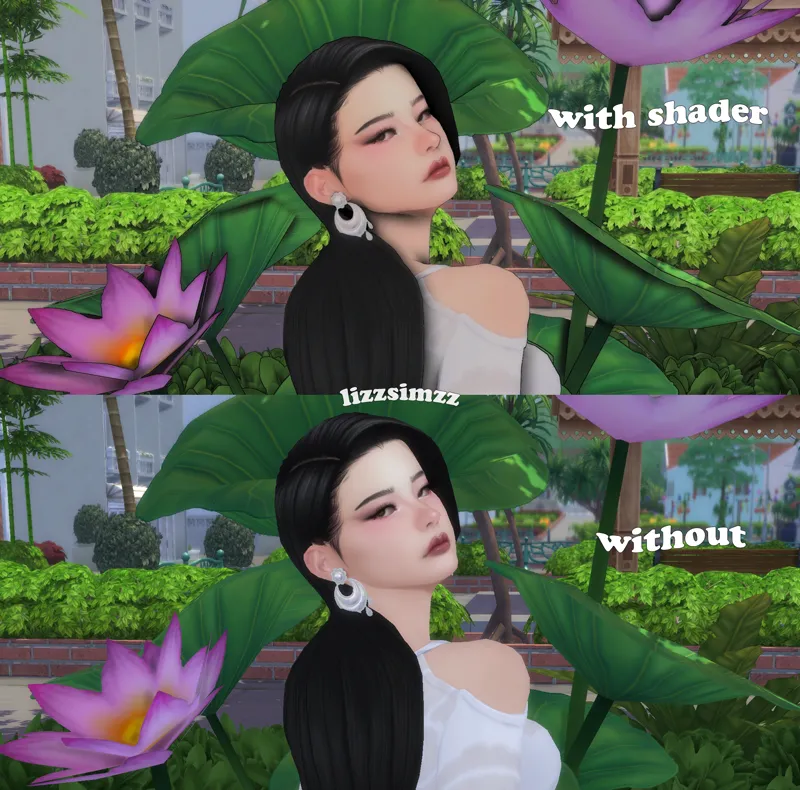
Here is my GShade preset for in game, I am beyond excited to share it with you all! I have been wanting to make a preset for just in game for a long time, but I spend so much time in create a sim that I never had the time to. It looks so beautiful in game & really brings all the colors to life! I still kept the comic effect to it because I love it, but it also looks stunning without it.
The pictures included are completely unedited & are how the preset actually looks in game, however I do use an in game lighting mod which is bright saturated light rooms by Northern Siberia Winds.
I will be converting & updating this preset to ReShade very soon!
Also PLEASE make sure to disable edge smoothing in your sims 4 graphic settings, as it causes the comic effect/outlines to not appear in game.
Download link: https://drive.google.com/drive/folders/1mZvgOO25HA2yw1U46CoGoeVWlqwGxa6L?usp=sharing
(for anyone confused about requesting access on the google drive link, just request access on it & i will send you back access asap! also please make sure your email/name you are requesting on matches yours on patreon)
In order for the preset to work correctly, you need to follow these steps:
Download my preset on the google drive link.
Open file explorer, click on this pc, then windows. Next locate your program files or program files(86) folder & open it.
You should find your EA Games folder in there, click & open that folder.
Next open on your Sims 4 folder & inside there locate your game folder then click on the bin folder.
Your gshade-presets folder should be in there so click on that & then the custom folder.
The last step is putting my preset file into your custom folder.
PS. if you have any issues downloading my preset or getting it to work correctly, feel free to send me a message & I will help you!
TOU: DON'T make changes to it, reupload, or claim it as your own & please feel free to tag me if you use it. DO NOT REUPLOAD MY SIMS OR ART. Enjoy! ♡