














Action Taimanin All Mods + UtilityMod - 2025/12/2
1. Download files 1. Descargar archivos Link:
1. Download all files shared in the link (includes utilitymod + 3DFix)
1. Descarga todos los archivos compartidos en el link (incluye utilitymod + 3DFix)
Link:
https://drive.google.com/drive/folders/1F706HtFGnOKPv9p7aUl7zhOKGOYwgvxc
2. Introduce it in the main folder of the game.
2. Introducir en la carpeta principal del juego.
Steam\steamapps\common\Action Taimanin
Dear friends, as I had previously announced, I have renewed all the folders and the configurations of the commands. That is to say, all the modified costumes, hair, faces and eyes are included, plus the EXTRAS, and the combinations to remove effects and clean the screen.
So that there are no conflicts, I suggest that you cut the contents of the "MODS" folder, and I'll clarify what to cut, in case any of you have your own modifications inside any of the folders.
Then, they unzip this file in the main folder of the game, so many files will be replaced, and inside the "MODS" folder there would only be two folders:
_FX
ModerJack
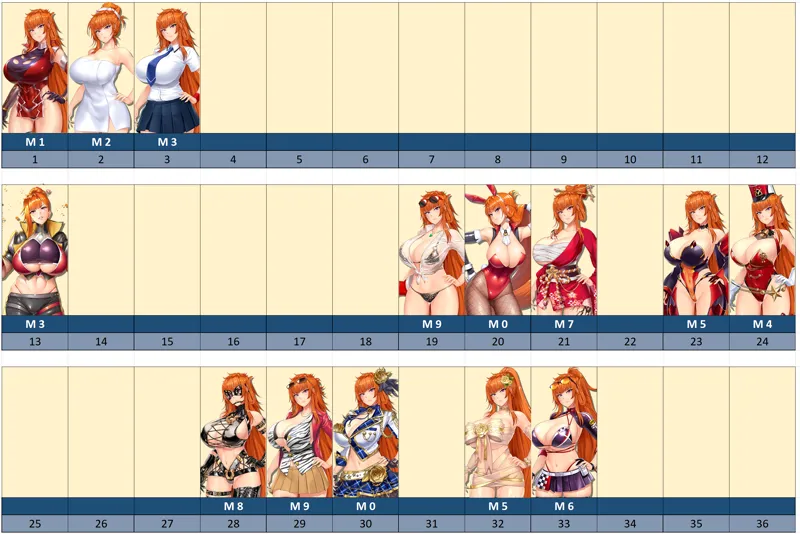
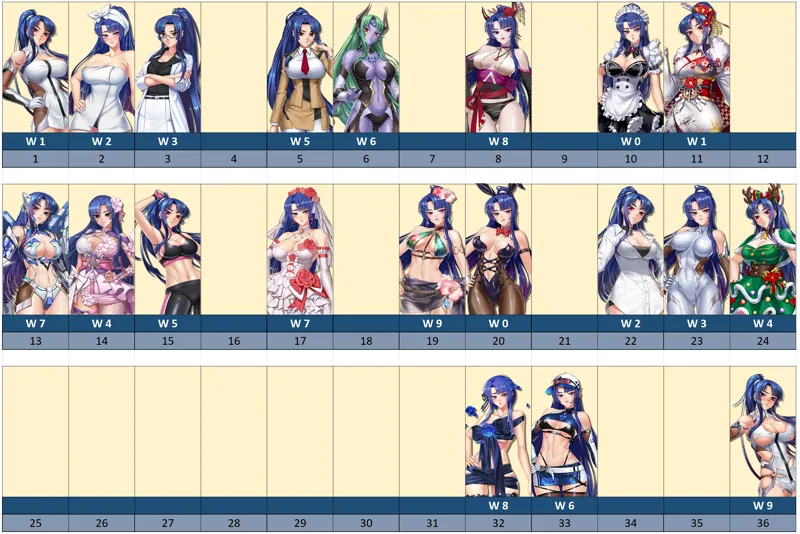
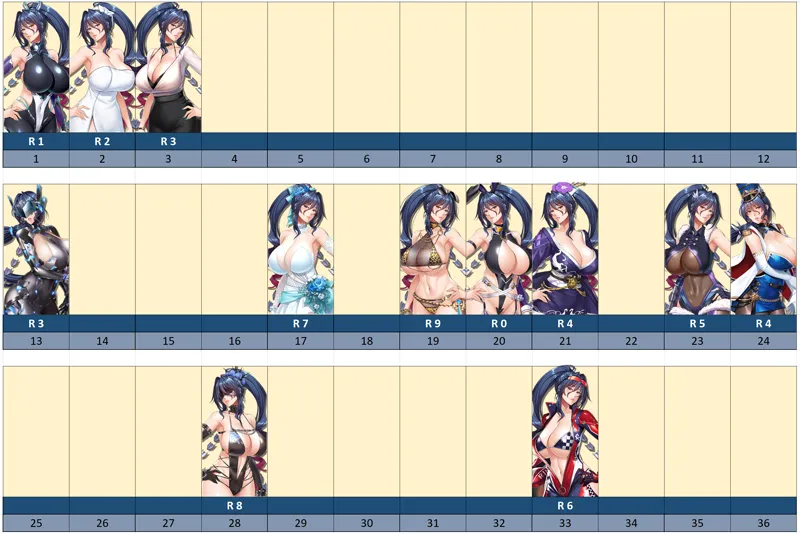
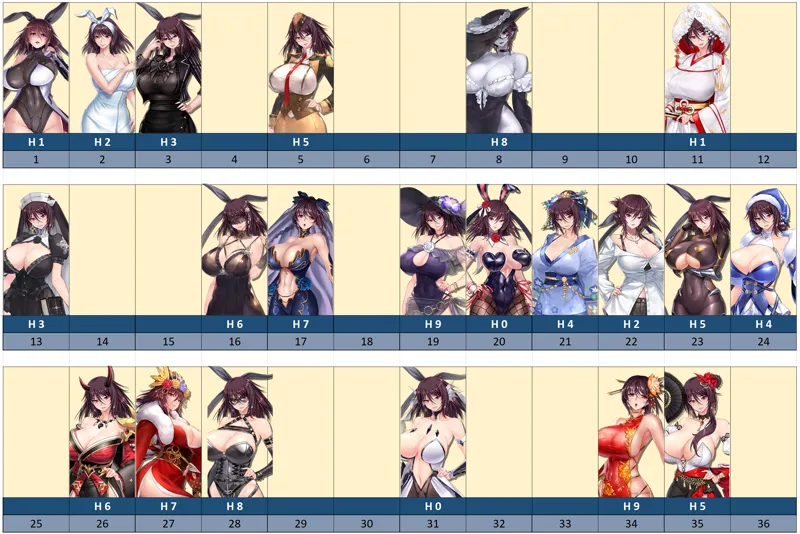
As shown in the pictures.
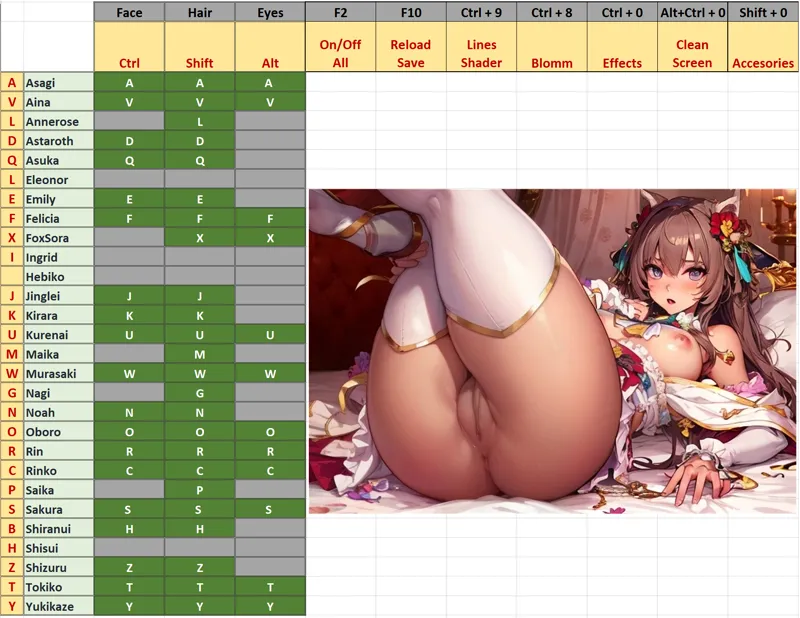
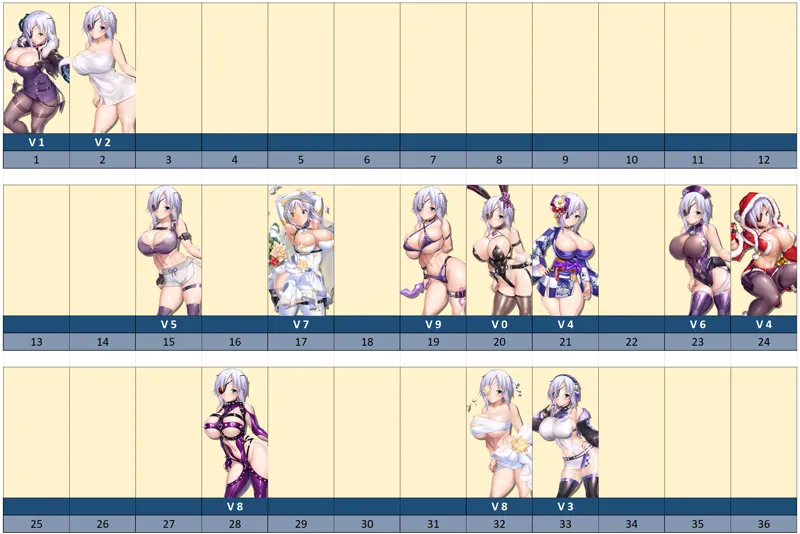
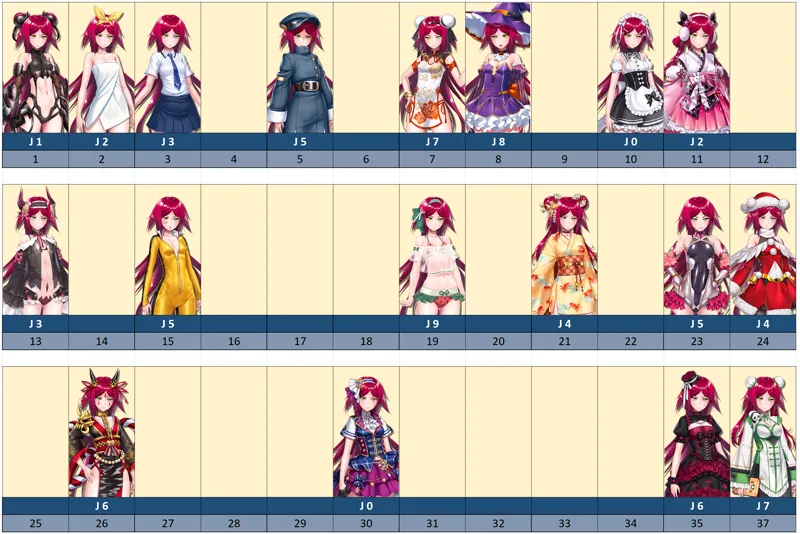
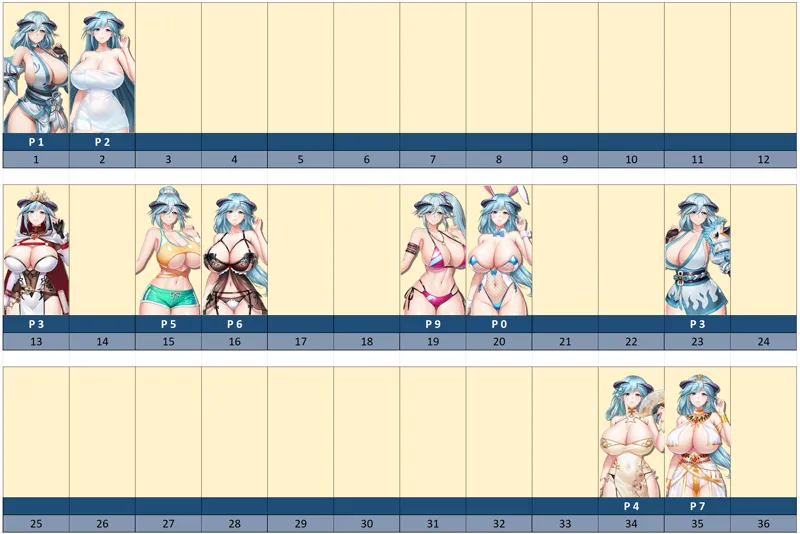
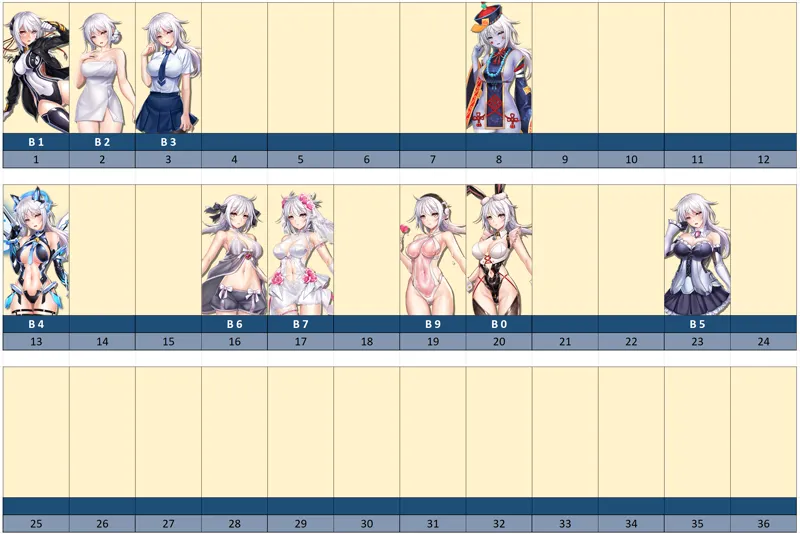
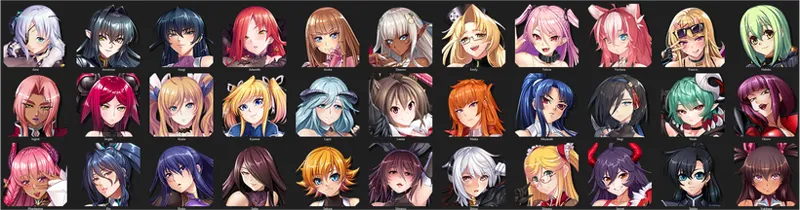
Inside the "ModerJack" folder are all the taimanins (I hope you also see the icons of each one) and inside each taimanin, all the folders for each suit, with their configuration file so you can modify them to your liking . In the image I show you the inside of Asagi's folder.
Some important combination:
"F2" - ON/OFF ALL
""F10" - Save the Last Options
"CTRL + 9" - Outlines & Shadows ON/OFF
"CTRL + 0" - Effects ON/OFF
"CTRL + ALT + 0" - CLEAN SCREEN ON/OFF (WARNING with that)
All the combinations are found in the EXCELL file under "ModerJack"/Key Combination, and also as PNG file in each taimanin's folder.
For example, if you want to add more costumes in Asagi_2 "Bathrobe", you modify the text file, and add numbers to the cycle "A + 2"... You can also change the key combination you want for each costume, hair or face. Only the line "KEY = A + 2" should be modified in the same text file.
They can also change the key combination they want for each suit, hair or face. They only have to modify the "KEY = A + 2" line in the same text file.
Some taimanins have some combinations for removing accessories "SHIFT+0" and for "Masked Oboro: "Shift+4".
Finally, you need to download the "model_char" file so that the mods look better, since if they don't have it, some skin colors or some hairstyles don't work completely correctly. In the next post I will renew it with each update of the game.
MODEL_CHAR
https://www.patreon.com/posts/model-char-file-92724542
And in the following posts you will find other edited files:
BACKGROUND
https://www.patreon.com/posts/background-file-98119811
CARD
https://www.patreon.com/posts/80466015
ICON
https://www.patreon.com/posts/icon-file-alt-2-106759201
FAVOR
https://www.patreon.com/posts/favor-file-2024-98187372
ROOM
https://www.patreon.com/posts/room-file-nsfw-98235167
STORY
https://www.patreon.com/posts/98236079
ANIMATION_CHAR
https://www.patreon.com/posts/animation-char-98067547
MODEL_CHAR - FIX COLOR + NUDE MODS
https://www.patreon.com/posts/103971088
Any questions or inconvenience that may arise I will be attentive to help you solve it!
Queridos amigos, como les había anunciado anteriormente, he renovado todas las carpetas y las configuraciones de los comandos. Es decir, están incluidos todos los trajes modificados, pelos, caras y ojos, más los EXTRAS, y las combinaciones para quitar efectos y limpiar la pantalla.
Para que no se generen conflictos, les sugiero que corten el contenido de la carpeta "MODS", y aclaro lo de cortar, por si alguno de ustedes tiene modificaciones propias dentro de alguna de las carpetas.
Luego, descomprimen este archivo en la carpeta principal del juego, de manera que se remplazarán muchos archivos, y dentro de la carpeta "MODS" solo quedarían dos carpetas:
_FX
ModerJack
Como se muestra en las imágenes.
Dentro de la carpeta "ModerJack" se encuentran todas las taimanins (espero que ustedes también vean los íconos de cada una) y dentro de cada taimanin, todas las carpetas de cada traje, con su archivo de configuración para que ustedes puedan modificar a su gusto. En la imagen les muestro el interior de la carpeta de Asagi.
Some important combination:
"F2" - ON/OFF ALL
""F10" - Save the Last Options
"CTRL + 9" - Outlines & Shadows ON/OFF
"CTRL + 0" - Effects ON/OFF
"CTRL + ALT + 0" - CLEAN SCREEN ON/OFF (Cuidado con esta función)
Todas las combinaciones las encuentran en el archivo EXCELL dentro de "ModerJack"/Key Combination, y también como archivo PNG dentro de cada carpeta.
Por ejemplo, si quisieran agregar más trajes en Asagi_2 "Bathrobe", modifican el archivo de texto, y agregan números al ciclo "A + 2"...
También pueden cambiar la combinación de teclas que deseen para cada traje, pelo o cara. Sólo deben modificar en el mismo archivo de texto el renglón "KEY = A + 2".
Algunas taimanins tienen algunas combinaciones para quitar accesorios "SHIFT+0" y para "Masked Oboro: "Shift+4".
Finalmente, necesitan descargar el archivo "model_char" para que los mods luzcan mejor, ya que sino lo tienen, algunos colores en la piel o algunos peinados no funcionan del todo correcto. En el siguiente posteo lo voy renovando con cada actualización del juego.
MODEL_CHAR - Only FIX COLOR
https://www.patreon.com/posts/model-char-file-92724542
Y En los siguientes post encontrarán otros archivos editados:
BACKGROUND
https://www.patreon.com/posts/background-file-98119811
CARD
https://www.patreon.com/posts/80466015
ICON
https://www.patreon.com/posts/icon-file-alt-2-106759201
FAVOR
https://www.patreon.com/posts/favor-file-2024-98187372
ROOM
https://www.patreon.com/posts/room-file-nsfw-98235167
STORY
https://www.patreon.com/posts/98236079
ANIMATION_CHAR
https://www.patreon.com/posts/animation-char-98067547
MODEL_CHAR - FIX COLOR + NUDE MODS
https://www.patreon.com/posts/model-char-file-98289879
Cualquier duda o inconveniente que pueda presentarse estaré atento para ayudarlos a solucionarlo!





Comments (44)
Idk if this bug or not. After install utillity mod it show bunch errors.
oh! What kind of error?
Today is July 17, 2026. I am a Tier 3 member, and I downloaded the latest version of the mod today. The mod seems to load correctly because F1, F2, and F10 all respond when I press them. However, I’m playing Asagi, and when I hold the A key and press the number keys, nothing happens. I can’t change outfits or enable the nude mod. I also tested with other characters, but the result is the same. It seems like the latest game update may have broken the mod, but I’m not sure if I’m doing something wrong. Could you please let me know if this is a known issue? If you’re planning to release an update or fix, I’d really appreciate it if you could let us know as soon as possible.
I can't even seem to download the files. Google just stays stuck at zipping them.
I downloaded the mod folder and placed it in the main game folder, but the mods are not working. Figured I'd ask since I'm new to this, lol. A video tutorial would have been helpful for the newbies.
Oh! So sorry friend! Try press F2 to ensure "UtilityMod" is working...
https://imgbox.com/oIl5NLTp No sirve, no se que estoy haciendo mal.
No entiendo por qué pudo suceder eso, se me ocurre que el problema podría ser el archivo "D3dx_User", prueba eliminando ese archivo.
Hello dear friends! I wanted to let you know that I've updated all the files!
Hola queridos amigos! Les cuento que he renovado todos los archivos!
When i download ModderJack-file there are two files with same name and differtent size.Which should i install?
That's right, one is for level 1 and the other is for level 3.
I have error https://hizliresim.com/5ox1100
Oh! I don't understand what that is, try removing the "d3dx_user" file, a new one will be generated when you start the game.
Im sorry I dont understand how to make the mods work can someone help me ? Ive moved them to the main folder and nothing, Ive unzipped them there and nothing, Im new at this so i dont know what im doing wrong.
Dear friend, once you install the unzipped UtilityMod folder, you should see a box with green letters when you start the game. This indicates it's working. Then, in the game, press the combinations for each taimanin and their respective costume.
I dont quite understand how this works. I put inside the game dir the files. But when I open the game only the f2 thing works. No shortcuts working or changing the costumes of characters. Any more detailed guide or some help?
Hello dear friend, from what you tell me, utilitymod is working, then, for each variant, you should press the corresponding key combination, that is, if you want to change Asagi's main suit, hold down the "A" key and pressing the number "1" you will change the suit.
acabo de descargar la carpeta de Mods de drive.google y la carpeta de Natsu no exite en los archivos.
Tienes razón hermano! Prometo subirla en menos de 3 dias!!!
waiting for the next bundle to start modding again... i fell too far behind!
Hello dear friend! Do you mean the compilation of folders in Google Drive? If so, I'm working on it! I promise to update it soon!
Sry how to get “UtilityMod + 3DFix” file ? I didn't find them in the link
Hi Bro! Here the inicals files: https://drive.google.com/file/d/1hL2jys1qtaUqQXWzN5RxPLuLogaJbc0d/view?usp=sharing
I installed this mod but game is not playing Failed to load PlayerSettings (internal index #0). Most likely data file is corrupted, or built with mismatching editor and platform support versions.
I am getting the same error, I have no idea what the latest pack is as there is a MEGA file and a Google Docs folder. It would be nice to get clarification on what is the actual latest all mods set up as there is no consistency here.
Hey, is it possible for this mod to not work with the new (27th August) update? After downloading the mod and following instructions the game doesnt launch. I think the update is the only explanation.
Hello dear friend! This is the second time I've been notified of this problem, so I'm updating the uploaded files to fix it! I apologize for that! Apparently it's some residual file, so nothing needs to be replaced, what I added would be enough...
Dear friends, I have updated all folders again, so I suggest you delete the "mods" folder before locating the updated one. There are several fixes and additions. Greetings and thank you very much for your support!
Queridos amigos, he actualizado todas las carpetas nuevamente, por lo que sugiero que eliminen previamente la carpeta de "mods" antes de ubicar la actualizada. Hay varias correcciones y agregados. Saludos y muchas gracias por su apoyo!
and how to fix when open it steam client not found please
I don't understand what could have happened, I only saw a message like this when I wanted to open the game from the executable inside the folder, but it never happened to me with the Steam shortcut
hi i accidently pressed f10 and the mod's hotkey doesn't work anymore. is there anyway to solve it. Thank you,
Hi, friend! Pressing only F10 updates and saves the last selections. If you press F2 it turns it on and off, and ALT+CTRL+F10 resets everything to default.
Dear friends, I have reuploaded all the files again, since some of you had certain errors. Remember to delete at least the "mods" folder to avoid duplicates.
Queridos amigos, he resubido todos los archivos nuevamente, ya que alguno de ustedes tenía ciertos errores. Recuerden eliminar al menos la carpeta "mods" para evitar duplicados.
Holas man tengo hartos problemas de failed texture to load con varios trajes de varias taimas.
Hola Bro! Te aseguraste de borrar las carpetas antes de descargar la última actualización? Me sorprende que sean muchos errores... Podrías mencionar algunos así los chequeo?
Dear friends, thanks to the information of one of you, I have reuploaded all the files again, with some improvements in certain costumes and some additions.
Queridos amigos, gracias a la información de uno de ustedes, he resubido todos los archivos de nuevo, con algunas mejoras en ciertos trajes y algunos agregados.
Looks great. Can you pin this one to replace the old one?
Sorry friend! But the post that is posted is free, for that reason I leave the link for the patreons. Tank you very much for your support!!!
Para quitar los maquillajes simplemente presionas la combinación hasta que complete el ciclo, y así verás que aparece la cara original, sin maquillajes ni nada.
¿Disculpe, como les quito el maquillaje?