

EmuDeck 2.1.32 RC - Windows Gaming mode is back!
Hello everybody!!!
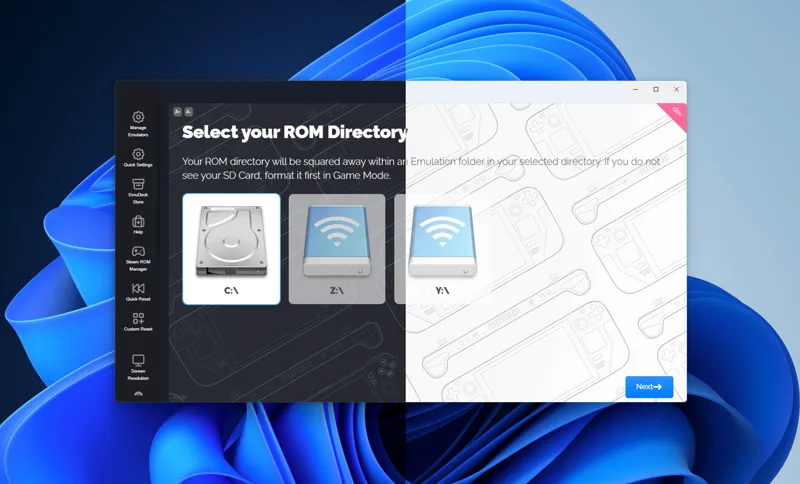
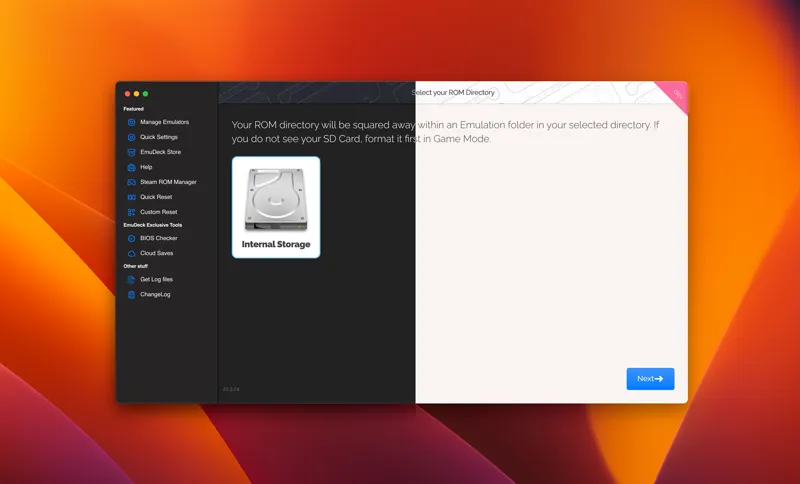
We are near public release and since EmuDeck is going to be available in more than the SteamDeck a new UI was in order!
Now EmuDeck will have a more similar UI to the OS it's running on, Windows, Linux, Mac and ChimeraOS will have slightly different UIs, all supporting light and dark modes.
A new lateral sidebar replaces the old welcome screen, with so many icons it was starting to get a little confusing, now it should be easier to navigate. These new UI are not final, I'm waiting for your feedback to keep them, adapt them or revert them.
Besides that we also have:
Windows
- Fixes Citra Bios Path
- DNS detector, the installer will warn you if you are not using fast DNS like 8.8.8.8 or 1.1.1.1
- Gaming mode, gives your Windows handheld a more SteamDeck experience, booting straight up to Steam, no Windows Desktop. Close Steam to get back to the desktop, restart to get back to Gaming mode. ( changing mode it's going to be slow for testing proposes, it will be faster after testing has been finished ). Enable / disable it from Quick Settings. If you have antivirus there's a big chance this will be marked as a virus / trojan, so please add an exception :). If you are stuck on game mode-> CTRL+ALT+SUPR, File, Run, explorer.exe, open EmuDeck again and change Boot mode to Desktop.
SteamOS
- Auto Sudo
If you don't have a sudo password we will create a temporary for you so you can install Decky and other stuff without hassle. If you have a sudo password already then we will just ask for it
Both
- Added a "see log button" on the "building backend page" so if it gets stuck you can see why.
- Hability to close or open certain features to be patreon only, not jut the whole app.
- EmuDeck Store - Feeds
Now you can add your own homebrew games to the store, just create a json file in the USERFOLDER/emudeck/feeds/ folder, use the same format and names as used in the USERFOLDER/emudeck/store/ folder, a UI to make this more seamless is in the works.
- Pegasus Frontend
New frontend besides Steam or EmulationStation with theme selector on install / reset. You need to parse your games before using EmulationStation since Pegasus can't scrap games. I'm are working on a "auto parse" feature that will be like cloudSync but instead of download saved games, it will download artwork in the background, this will parse both EmulationStation and Pegasus games. In the future there will be a theme selector inside EmuDeck, not only when doing a fresh new install.
- New parsers
Intellivision, NEC PC-FX, Nintendo Virtual Boy
Bonus: ChimeraOS
- Added PowerControl so you can control your CPU cores, TDP, etc. in compatible handhelds.
And that's all for today's update! With every update I post here I'll close the comments of the one posted before so I don't miss questions in older posts, so if you see some closed comments in old posts is because of that ;)
See you in the comments!
Comments (45)
I'm curious if I cancel my membership, will I lose access to my ea build, even if I don't update?
Installed the update and my rog stopped recognising any input from the controller whatsoever, wiped my drive twice with no avail and had to send the device into asus to get repaired. Beware of this update
I try to run my ps2 games and the rog ally isn’t recognizing im trying to use the on board controller plus it has an error reading my storage
When is the MAC version coming out?
I just installed but for some reason steam rom manager is not launching when I click on the button in emudeck. It does nothing
Thanks for all hard work! I have an issue with "Update all Configurations" notification on main screen, even though I did the update, it reappears every time I open Emudeck. (Rog Ally Z1 Extreme)
Emudeck system getting better. I hope future update is good and smooth
Guys, I need help, after installing emudeck on my rog ally, when I turn it on, the system opens directly to Steam and I don't have access to Windows, if I close Steam everything goes black.
Boot into safe mode, and toggle off steam deck ui in emudeck
Malware.AI.(id-nr) has just started flagging ...\GAMEMODE\LOGIN.EXE and \ENABLE.EXE as an unknow threat.
The Install / Update seems to work without issues on the ASUS ROG ALLY (Windows-11-Pro-x64). The "Update All" Function doesn't remove the orange ticks on PC (Windows-11-Pro-x64 Version 21H2 Build 22000.2538), only doing the updates one by one manually, is removing the orange ticks. Retro Achievements still not logging-in / working at all. Thanks a lot for the hard work and improvements !
Great job, I’m glad you got things sorted
god I cant wait for the public release to get my friendos to install it
The new UI looks gorgeous 😃 thanks!
Confirming what Randy Ray stated. The ROG ALLY is stuck in a no desktop environment even after exiting steam. I have tried exiting steam, exiting big picture, tried suspension, have signed out and back in to windows, and even restarted DWM and no dice
Yep same here. I would be keen to know if the dev builds are running on a fully updated device.
Happened the same to me as Jason Bellisle. Installed and only get to a screen with "Manage your emulators". Also, everything was installed in C:\, which sucks, I was never given the option to change the place of installation.
yeah, open EmuDeck again please, it was a bug but it's been fixed
I turned on some steam deck mode on my rog, and now I don't have access to the desktop and can't figure out how to disable it to get it back.
Would be nice to know how to turn this steam deck mode off on a rog ally. I can't even access my windows desktop anymore.
I installed the latest version, everything appears to install and I get to a screen that says Manage Your Emulators and it shows boxes with all the different emulators. There is no next button or anything to get past this screen. I really want to try this product, but I cant get past that screen to actually do anything. HELP!
I am having same issue
Promising! tested on my Legion Go. Downside is, when it boots up on "steam mode", some commands dont work, like the volume buttons. Not sure if its related to windows not loading up so its limiting its functions
Yuzu still doesn’t work for me. I cannot install DLC or updates.
Nice upgrades! Looking forward to playing with it... I still would like to see an option in Windows to "update all Emulators" so I don't need to go through each one looking for an update.
Can't you just re-install everything with Custom Install / Quick Install?
Awesome stuff 🥳
This update set every Parser for me in srm to sd card even tho i installed on the internal ssd (steam deck) Cant install pegasus because of that. I only found a pegasus config file where every rom folder is set rd card too. Did a custom reset and still same :/
ok, so the same old issue is still happening.. It did happen to me on a the previous release, not on this one. Can you send me a DM?
🥳🎈🎉👌
This is awesome!! 😎
Very nice work thanks you
What is the expected swap time from game mode to desktop mode? Waited like 2-3 minutes and I was stuck at a black screen
10 seconds on a clean windows installation. Tested on a Rog Ally
With the DNS check for “fast dns”. Is there going to be a checkbox so it doesn’t complain about not using Google DNS if a user prefers their own DNS, like someone using PiHole or their own authoritative DNS in their network
it checks for 8.8.8.8 and 1.1.1.1, there a lot of issues for people having bad DNS, if you already installed EmuDeck don't worry, we only check when running the bat.
Great work!! 👍🥳
Wow this looks great. It would brle great to have some kind of support everytime a new update comes our. Such as a email or place for us to message someone. I've had issues and never received response on here or discord. I've tried the wiki and that was no help. One issue I have is everything I update I lose my favorites. I kept getting an issue that there was an update, it wanted me to navigate to the site and update and after I did I still had that message. Then I had to reset my configuration Uninstaller reinstall it just became a big mess.
you can always sent me a DM. The best way is the issues discord forum. I've been sick for a whole week so I haven't been around a lot, so if you posted a question there then It's already on my to do list :)
Were roms path like gc and GameCube fixed?
where was this wrong? Windows / Steam? GC is the "good one", gamecube is just a symlink to gc so you can use either one.
Thanks for the update! How to fix the citra bios please ? Where i hafd to go? Thx
reset Citra's config.
Is the SRM mapping issue fixed in this or when will that be sorted? Nightmare on my new OLED Deck, I mapped some stuff manually but left others until its fixed in an update. Now scared to update until this is confirmed as resolved as I can't keep remapping everything after every update.
Also wondering about this