


EmuDeck 2.1.17
Edit: 2.1.16 had a mayor bug, please update to 2.1.17
Hi, here comes a new release with a ton of bug fixes!
SteamOS
Fixes:
- CloudSync speed improvements
- Quicksettings, proper naming for the buttons
Windows
Fixes:
- Cloudsync will be launched on EmulationStation only when launching games, speeding up EmulationStation launch and exit
- CloudSync speed improvements
- CloudSync can now be uninstalled
- CloudSync conflict messages have been rewritten to make then easier to understand.
- Handheld shaders are working like they should
- Now you are able to upgrade SteamRomManager from Manage Emulators
- MelonDS and PPSSPP are now enabled on cloudSync
- MelonDS wasn't being installed on some cases
- Dolphin aspect ratio selector not working on Quick Settings.
- Quick Settings, proper naming for the buttons
- SELECT + START now closes the emulators immediately
- Proper button layout for shoulders & triggers on GameCube
- You won't see CMD windows when launching games or emulators ( except on EmulationStation, but we are working on it )
- Completely reworked Steam Input profiles for better compatibility, fixing issues with ZTOTK and other games.
New:
- When setting up CloudSync you'll get the option to download or upload all your saves. ( coming to SteamOS soon )
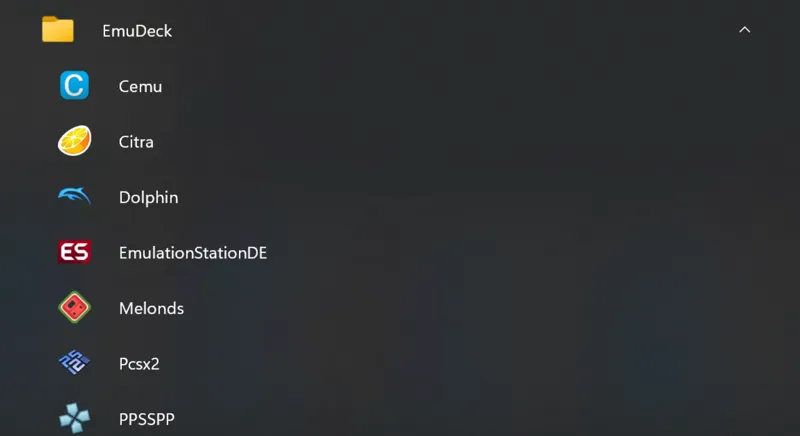
- New EmuDeck folder on the Windows Start Menu with launchers with support for CloudSync
- New Citra shortcuts Select + R1/R2 to switch layouts.
- Instructions on how to enable EmuDeck controls with other frontends like Playnite ( You need to keep Steam open in the background though ) https://youtu.be/ra_B1axeFqU
- Added an alert when opening SteamRomManager from EmuDeck, warning that it will take some seconds to load.
In order to get this update you need to:
- Open EmuDeck until it updates itself to 2.1.16
- Go to Manage Emulators, click on Update all Configurations.
Optional:
- Open Steam Rom Manager, Settings, remove all entries and when it finishes go to Preview, parse your games and save them back, this is needed to hide the CMD windows, if you don't care about them you don't need to do this step.
Comments (39)
Do I need 7zip already downloaded? I’m stuck at the installing dependencies screen with a x by GIT and 7Zip
Try this: https://github.com/EmuDeck/emudeck-we/wiki/Common-Issues#7zip-and-git-are-not-being-detected
C\Windows\System32ande X Out-File: Could not find a part of the path 'C:\Emulation\saves\rpcs3\.pending_upload'. At C:\Users\anali\AppData\Roaming\EmuDeck\backend\functions\ToolScripts\enuDeckSaveSync.ps1:442 char:15 Get-Date | Out-File -FilePath $savesPath/$emuName/.pending_upload + Category Info + : OpenError: (:) [Out-File], DirectoryNotFoundException FullyQualifiedErrorId : FileOpenFailure, Microsoft.PowerShell.Commands.OutFileCommand
delete that file: C:\Emulation\saves\rpcs3\.pending_upload and try again
I'm having a problem when running rpcs3, it appears very fast and in red and the program does not open... it appears like this (more or less)
CloudSync successfully linked to my cloud distributor but syncing does not occur when I launch a game. I reset EmulationStation configuration but that didn't work. I always seem to have a ton of trouble setting up CloudSync on the SteamDeck. I also get this when using Steam Rom Manager: "Fatal error occurred in Preview. See event log for details. Error: File Parser Execution: Preparser step for "Sega Dreamcast - Flycast (Standalone)": TypeError: Cannot read properties of undefined (reading 'path')"
how are you launching ESDE? You have to launch it either from steam or from the Shortcut we create in the Start Menu
I can say for windows Emudeck is absolutely perfect! On my main rig and my ally. Cloud sync finally works!!! Thank you!
Also like some others Yuzu keeps going back to any for the control configuration every time it opens back up to run a game. I have to now manually put it back on Xbox 360 controller config each time I reopen yuzu. Didn’t have this problem on prior Emudeck build
Do you have Yuzu 1476? Newer versions have issues with controllers. Reinstall from EmuDeck should fix it
Dolphin keeps pulling cover info for some old activation game. How do I change that?
Click on the image, then on the magnifying glass and look for dolphin emulation on the right
When I launch a game via emulation station now, the preview video sound for the game metadata continues to play well after I hit the start button on the game. Didn’t happen before on previous version. Also Duckstation no longer finds my rims to play through the correct path. Worked fine on previous version. Thanks!
I have exactly the same :(
Buenas Noches, después de la actualización dice que no encuentra los juegos. La ruta es la correcta, pero dice que no los encuentra.
Prueba a seguir los pasos del último email q he mandado hoy y le dices si se arregla
Downloaded this update and my setup is now awful! I even uninstalled and reinstalled.... I try to boot up a game and like others Emulationstation cant seem to find my roms! What is going on?!
I tried to play a rom (tested a PS2 one) from the emulator directly and that works fine. Its something on Emulationstation maybe?
Is there a discord or anything. Super Mario World on ROG Ally runs like shit with default settings.
Just downloaded the latest update for emudeck and used the update all emulators feature (incl retroarch and emulationstation). But now: - multiple gamelists (not all) in the .emulationstation folder were overwritten by empty ones (loosing all the metadata and carefully edited game titles) - retroarch is reset to default configuration missing all my changed settings What did I do wrong here? :( My roms are on the micro SD card. Emulationstation prompted it couldn’t find the roms anymore and I had to reselect the correct path again.
Please try today’s fix
So had to uninstall everything, remove everything start from zero but it's working now
Did the recent update and now Game cube and Wii U games have disappeared from Steam Rom Manager. Also Dolphin and CEMU don't show up in SRM. Any ideas whats going on?
We didn’t change anything related to that. Can you try again or send me screenshots?
So I updated and now my PS2 games don’t launch anymore from emulation station when they did before. It’s strange as the other platforms are launching games fine
Sorry mate still doesn't work. I reinstalled it, didn't work. So even then deleted the install folder, reinstalled and didn't work. Clicked reconfigure, still no controls work. If i open yuzu directly through steam or explorer and look at controller settings it says "any" under input devices. I can manually select xbox360 controller and save it which then enables controls in game but exit hot key won't work. If I click reconfigure in emudeck it goes back to "any" under input devices and then I'm back to square one. If its a bug I can live with just exiting the app without the hotkey for now. I'm using a rog ally BTW, and I have double checked control mode is set to gamepad.
What yuzu version do you have? It has to be 1476
Yuzu controls don't seem to be working for me, so can't hotkey out, use any controls of any kind. But they work on all other emulators. I've reset updated all configurations, even reset just for yuzu again, reinstalled etc.
Reinstall yuzu, there was an update that broke that. Reinstalling from emudeck will install the non broken version
Can you go to our discord? We are talking about that right now
Sure be right there
Did the update, deleted all entries, and re-parsed. Still getting the cmd box for yuzu and cemu, not sure if it's only a few emulators that shouldn't see it.
Sorry, another pesky bug, do it again, should work now :)
If I use quickreset option does my Bios and Roms in Emulation folder get deleted?
Nope. Reset only affects configurations
Ditto
please restart EmuDeck
I don’t see a reset all configurations option, not sure if I’m missing something?
please restart EmuDeck