
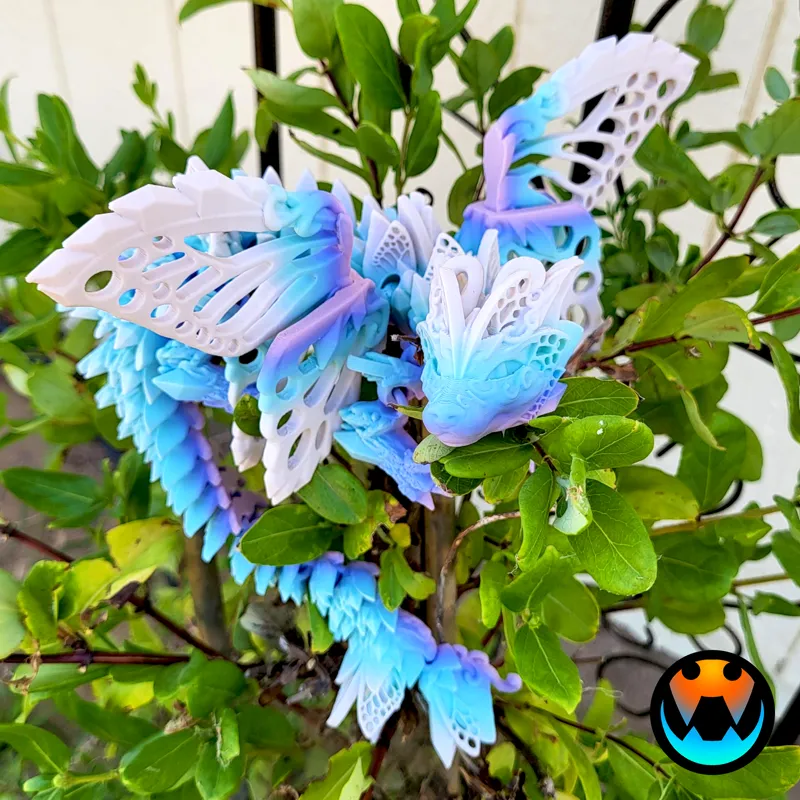
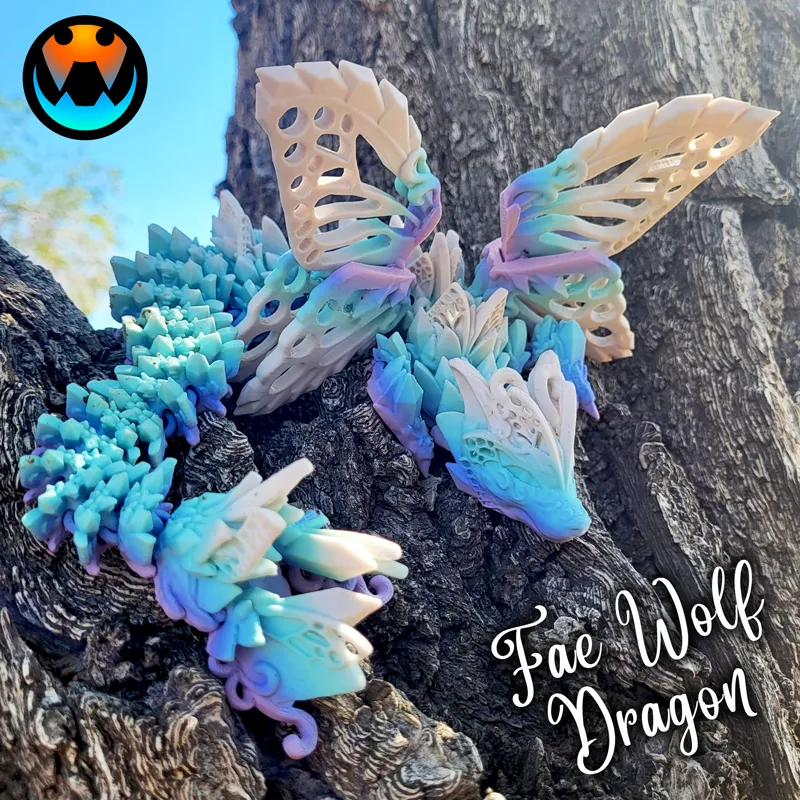
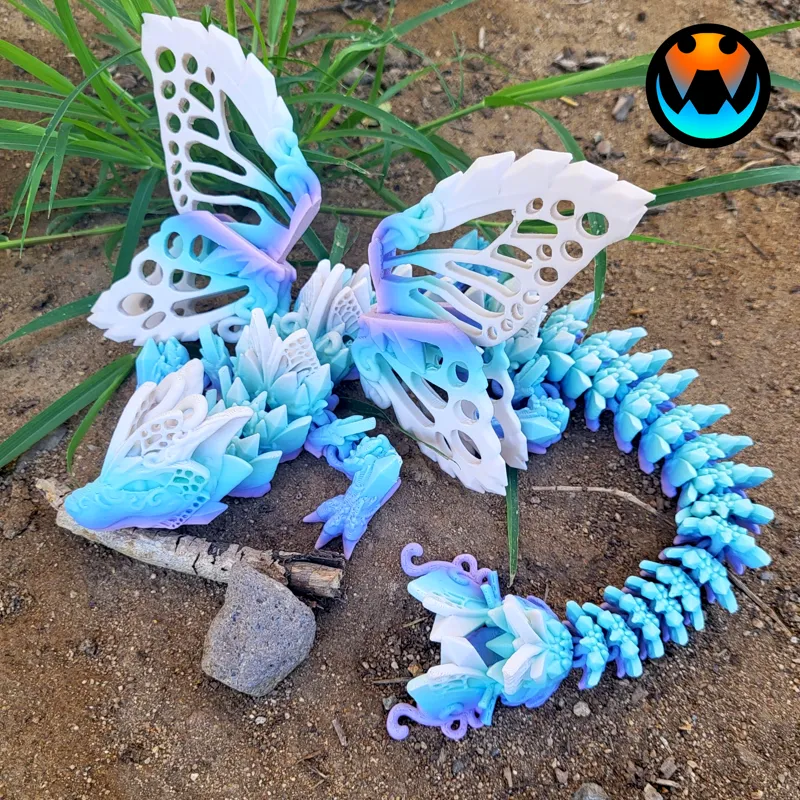
Fae Wolf Dragon!
This was an JULY Design and has been Archived! If you were subscribed in JULY, you will receive an email from MyMiniFactory within the week to access the archived files from that month. If you are starting your Subscription in August 2024, Welcome! Your exclusive models are available immediately in the Exclusive posts (link below) and the AUGUST Models will be in the AUGUST posts tab as they come out over the month! https://www.patreon.com/cinderwing3d?filters[tag]=Exclusives
If you missed this model or any others they are available on MMF for purchase! You can get the most up to date discount code on the Welcome and Info post!
https://www.myminifactory.com/users/Cinderwing3D?show=store
-----------------------------------------------------
UPDATE 3: There is an updated Open Wing file VERSION 4 attached below. I have made more support crystals at the base of the big wing and another additional connection farther up for those of you who are having using with the filament printing correctly up the wing. Also remember, there is a Close Wing version (where there are no open holes) which is easier to print.
If you are still having issues please read the below helpful steps that one of our Testers, "Silver", has outlined:
*Wings failing? Here are some suggestions:*
- NOTE: this is geared towards Bambu printers, as these have mostly been the ones having issues. However, many of the general principles should be applicable to other printers as well.
- Make sure your cooling is at 100% when printing PLA. On the A1 series printers, the part fan cooling defaults to 80%. Go into filament settings and set that to 100% anytime you are printing PLA
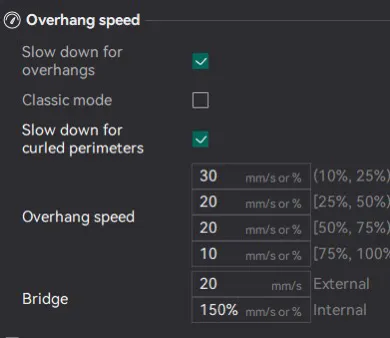
- Slow down your overhangs! Find the speeds that we suggest in the image below (attached to the post please note screenshot is from Orca but the speeds are the same! You will be missing the slow down for curled overhangs checkbox in Bambu Studio)
- Use a brim. Recommended brim settings: gap of 0.2-0.4mm, width of 5-6mm
- If using a textured PEI plate, make sure it is clean. Wash it with soap and water, dry it with a paper towel. Do not use glue/hairspray on a textured PEI plate when printing PLA, glue is a release agent and does not improve adhesion.
- Dry your filament, even brand new filament can/will be wet. Dry for at least 8hrs at 50C.
- Tune your filament: flow ratio in particular is important.
UPDATE 2: Fixing one fuse created another, oops. It is 100% fuse free now! Sorry y'all!
Update: a VERY small fuse was found, this has been fixed. :) This was only on the open wing version, please download V2!
-------------------------------------------------
Hi Cinders!
I have a new Wolf Dragon for you all:::: the FAE WOLF DRAGON!
The original Wolf Dragon had pop in wings, and by popular request, I have made this an all in one print with no pop-ins! Like all wings this style, simply rotate and fully expend the taller wing part out to hold them in place!
Also - as a fun bonus I made two wing renditions for you all! Closed Hole Wings and Open Hole Wings! The Open Hole Wings have cut outs in the wing design and print well with little overhang.
The filament used is ZIRO Pastel Spectrum, but it does look like it is out of stock at this time.
Thank you all! Next release will be in about a week! Stay tuned! :)
- Tracy
----------------------------------------------------
All my designs are print-in-place and require no supports. All you need is a clean bed and you're off!
Print Settings: .2 Layer height, 15% infill, gyroid infill, no brim, and no supports. (If there are smaller parts of your print that have a hard time staying stuck to the plate, please try a brim around those parts)
Any errors regarding floating regions can be safely ignored. If you are having issues with the hole wings please check your cooling and overhangs!
Please join our discord chat below for more help and discussions.
Filament: https://www.amazon.com/shop/cinderwing3d
------------------------------------------------------
JULY 2024 Models: HERE
Tiny Squid - RELEASED
Tiny Starfish - RELEASED
Fae Wolf Dragon - RELEASED
Secret Design
Secret Design
-------------------------------------------------------
PLEASE READ
Please remember, NO sharing, re-selling, or distributing this digital file or modifications of it in any way. Also, you are not authorized to use Cinderwing3D photos or anyone else's photos without their permission.
Please see WELCOME POST for questions, all exclusive releases, and links: https://www.patreon.com/posts/welcome-to-info-71819754
All Supporter Exclusives: https://www.patreon.com/cinderwing3d/collections
Discord is our MAIN form of communication and way to provide help! Please join our community below: Discord chat HERE: https://discord.gg/cinderwing3d
For any help requests or issues please go through this email: Email (contactcinderwing3d@gmail.com) OR through a Discord ticket!
Thank you, Cinders, for your support!!! And Thank you to our Admin Jazzy and Test Team for all your hard work!

Comments (125)
I wanted this dragon and subscribe to u but when I go to mini factory it wants me to pay for the file
If you feel like you are missing files please message in and I can check it out!
I love the open wings, but a wolf fae dragon is a bit too far fetched for me. Will there also be a fae dragon with those open wings? or do they already exist somewhere and i don t know? Thanks!
Probably not!
Please explain how I can get this dragon.. I am subscribed, but can not find a link to it. I just received the email , but none of the links will take me to a download link.. I can only see the pictures. Thanks
Hey there, they should be on your MMF account!
Im not understanding something, if we are a subscriber, can we sell the printed Fae Wolf Dragon? I only ask because when I bought the file, it said personal use only.
Yep as long as you are a subscriber you are good to go
Like many, I had a few failed prints with the first two versions of this. I missed downloading the latest V4 in July. Does anyone know if the version on MyMiniFactory is V4? It doesn't say in the file name after downloading it. Thanks!
Yes it is
V4 Open Hole wings has been great! 2 have printed with no issues and I kept the same settings as the previous 4 that failed. Thanks for fixing this one!!!
Thank you so much for fixing the problem with V3 and releasing V4. Just printed one and had no issues. I'll be printing a few more shortly, but looking at how you fixed it - I'd say we can consider this problem resolved. Thanks again, Mac
First print attempt, went perfect. No issues, printed at 100%, followed all the settings advice here. Used lots of glue.
I think slow for curled overhangs is currently only in Orca slicer. But having the slow for overhangs checked in Bambu studio is still there.
Yes this is correct
Thank you for posting these updates! Stupid question... My Bambu Lab software does not look like the screenshot you posted. Is it because I print on the P1S and you use the X series? For example, I am not seeing the "Slow down for curled perimeters" option. Thanks!
Sorry that screenshot was from Orca, the rest is the same :)
Thank you so much for working on this model again it's such a great one
when is the fix coming? before another release because we are waiting
As soon as its ready
Will there be a version without wings?
No, likely not, it is a fairy after all!
Love this model. I have been printing all the dragons for months now, but i am now have issues with the articulating connections. They are all jaggered and dont connect well, i have tried all different settings. Can someone help, Bambu lap P1S on Orca Slicer. Thank you
Check your cooling!
Hey everyone! As stated on the new Baby Axolotl Post I am working on adjustments to this file. I see and understand folks are having issues. Please be patient! You do not need to keep reporting you have issues! I am aware and working on it. Thank you. :)
I had a fail in the left wing on the inside. big hole.
I've had 2 failures on the v3 openwing using my Bambu Lab P1S with AMS. The top Y on the wings has broken off both times during printing. Printing using the factory 0.16mm high quality profile. Any tips on getting this to work? This is the only print I've had trouble with.
i had the same two times i think this model needs to be printed at really low speeds. In fact its on the not to print list for me now.
I also had 2 failures on V3 openwing. Center part of the wing near the top
same!
I had my fail as well. In my case the wings completely popped off the plate. I was able to hot glue them on long enough to get it completed to a point where it looks like it was designed to look that way. I got to something like 92%. I'm still new to using my printer so the issue could have been mine. It was such a long print.
i would love this wings on a butterfly dragon!
Love the design! The center wings on both sides are still causing a problem for me though!
Me too. I have had two fails out of three.
Printed perfectly, thank you.
Everyone, the only thing between the versions was a fix in the fuse in the leg. NOTHING else on the model changed and none of the fixes had to do with the wings. Please make sure you slow down the wings, use a brim, and check your overhang and cooling. Thank you! :)
This many failures is not common.
Love this design so much, I've attempted it 3 times now. Furthest I've gotten was today, at 90%.
Also 2 failures on both sides out of 3 on the open V3 middle wing that were printing at the same time on different printers. I think the problem starts already around layer 25, below the "y" when the column goes pretty far up but only has two walls with nothing in it for a while. The drag from the nozzle further up, simply snaps that off during printing. If that was a tiny bit thicker, this might not be happening. Or perhaps a slightly different pattern below the "y" that can support itself better to the neighboring geometry. Otherwise, everyone I showed this to loved it. This may be one of your best designs yet! :-) Cheers, Mac
2 failures on v3 inner wing same spot on each one finished but the in side of wing was missin
V3 has now had 4 failures at the inner wings on the open design. V2 was the only one to actually finish for me. Going back to V2 and just breaking the little joint loose.
argh - three failures at the inner wing. Two different printers (Prusa and Kobra) - first failures of any Cinderwing stuff. :(
the updated file but I dont see where to download the V2? still only shows V3
it's very confusing
I also had trouble with the inner wing always coming loose and being brittle if it did work. I’ve been using high quality filament like cookiecad and it’s been a lot better now
Is there a tadling version coming by chance?
I'm going to join in with others that there is something with the lace design on inner part of the wings that is very finicky. I have a slower printer that handles overhangs really well, to the point that it was able to recover from the failed section and print the rest of the wing. It'll look nice on our shelf, but not sellable.
Off the build plate, the failure point for me appears to be with the branches coming off the central column. On both sides, I got a bit of spaghetti in there where those branches failed. Fortunately, the rest of the wings completed and I was just able to cut out the mess in the inner wing and it still looks good. I'll stick to solid wing for now, but maybe just a little bit more support on the inner section would stabilize that column and improve reliability. Other then that, one of my favorite dragons you've made so far.
is there a multi color file of this one ?
No there is not
Success 1st go always use glue, not a brim fan too messy and never come off clean. P1S and 50% silent mode always for Dragons never rush them. 150% top layer outside/inner walls. Love this model
I love this model but the wings don't love me will there be a no-wing version by chance?
I asked earlier and she said she doesn't plan on making one :(
Same here, open wings always fail. (Even v3)
3 failures for me on 2 different printers. I LOVE the open wings, but can’t get the inside wing to print. I slowed the print down to 75% but it still failed. GORGEOUS dragon… I’m going to try the solid wing. She said there was a solid wing version, right?
Yes, there is a solid wing version :)
Welp, 1 out of 4 isn’t bad.. UGH. I’ve slowed it down added a brim (And I never have adhesion problems) Gyroid infill and that one wing always messes up. I’m so sad cuz it’s so beautiful. I just can’t waist any more product. 😞
Love it, but only 1 successful print out of 3. Not making anymore. Open wing version at 75% printed nice. I tried one at 100% and middle of one wing was weird and the top of one wing just...didnt print and dropped the filament in the wrong spot.
This is what happened to mine. 16m to go and it just went spaghetti everywhere. Just the center wing. You can see where it started to go off in the print down in the wing.
2 failures in a row for me! Ugggg! First one on my A1 when one wing poped off the bed. 2nd on my K1, when there was a huge layer shift in the middle of the wings for no apparent reason? Everything was still stuck to the bed. I’m giving up on this one for now. (It’s the one with the holes in the wings)
u having issue with the new file?
Middle of the inside wings failed and broke apart on 2 of these. Both at 100% and one at 60%. I'm seeing several others are having the same issue. Are you going to address this problem? I can actually see this same problem starting on one of the wings in your photos. Take a close look at the top right inside wing in your picture
If you are having issues I'd recommend looking at your speed, cooling, and overhang settings. Me and the test team will look more into it but none of the testers had much issue with this model. You can also make use of the closed hole version!
Will there be one without wings? I was so impressed with my print until the middle of the wings popped out and ruined the print with less than an hour to go. I had even slowed it down to avoid the wing pop on the second one but no go. Going to try to remove the wings to at least have a semi usable print. I just don't have luck with print in place wings.
I have no plans to do so at this time!
Did the holes in wings. 16m left and it's like the whole tips of the middle wings shifted in the file and just started spaghetti everywhere. Print head is running no where near where the wings are. Edit. You can see about a 1/2in down where it started to shift. X1 carbon, standard speed.
Successfully printed 4 so far, all @ 60% with different filaments to test. No issues with default settings (Bambu Studio). I did break the inner right wing on the first one, but only because i was lifting it too hard, not due to a printing issue. These look and print great! I too received the the "floating regions" warning, but let it ride and had no issues.
i printed the with hole wings and it was done by 10am the next morning, by then you had released an update. I printed no hole wings last night. I have one wing very hard ti get to pivot. The wing on the right loooking at the nose is stuck solid.
That sounds more like a first layer issue. There was fusing in a leg, not a wing.
Make sure you check your cooling and overhang settings!
Me too actually, I'm going to turn bridging on and see if that helps any.
I had the same problem the inner wing a piece printed a little off it was v3 update
My very first 2 prints both failed on one of the inner wings. The middle of the inner wing was just broken apart.
Mine both broke apart in the middle wings as well
I get the same warning with both V2 and V3: "It seems object Cinderwing3D Open Hole Wings V2.stl has floating regions. Please re-orient the object or enable support generation.
you can ignore this!
Was going to print both at 65%, but i have to wait. My 9yr old requested and decided on the four different colours for this one (I think he likes this the most). Now I am working on getting the colours just right before i print. Wish me luck!
Will there be a color file version ?
Maybe! As always color files are a bonus!
where is the mmu please?
There is no color file for this one. Do remember that color files are a bonus, not an expectation!
I canceled version 1 for version 2. V2 has 2 hrs to go. I'm gonna let it ride.
It should be fine, a lot of folks are coming back saying a little wiggle breaks it free!
There was a fuse problem. Printed a few of these and didn't have a fuse issue. Where was the fuse located at?
its on the front left (dragons left) leg very tiny haha
My kids are gonna lose their minds for this one!
I love it! How long is it at %100?
Oml this is absolutely gorgeous 🩷🙌
I'm in love with this one. I printed it overnight
Oh the agony of waiting for other prints to finish. Ha! Can’t wait to start this one. From the pictures I think this might be my favorite one yet.
Not sure if anyone else had an issue, But my leg still fused slightly on the v2 version and the middle of the wing in the fold out part broke off as it was printing.
Hmm it shouldn't be fused and I'm not sure about the wing. I'll review it again!
Where is the fuse on v1? My 60% open wing didn’t seem to have an issue.
It was on the front right leg.
Yasss, lovely!
Sooo odd question I started v1 when I went to bed. It's been going for 9 hours should I stop it and get v2? I'd hate to waste time and material if the dragon isn't usable.
I was thinking the same thing, but I'm letting it ride.
Its freaking awesome!! Got 1 started right now and when another printer finishes ill be doing one on it as well. Ill be selling it in my booth at the 10 day state fair starting next week.
Awesome
now all it needs is a baby version!!??
OMG!!!!!! I cant wait to have a printer free! Im in love with this Fae Wolf Dragon! Please if you ever do the head mount again this would be so cool as one.
That is going to be a beautiful dragon! I can’t wait to print it
The wings
Omg so inlove with it
This may be my new favorite out of literally every file I own from every creator I subscribe to. It's so pretty I've got to print 10 just for myself
Printing this now! So COOL!
I love this SO much! Might be my favorite dragon- and that’s saying A LOT!!! 😍
This one is beautiful. Now we need a darker dragon, like a scorpion dragon!
Check out the Dune Striker.
What is the most it can be scaled down to?
Same as always! 60%
Wow! Amazing work! You are the best!
The wolf dragon is by far my favorite dragon, can’t wait to print this one!! Would love a wingless version too if possible!!
Gorgeous!
I know what my next print is this is the dragon I didn’t know I wanted
Love it!
It's beautiful. I am wondering if we can get an update of heads and tails for keychains for the newer guys.
The head and tails keychains were just separating the model to objects and pulling the heads and tails, they aren't really modified so much as pulled apart! You are welcome to do this with any dragon!
Omg I love it
this is great cant wait to print thanks!
Ohhhh I love this one!
Omg!!!! I love it!! Can’t wait to make it!
This is Beautiful
Love it!!
It's so pretty!!